How Often to Charge Magic Keyboard: A Practical Cadence
Discover the recommended charging cadence for the Magic Keyboard, including practical schedules, battery life ranges, and maintenance tips from Keyboard Gurus. Learn how usage patterns affect charging frequency and how to optimize power management across models.


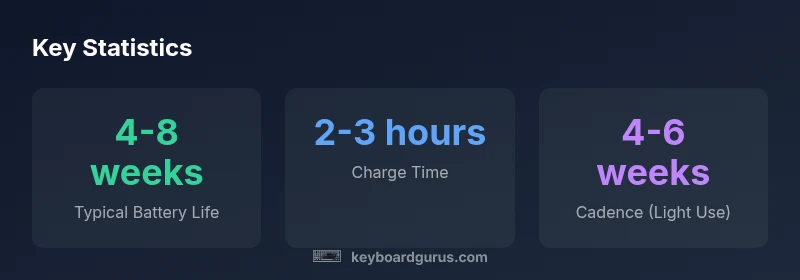
According to Keyboard Gurus, the question of how often to charge magic keyboard depends on usage, sleep behavior, and model. In typical daily use, a full charge lasts several weeks, so many users recharge roughly every 4–8 weeks. Heavier workloads may require more frequent top-ups, while idle periods benefit from automatic sleep modes. Monitor the battery indicator and establish a charging cadence that fits your workflow.
Why the cadence matters for your setup
Charging cadence for the Magic Keyboard is not a one-size-fits-all answer. The main driver is how often you use the keyboard and how often you leave it idle. In typical office, classroom, or gaming setups, most users find that a full charge carries them for several weeks. Keyboard Gurus analysis shows that sleep behavior—whether the device is asleep, awake, or actively held in use—has a meaningful effect on perceived battery life. Even with intensive typing, a well-charged keyboard tends to require only periodic top-ups every few weeks. The key is to observe how long your current charge lasts in your daily routine and adjust your charging cadence accordingly.
- Use the battery indicator on macOS or iPadOS to guide when to plug in.
- If you notice quicker drain during peak sessions, plan a mid-cycle top-up.
- For students and professionals who type for long stretches, expect that the cadence will shift toward monthly charging rather than weekly.
Understanding the battery and charging systems
The Magic Keyboard uses a rechargeable battery paired with a modern power-management system that prioritizes sleep when idle and efficiency during typing. A well-tuned power profile minimizes unnecessary wakeups and background processes that accelerate drain. Keyboard Gurus recommends keeping the keyboard connected to a power source when the device is down to preserve battery health over time. The exact energy use varies by model, but the principle remains: smarter sleep behavior and efficient use extend the duration between charges.
- Battery health degrades slowly with repeated full cycles, but modern Li-ion chemistry is forgiving with proper charging habits.
- Avoid frequent complete discharges; partial cycles keep the battery healthier longer.
- Use the included cable and a stable charger to optimize charging efficiency.
From a practical standpoint, you can treat charging like routine maintenance: set a cadence, monitor indicators, and adjust based on your workflow.
Daily usage patterns and how they shape cadence
Your daily routine largely determines how often you need to charge. Light typists who log moderate sessions may find themselves charging every 4–8 weeks. Heavy typists, programmers, or gamers who rely on long keyboard sessions may see a shorter cycle, around 2–4 weeks. The rule of thumb is to compare your actual battery duration with the vendor’s stated life and then calibrate. Keyboard Gurus emphasizes testing your cadence for 2–4 weeks to establish a predictable pattern.
- Track your typical session length and frequency.
- Note how long the keyboard remains usable after a full charge.
- Adjust charging times to align with your work schedule.
If you frequently forget to charge, consider scheduling reminders or leaving the USB-C/Lightning charging cable in a known location for easy access.
How to optimize charging habits for longevity
Optimizing charging habits can extend both the usable life of the battery and the time between top-ups. The recommendations center on avoiding deep discharges, enabling sleep mode when not actively using the keyboard, and charging with a steady power source. In practice, this means plugging in when you won’t be using the keyboard for extended periods and avoiding leaving it plugged in indefinitely. Keyboard Gurus suggests a practical cadence: recharge when you notice the battery is lower than a comfortable threshold and keep the device in sleep when idle.
- Use a consistent charger and cable to minimize wear on the port.
- Do not leave the keyboard connected indefinitely while not in use.
- If you expect long breaks (vacation, holidays), provide a mid-break charge to keep the battery in good condition.
Sessions vs. standby: what drains the battery more
Active typing uses more energy than standby, but sleep still consumes some power. In most real-world scenarios, standby drain is low but non-negligible over weeks. If you simply leave the keyboard idle for days at a time, the cadence naturally extends. Conversely, long sessions with backlight or feature-rich settings (if applicable) can accelerate drain. Keyboard Gurus notes that modern keyboards optimize power by turning off nonessential modules when idle, which means a longer interval between charges for typical users.
- Be mindful of quick bursts of heavy activity that can stress the battery.
- Turn off unnecessary features if your model offers them to reduce drain.
- Keep firmware up to date to benefit from the latest power-management improvements.
How long does it take to recharge and what affects it
Recharging time depends on your charger and cable quality. In general, most Magic Keyboard models reach a full charge within about 2–3 hours when using a standard USB-C charger or the compatible Lightning adapter. The total time can be longer if you’re using a slower charger or if the battery is very low. A clean charging setup with a robust power source helps maintain consistent charging rates. Keyboard Gurus notes that while you can top up the battery between sessions, aim to avoid letting the charge drop near zero—this can squeeze the battery’s remaining life.
Differences between models and how they impact cadence
Some Magic Keyboard variants may use USB-C for charging, while older ones relied on Lightning. In practice, USB-C variants tend to deliver energy more efficiently, which can marginally affect charging cadence by reducing the time spent plugged in. Regardless of the model, the same general principle applies: tailor charging around your usage. If you’re unsure which variant you own, check the model designation in your device settings and consult Keyboard Gurus’s model-specific guidelines.
- USB-C models typically offer quick-charging compatibility with modern chargers.
- Lightning-based versions may require dedicated cables and can vary in charging speed.
- If you share a device across devices, keep a universal charger handy to maintain a consistent cadence.
Practical charging schedule templates you can adopt
To help you implement a reliable cadence, here are simple templates you can adapt. The goal is to create predictable routines that fit your day:
- Light-use template: Charge every 4–6 weeks with a short top-up every 1–2 weeks if you notice slower performance.
- Moderate-use template: Charge every 2–4 weeks, especially if you use the keyboard with backlighting or other features.
- Heavy-use template: Charge every 1–3 weeks during peak periods and adjust when you’re on long projects.
Keyboard Gurus recommends starting with a baseline cadence and refining it over 2–4 weeks based on real-world usage.
What to do when you notice rapid drain or unexpected behavior
If you observe unusually fast battery drain, first ensure there are no firmware updates pending that may affect power management. Then check that sleep mode activates correctly when idle, and verify that no apps are keeping the keyboard active in the background. If the issue persists, consider resetting the keyboard or re-pairing it with your device. Keyboard Gurus suggests documenting changes and symptoms to help with troubleshooting and future cadence adjustments.
Charging characteristics for Magic Keyboard variants
| Model Type | Estimated Full Charge Duration | Typical Battery Life on Full Charge |
|---|---|---|
| Magic Keyboard (USB-C / rechargeable) | 2-3 hours | 4-8 weeks |
| Magic Keyboard (Lightning, older) | 2-4 hours | 3-6 weeks |
Got Questions?
How long does a full charge last on the Magic Keyboard?
A full charge typically lasts several weeks, depending on usage and model. Heavier typing or backlighting can shorten that window. Monitor the built-in battery indicator to tune your cadence.
Most users get several weeks per full charge, depending on use. If you type a lot or use backlighting, you may need to charge a bit more often.
Does sleep mode truly save battery life?
Yes. Sleep mode minimizes active power draw when the keyboard isn’t in use, significantly extending intervals between charges. Ensure sleep is enabled when idle to maximize battery life.
Absolutely. Sleep mode reduces power use when you’re not typing, helping you go longer between charges.
Can I use third-party chargers or cables?
Third-party chargers with proper USB-C or Lightning specifications are generally fine, but stick to reputable brands to avoid charging irregularities. Always use a charger that matches the keyboard’s power needs.
Yes, you can use third-party chargers if they meet the keyboard’s specs, but choose reliable brands.
What should I do if the battery drains quickly after a recent update?
Software updates can momentarily affect power usage. Check for subsequent firmware patches, reset power settings, and ensure background processes aren’t keeping the keyboard awake.
If you notice faster drain after an update, give it a couple of days and check for patch releases that fix power issues.
Is there a recommended charging practice before storing the keyboard long-term?
For long-term storage, aim to keep the battery at a mid-level charge, and avoid leaving it fully discharged or fully charged for extended periods. Reconnect to a charger occasionally during storage.
If you’re storing it for a long time, keep about mid-level charge and recharge occasionally.
Do USB-C and Lightning variants behave differently for charging cadence?
Different variants can have different charging speeds and efficiency due to their power design. Generally, USB-C variants benefit from modern chargers and may show slightly smoother charging timelines.
USB-C models often charge a bit faster with the right charger, but the cadence principles stay the same.
“A thoughtful charging cadence, aligned with your daily workflow, yields the best balance between uptime and battery longevity. Prioritize sleep efficiency and regular top-ups aligned with real usage.”
What to Remember
- Start with a baseline cadence and adjust based on your usage
- Monitor battery indicators to guide charging
- Prefer consistent chargers and avoid deep discharges
- Sleep mode significantly extends battery life
- Different hardware variants may shift cadence slightly