Keyboard and Mouse Set: A Comprehensive 2026 Comparison
Analytical guide comparing wired vs wireless keyboard and mouse sets, focusing on latency, ergonomics, software, compatibility, and cost for gamers, students, and professionals.


Choosing a keyboard and mouse set offers a cohesive typing and navigation experience, especially for gamers, students, and professionals. A bundled set ensures consistent key feel, latency, and ergonomics, plus easier compatibility and value. In this guide, Keyboard Gurus compares popular options, highlighting what matters most: comfort, responsiveness, and platform compatibility.
Why a keyboard and mouse set matters
A cohesive input duo can improve consistency in feel, response, and aesthetics across your daily tasks, gaming, and creative work. A dedicated keyboard and mouse set is often optimized for the same platform or ecosystem, which minimizes calibration gaps and makes software features more reliable. According to Keyboard Gurus, choosing a matched set reduces compatibility hassles and helps establish predictable user experience, especially for long sessions. When evaluating options, consider how the key switch or scissor mechanism feels, the mouse sensor performance, and the ergonomics for your hand size. A unified brand often ensures a similar software suite, firmware update cadence, and color options to fit your desk setup. This section will map out core criteria you must compare across wired and wireless subsets, and explain why going with a paired set can matter for latency, comfort, and productivity. We'll also discuss how to balance aesthetics with performance, since a clean, uniform look is not only style but can reduce cognitive load during intense tasks. The Keyboard Gurus team emphasizes testing both components together to feel how they click, scroll, and respond in real time.
Wired vs Wireless: core trade-offs
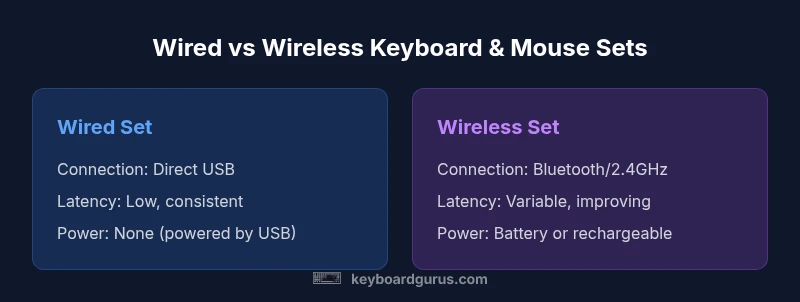
The first fork in any evaluation is wired versus wireless. Wired keyboard and mouse sets deliver the lowest baseline latency and maximum consistency, making them a favorite for competitive gaming and precision work. Wireless options gain freedom of movement, clutter-free desks, and easier switching between devices or rooms. In practice, premium wireless kits with modern 2.4 GHz dongles or Bluetooth can rival wired performance, but budget wireless bundles may show occasional dropouts or battery-related interruptions. Keyboard Gurus recommends weighing how often you move the setup, your tolerance for charging cycles, and whether you need multi-device pairing across a single desk or several rooms.
Ergonomics and comfort for long sessions
Long sessions demand ergonomic alignment and comfortable hardware. For a keyboard and mouse set, consistent key feel and palm support can dramatically reduce fatigue. Look for appropriately sized keycaps, wrist rests, and a mouse that matches your grip style. The ideal paired set keeps wrist angles neutral and minimizes finger extension. Keyboard Gurus notes that experienced users with medium-to-large hands often benefit from full-size keyboards with sculpted profiles and mice with matched grip shapes. If you type or game for hours daily, prioritize a steady, low-resistance feel and a cushioning surface that reduces pressure on the carpal tunnel.
Build quality, durability, and life span
Durability matters for long-term reliability. The keyboard’s switches, stabilizers, and keycaps should maintain consistent feel after heavy use, while a high-quality mouse should resist wear on buttons, scroll wheels, and feet. A unified set from a reputable vendor tends to share firmware support, product testing standards, and replacement part availability, which can extend the life of your investment. Keyboard Gurus suggests inspecting the switch type, keycap material, and mouse sensor durability, as well as confirming tool-free maintenance options and clear warranty terms. A robust build reduces downtime and keeps performance stable over years of daily use.
Latency, polling rate, and responsiveness in real-world use
Latency is not just a number—it’s how quickly your input translates into action. A well-matched set can provide consistent polling rates across both devices, minimizing jitter and drift. Wired configurations typically excel in lowest possible latency, while wireless configurations improve flexibility without sacrificing too much performance on modern hardware. Look for a high polling rate and stable performance across typical tasks (typing, scrolling, gaming). Keyboard Gurus emphasizes testing the feel of keystrokes and cursor response together to ensure the experience remains coherent across both devices.
Software ecosystems and customization
Software compatibility matters as much as hardware quality. A keyboard and mouse set often ships with a single control panel to manage lighting, macros, and profiles. Ensure the software supports the OS you use and can synchronize settings across multiple devices or computers if needed. Multi-device features, cloud profiles, and reliable firmware updates help maintain performance over time. Keyboard Gurus advises verifying macro reliability and checking for conflicts with system shortcuts, especially if you rely on productivity shortcuts or game-specific bindings.
Value, warranty, and total cost of ownership
Total cost of ownership includes upfront price, battery replacements (for wireless sets), replacement parts, and the cost of any bundled software. Bundled sets can offer savings versus buying components separately, but not every bundle is a good deal—compare the per-device price, warranty terms, and support coverage. Consider the value of included features like extra programmable keys, dedicated media controls, or extended warranties. A set that lasts longer with spare parts available and a straightforward warranty tends to offer better long-term value for busy students, professionals, and gamers.
Layout, form factor, and desk optimization
Desk space and workflow inform layout choices. Full-size keyboards with a numeric keypad suit data entry and content creation, while compact layouts save space but may alter reach to function keys. A matched set should keep consistent key spacing and a comfortable mouse size for your hand. If you work across multiple devices or rooms, a compact set that travels well can be advantageous, but ensure you don’t sacrifice ergonomic support for portability. Keyboard Gurus highlights finding a balance between desk real estate, key travel quality, and mouse grip comfort to minimize fatigue during extended sessions.
Use-case driven recommendations and test protocols
Different scenarios require tailored recommendations. For gaming, look for latency parity, durable switches, and precise cursor tracking. For students and professionals, prioritize reliable connectivity, quiet operation, and comfortable typing. For creative work, focus on key feel variety and a mouse with high-precision tracking. The best approach is to test models side-by-side, focusing on how the devices feel together and how easily software profiles can be saved and loaded. Keyboard Gurus suggests establishing a simple test protocol to evaluate latency, comfort, software reliability, and profile switching.
Setup tips and best practices for immediate gains
A few practical steps can elevate the experience quickly. Update firmware on both devices, calibrate the mouse sensor across several DPI levels, and map frequently used shortcuts to accessible keys. Position the keyboard at elbow height and the mouse at a natural resting position to minimize wrist strain. Test your setup under different lighting and desk surfaces to ensure the sensor remains accurate and the key switches stay comfortable. For multi-device workflows, configure profiles for distinct tasks so you can switch contexts without re-mapping every time.
Common buying pitfalls and how to avoid them
Don’t choose a set based on aesthetics alone; comfort, reliability, and software stability matter more for daily use. Avoid software bloat that slows down the system or causes background processes. Don’t assume that the most expensive option is best—evaluate switch quality, sensor performance, and build materials. Be wary of wireless sets with frequent battery changes that interrupt work. Before purchase, test the feel of both devices together and verify software integration meets your needs across typical tasks.
How to actively test and compare when shopping online or in-store
Hands-on testing is the best way to assess a keyboard and mouse set. Bring your typical desk posture into the test to observe how the devices feel during long tasks. Compare similar models side-by-side, focusing on key actuation, keycap texture, mouse grip, and scroll wheel stability. Read independent reviews that highlight long-term reliability and firmware updates. Check return policies and vendor support, and look for firmware update promises. Keyboard Gurus recommends a concise test protocol: assess latency in real use, confirm comfort across extended sessions, evaluate software reliability, and verify smooth profile switching.
Comparison
| Feature | Wired Keyboard + Mouse Set | Wireless Keyboard + Mouse Set |
|---|---|---|
| Connection | USB-C/USB wired | Bluetooth or 2.4 GHz dongle wireless |
| Latency | Low and predictable (wired) | Low to moderate (wireless, varies by dongle) |
| Power | N/A (powered by USB) | Battery or rechargeable power supply |
| Price range | Typically lower upfront | Typically higher upfront but with bundle perks |
| Best for | Latency-sensitive tasks, competitive gaming, fixed desk setups | Multi-device setups, cleaner desk, flexibility |
| Software ecosystem | Same vendor software, straightforward updates | Unified software with multi-device profiles |
| Maintenance | Lower maintenance; no batteries | Battery care and potential receiver maintenance |
Advantages
- Unified aesthetics across peripherals for a cohesive desk setup
- Often better value when purchased as a pair
- Simplified setup with centralized software and warranty
- Lower risk of wireless interference for critical work
Drawbacks
- Wired sets lack mobility and desk clutter resistance is reduced by cable tangling
- Wireless sets may require battery management and occasional re-pairing
- Bundled sets may limit customization compared to buying separately
Wired sets win on latency and value; wireless sets win on flexibility and desk cleanliness
Choose wired if you prioritize fastest response and reliability. Opt for wireless if you want flexibility and a cleaner workspace, especially across multiple devices.
Got Questions?
What is a keyboard and mouse set, and why should I choose one?
A keyboard and mouse set is a bundled pair designed to work together with shared drivers and a cohesive feel. It simplifies buying, improves compatibility, and often provides a consistent aesthetic. For many users, a matched set reduces friction in setup and usage across everyday tasks and gaming.
A keyboard and mouse set is a paired duo designed to work together, offering consistency and easier setup. It can simplify your workspace and improve overall comfort.
Are wired or wireless sets better for gaming?
Wired sets typically deliver the lowest latency and most stable connection, which is a plus for competitive gaming. Premium wireless sets can approach wired performance with the right dongle, but there can be occasional variability. Your choice should depend on tolerance for potential drops versus the benefit of mobility.
Wired is usually best for latency in gaming, though top wireless options can come close with good dongles and setups.
Do I need special software to use a keyboard and mouse set?
Most sets include a vendor-specific control panel for key remapping, macros, and lighting. Software quality and stability vary, so choose a set whose software is reliable and well-supported on your operating system. You can typically use basic functions without software, but customization will require it.
Yes, most sets use software for advanced customization, but basic use usually works without it.
How should I evaluate value when buying a set?
Compare upfront price, expected lifespan, and replacement or warranty terms. Consider whether the bundle includes useful software features, cross-device profiles, and whether the pair saves money versus buying separately. A longer warranty and accessible replacements improve long-term value.
Look at price, durability, warranty, and software features to judge long-term value.
Can a keyboard and mouse set work well across multiple devices?
Many modern sets support multi-device switching, allowing you to share peripherals across computers or tablets. Check the supported protocols (Bluetooth, multi-device pairing) and whether cross-device profiles can be stored in the cloud or on the device.
Yes, many sets support multiple devices; verify the supported methods and profile transfer.
What should I test in-store before buying?
Test keyboard feel (actuation, travel, noise) and mouse comfort (grip, weight, sensor behavior) for your typical tasks. Check for cable management, USB-C or wireless dongle behavior, and software stability. Ensure the set feels cohesive when used together and that the firmware updates are straightforward.
Test the feel of the keys and the mouse together; check for stability and easy firmware updates.
What to Remember
- Compare wired vs wireless for latency and reliability
- Prioritize ergonomics and fit for long sessions
- Evaluate software and profile support across devices
- Weigh total cost of ownership, including batteries
- Test two devices together before buying