Keyboard vs MIDI Keyboard: A Practical 2026 Guide
Compare computer keyboards and MIDI keyboards: purpose, data output, connectivity, playability, and budget to decide the right tool for typing, music production, or teaching in 2026.


At a glance, a keyboard is a general input device for typing and navigation, while a MIDI keyboard is a musical controller that sends MIDI data to software or hardware. If your primary goal is typing and computer work, a traditional keyboard is the practical choice. For music creation, sound design, or live performance, a MIDI keyboard unlocks expressive potential in DAWs and virtual instruments.
What is a keyboard vs MIDI keyboard?
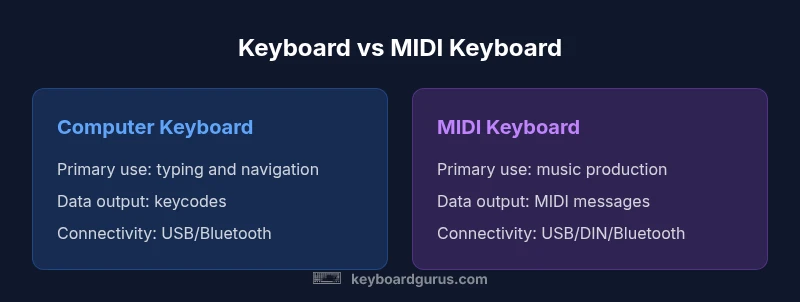
From Keyboard Gurus' perspective, the two devices occupy different worlds. A traditional computer keyboard serves as an input device that translates key presses into character codes and commands for software. A MIDI keyboard, by contrast, is a musical controller that generates MIDI messages—note on/off, velocity, aftertouch, and control changes—that your DAW or hardware synthesizers interpret as musical events. This fundamental distinction shapes every other consideration, from features and connectivity to use cases and learning curves. Understanding that a keyboard and a MIDI keyboard are not interchangeable in their primary purpose is the first step toward making a smart purchase for 2026. The Keyboard Gurus team emphasizes that most users actually benefit from owning both, but for different tasks, one will dominate your workflow.
Core differences at a glance
- Primary purpose: Computer keyboards optimize typing and navigation; MIDI keyboards optimize musical control and expressive nuance.
- Output data: Keycodes vs MIDI messages (note, velocity, control changes).
- Playability: Typing feel vs keybed feel varies by model and purpose.
- Ecosystem: OS and software compatibility for typing; DAWs, virtual instruments, and hardware synths for MIDI.
- Price/value: Budget keyboards cover typing needs; MIDI keyboards span beginner to professional ranges.
- Best for: General computing vs music production and live performance.
Use-case analysis: studio, classroom, stage
For a home studio focused on DAW-based music production, a MIDI keyboard often becomes a central tool. It helps you control virtual instruments, automate parameters, and perform live with expressive dynamics. In a classroom or self-study scenario, a traditional keyboard is essential for mastering typing speed, ergonomics, and office tasks. On stage, a MIDI keyboard can drive live synths and samplers, while a computer keyboard remains reserved for quick on-stage notes and control. In 2026, hybrid setups are common: dedicated MIDI controllers paired with laptops, plus a standard keyboard for daily workflow. The decision rests on your primary goal: music creation or productivity.
Hardware and form factors
Keyboards come in many sizes—from compact 25-key MIDI controllers to 88-key weighted action units for serious piano-style play. When evaluating a MIDI keyboard, consider key size, velocity curves, aftertouch, and the presence of assignable knobs/sliders for DAW control. Computer keyboards focus on layout efficiency (QWERTY, ergonomic designs) and shortcut availability. Your choice will depend on whether you prioritize portability or a fuller playing surface. In 2026, many MIDI keyboards include USB-C, Bluetooth, and digital audio interfaces, which can simplify integration with modern laptops and desktops.
MIDI protocol and data: what actually travels
MIDI keyboards output structured messages, primarily note on/off with velocity data, plus possible aftertouch, sustain, and control change messages. These messages travel over USB MIDI, traditional 5-pin DIN MIDI, or Bluetooth MIDI, depending on the model. The receiving software interprets these messages to trigger sounds, adjust synth parameters, or perform other automated tasks. Unlike computer keyboard data, MIDI data is musical and time-based, which means it interacts with tempo, groove, and sequencing in a DAW. Understanding MIDI data helps you map notes to tracks, set up arpeggiators, and craft expressive performances.
Connection options and power: USB, MIDI DIN, Bluetooth
Both types of keyboards can connect via USB, but MIDI keyboards often add traditional MIDI DIN ports for compatibility with hardware gear. Many modern MIDI keyboards support USB-MIDI, class-compliant connections, and Bluetooth MIDI for wireless setups. Computer keyboards primarily use USB or Bluetooth, focusing on plug-and-play reliability and low latency typing. Power options vary: some keyboards draw power from USB, while others require external adapters. For mobile setups, lightweight USB-C MIDI controllers paired with a laptop offer compelling flexibility in 2026.
Playability and feel: keybed and action
A crucial consideration is the keybed feel. Computer keyboards emphasize travel distance and tactile feedback for typing, while MIDI keyboards vary widely—from inexpensive, light-action keyboards to high-end semi-weighted or graded hammer-action keys. For music performability, velocity sensitivity, aftertouch, and a realistic keyweight can influence your expressive options. If you plan to practice piano skills beyond triggering samples, a weighted or semi-weighted 88-key MIDI keyboard may be worth the investment. If you only need MIDI control, a lighter 49- or 61-key model could suffice.
Software integration and instrument ecosystems
MIDI keyboards shine when paired with software instruments, sample libraries, and virtual synthesizers. The strength of your setup often lies in the DAW compatibility, plugin support, and virtual instrument availability. Computer keyboards excel in any software environment that requires fast typing, editing, and navigation, with broad support across operating systems and applications. In 2026, boutique and mainstream software ecosystems reward users who can map MIDI controllers to workflow macros and automation, making MIDI hardware an integral part of production pipelines.
Budgeting and value: cost considerations
Pricing for keyboards varies widely. A basic computer keyboard is typically inexpensive, while a MIDI keyboard spans a broad spectrum—from entry-level controllers to professional-grade instruments with premium keybeds, wheels, and aftertouch. In practice, the cost reflects the intended use: typing-focused devices prioritise reliability and ergonomics, while music-focused controllers prioritise key action, velocity response, and control surface features. When budgeting, consider total cost of ownership, including software, straps of DAW licenses, or expansion packs that you might need to realize your creative goals.
Practical buying guide and checklists
- Define primary use: typing vs music production.
- Choose form factor: 25/49/61/88 keys for MIDI, layout and ergonomics for keyboards.
- Check key action: weighted vs semi-weighted vs synth-action depending on goals.
- Confirm connectivity: USB-C, USB-MIDI, Bluetooth, and any DIN ports you may need.
- Review software compatibility: DAW integration, plugin support, and mapping flexibility.
- Consider portability and setup: travel needs, desk space, and power options.
- Budget and value: weigh feature sets against price across 2026 models.
Common myths and misperceptions
A common myth is that all MIDI keyboards can replace a computer keyboard for typing. They cannot, because MIDI devices do not output standard character codes; they output musical messages. Another misconception is that you need the most expensive keyboard to achieve good results in music production. While higher-end models offer benefits like better keybeds and more controls, many affordable options deliver solid results for beginners and practical workflows.
Getting started: first steps after purchase
- Install and set up your DAW and any instrument plugins. 2) Connect your MIDI keyboard and test basic note triggering. 3) Configure basic performance controls like velocity curves and aftertouch if available. 4) Create a simple project to explore sound design and sequencing. 5) Expand gradually with additional plugins and mapping to suit your workflow. By following these steps, you can move from setup to creative output quickly in 2026.
Comparison
| Feature | Computer Keyboard | MIDI Keyboard |
|---|---|---|
| Primary purpose | Typing, navigation, productivity | Music creation, performance, control |
| Output data | Keycodes/characters for OS and apps | MIDI messages (note, velocity, CC) |
| Connectivity | USB/Bluetooth; widely supported | USB, MIDI DIN, USB-MIDI, Bluetooth (often) |
| Key action | Typing-focused, light travel | Varies by model: synth-action to weighted |
| Best for | General computing and typing | Music production and live performance |
| Price range | Low to mid range for basic typing | Mid to high range for feature-rich MIDI keyboards |
Advantages
- MIDI keyboards unlock expressive musical control and software integration
- Computer keyboards are ubiquitous, affordable, and reliable for typing
- USB-C and wireless options improve portability and setup speed
- Both can be essential in learning environments and professional workflows
Drawbacks
- MIDI keyboards require DAWs or sound sources to produce audio
- Computer keyboards cannot provide musical expressiveness or programmable controls
- High-end MIDI keyboards can be costly and complex to optimize
MIDI keyboard is the better choice for music creation; computer keyboard remains essential for typing and everyday tasks
For musicians and producers, a MIDI keyboard expands sonic possibilities and workflow control. For day-to-day tasks, a traditional keyboard is the practical baseline. Many users benefit from both, depending on their primary goals.
Got Questions?
What is the key difference between a keyboard and a MIDI keyboard?
The key difference is purpose: a computer keyboard is for typing and navigation, while a MIDI keyboard is a controller for musical data. MIDI keyboards send notes and control messages to software or hardware, enabling sound production. The distinction matters for deciding which device fits your goals.
A computer keyboard is for typing; a MIDI keyboard is for playing music in software or hardware synths.
Can a MIDI keyboard be used as a computer keyboard?
MIDI keyboards are not designed to output traditional characters used by computing systems. Some have key mappings that approximate typing in certain contexts, but they do not replace a real computer keyboard for regular tasks.
MIDI keyboards aren’t meant to replace a computer keyboard, though some mappings exist for basic controls.
Do MIDI keyboards produce sound on their own?
Most MIDI keyboards do not produce sound by themselves; they send MIDI data to software or hardware that generates audio. Some hybrid keyboards have built-in sounds, but those are a subset and usually add price.
Usually not—MIDI keyboards need software or hardware to make sound.
What features should I look for when buying a MIDI keyboard?
Priorities include keybed feel (weighted vs. synth action), velocity sensitivity, aftertouch, number of keys, and control surface extras like knobs or pads. Also consider connectivity (USB-C, Bluetooth, DIN), compatibility with your DAW, and portability.
Look for key action, velocity, aftertouch, and how you’ll connect to your DAW.
Are there keyboard controllers that combine typing and musical features?
There are devices with hybrid features, but they are uncommon. Most users choose separate devices tailored to each task. For compact setups, a MIDI controller can be paired with a separate keyboard for typing.
Hybrid devices exist, but most people use separate gear for typing and music.
Do I need a computer or DAW to use a MIDI keyboard?
Yes—most MIDI keyboards are used with a computer or standalone hardware so you can generate and control sounds. A basic DAW or sound source lets you hear what you play and experiment with presets.
You’ll usually need a computer or sound source to hear what you play.
What to Remember
- Identify your primary use case before buying
- Expect MIDI keyboards to pair with software and sound sources
- Choose form factor based on space, portability, and playing needs
- Budget for the ecosystem you intend to use (DAW, plugins, etc.)