Difference Between a Keyboard and MIDI: A Practical Guide
Explore the difference between a keyboard and MIDI. This analytical guide covers definitions, use cases, and how to choose the right tool for production, performance, and education.


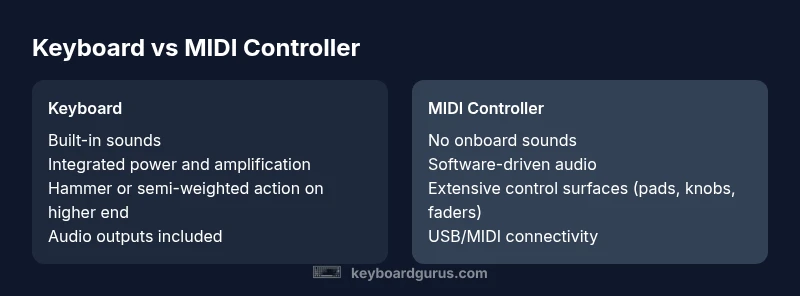
The difference between a keyboard and a MIDI controller is foundational: a keyboard is a self-contained instrument with its own sound engine, while a MIDI controller has no intrinsic sounds and only sends MIDI messages to software or hardware. If you want standalone playability and built-in sounds, choose a keyboard; if you need flexible software integration and control across DAWs, go MIDI. This guide explains when each tool shines.
Understanding the difference between a keyboard and a midi
The difference between a keyboard and a midi is a core distinction in modern music production and live performance. A keyboard is typically an all-in-one instrument with a keyboard action, internal sound engine, speakers or amplification, and batteries or power adapters. A MIDI controller, by contrast, is a versatile control surface that sends note data, velocity, aftertouch, and other MIDI messages to external software or hardware. According to Keyboard Gurus, many beginners start by assuming both are equal because they share a keyboard-like surface, but the practical implications are substantial for workflow, sound design, and portability. This distinction matters in studio setups, classrooms, and on stage, where the chosen tool shapes everything from routing to programming and rehearsal routines. Understanding this difference helps you map your needs to the right piece of gear and avoids spending on features you will not use.
In short, the key difference lies in sound generation versus control. A keyboard supplies its own tones, while a MIDI controller relies on connected software or hardware to generate sound. The Keyboard Gurus team emphasizes clarifying these roles early to prevent mismatches in your music system and to optimize learning curves for students and hobbyists alike.
wordCount”:210},
Comparison
| Feature | Keyboard | MIDI Controller |
|---|---|---|
| Core purpose | Play built-in sounds and be a standalone instrument | Send notes and control signals to software/hardware only |
| Keybed/action | Typically heavier, drift toward piano-like feel (graded hammer action on higher-end models) | Usually unweighted or light-weighted; focus on control rather than keyboard feel |
| Sound engine | Integrated sound engine; may include built-in speakers | No internal sounds; relies on DAWs or synthesizers for audio output |
| Connectivity | Audio outputs, MIDI ports, USB (often both power and data) | USB/MIDI to computer or hardware; may include external control features like knobs, faders, pads |
| Power | AC power or batteries; may be powered by internal amplification | USB-powered or AC adapter; consumes power for sending signals only |
| Best for | Players who want an all-in-one instrument and performance-ready setup | Producers, composers, or educators who need flexible software integration and extensive MIDI routing |
| Price range | Broad range depending on features; often higher for full instruments | Typically lower upfront cost for simple MIDI operation; scales with controls and build quality |
Advantages
- All-in-one instrument with visible tactile feedback
- Built-in sounds simplify practice and learning
- Often portable and playback-ready without a computer
- Familiar keyboard feel helps with piano pedagogy
- Ideal for beginners and performers who want immediate results
Drawbacks
- Sound variety limited to onboard engines (vs. software libraries)
- Requires external gear for most high-end production workflows
- Bulkier or heavier than compact MIDI controllers
- Higher price for feature-rich models compared to basic MIDI controllers
Neither option is universally better; pick based on your workflow and goals
If you want standalone performance and onboard tones, a keyboard is best. If you need maximum software flexibility, seamless DAW integration, and hands-on control, a MIDI controller wins. The Keyboard Gurus team emphasizes aligning your gear with your actual use case to maximize value.
Got Questions?
What defines a keyboard vs a MIDI controller?
A keyboard is a self-contained instrument with its own sound engine and speakers, while a MIDI controller does not produce sound on its own and only sends MIDI data to software or external sound sources.
A keyboard makes sound by itself; a MIDI controller simply talks to your computer or sound module.
Can a MIDI controller replace a keyboard for beginners?
For beginners, a MIDI controller can be used to learn note patterns, rhythms, and DAW workflows, but you’ll still need external software or sounds to listen to what you create. A keyboard is easier for immediate listening and practice.
If you want to hear tones right away, a keyboard is simpler; MIDI controllers need software to produce sound.
Are there keyboards that also function as MIDI controllers?
Yes, some keyboards include MIDI-out capabilities or USB MIDI modes, allowing them to function as both a self-contained instrument and a controller for software.
Some keyboards can act as MIDI devices when connected to a computer or gear.
What are typical price considerations?
Keyboards with built-in sounds and amplification tend to be pricier than basic MIDI controllers. MIDI-only controllers often range in price with the number of features like pads, sliders, and knobs.
Expect a broader price spread for keyboards; MIDI controllers often cost less upfront, depending on features.
How important is key action for MIDI controllers?
Key action matters mainly for touch feeling when choosing a keyboard. MIDI controllers focus on control surfaces rather than realistic piano action, though some high-end models imitate hammer action.
If you care about piano feel, pick a keyboard; if you mainly need control surfaces, MIDI suffices.
What to Remember
- Define your use-case before buying to avoid feature bloat
- Choose a keyboard for stand-alone playability and learning; choose MIDI for studio flexibility
- Assess software compatibility and routing needs early in the decision process
- Factor in portability and power requirements relative to your setup
- Test key feel, controller layout, and software mapping to ensure workflow fit