Difference Between Keyboard and Keytar: A Practical Guide
Explore the difference between keyboard and keytar, covering form, function, and use cases for studio and stage. Learn which instrument fits your setup and goals with clear, expert guidance from Keyboard Gurus.


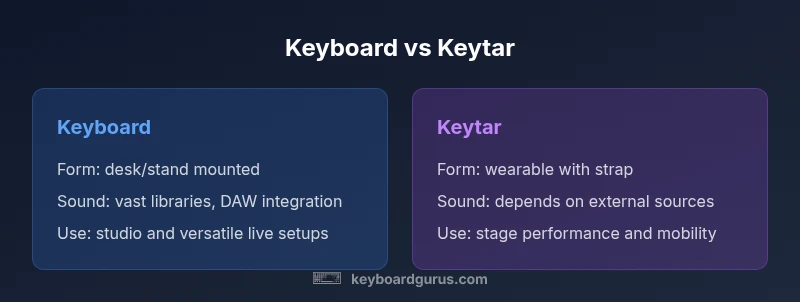
According to Keyboard Gurus, understanding the difference between keyboard and keytar hinges on form, function, and use. The difference between keyboard and keytar is most visible in form factor and intended setting: a keyboard is a conventional, desk- or stand-mounted instrument with built-in voices and MIDI, while a keytar is a portable keyboard worn on a strap for mobility on stage. Keyboard Gurus analysis highlights how portability, control layout, and sound design shape their best-use scenarios.
What is the difference between keyboard and keytar? <br/>In lay terms, a keyboard is a traditional piano-style instrument or controller that sits on a stand or a desk. It can be a standalone instrument with its own voices or a MIDI controller that drives a sound engine in a DAW. A keytar, by contrast, is a keyboard integrated with a strap and a neck-like column that lets the player move around the stage while playing. This distinction—form factor and usage context—forms the backbone of most assessments in Keyboard Gurus' guidance. The key difference between keyboard and keytar is not simply how it looks, but how it enables performance: keyboards excel in sound variety and studio integration, while keytars excel in stage presence and mobility. For beginners, the decision often boils down to whether you value portability and a showy live presence or a broad sonic toolkit and studio flexibility.
type
Comparison
| Feature | Keyboard | Keytar |
|---|---|---|
| Form factor | Flat, desk- or stand-mounted keyboard | Shoulder-hugging, strap-enabled wearable controller |
| Portability | Moderate to high setup requires stands and cables | High mobility; designed for walking the stage |
| Sound and voices | Built-in voices and options to layer sounds, plus external sound module compatibility | Often relies on external sound sources or DAWs; built-in voices vary by model |
| MIDI and control | Rich MIDI capabilities, velocity/aftertouch, multiple ins/outs on higher-end models | MIDI out/in plus USB; emphasis on performance controls |
| Best used for | Studio work, composition, versatile sound design | Live performance, showmanship, on-stage movement |
| Price range | Wide range depending on features and build quality | Typically mid-range to high depending on build and features |
Advantages
- Clear distinction in use-case simplifies buying decisions
- Keytars enable dynamic stage performances with movement
- Keyboards provide broader sound libraries and studio-ready workflows
- Both integrate with DAWs via MIDI for flexible production
Drawbacks
- Keytars can be expensive and physically demanding for long gigs
- Keytar ergonomics may feel awkward for players new to strapped instruments
- Keyboards with many features can overwhelm beginners
Choose based on your primary context: keytar for stage mobility; keyboard for studio versatility
If live performance and dynamic stage presence matter most, a keytar is advantageous. For broad sound palettes, DAW integration, and studio work, a traditional keyboard offers greater value and flexibility.
Got Questions?
What exactly is a keytar and how does it differ from a keyboard?
A keytar is a keyboard strapped to a player so they can move on stage, offering mobility and a visual performance element. A keyboard is a traditional, desk- or stand-mounted device focused on range of sounds and studio integration. The core difference is form and use-case: stage mobility versus studio versatility.
A keytar is a strapped keyboard for on-stage action; a keyboard is a traditional instrument for studio or performance with less emphasis on movement.
Can you use a keyboard on stage like a keytar?
Yes, you can perform with a standard keyboard on stage by mounting it on a stand and using wireless or wired MIDI for live control. However, you lose the mobility and showmanship that a keytar offers. It’s about balancing practicality with performance flair.
You can play a keyboard on stage, but you’ll miss the mobility that a keytar provides.
Who should buy a keyboard vs a keytar?
Buy a keyboard if you need broad sound choices, deep DAW integration, and a stable setup for studying or recording. Choose a keytar if live performance, visual presence, and freedom of movement are top priorities.
Buy a keyboard for studio work; go with a keytar for stage mobility.
Do keytars have built-in sounds worth using in a live set?
Some keytars offer bundled sounds, but many performers rely on external synths or software instruments for richer tones. Depending on the model, you may get adequate onboard voices, yet most players pair with a sound module or laptop.
Keytars may have onboard sounds, but many players pair them with external synths or DAWs.
Are keytars simply keyboards with straps, or do they offer something more?
Keytars are designed to expand performance possibilities by combining a keyboard’s layout with mobility. They are more than strapped keyboards because their ergonomics, routing, and input controls are tuned for live expression.
They’re not just strapped keyboards; they’re built for expressive live performances.
Can a keyboard or keytar connect to a DAW and control virtual instruments?
Both can connect to a DAW via MIDI and control virtual instruments, but keyboards typically offer broader integration through dedicated controllers and software ecosystems. Keytars emphasize performance controls that map to live playing workflows.
Yes, both can connect to a DAW, with keyboards often offering broader control options.
What to Remember
- Identify your primary environment (stage vs studio)
- Evaluate portability vs ergonomics for prolonged play
- Assess MIDI capabilities and software integration
- Consider budget in relation to feature depth
- Test both forms to feel the control layout