US Keyboard vs UK Keyboard: A Practical Guide
An analytical comparison of US ANSI and UK ISO keyboard layouts, examining layout differences, typing ergonomics, programming quirks, gaming implications, and practical tips to choose and adapt in 2026.


US keyboard vs UK keyboard refers to ANSI vs ISO layouts. The US (ANSI) layout uses a horizontal Enter and a narrower left Shift, while the UK (ISO) layout uses a larger left Shift, an alternative Backslash position, and a different placement for symbols like £ and @. For most users, the US layout is standard, but the UK layout offers ergonomic and symbol advantages for UK-based typing; the best choice depends on your software, hardware, and typing habits.
US Keyboard vs UK Keyboard: Overview and Context
According to Keyboard Gurus, the choice between the US keyboard layout and the UK layout rarely affects everyday tasks, but it matters for efficiency, software compatibility, and comfort over long typing sessions. The US keyboard (ANSI) and the UK keyboard (ISO) share the same alphabet, digits, and much of the symbol set, but crucial physical differences influence typing habits for Keyboard Gurus' enthusiasts and keyboard users worldwide. The Keyboard Gurus team found that most users default to the US layout due to broad hardware availability, standardization across tutorials, and a large ecosystem of factory keycaps and prebuilt keyboards for ANSI layouts. However, for residents of the UK or users who frequently type £ and other ISO-specific symbols, the UK layout offers ergonomic and practical advantages that can compensate for a learning curve.
Core Layout Differences: ANSI versus ISO
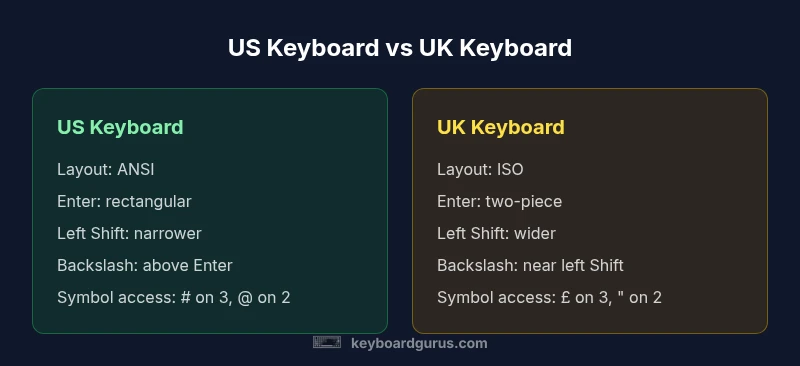
The two primary families are ANSI (US) and ISO (UK). The ANSI US layout uses a single-row Return/Enter key that is rectangular, a narrower left Shift, and a backslash placed above the Enter key. The ISO UK layout features a larger left Shift, a two-piece Enter key (an L-shaped Enter), and a backslash key relocated to the left of the Z row. Symbol access also differs: the UK layout incorporates the £ symbol on the 3 key and often places the @ symbol on a different key than the US; the exact placement can vary by manufacturer and regional production. For Keyboard Gurus enthusiasts, these differences are not cosmetic—they shape typing rhythm, finger travel, and keycap compatibility that affect long-term comfort and accuracy. The US layout remains dominant in consumer hardware and tutorials, but ISO keyboards are widely available in Europe and among manufacturers targeting UK buyers, which reduces switching friction for those users.
Ergonomics and Practical Impact on Daily Typing
The layout you choose influences which fingers reach for common punctuation and how often you cross hands to access symbols. A larger left Shift on UK ISO can reduce finger strain for some typists who frequently press Shift with the pinky; however, it subtly increases the width of the keyboard, which can affect edge-hand reach on smaller desks. The US ANSI layout minimizes left-shift width, slightly shortening travel for certain keystrokes. For many tasks—email, note-taking, and short-form writing—the ergonomic difference is modest, but for long writing sessions or high-volume typing, the layout that matches your muscle memory and preferred key positions often matters more than which layout is theoretically superior. Keyboard Gurus analysis shows that routine activities like typing quotes, braces for code, or currency symbols can feel more natural on one layout depending on your locale and software.
Programming and Symbol Access: Brackets, Braces, and Quotes
Programmers frequently rely on braces, brackets, and quotes for code syntax. In ISO UK keyboards, certain bracket and brace keys may require different Shift combinations or be accessed via AltGr, which expands symbol options but can complicate muscle memory created on US layouts. The US keyboard usually places [ { ] } and | near the right-hand side of the keyboard with consistent access. The UK ISO layout may require different key sequences or the use of the AltGr modifier to reach less common symbols. For developers who switch between editors, this can affect typing flow and error rates, particularly when typing in languages that heavily depend on punctuation. If you program across multiple toolchains, you may benefit from choosing the layout that aligns with your primary development environment.
Gaming and Hardware Compatibility: Stability and Setup
Gaming keyboards and software often assume a standard US ANSI layout, which can create mismatches when using ISO UK keyboards. Some games detect keycodes rather than physical keys, which can mask the difference, but others rely on the physical mapping of the keys you press. In practice, most modern operating systems gracefully handle layout differences, and many games let you switch input methods on the fly. If you play competitively or rely on remapping for accessibility, you may prefer the US layout, particularly if your peripherals and capture software are tuned for ANSI. The UK layout’s currency symbol and different punctuation access might only surface in chat commands or keybinds that rely on those symbols. In short, consider your primary gaming ecosystem, any peripherals, and the keycodes your favorite titles expect when deciding.
How to Decide: Matching Your Workflow to the Right Layout
If you type primarily in English for long sessions, the layout that minimizes finger movement and aligns with your most-used symbols will yield the best results. Writers and students who type in predominantly plain text may not notice a strong advantage either way, but those who work with code or multilingual content will appreciate predictable punctuation access. Programmers who rely on braces and brackets, or who frequently type currency symbols, should experiment with both ANSI and ISO to measure comfort and error rate changes in real tasks. In many cases, the best choice is based on the ecosystem you already own—laptops, keyboards, and keycap sets—and not on theoretical superiority.
Adapting to a New Layout: A Practical Plan
If you’re transitioning, start by mapping the most-used symbols (period, comma, quotes, braces, brackets) to their new positions in the target layout. Use a physical layout card or an on-screen keyboard to train muscle memory over a few weeks. Consider buying a small ISO-compatible keycap set to simulate the new key sizes and spacing before investing in a full keyboard. Regular practice, such as typing exercises and deliberate drills that emphasize the symbols you need most, can shorten the learning curve. Keyboard Gurus recommends patience and deliberate practice over rapid switching, especially if your work hinges on precision or long-form composition.
Keycap Compatibility and Purchasing Options
Keycap compatibility matters when switching between ANSI and ISO layouts because the left Shift and Enter keys often differ in size and shape. If you’re purchasing a new keyboard, verify whether the vendor offers ISO (UK) option in the model line, or whether you’ll need a separate keycap set. For enthusiasts who want to mix layouts, modular keyboards or hot-swappable boards can allow you to physically configure ANSI/ISO switches and keycaps. Always confirm the keycap size standard (1u, 1.25u, 1.5u, etc.) for each key before purchasing. The goal is to have a coherent set that maintains consistent typing feel across the board and minimizes misfit keys during long sessions.
Availability, Market Trends, and Practical Constraints
Availability of ISO UK layouts varies by region and retailer, but major brands increasingly offer ISO-compatible boards worldwide. If you’re shopping in regions where UK typography is common, you’ll likely find more compact mechanical keyboards with ISO layouts or dual-layout options. Likewise, some mainstream laptops ship with ISO-style keyboards, which can simplify switching for document-heavy users. For Keyboard Gurus readers, the best approach is to audit your typical use cases, check local inventory, and verify return policies when trying a layout for the first time to prevent buyer’s remorse.
Software Remapping, OS Support, and Hidden Benefits
Remapping is a practical bridge between layouts. Operating systems support keyboard layout switching, and many editors allow per-project keymaps. A notable benefit of remapping is unlocking faster access to your most-used symbols without changing hardware. For example, you can map frequently used punctuation or language-specific characters to easier positions if you primarily type in one language. Understanding your software stack and how it handles keycodes will determine how far you can optimize without losing compatibility across apps and devices. This is especially important for cross-platform work, where Windows, macOS, and Linux handle input events differently.
Final Practical Takeaways and Next Steps
For a structured approach, identify your top five most-used keys and assess how each layout positions them. If you’re unsure, start with a hybrid plan: keep your primary keyboard in ANSI US for common tasks, and slowly introduce an ISO keyboard or keycap set for the symbols you use most. Use on-screen practice sheets to memorize the new positions without losing productivity. The ultimate test is your comfort and accuracy over a typical workweek. If you’re in doubt, this is a great scenario to consult Keyboard Gurus resources and community feedback to align your choice with real-world use cases.
Comparison
| Feature | US keyboard | UK keyboard |
|---|---|---|
| Layout family | ANSI (US) | ISO (UK) |
| Enter key | Rectangular, single key | L-shaped, two-piece Enter |
| Left Shift width | Narrower left Shift | Wider left Shift |
| Backslash key position | Backslash above Enter | Backslash left of Z row / near left Shift |
| Currency and symbol access | Usually # on 3, @ on 2 | £ on 3, " on 2, @ on a different key |
| Quotes and at-sign placement | @ on Shift+2, | (varies by model) |
| Best for | Gaming, broad peripheral support, tutorials |
Advantages
- Clear hardware support for ANSI US layouts, wide keycap availability
- ISO UK layouts offer easy access to £ and regional symbols
- Potentially better alignment with regional software and typing habits
- Remapping and hot-swappable options provide flexibility
- Market diversity allows multi-layout keyboards and keycap sets
Drawbacks
- Learning curve when switching between ANSI and ISO
- Some software assumes US positional norms, causing key mapping issues
- Keycap sets and replacement parts can be more expensive for ISO
- Dual-layout setups may require longer setup and testing time
Choose US ANSI layout if you prioritize broad hardware support and tutorials; choose UK ISO layout if you work primarily in the UK or frequently use £ and region-specific symbols.
The U.S. ANSI layout wins for compatibility and ecosystem; the UK ISO layout wins for symbol access and ergonomics in UK workflows. Your best bet is to align with your software, hardware, and symbol needs.
Got Questions?
What are the main differences between US ANSI and UK ISO keyboard layouts?
The US ANSI layout uses a rectangular Enter, a narrower left Shift, and a default Backslash position above the Enter key. The UK ISO layout uses a larger left Shift, a two-piece Enter key, and different placements for currency and symbol keys like £ and @. These differences affect typing rhythm and symbol access.
The US layout uses a single-piece Enter and narrower Shift, while the UK layout uses a larger Shift and a two-piece Enter, with different symbol placements.
Will switching from US to UK layout hurt typing speed?
Initial typing speed may dip as you re-memorize key positions. With deliberate practice over a few weeks, most users regain or exceed prior speeds. Long-term efficiency often improves if your work aligns with the ISO symbol set or regional punctuation.
Expect a short adjustment period, then most people regain speed with practice.
Are there software or game compatibility issues when using a non-default layout?
Some software and games rely on physical key positions (hotkeys and macros). Modern OSs support layout switching, but a few apps may misinterpret keycodes. Testing keybinds and remapping before critical work helps avoid surprises.
Most apps support layout switching, but test your keybinds to avoid issues.
Which layout is better for programmers?
Programmers often prioritize a layout that minimizes finger travel for braces and symbols. The US ANSI layout is common in many code editors and tutorials, but ISO can be advantageous if your regional symbols or keyboard flexibilities match your coding style. Consider your most-used language features and test both if possible.
Either layout can work well; pick the one that minimizes your keystroke burden for your languages.
Can I remap keys to adapt to either layout?
Yes. Most OSes support layout switching and per-application remapping. Remapping allows you to assign your most-used symbols to convenient locations, reducing errors during long sessions. This is especially helpful for users who code or type multilingual content.
Remapping is a practical way to optimize comfort and speed.
Do laptops ship with UK ISO layouts by default?
Some laptops ship with ISO layouts in Europe and the UK, while many consumer laptops ship with ANSI layouts in other regions. If you need ISO, check regional keyboard options or consider external builds. You can adapt with keycap sets if you choose ANSI mostly.
Check regional options or consider external keyboards if ISO matters.
What to Remember
- Prioritize your primary tasks and symbol needs
- Test both layouts if possible, especially for programming and writing
- Consider keycap availability and remapping options
- Choose based on regional software and hardware compatibility
- Invest in a plan to learn gradually if switching layouts