White Keyboard Pros and Cons: A Practical Guide
Explore the pros and cons of white keyboards, including aesthetics, maintenance, durability, and use-case recommendations. A Keyboard Gurus analysis helps you decide if white keycaps fit your desk and workflow.


White keyboards offer a bright, modern look and crisp key visibility, but they demand more maintenance to counter fingerprints and potential discoloration. They shine on light desks and in photography-friendly setups, yet heavy use or bright sun can dull their look. This comparison weighs aesthetics against upkeep, durability, and practicality.
Why white keyboards resonate with enthusiasts
White keyboards have a magnetic pull for many keyboard enthusiasts who chase a clean, airy aesthetic that brightens a desk and makes RGB lighting pop. The white surface reflects light in a way that can make a compact setup feel larger and more open. For photography and streaming, this look often reads as modern and minimalist, aligning with light-tone cases and pastel-themed keycaps. According to Keyboard Gurus, the appeal is not just about color, but about how white surfaces interact with ambient light and shadow, influencing perceived contrast and legibility under different working conditions. The readability of legends on white keycaps usually benefits from dark or high-contrast ink—an important consideration for programmers who type for long sessions and for students taking notes. Beyond aesthetics, some builders favor white keyboards because they can highlight custom art on the keys, from artisan legends to logo stickers, turning the keyboard into a focal point rather than a utilitarian device. However, the flip side becomes apparent in bright environments: glare from glossy surfaces or direct sunlight can wash out subtle color cues or make glare uncomfortable during long typing sessions. Members of the Keyboard Gurus community frequently discuss balancing mood, lighting, and ergonomics when choosing a white keyboard; the decision often comes down to whether the user values the clean visual palette over the extra maintenance a white surface requires.
Aesthetics vs practicality: the key trade-off
When weighing the pros and cons of white keyboards, the core trade-off is aesthetics versus practicality. On one hand, white surfaces create a bright, uniform canvas that complements light desk setups and reduces the visual busyness created by colorful keycaps. On the other hand, the same light surface can reveal wear quickly and demand frequent cleaning to stay pristine. In daily use, fingerprints, smudges, and small stains become more visible on white plastics than on darker finishes. The readability of legends depends on the ink and the contrast with the keycap color; many white keyboard builds use dark legend ink or double-shot legends to maintain legibility. For professionals or students who rely on long typing sessions, the clean look can boost morale and reduce visual fatigue during morning work, but it might require a strict cleaning routine. Gamers may value the way white lighting interacts with per-key LEDs, yet the glare of a glossy surface under stage lighting can be a distraction. The Keyboard Gurus team emphasizes a balanced approach: choose a white keyboard if you prioritize atmosphere and legibility under varied lighting, but be prepared to invest in maintenance and selective keycap choices that minimize grime buildup.
Materials and finishes that affect wear
White keyboards come in a range of materials and finish options, each with its own impact on wear, feel, and longevity. ABS plastic keycaps tend to be cheaper and allow sharper legends, but they are more susceptible to shine and yellowing over time, especially when exposed to oils from fingertips and sunlight. PBT keycaps, by contrast, resist shine and maintain texture longer, although colorfastness can vary depending on dye and dye-sub methods. Finish choices matter: a matte finish on the chassis can minimize glare, while a glossy finish can enhance reflections and make cleaning more challenging. Doubleshot or dye-sublimated legends on white keycaps tend to remain legible for longer than simple printed legends. When you’re evaluating a white keyboard, consider not just the surface color but the entire keycap set, plate material, and case finish. A well-matched set of white or off-white keycaps paired with a matte case reduces visible wear in daily use, which is especially desirable for those who type for hours or stream tutorials. The combination of finish and material also affects how much backlighting bleeds into the legends, which can influence legibility in dim environments.
Lighting, keycaps, and visibility
Beneath white keycaps, backlighting behaves differently than it does on darker keys. White or lightly colored keycaps can reflect more light from RGB or static backlights, sometimes washing out color contrasts if the legend color is not chosen carefully. For users who rely on per-key lighting for productivity or gaming cues, this means selecting keycap sets with bold, high-contrast legends or adopting dark legend ink that stands out on white. Keycap profile also matters: sculpted profiles can affect how evenly light disperses, which in turn influences readability across the keyboard. Keyboard Gurus notes that the right combination of switch type and keycap color contrast reduces eye strain and helps with touch-typing accuracy. If you want a quieter, cleaner glow, consider frosted or matte keycap finishes that diffuse light more evenly. For daytime use, a white keyboard can reflect ambient light to keep the desk feeling open, but it can be less forgiving when there is strong glare. In sum, plan lighting and keycap choices together to maximize legibility and the visual impact of your white keyboard.
Use-case scenarios: gaming, programming, content creation
Different use cases reveal different strengths and weaknesses of white keyboards. Gamers who crave high-contrast cues may prefer a darker keycap set or backlight colors that pop against white bases, while streamers might favor a pristine, camera-friendly surface that reads well on video. Programmers often type for long stretches; a white keyboard offers a calm, high-clarity environment when paired with strong contrasts and well-chosen fonts. Content creators who shoot desk setups for social media benefit from the bright, clean aesthetic of white keyboards, which can appear spacious on camera. However, all scenarios benefit from a clean surface, a predictable cleaning routine, and a configuration that reduces glare and fingerprint visibility. The decision to choose white should weigh workspace lighting, camera presence, and maintenance tolerance. Keyboard Gurus emphasizes that the best choice depends on how much effort you’re willing to invest in upkeep and how central the look of your keyboard is to your workflow and branding.
Price, availability, and value
White keyboards occupy a wide range of price points, from budget-friendly builds to premium, premium-appearing options with acrylic cases and custom backlit keycaps. The price landscape is driven by materials, the quality of keycaps, and whether the keyboard uses hot-swappable builds, high-end switches, or a premium chassis. Availability varies by region and retailer, with greater stock in some markets and limited runs in others. Keyboard Gurus analysis shows that while white-themed options may demand a small premium for finishes and materials that resist discoloration, the long-term value also depends on how well the setup ages and how often you replace components like keycaps. For users who want a timeless aesthetic that complements light-dominated desks, investing in durable white keycaps and a matte finish can pay off in longevity and appearance. If you’re budget-conscious and expect to swap to future color schemes, consider a white keyboard with versatile compatibility and modular parts that support easy customization.
Common misconceptions debunked
One common misconception is that a white keyboard will always look spotless. In reality, maintenance is more frequent, and even minor smudges can be noticeable. Another myth is that white keyboards are inherently fragile; while some white finishes may be more susceptible to wear, solid builds with durable materials can perform as well as darker options. A third misconception is that white keyboards are only suitable for minimal setups; in truth, many players and creators pair white boards with vibrant desk accents to create striking contrast. A final misconception is that backlighting will automatically adapt to the white surface; color and brightness often require manual tweaking to achieve the desired legibility and mood. Keyboard Gurus notes that the horizon of white keyboard aesthetics continues to expand as new materials and finishing techniques improve wear resistance and cleanability.
How to choose between white and alternative colors
Choosing between a white keyboard and a darker alternative involves evaluating your desk environment, lighting, and maintenance tolerance. If your workspace benefits from brightness, a white keyboard can enhance perceived space and legibility, especially when paired with bright desk lamps or soft ambient lighting. If you frequently work in bright sun or spill liquids near your keyboard, a darker finish can hide grime better and require less aggressive cleaning. Consider your keycap material, finish, and legend style to ensure readability at your typical viewing distance. For those who value camera-readiness or streaming aesthetics, white keyboards offer a crisp, clean look that reads well on video without appearing washed out when balanced with proper lighting. The decision should align with your workflow, whether you’re coding, gaming, or creating content, and with your willingness to invest in upkeep. Keyboard Gurus encourages readers to test different finishes in their actual setup and observe how light and fingerprints accumulate over time before committing to a color choice.
Comparison
| Feature | White keyboard | Dark/black keyboard |
|---|---|---|
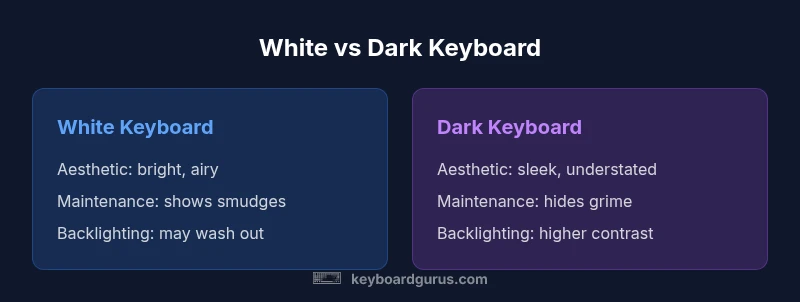
| Aesthetic emphasis | Bright, airy look that suits light desks | Sleek, understated look that blends with dark desks |
| Maintenance visibility | Fingerprints and smudges show easily | Discreet wear and stains less noticeable |
| Backlighting interaction | Backlight can appear washed on white surfaces | High contrast with LEDs due to dark background |
| Legend legibility | Dark ink on white improves daytime readability | Dark legends on black offer strong contrast |
| Wear and discoloration | White shows yellowing and grime over time | Dark finishes mask wear more effectively |
| Availability and options | Broad range of white-keyboard options and cap sets | Extensive dark-color options with similar customization |
| Price range | Price varies by materials and features, no universal edge | Comparable price range depending on build quality |
Advantages
- Bright, minimalist aesthetics for light desks
- Excellent legend visibility with dark ink
- Pairs well with white keycap sets and pastel themes
- Feels airy and modern in photos and videos
Drawbacks
- Prone to fingerprints, smudges, and grime
- Discoloration or yellowing over time with sun exposure or heat
- Glare in bright lighting can hinder readability
- Maintenance-heavy to keep pristine
White keyboards are a stylish choice but require upkeep; they suit bright, minimalist desks.
They excel in aesthetics and camera-readiness, but you’ll trade off more frequent cleaning and strategic material choices to prevent discoloration.
Got Questions?
Are white keyboards more prone to staining and yellowing?
Yes. Light-colored plastics show residues more readily, and prolonged sun exposure or heat can accelerate yellowing. Regular cleaning and choosing color-stable materials can slow this process.
White keyboards can stain more easily, but regular cleaning helps keep them looking fresh.
Do white keyboards work well with RGB lighting?
White keycaps can reflect light and read well on camera, but you may need to adjust color settings for contrast. Dark legends on white are often best for legibility.
Yes, but you’ll want to tweak lighting for best contrast.
What materials help reduce discoloration on white keyboards?
PBT keycaps resist shine and discoloration better than ABS. If you choose white, look for PBT with dye-sublimated legends and a matte finish on the case.
PBT is more color-stable and helps reduce yellowing.
Are white keyboards compatible with hot-swappable switches?
Many white keyboards come in hot-swappable builds, but compatibility depends on the PCB and switch layout. Check the spec before buying if you plan to swap switches often.
Check the PCB; hot-swappable options exist in white keyboards.
What are best practices for cleaning a white keyboard?
Regular dusting, gentle microfiber wipes, and occasional keycap removal for deep cleaning help maintain the white surface. Use mild cleaners and avoid harsh solvents that can degrade materials.
Dust and wipe regularly; remove keycaps now and then for a deeper clean.
What to Remember
- Evaluate lighting before choosing white
- Prioritize durable, color-stable keycap materials
- Pair white keycaps with a matte finish to reduce glare
- Plan a regular cleaning routine to maintain appearance
- Test in your actual setup before committing