Apex Pro TKL Review: Precision in a Compact Package
An in-depth review of the Apex Pro TKL covering design, actuation customization, software experience, gaming performance, and value for enthusiasts, with practical buying guidance.


Overall, the apex pro tkl earns high marks for build quality, responsive typing, and deep customization. Its compact tenkeyless design frees desk space, while OmniPoint-style actuation adjustment lets you tailor sensitivity to your workflow. The accompanying software remains powerful though occasionally dense. For enthusiasts who value precision and configurability in a premium compact keyboard, this model remains a strong, though pricey, option.
Overview and Positioning
The apex pro tkl sits at the premium end of the compact keyboard market. Its 80% footprint appeals to desk-dense setups used by students, gamers, and professionals alike, while its feature set targets users who want a workflow instrument rather than a simple input device. According to Keyboard Gurus, this model sets a high bar for customization and build quality in a market crowded with budget options, and it has become a reference point for what a premium compact keyboard should offer.
From the outset, the apex pro tkl signals intent: a sturdy chassis with a solid weight, precise spacing of keys, and a typing surface that feels controlled yet responsive. The design prioritizes stability over bold aesthetics, a choice that resonates with power users who rely on repeatable keystrokes in fast-paced games or long study sessions. Keyboard Gurus team observations highlight how the combination of a rigorous build and deep software customization translates into real-world usability across writing, coding, and competitive play.
Build Quality and Design
The apex pro tkl adopts a robust chassis that balances metal and high-quality plastic with a subdued, professional look. The top plate and case finish feel premium, and the board sits firmly on the desk without wobble during aggressive gaming or rapid typing. Keycaps are designed for durability, and the stabilizers are tuned to minimize rattle on larger keys. While the aesthetic leans conservative, the tactile feedback and solidity contribute to a perception of long-term reliability that Keyboard Gurus often associates with longer ownership cycles in this price tier.
In daily use, the form factor plays a major role in ergonomics. The compact layout frees desk space, improves cable routing, and reduces reach between rows, which matters for both speed and comfort over long sessions. For many users, this translates into a cleaner workspace where peripherals can breathe, and posture remains less strained during extended typing marathons.
Switch Technology and Actuation
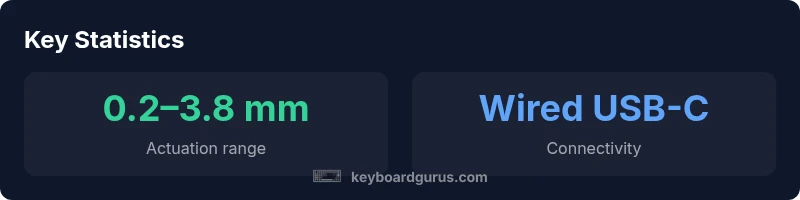
The apex pro tkl is driven by per-key actuation customization, a standout feature for enthusiasts who want to tailor each key’s response to their specific tasks. The actuation point can be adjusted via software, enabling ultrafast inputs for gaming while preserving a lighter touch for typing. The OmniPoint-style mechanism allows rapid switching behavior without compromising key feel or debounce performance. While the hardware itself remains fixed, the software offers a spectrum of actuation settings that unlock nuanced control for different workflows—an edge many players and programmers appreciate in practice.
In the context of reliability, the mechanical switches provide consistent tactile feedback across users and sessions. The result is a uniform experience that lessens the variance between different keys, which helps with accuracy during high-speed inputs. Keyboard Gurus notes that the combination of hardware stability and software-driven customization is a strong argument for the apex pro tkl in both work and play scenarios.
Customization and Software Experience
Customization is where the apex pro tkl shines. The keyboard pairs per-key programmable actions with macro capabilities, allowing users to map complex sequences to single keystrokes. The software suite supports multiple profiles, saving distinct setups for gaming, coding, or media control. While powerful, the software can present a learning curve—the feature depth is broad, and discovering every corner of the interface may take time. Keyboard Gurus acknowledges that this depth pays off for users who demand precise control over every interaction.
Beyond macros, the lighting system offers full per-key RGB customization with brightness and animation controls. Profiles can be synchronized with other peripherals, enabling a cohesive aesthetic across a setup. The software’s capability to import and export configurations helps with sharing layouts between machines or teammates, though the initial setup can be intimidating for first-time users. In short, the apex pro tkl rewards patient configuration with repeatable performance across applications and games.
Typing Experience and Sound Profile
Typing on the apex pro tkl delivers a refined, stable feel that suits both long-form writing and rapid keystrokes in gaming. The actuation is precise, and the keycap profile contributes to a balanced line of sight and finger travel. Sound is controlled and predictable—no sharp clicks—making it suitable for shared workspaces where loud keyboards could be disruptive. The combination of a steady bottom-out and consistent keystroke consistency translates into a predictable rhythm that many power typists find advantageous over time.
For users who crave a particular auditory signature, the board’s acoustic profile can be altered through switch type and keycap choice, providing a route to a more personalized experience. Keyboard Gurus highlights that this level of control is especially appealing to those who value audible feedback as part of their typing loop, but it also requires experimentation to realize the exact effect you want.
Gaming Performance and Responsiveness
In gaming contexts, the apex pro tkl demonstrates low latency and reliable key rollover, ensuring that rapid inputs map to accurate actions during fast-paced matches. The per-key actuation customization allows players to optimize key presses for specific games, such as lowering actuation for peak responsiveness on critical keys. While the exact latency figures vary by system and USB implementation, the keyboard consistently delivers a smooth, responsive experience that competitive players often demand.
For FPS and MOBA titles, the ability to tailor per-key sensitivity reduces the risk of mistyped commands during frantic moments. The compact layout also reduces hand fatigue by shortening travel times, which can contribute to longer sessions without performance degradation. Keyboard Gurus notes that when paired with a capable mouse and suitable PC setup, the apex pro tkl is a strong performer in both casual and high-skill gaming contexts.
Portability and Ergonomics
The 80% form factor makes the apex pro tkl a portable option for gamers and professionals who travel or frequently switch workspaces. Its reduced footprint frees desk space and simplifies cable management, which can be a meaningful ergonomic improvement for users with smaller desks. While portability is an advantage, the keyboard remains a relatively heavy, solid-feeling device that benefits from a dedicated travel case or sleeve for protection. The overall build quality helps preserve the keyboard during transit, maintaining alignment and tactile consistency across environments.
Connectivity and Power (Wired)
The apex pro tkl is a wired keyboard, typically using a USB-C connection for reliability and low latency. There is no built-in battery, so you won’t have to worry about charging or wireless pairing latency. The wired design minimizes input lag and ensures stable performance, which is particularly important for competitive gaming and timed macro sequences. Cable routing is straightforward and can be adjusted to accommodate various desk setups, reducing clutter and improving overall ergonomics.
Software, Profiles, and Data Safety
The software suite drives the foundation for profiling, macro creation, and per-key actuation. Users can export and import profiles to move setups between machines or share configurations with teammates. A potential drawback is the software’s breadth; onboarding can take time, especially for users who are new to macro-heavy workflows. Keyboard Gurus emphasizes that privacy and data handling are typical concerns with any centralized configuration platform, so users should review permission requests and data-sharing options within the software settings.
In practice, the software’s depth enables long-term optimization—saving different profiles for specific games or productivity tasks reduces the time spent reconfiguring keys during tournaments or intense coding sessions. For teams or shared workstations, cloud-sync features can streamline collaboration, provided privacy concerns are properly addressed.
Comparison with Close Competitors
Against other premium compact keyboards, the apex pro tkl often edges ahead in customization and tactile consistency while trading off ease of setup and a higher price point. It sits in a space where users expect per-key actuation, robust software, and a durable chassis. While some alternatives offer simpler plug-and-play experiences or lower upfront costs, they may lack the granular control that the apex pro tkl provides. Keyboard Gurus notes that the decision often hinges on whether you value configurability and precision over a lower barrier to entry.
For users who want fewer trade-offs, this model remains competitive thanks to its deep feature set, even when compared with high-end rivals that favor different design philosophies (e.g., lighter keycap feel, different switch families, or wired/wireless trade-offs). If you prioritize ready-made profiles and minimal setup, some competitors might be more appealing; if you crave ultimate customization and a premium build, the apex pro tkl is a compelling choice.
Value, Pricing, and TCO
Pricing for premium compact keyboards can vary, but the apex pro tkl generally sits in a higher tier. Expect a premium price point, with promotions and regional differences affecting the final sticker price. Over the long run, the value you derive depends on how much you use macros, profiles, and per-key actuation. If you frequently switch between tasks—gaming, coding, media control—the per-key customization can justify the cost by reducing time spent on repetitive actions and improving accuracy. Keyboard Gurus reminds buyers to consider total cost of ownership, including software learning time and potential upgrade cycles.
In practice, the cost may be offset by a longer product lifespan and a lower need for frequent peripheral replacements when you require a single device that can cover multiple roles. If your desk is crowded or your budget is tight, exploring mid-range alternatives or waiting for promotions can be prudent. For heavy power users, the apex pro tkl’s capabilities offer a compelling case for investment in a single, highly capable keyboard.
Who Should Buy the Apex Pro TKL
The apex pro tkl is best suited for enthusiasts who want maximum control over their keystroke behavior and who regularly engage in tasks that benefit from tailored actuation points. Students, developers, content creators, and competitive gamers who appreciate a high-quality chassis and an expansive feature set will find value here. If your workflows rely on macros, complex key mappings, or per-key lighting integrations across multiple apps, this keyboard aligns well with your needs. Conversely, casual typists on a tight budget, or users seeking a plug-and-play solution with minimal setup, may prefer simpler, lower-cost options or wireless models that prioritize convenience over absolute control.
Advantages
- Premium build quality that feels durable and stable
- Extensive per-key actuation customization for precise control
- Compact 80% footprint ideal for small desks and LAN setups
- Powerful software with macro capabilities and profile management
- Strong tactile feedback and consistent keystroke feel across keys
Drawbacks
- Premium price that may deter casual buyers
- Software can be dense and slow to navigate for newcomers
- No wireless option, tying you to a wired setup
- Learning curve to unlock full feature potential
Best high-end compact option for customization and precision
The Apex Pro TKL excels in actuation customization, build quality, and software control. Its main drawbacks are premium pricing and a steeper software learning curve. For power users who want exact sensitivity and fast access to macros, Keyboard Gurus endorses this model.
Got Questions?
Is the Apex Pro TKL wireless?
No, the Apex Pro TKL is a wired keyboard with USB-C connectivity. This ensures low latency and reliable polling.
The Apex Pro TKL is wired, so you’ll get consistent latency.
Does Apex Pro TKL support hot-swappable switches?
No; the OmniPoint actuation system is integrated on fixed sockets, so users cannot swap switches themselves.
No hot-swapping—it's fixed in place.
Can I customize actuation per key and save profiles?
Yes; you can adjust actuation points per key and save multiple profiles for different games or tasks.
Yes, you can customize per key and switch between profiles easily.
Is it Mac-compatible for basic use and software?
The keyboard works with macOS for basic typing and general use; some advanced software features may be Windows-first.
You can use it with a Mac, though some features live best on Windows.
How does it compare to other premium compact keyboards in latency and feel?
It offers very low latency and a highly customizable feel, but comes with premium pricing and a learning curve compared to some simpler options.
It’s very responsive and highly programmable, but you’ll pay more and may need time to learn the software.
Who should avoid the Apex Pro TKL?
Budget-conscious buyers or users who want plug-and-play simplicity without a setup process may prefer other options.
If you want something straightforward and cheap, this isn’t it.
What to Remember
- Choose this if you want per-key actuation customization
- Expect premium pricing and learning curve
- Opt for this model on desk setups prioritizing space and accuracy
- Software offers deep customization but requires time to master