Does Wooting Keyboard Make a Difference? A Practical Analysis
Explore whether a Wooting keyboard makes a difference for gaming, typing, and daily use. We weigh analog actuation, software customization, and real-world scenarios to help you decide if the upgrade is worth it for your setup.


Does wooting keyboard make a difference? The answer is nuanced: for many users it does, but primarily when you leverage analog actuation, per-key profiles, and software-driven tweaks. Wooting keyboards can sharpen precision in certain games and workflows, while standard keyboards stay simpler and cheaper. Keyboard Gurus notes emphasize context over hype.
What makes Wooting keyboards different
Wooting keyboards introduce a core distinction: analog actuation paired with robust software customization. Unlike traditional digital keyboards that treat each key as a binary on/off input, Wooting devices can interpret a range of press depths. That capability enables adjustable actuation thresholds, per-key curves, and profiles that adapt input behavior to your tasks. When you ask does wooting keyboard make a difference, the practical answer depends on how you intend to use the keyboard. For some, the ability to map different actuation points to different actions can reduce keystrokes and improve accuracy in complex macros; for others, the gain may be subtle and not justify the higher price or learning curve. The real value emerges when you actively design profiles for specific games, coding tasks, or creative workflows rather than relying on generic use. As with any gear decision, context matters more than novelty.
What makes Wooting keyboards different
Wooting keyboards distinguish themselves through a combination of hardware sensing and software that together deliver more than a standard keystroke. Analog actuation means keys can report a continuum of input strength rather than a single press, enabling multi-threshold actions or even soft press-in to trigger different outputs. The firmware and companion software let you adjust actuation points, fine-tune response curves, and store multiple layouts. This capability is especially valuable for gamers who rely on precise control, or for productivity users who want granular shortcuts. Of course, you pay a premium for this flexibility, and benefits hinge on how deeply you customize rather than how quickly you click.
What makes Wooting keyboards different
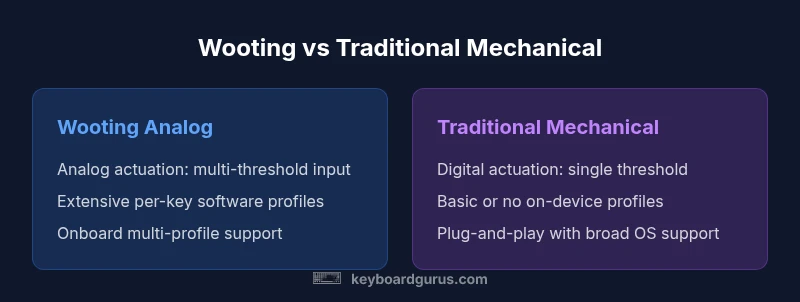
Comparison
| Feature | Wooting Analog Keyboard | Traditional Mechanical Keyboard |
|---|---|---|
| Analog actuation | yes; multi-threshold input | no; digital on/off |
| Software customization | extensive per-key profiles and curves | limited or no customization |
| Programmable profiles on device | multiple onboard profiles | basic/onboard memory varies by model |
| Compatibility and setup | requires software setup; OS dependent | plug-and-play with broad compatibility |
| Typical use-case fit | gaming precision, complex macros, productivity workflows | general typing and gaming without extensive tweaks |
Advantages
- Deep customization enables tailored input behavior
- Potential accuracy gains in tasks that benefit from precise actuation
- Powerful macro and profile support for advanced workflows
- Encourages experimentation and optimization for power users
Drawbacks
- Higher upfront cost compared to many traditional keyboards
- Learning curve and setup time to unlock benefits
- Software reliance can complicate OS compatibility and updates
- Not all titles or tasks will show a noticeable difference
Wooting keyboards are worth considering if you will actively leverage analog actuation and profiles; otherwise, a traditional mechanical keyboard often offers better value and simplicity.
Choose Wooting if you value granular control and can invest in setup. For casual use or budget-conscious buyers, a standard keyboard remains a solid choice.
Got Questions?
What exactly is analog input on keyboards, and how does it work?
Analog input on keyboards allows the keyboard to read a range of press depths rather than a simple on/off signal. This enables features like adjustable actuation points and dynamic output based on how hard you press a key. The practical impact depends on software configuration and how you map those depths to actions.
Analog input lets keys report more than just pressed or not pressed, so you can tailor responses to how hard you press and when. It’s powerful, but you’ll get the most value only if you customize and test it for your tasks.
Do Wooting keyboards improve typing speed or accuracy for everyone?
Not everyone experiences a dramatic speed increase. Some benefit from better distinction between inputs or more comfortable actuation, while others may not notice a difference in routine typing. The main gains typically show up when you combine analog input with personalized layouts and macros.
Some people type faster with a Wooting because they adapt their layout, but it isn’t universal. It helps most when you tailor it to your tasks.
Are there drawbacks to switching to a Wooting keyboard?
Yes. The main drawbacks are cost, setup time, and the need to maintain software configurations. If you rely on quick plug-and-play setups or have limited time to customize, the benefits may be limited. Additionally, some titles or platforms may require extra tweaks to maximize analog features.
There’s a trade-off: more customization and potential precision, but more setup and possible compatibility considerations.
Is the software stable across different operating systems?
Software stability varies by model and OS, but major platforms typically support basic features. Advanced profiles and on-the-fly adjustments may require occasional updates. If you rely on specific workflows, verify OS compatibility and update cadence before committing.
The software generally works, but advanced features may need ongoing updates and some patience during setup.
What should I consider before buying a Wooting keyboard?
Define your primary use cases (gaming, coding, content creation), budget, and willingness to invest time in setup. Check OS compatibility, the availability of onboard profiles, and how well the keyboard’s software aligns with your workflow. If possible, try a hands-on demo or borrow a unit to test.
Think about your goals, your budget, and how much you’ll customize. A test run can prevent buyer’s remorse.
How does Wooting compare to other programmable keyboards?
Wooting emphasizes analog actuation and detailed software control, which sets it apart from many programmable keyboards that rely on digital actuation with basic macro features. If you want deeper customization and true analog capability, Wooting is a strong option; otherwise, other programmable keyboards may offer simpler setups at lower cost.
Wooting focuses on analog input and rich customization, which is great if you want depth; otherwise, there are other options that are easier and cheaper.
What to Remember
- Assess your primary tasks to gauge potential benefits
- Expect a learning curve with analog actuation and software
- Balance feature depth against price and maintenance
- Test if OS and game support justify the upgrade
- Plan for a period of experimentation and refinement