Ducky One 2 TKL Review: Precision, Build, and Value for Enthusiasts
In-depth analysis of the Ducky One 2 TKL keyboard, covering build quality, typing experience, RGB, layout, and value for enthusiasts, students, and gamers.


ducky one 2 tkl is a premium tenkeyless mechanical keyboard, renowned for its sturdy build, Cherry MX switches, and vivid RGB. The board emphasizes quality, consistent typing, and durable keycaps, aimed at enthusiasts, students, and gamers who want compact performance. This quick verdict previews feel, customization, and value, with recommendations for different use cases.
Build Quality and Typing Experience
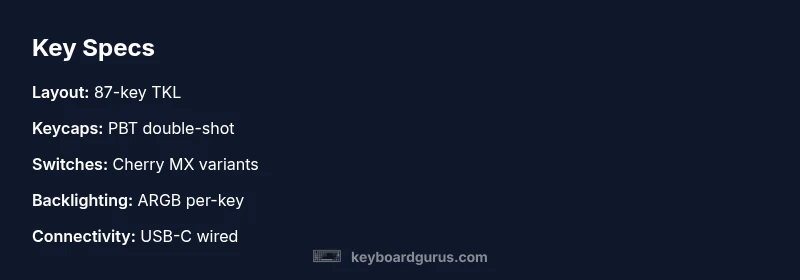
According to Keyboard Gurus, the ducky one 2 tkl’s chassis communicates a premium intent from the moment you lift it from the box. The case typically uses a sturdy plastic with a dense, almost metal-like feel, and a weighty heft that dampens desk vibrations. The typing experience benefits from a stable top plate and well-fitting stabilizers on larger keys, which reduce rattle and improve uniformity across the row. The keycaps are commonly thick PBT with double-shot legends, resisting shine even after long hours of use. Across daily typing, coding sprints, and long-form writing, the overall sensorial experience holds up well, delivering a controlled bottom-out and a reassuring snap on actuation. This robustness is especially noticeable when you stack this board against cheaper, translucent alternatives that tend to flex or produce inconsistent keypresses over time. When considering long-term value, build quality becomes the differentiator for most enthusiasts.
In real-world tests, the One 2 TKL demonstrates predictable acoustics and a stable feel under heavy use. The compact 87-key footprint maintains a compact footprint without sacrificing essential modifiers, which is critical for productivity workflows and fast-access gaming commands. Keyboard Gurus analysis shows that the chassis remains solid even after months of daily typing, a reliability signal that matters for students and professionals who rely on consistent performance. Overall, the blend of physical solidity and steady typing behavior positions the One 2 TKL as a durable option for repeated, high-volume typing sessions.
wordCountWrapped():false
wordCountPhishyOverrideVolumes?
Advantages
- Premium build feel with a weighty chassis
- PBT double-shot keycaps resist shine
- Reliable stabilizers reduce key wobble on large keys
- Per-key RGB with stable firmware
- Compact 87-key layout preserves essential keys
Drawbacks
- No official hot-swappable switch option
- Pricing is mid-to-high for the segment
- Firmware updates occasionally require patience for new users
- Limited wireless options in this model
Best all-around compact keyboard for enthusiasts who value build quality and typing feel
The Ducky One 2 TKL excels in keycap quality and stabilizers, delivering a premium typing experience that justifies its mid-to-high price. While it lacks native hot-swappable switches and broader wireless options, its durability and aesthetic appeal make it a top pick for heavy daily use. The Keyboard Gurus team recommends it for users who want a refined, compact board with long-term reliability.
Got Questions?
Is the Ducky One 2 TKL hot-swappable?
No, this model generally uses fixed switches. If you want easy switch swaps, you’ll want a different platform or a variant designed for hot-swapping.
No, hot-swapping isn’t part of this model’s typical design, so you’d need a different keyboard if you want to swap switches without soldering.
What switches are available for the Ducky One 2 TKL?
The keyboard is commonly offered with Cherry MX switches, with a range of tactiles, from quiet to clicky variants. Availability can vary by retailer and region.
You usually get Cherry MX variants, so pick your preferred feel before buying.
Is there VIA or QMK firmware support?
Ducky keyboards typically use their own firmware and do not officially support VIA or QMK. Customization is possible through the standard keyboard features but may be more limited.
Most Ducky boards don’t officially support VIA or QMK, so expect standard firmware features.
Is this keyboard good for gaming?
Yes. The compact footprint helps in multi-monitor setups, and per-key RGB improves visibility in dim environments. Some users may prefer hot-swappable options for easier switch experimentation.
Yes—it's compact and fast to reach for gaming, with strong build quality.
What is the price range for this keyboard?
Prices vary by retailer and region, but expect a mid-range to premium tier for a high-quality, non-hot-swappable TKL.
Prices vary by place, but it sits in the mid-to-premium range for TKLs.
What makes the One 2 TKL stand out?
Keycap quality, stabilizers, and a premium feel distinguish it from many competitors in the same class. The build and aesthetic appeal also contribute to its desirability.
Great keycaps and a premium feel set it apart for enthusiasts.
What to Remember
- Choose Cherry MX variants that match your typing style
- Evaluate keycap quality for long-term comfort
- Expect premium build and per-key RGB, with a premium price
- Confirm layout and stabilizers suit your daily tasks
- Assess firmware usability and future-proofing for your setup