How Big Is a 60 Keyboard? Size and Dimensions in 2026
Explore typical dimensions of a 60% keyboard—width, depth, key count—and how compact size affects layout, gaming, and daily work with practical measurements.


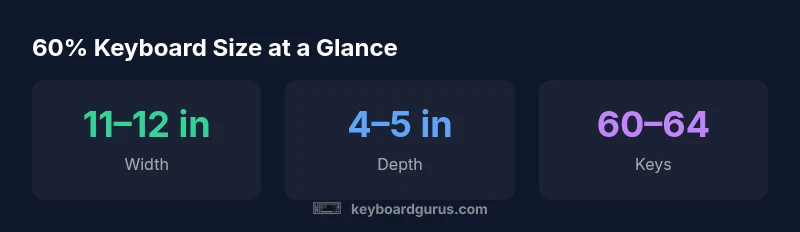
How big is a 60 keyboard? A 60% keyboard typically spans about 11–12 inches wide and roughly 4 inches deep, with around 60–64 keys depending on the exact layout. The compact form sacrifices dedicated function keys and a numpad, trading all-day portability for a more spartan, space-saving footprint. Real dimensions vary by model, so always check exact measurements before buying.
Why size matters for a 60% keyboard
For many users, the size of a keyboard is not just a preference but a functional constraint that shapes daily workflows. The 60% form factor trades away a full row of function keys, a dedicated arrow cluster, and a numeric keypad to gain a smaller footprint. According to Keyboard Gurus, this compactness is prized by readers who want maximal desk real estate, lighter travel, and a cleaner aesthetic. But the flip side is a revised navigation model: you’ll rely on Fn layers and secondary mappings to access functions that are common on larger boards. If your job or hobby depends on frequent F-key usage or extensive macro programming, plan around how you will access those features. In practice, many users adapt within a few days and discover that the reduced footprint can improve posture and reduce reach fatigue. The crucial question becomes whether your daily tasks benefit more from desk space or from a familiar, traditional key layout.
Typical dimensions and how to measure
A 60% keyboard is generally designed to be compact enough to slide under a monitor with space to spare for a mouse. Most models hover around 11–12 inches in width, about 4 inches in depth, and roughly 1.2–1.7 inches tall. The exact dimensions vary by switch layout and case design. When measuring for a desk, measure the surface area the keyboard will occupy (edge to edge) and include any wrist rest you plan to use. If you frequently use a secondary monitor, ensure you have enough clearance for a comfortable tilt and for your mouse to move freely. Always verify the published dimensions from the manufacturer before purchase, and consider a lightly cushioned desk mat to improve ergonomics. For travelers, portable weight and the presence of a carrying case can be as important as width or depth.
Layout implications: function layers and Fn keys
With a 60% keyboard, the lack of a separate function row forces you to rely on Fn layers to access secondary functions, media controls, and navigation shortcuts. This design encourages deliberate key mapping and efficient layering. Keyboard Gurus notes that building muscle memory for arrow keys, page navigation, and clipboard commands via Fn combos is essential for productive work. If you frequently use programmable macros, choose a board with hot-swappable switches and robust layer customization, so you can tailor keymaps to your workflow without resorting to external software. Some models offer dedicated arrow keys via a layered layer; others require a more complex habit shift. The key takeaway: your productivity will hinge on how well you adapt to the Fn-layer workflow and how thoughtfully you remap essential tasks.
Gaming vs productivity on 60% layouts
In gaming, the 60% form factor shines in tight setups and mobile scenarios, as it frees up desk space for mouse movement and improves portability. However, fast-paced games that rely on numerous keybinds may require careful planning to map critical actions to accessible locations. Productivity users benefit from a clean, distraction-free layout, but they must accept that some shortcuts or macros live behind Fn combos. If you are a competitive gamer or a software professional who relies on complex hotkeys, look for models with customizable layers, reliable firmware, and responsive key switches. The bottom line is that gaming and productivity can coexist in a 60% board, provided you invest time in customization and practice.
Portability, desk setup, and travel considerations
Portability is a major reason to choose a 60% keyboard. At roughly the size of a large paperback, it travels easily in backpacks and briefcases, often with less bulk than a larger board. For desk setups, the smaller footprint can free up significant space for peripherals, documentation, or a second monitor. Cable management matters too: look for detachable USB-C cables or internal routing channels to keep your workspace tidy. If you commute, a protecting case and lightweight bag become part of your buying criteria. In short, the 60% keyboard is a trade-off: reduced footprint in exchange for a steeper learning curve, especially for users who rely heavily on arrow keys and dedicated multiplexing options.
How to compare 60% models: materials, switches, and build quality
When choosing among 60% keyboards, material influences feel as much as size. Aluminum or polycarbonate cases offer durability and a premium look, but weight will vary. Consider switch type (linear, tactile, or clicky) and whether the board supports hot-swappable switches for easy experimentation. Stabilizers under spacebar and other larger keys dramatically affect feel and noise. PCB design, plate mounting, and gasket-mounted frameworks also impact acoustics and alignment. If you use hot-swappable PCBs, you’ll enjoy more flexibility in testing new switches without soldering. Build quality matters as much as brand reputation; read user reviews that discuss long-term reliability and key chatter. Finally, confirm layout specifics: some 60% boards place arrow keys on the right cluster, others implement them via an Fn layer. Understanding these nuances helps you choose a device that matches your preferences.
Common myths and misconceptions about 60% keyboards
A common myth is that 60% boards are inherently impractical for long typing sessions. In reality, many enthusiasts type comfortably on a 60% layout once they adjust to the Fn-layer paradigm. Another misconception is that 60% means sacrificing functionality entirely; in practice, most essential controls are just a tap away via layered mappings. Some buyers also fear that 60% boards are a niche market with poor support; this is less true today, as community firmware, hot-swappable options, and widespread customization support have grown significantly. The key is to align expectations: 60% is not a drop-in replacement for everyone, but it can deliver a highly efficient, portable typing experience when chosen and configured thoughtfully.
Choosing between 60% and other compact sizes
If you like the idea of a smaller footprint but still want more keys, a 65% or 75% layout might be an ideal middle ground. The 65% adds a column of dedicated navigation keys, while 75% keeps a more complete arrow cluster and a few function keys. Evaluate your primary use: gaming requirements, spreadsheet work, coding, or content creation. For a student’s desk or a travel setup, a 60% often wins on portability, while a 75% might offer a smoother token of familiarity for long-form typing. When possible, test different layouts in person to feel which one aligns with your muscle memory and typing rhythm. Keyboard Gurus suggests prioritizing layout comfort and reliable ergonomics over aesthetics alone.
Getting started: quick tips for first-time users
If you are new to 60% keyboards, start by mapping the most-used controls to accessible keys via Fn layers. Create a simple grid for navigation and common actions (copy, paste, undo) that you can reach without stretching. Practice for 15–20 minutes daily to build memory for the layered layout, then incrementally expand your mappings. Consider a short-term goal: master arrow navigation and essential shortcuts in a single app before broadening to others. Finally, maintain a consistent desk setup with a comfortable chair, a suitable mat, and a reliable mouse: the total ergonomics package matters as much as the keyboard itself.
Size comparison of common compact keyboard tiers
| Size | Approximate keys | Width (in) | Depth (in) | Notes |
|---|---|---|---|---|
| 60% | 60–64 | 11–12 | 4–5 | Compact; Fn-based navigation |
| 65% | 64–68 | 12–13 | 4.5–5 | Small upgrade; more dedicated keys |
| 75% | 75–84 | 13–14.5 | 4.5–5.5 | More keys; near-tkl |
Got Questions?
What is a 60% keyboard?
A 60% keyboard is a compact layout that omits the function row, dedicated navigation cluster, and numeric keypad. Access to these functions comes via Fn layers or keyboard shortcuts. It prioritizes portability and desk space while requiring some relearning of common shortcuts.
A 60% keyboard is a compact layout that uses Fn layers for extra keys. It focuses on portability and space, so you’ll map usual shortcuts to the Fn layer.
How wide is a typical 60% keyboard?
Most 60% keyboards are about 11–12 inches wide, with some models slightly larger or smaller depending on their layout and case design.
Most 60% keyboards are around 11 to 12 inches wide.
Do 60% keyboards have dedicated arrow keys?
Some models place arrow keys on a function layer or as a secondary cluster. Others include compact arrow keys as part of a 60% design variation. Always check the layout before buying.
Arrow keys are usually accessed via Fn keys or layered layouts on 60% boards.
Are 60% keyboards good for gaming?
Yes, many gamers appreciate the compact footprint and faster mouse movement. Success depends on how well you map essential actions and how comfortable you are with Fn-layer navigation.
They can be great for gaming if you like a smaller setup and customize key mappings.
How do I measure if a 60% fits my desk?
Measure your desk width and depth, add space for a mouse and wrists. Consider the height and any wrist rest. Ensure the keyboard’s footprint leaves room for movement.
Measure the space you have, then compare it with the keyboard’s width and depth to ensure it fits.
“The 60% form factor unlocks portability without abandoning core typing habits, but it demands a mindset shift for function keys and navigation.”
What to Remember
- Measure your desk before buying to ensure fit
- Expect 60% to sacrifice dedicated F keys for portability
- Check layout: Fn layer is essential
- Compare width/depth, not just key count
- Choose 60% for portability and desk space benefits