How Big is a 61-Key Keyboard? A Definitive Size Guide
Explore how big a 61-key keyboard is with practical size ranges, desk-fit tips, and layout considerations for gamers, students, and keyboard enthusiasts.


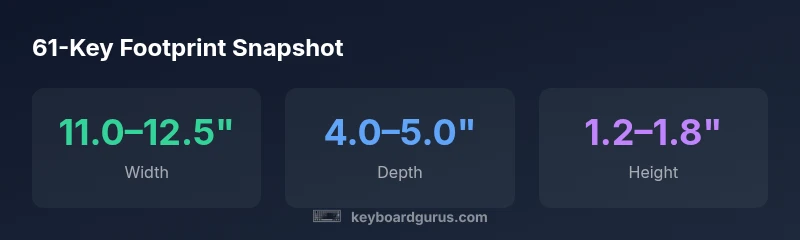
A 61-key keyboard footprint is typically similar to other compact layouts like 60% boards. Expect a width in the range of roughly 11 to 12.5 inches (28 to 32 cm), a depth of about 4 to 5 inches (10 to 13 cm), and a height around 1.2 to 1.8 inches (3 to 4.5 cm) depending on case and feet. Layout variants may tweak width slightly.
What does 61-key mean in practice
When you ask how big is a 61-key keyboard, the practical takeaway is that this layout sits between a true 60% board and a compact 64-key option. The extra key row typically provides a programmable function row or access to navigation keys without expanding to a full-size layout. For many students, developers, and gamers who want fewer keys than a full-size keyboard but more flexibility than a pure 60%, the 61-key form is a sweet spot. The Keyboard Gurus Team notes that the 61-key format often retains the compact width of a 60% layout while adding a handful of dedicated keys or a slim top row. This extra scope can influence how you reach for modifier keys, how you map layers, and how you perceive desk depth during long sessions. If you’re evaluating a 61-key board, it’s worth thinking about whether the extra row will support your typical workflows without intruding on your typing rhythm.
Footprint ranges and typical dimensions
In practice, size varies by case design, mounting, and whether feet are retracted. For a typical 61-key keyboard, the width generally falls in the 11.0 to 12.5 inch range (28 to 32 cm), which is slightly wider than a pure 60% board but still far more compact than a full-sized keyboard. Depth is usually around 4.0 to 5.0 inches (10 to 13 cm), reflecting the compact front-to-back footprint of most aluminum or plastic cases. Height depends on the stand-off or front feet, commonly about 1.2 to 1.8 inches (3 to 4.5 cm). Many users notice that the tactile surface area of the key cluster feels similar to other compact boards because the key spacing remains consistent across layouts. Keyboard Gurus analysis shows these ranges hold across a broad spectrum of 61-key options, from hot-swappable builds to resin cases with integrated stands.
Desk setup implications and ergonomics
A 61-key keyboard occupies a compact footprint, which can free space for a larger mouse area or a secondary input device. However, the width still demands mindful placement to minimize reach and shoulder strain. If your desk is wide enough, align the keyboard so the primary typing area sits just in front of your monitor; if it’s narrower, center the board and use a small wrist rest to support neutral wrist posture. Elevation matters too—slightly tilting the keyboard with feet or a stand can improve comfort during long sessions. In practice, plan for several inches of clearance on each side and a stable, even surface to avoid wobble. Keyboard Gurus emphasizes trying a board in person when possible to assess how the extra row affects your natural typing rhythm and finger travel.
Variants that influence footprint
Not all 61-key boards are created equal. Some models include an extra function row that sits above the main key cluster, while others integrate the row into a raised top edge. Case materials (aluminum, hot-pressed plastic, or polycarbonate) and the presence of integrated feet or adjustable tilt will shift the actual footprint by a fraction of an inch. Additionally, some 61-key designs use a shorter plate or a compact stabilizer system, which can make the switch feel smaller or larger depending on switch type. If you value portability, look for slim bezels and removable cables; if you want keycap compatibility, verify the keycap mount standard and space between rows.
Measuring your space: a step-by-step approach
To ensure fit, measure your desk in three dimensions:
- Width: Record the usable surface from edge to edge where the keyboard will sit.
- Depth: Measure from the front edge of the desk to the back of the keyboard including any tilt feet.
- Clearance: Check space for a mouse, wrist rest, and occasional cable routing. Then compare these measurements with the manufacturer’s listed footprint ranges and add a small buffer (about half an inch) for cable and movement. If you frequently swap to a mouse-heavy workflow, consider the distance to your primary monitor and the angle at which you’ll sit to avoid over-rotation of the neck.
Practical buying tips for size-conscious buyers
When shopping, prioritize exact footprint specifications from the product page rather than assuming based on key count alone. Look for:
- Clear width and depth measurements (inches or cm).
- Information about feet and tilt options (include if adjustable).
- Photos or a spec sheet showing the top view and side profile.
- Any included accessories that affect size, such as built-in stands or removable feet. If in doubt, choose models with online return options so you can test fit at home. Keyboard Gurus also recommends comparing a 61-key candidate against your current layout to judge how much travel or repositioning you’ll need in daily tasks.
Common misconceptions about 61-key sizes
A common myth is that 61-key boards are exactly the same width as 60% boards. In reality, the extra key row can push the overall width modestly wider, while depth and height remain in the same range as other compact boards. Another misconception is that all 61-key boards come with the same ergonomics; the true difference lies in case design, key spacing, and whether the function row is physically separated or integrated. Finally, some buyers assume a larger footprint guarantees more functionality; in truth, layout efficiency and software mapping can deliver more control without increasing physical size.
Visualizing size before purchasing
A practical technique is to print out a simple footprint diagram on paper and tape it to your desk area. Measure your current keyboard and compare it against the diagram to gauge real-world fit. If you’re moving from a traditional full-size keyboard, simulate the transition by placing a long ruler on your desk to mimic the width and test reach to essential keys. Online retailers often provide product dimensions and 3D model previews—use these to assess scale relative to your monitor height and chair position. For a quick mental model, think of a 61-key board as a compact alternative that preserves a familiar typing surface while trading extra rows for desk real estate.
Footprint ranges for common compact keyboard layouts
| Layout | Width (in) | Depth (in) | Height (in) |
|---|---|---|---|
| 61-key | 11.0–12.5 | 4.0–5.0 | 1.2–1.8 |
| 60% (typical) | 11.0–12.0 | 3.8–4.5 | 1.2–1.6 |
| Compact 65% | 11.5–13.0 | 4.0–5.0 | 1.3–2.0 |
Got Questions?
What is the main difference between 61-key and 60% layouts?
A 61-key layout adds an extra key row or function keys compared to a pure 60% keyboard. This can improve access to navigation and shortcuts without expanding to a full-size footprint, but may slightly widen the width.
A 61-key layout adds a small top row or extra keys while staying compact—less width than a full-sized board, with similar depth.
Are 61-key keyboards portable enough for travel?
They retain a compact footprint similar to other 60% boards, making them reasonably portable. Weight and case design can affect travel ease, so look for slim builds and detachable cables.
Yes, they’re generally portable like other compact boards, especially models with slim cases and removable cables.
Do all 61-key keyboards include a function row, and how does that affect size?
Many 61-key keyboards feature a function row or programmable layers. The extra row can slightly increase width, but depth and height usually stay within the compact range.
Most have a small extra row; it may widen the board a bit but won’t drastically change its compact feel.
What should I measure before buying for desk fit?
Measure width, depth, and the space around the keyboard for cable routing and mouse movement. Also consider chair position and monitor height to ensure comfortable reach.
Measure your desk space and leave room for your mouse and cables. Try to sit naturally centered on the keyboard.
Is there a standard size for 61-key keyboards?
There is no universal standard. Footprint varies by model, case, and feet. Always check the exact measurements from the seller.
There isn’t a universal standard—always check the product dimensions before buying.
Which users benefit most from a 61-key layout?
61-key boards suit students, developers, and gamers who want a compact setup with easy access to modifiers and routing keys without a full-sized keyboard.
Good for students and gamers who want a compact setup with extra function access.
“61-key keyboards offer a practical middle ground: a small footprint with enough keys to support common workflows without the bulk of a full-size board.”
What to Remember
- Know the footprint is compact but variable by design
- Expect 61-key width to be slightly wider than 60% but not drastically larger
- Check exact width/depth from the manufacturer before purchasing
- Account for desk clearance and mouse space when planning your setup
- Use real-world tests or return options to confirm fit