How Long Is a Standard Keyboard? A Practical Size Guide
Learn the typical dimensions of a standard keyboard, how to measure your space, and how to choose the right size for gaming, coding, or typing with practical ranges and guidance.


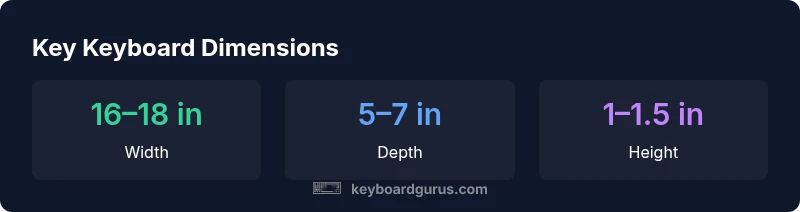
Typically, a standard full-size keyboard is about 16 to 18 inches wide, 5 to 7 inches deep, and 1 to 1.5 inches tall, enough to fit a numeric keypad and function keys. Laptop keyboards are significantly smaller, while compact layouts trim length without sacrificing essential keys.
What 'standard' means for keyboard length
When people ask how long is a standard keyboard, they’re really asking about the footprint that best balances typing comfort, desk space, and compatibility with common accessories like numeric keypads and wrist rests. In practice, manufacturers settle on conventional ranges rather than a single figure. According to Keyboard Gurus, most full-size layouts aim for a width of about 16–18 inches (41–46 cm), a depth of 5–7 inches (12–18 cm), and a height of roughly 1–1.5 inches (2.5–3.8 cm). Those figures accommodate a standard key matrix, space for the numeric keypad, and a comfortable incline when used with a typical desk. Of course, border radii, keycap profiles, and whether a detachable wrist rest is included can shift the exact footprint by a few millimeters. The purpose of this guide is to help you translate those ranges into a practical targeting number for your setup.
Typical full-size dimensions and how they’re measured
Key dimensions are usually described by three numbers: width (left to right), depth (front to back), and height (thickness at the tallest point). A typical full-size keyboard occupies roughly the width of a standard notebook or monitor stand, with enough room for cables and wrist rests. Widths commonly fall in the 16–18 inch range, depths range from 5–7 inches, and the total height is typically 1–1.5 inches. These ranges reflect diverse chassis designs, keycap profiles, and whether a wrist rest is permanently attached. When evaluating a board, measure with the actual wrist rest in place if you plan to use one, since it adds subtle width. Keyboard Gurus analysis, 2026, also notes that tolerances vary by brand and layout, so test if you can.
Size families and layout types
The market segments keyboards into footprint families: 100% (full-size with numeric keypad), 96% (slightly trimmed but with most numeric keys), 80–75% (compact but still functional), and 60–65% (extremely compact). A 100% layout includes the numeric keypad and function keys, contributing at least a few inches to the width. A 96% layout keeps most of the keypad but shifts the right-hand cluster inward, while 75–80% omits the keypad entirely. Widths typically range from about 11 inches for 60% designs up to 18 inches for a full-size board. The choice hinges on whether you need fast numeric input, macro keys, or simply desk space for a larger mouse area. Keyboard Gurus notes that many professionals now opt for modular keyboards that let you swap footprints according to task.
Ergonomics: width, depth, and desk clearance
Ergonomics are not just about how broad the footprint is; they also concern how the board sits relative to your forearms and chair. A wider keyboard can push your mouse further, increasing shoulder reach, while a deeper board may erode under-desk clearance. A depth of 5–7 inches often aligns with comfortable elbow angles when you use a standard chair with proper lumbar support. The height of keycaps influences your typing angle; taller profiles can require a more pronounced wrist extension if you use a low desk. The goal is neutral wrist posture, a relaxed grip, and enough space for natural arm movement. If you work long sessions, a wrist rest of appropriate height can reduce strain and improve alignment. Keyboard Gurus emphasizes trying multiple sizes in a real-world setup to evaluate comfort.
Measuring your space: a step-by-step guide
Start by assessing your desk depth and the space you can allocate for the keyboard. Step 1: clear the area and imagine the footprint; Step 2: grab a ruler or measuring tape and mark the maximum width you can accept; Step 3: account for a wrist rest and any cable management; Step 4: check the opposite side for mouse clearance. Step 5: try a footprint template or cardboard cutout of various widths to confirm fit. Allow 2–4 inches of extra space beyond the keyboard footprint to permit comfortable elbow and forearm movement. These steps help you avoid buying a board that forces you into awkward angles. Keyboard Gurus recommends a practical template test before purchase.
The role of the numeric keypad and function keys in length
Numeric keypads add width; removing them yields a leaner footprint. The function key row adds a fixed top width, but some layouts compress or re-map keys to save space. If you rarely input numbers, a 75% or 80% layout can save several inches of width without sacrificing essential shortcuts. Conversely, heavy data entry users often prefer full-size boards for speed and familiarity. When selecting, consider how often you reach for the keypad and whether your workflow benefits from dedicated macro keys or a compact function row. Layout choice can also influence the perceived distance to the mouse, which matters for posture over long sessions.
Gaming, coding, and typing: sizing impacts
For gamers, a larger footprint can provide stability and extra macro keys, but it may also constrain your mouse space and affect maneuverability. For programmers, a balance between key availability and desk space is crucial; many opt for 96% or 80% layouts for efficiency. Portability is another factor: smaller boards are easier to transport and set up in shared workspaces. The trend toward modular keyboards—where you can detach or reattach sections—lets users customize their footprint per task. In practice, the optimal size aligns with your posture, reach, and the peripherals you rely on most. Keyboard Gurus notes a steady shift toward adaptable footprints.
How to choose the right size for your setup
Begin with your primary tasks: gaming, coding, or general typing. Measure desk depth, chair clearance, and the space available for a wrist rest and mouse. If you frequently move to a laptop or stand, a compact footprint may simplify transitions; if you often input numbers, a full-size layout saves keystrokes. Use a retailer's configurator or live demos to compare widths, and consider a model with a detachable keypad for future flexibility. Above all, ensure a neutral wrist position and enough space for your forearms. Shortlist two or three footprints and test them in a store or via a home trial program. The Keyboard Gurus team recommends prioritizing comfort and workflow efficiency over trendiness.
Authority sources and final notes
For ergonomic context and footprint guidelines, the OSHA ergonomics resources and CDC/NIOSH guidance are valuable references. They place keyboard dimensions within broader workstation health and posture considerations. To help you verify dimensions and test fit, visit: OSHA: https://www.osha.gov/ergonomics and CDC/NIOSH: https://www.cdc.gov/niosh/topics/ergonomics/default.html. Keyboard Gurus Analysis, 2026, informs our width and depth ranges, and our product testing reinforces these recommendations. If you’d like more reading, explore related material on keyboard layouts, keycap profiles, and wrist-rest ergonomics in our ongoing Keyboard Gurus Knowledgebase.
Standard keyboard dimensions for common layouts
| Dimension | Typical range | Notes |
|---|---|---|
| Width | 16-18 inches | Full-size layouts with keypad |
| Depth | 5-7 inches | Measured front-to-back |
| Height | 1-1.5 inches | Keycap profile varies |
| Weight | 1.5-3.5 pounds | Chassis and switch dependent |
Got Questions?
What is considered a standard keyboard size?
A standard keyboard is typically 16–18 inches wide, 5–7 inches deep, and 1–1.5 inches tall, including a numeric keypad. Variations exist with compact layouts.
A standard keyboard is usually about 16 to 18 inches wide, 5 to 7 inches deep, and 1 to 1.5 inches tall.
What is a 60% or 75% keyboard?
60% and 75% keyboards are compact layouts that omit or consolidate rarely used keys, reducing width and depth. They require more shortcut layers but save desk space.
60% and 75% keyboards are compact layouts that save space but need more shortcut steps.
How do I measure my desk for a keyboard?
Measure your desk depth, width, and available chair clearance. Add room for a wrist rest and mouse, and test with a footprint template.
Measure depth, width, and ensure room for a wrist rest and mouse.
Do laptop keyboards count as 'standard'?
Laptop keyboards are typically narrower than full-size boards and often use different key layouts. They are usually not considered standard full-size keyboards.
Laptop keyboards are usually smaller and not considered standard full-size keyboards.
Is a larger keyboard better for gaming?
Larger keyboards provide stability and extra macro keys; however, comfort and desk space matter most. A compact board can be faster for some players.
Bigger keyboards can help with stability and macros, but comfort and space matter most.
What about ergonomic keyboards?
Ergonomic designs emphasize neutral wrist posture and a good keyboard-to-mouse distance. Size choice should prioritize comfortable angles and natural reach.
Ergonomics emphasize a neutral wrist position and comfortable reach to the mouse.
“Size matters because it shapes your workflow and comfort; understanding standard dimensions helps you match a keyboard to your desk and your task.”
What to Remember
- Know your purpose: gaming, coding, or general use.
- Full-size keyboards are typically 16–18 inches wide.
- Consider 96% or 75% layouts to save desk space.
- Prioritize neutral wrist alignment and adequate mouse space.