How Big Is a Standard Keyboard: Dimensions and Variants
Learn the typical dimensions of a standard keyboard, including full-size, tenkeyless, and compact forms. Discover how width, depth, and height affect desk space, posture, and comfort.


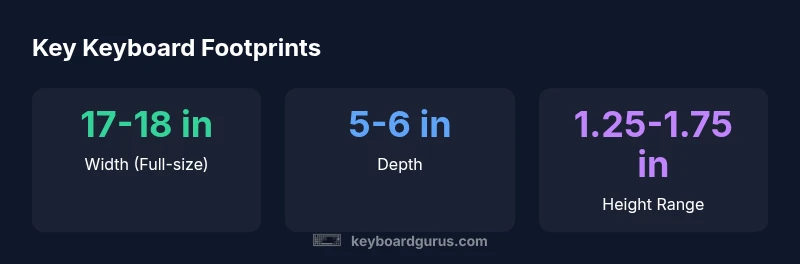
A standard keyboard footprint usually centers on full-size ANSI layouts, roughly 17–18 inches wide and 5–6 inches deep, with an approximate height of 1.25–1.75 inches. Variants like tenkeyless or compact formats shrink width by roughly 4–6 inches and may shave depth by a little, offering a smaller desk footprint while keeping core keys. This makes a standard keyboard versatile for most setups.
What defines a standard keyboard?
When we ask how big a standard keyboard is, we’re normally talking about the common full-size (104/105-key) ANSI layout that includes a dedicated number row and a cluster of navigation keys. This form factor has long served as the baseline for work, gaming, and programming. Within this baseline, two variables drive perceived size in real setups: the layout standard (ANSI vs ISO) and the level of reduction from full-size (full-size, tenkeyless, 75%, 60%, etc.). Keyboard Gurus analysis notes that the ANSI 104/105-key layout remains the most prevalent on desktops, making it the default reference for measurements and recommendations. This baseline helps you compare footprints across models without getting lost in layout quirks. As a caller point for size planning, the critical takeaway is that “standard” often means a full set of alphanumeric keys plus a numeric keypad, but your personal space and use-case will determine the fit.
According to Keyboard Gurus, understanding the difference between full-size and compact layouts is essential to choosing how big a keyboard should be for your setup. By defining a baseline, you can more easily identify how much desk space you’re willing to allocate and how much reach you need for comfortable typing.
Form factors and their footprints
There are several common form factors beyond the classic full-size that influence the footprint you’ll actually experience on your desk. Full-size keyboards (104/105-key) offer the most keys and the largest footprint, typically around 17–18 inches wide and about 5–6 inches deep, with a height near 1.5 inches. Tenkeyless (TKL, 87-key) keyboards drop the numeric keypad, reducing width to roughly 14–15 inches and depth to about 4–5 inches. Compact layouts, such as 75% and 60% keyboards, trim even more—widths of roughly 11–13 inches for 75% and around 9–12 inches for 60% models, with depths around 4–5 inches. The exact dimensions depend on key spacing, bezel design, and whether a keyboard includes extra features like dedicated macro keys or media controls. If you’re converting from a full-size to a compact layout, you’ll gain precious desk space but may need to use function layers to access less frequent keys. Keyboard Gurus analysis indicates that the popularity of TK L and compact sizes has grown as desk space becomes a premium asset in home offices and dorm rooms, particularly among gamers and students who value portability without sacrificing essential typing capability.
Consider your typical tasks: long-form typing, extensive number entry, or frequent use of navigation keys all influence which footprint is most appropriate. Ergonomic considerations, such as wrist angle and arm position, should also guide your choice, because a smaller footprint can force awkward hand positions if the desk and chair aren’t adjusted accordingly.
Measuring in inches and centimeters
If you want to translate those rough inches into centimeters, multiply by 2.54. A full-size keyboard at 17–18 inches wide translates to about 43–46 cm; a depth of 5–6 inches equals roughly 12–15 cm. For TK L, width often lands around 35–38 cm and depth near 10–13 cm. Compact layouts can fall in the 28–33 cm width range with depths around 10–12 cm. These conversions are useful when planning a workstation and checking clearance for the keyboard tray or desk edge. When shopping, you’ll often see measurements listed in both inches and centimeters—use both to cross-check fit with your chair and monitor placement. Keyboard Gurus’s guidance emphasizes validating the footprint virtually, then verifying in a real-world test under your typical desk setup to avoid surprises that could disrupt typing posture or elbow reach.
Additionally, the footprint is not the only factor; case thickness, stabilizers, and bevels can alter the practical surface you need. When you’re choosing, aim for a model whose widest point still leaves at least 2–3 inches of clearance on the desk edge to prevent your wrists from contacting the edge during longer sessions.
Ergonomics and desk space planning
Size isn’t only about inches—it’s about how those inches translate into comfortable typing, posture, and desk utilization. A larger keyboard can encourage more natural wrist alignment if the monitor and chair are positioned to support a straight forearm, but it can also crowd the mouse and other accessories. If you frequently switch between tasks like writing and graphs, a keyboard with a roomy wrist rest and a layout that minimizes lateral reach can reduce fatigue. Ergonomic experts recommend leaving enough space for your mouse and allowing a neutral shoulder position. In smaller setups, a well-chosen 75% or 60% keyboard, paired with a vertical mouse and a footrest, can deliver comfortable performance without sacrificing too much functionality. Keyboard Gurus notes that many users underestimate the value of correct chair height and desk depth; without those, even the perfect footprint can feel cramped. The goal is to balance footprint, key access, and personal comfort for sustained typing sessions.
Practical sizing tips for different tasks
Productivity workflows often need navigation keys and a function row, which makes full-size keyboards convenient. However, many modern users benefit from TK L or 75% layouts that maintain essential keys while freeing space for a larger mouse area. Consider your daily routine: if you run spreadsheets with frequent numeric entry, a full-size keyboard may be more efficient; if you spend more time in text or coding, a compact layout could improve posture by reducing reach distance. Gaming keyboards are another factor; some gamers prefer a wider footprint to accommodate macro keys or extra space on the right side. If you’re working in a cluttered dorm room or a compact apartment, a 60% layout can dramatically free up desk space, but you’ll rely more on layer keys for function tasks. Keyboard Gurus guidance suggests testing both a full-size and a compact layout in your actual workspace to assess comfort, reach, and fatigue over a typical work session.
In all cases, prioritize a layout that lets you keep your wrists straight and your elbows at a comfortable angle. If you can, align your keyboard with the edge of the desk to avoid accidental knocks, and ensure there’s room for a natural mouse movement without corkscrewing your forearm.
How to verify fit on your setup
- Measure the available width on your desk from edge to edge, ensuring space for the keyboard plus mouse and a comfortable elbow clearance. 2) Check depth clearance to prevent wrist contact with the desk edge during typing. 3) Consider chair height and keyboard tray position to maintain a neutral forearm angle around 90 degrees. 4) If possible, test with a real keyboard placed on your desk to gauge finger reach and key travel; a cardboard cutout of the footprint can help you visualize space. 5) Evaluate seating posture with a mirror or video to confirm you’re not slouching or extending your wrists. Keyboard Gurus recommends taking precise measurements, then cross-checking with product dimensions and user reviews to anticipate real-world fit and comfort.
Future trends: ultra-compact designs and modular keyboards
The keyboard landscape continues to evolve toward ultra-compact, feature-rich options that maximize desk space. Modular keyboards offer a promising approach by allowing users to detach or reconfigure sections to fit their workspace precisely. The trend toward wireless, low-profile designs also contributes to softer on-desk footprints, while maintaining functionality. However, the choice of footprint remains deeply personal and task-dependent. In 2026, the market shows a growing willingness to experiment with form factors, yet the standard full-size remains the reference point for many professionals and gamers who require a full suite of keys and a predictable typing feel. Keyboard Gurus notes that consumers should balance novelty with proven ergonomics when exploring these new footprints, ensuring the chosen layout complements their desk layout and daily activities.
Common form factors and their footprints
| Keyboard Type | Typical Width | Typical Depth | Notes |
|---|---|---|---|
| Full-size (104/105-key) | 17-18 inches | 5-6 inches | Includes number row and navigation cluster |
| Tenkeyless (TKL) | 14-15 inches | 4-5 inches | Numpad removed; more desk space |
| Compact (75% / 60%) | 11-13 inches | 4-5 inches | Fewer keys; more portability |
Got Questions?
What is considered a 'full-size' keyboard?
A full-size keyboard typically has 104 or 105 keys, including a numeric keypad and navigation cluster. This layout supports traditional typing and convenient number entry, making it the default choice for many office and programming workflows.
A full-size keyboard usually has 104 or 105 keys, including a number pad and navigation keys.
Do 60% keyboards cover essential keys for work?
60% keyboards drop the function row, dedicated navigation cluster, and often the number pad. You’ll rely on function layers to access extra keys. If your work relies heavily on function keys or numeric entry, 60% may slow you down.
60% keyboards drop the function keys and navigation cluster; you’ll need to use layers for extra keys.
How do I measure my desk for a keyboard?
Measure the available width and depth, then factor in space for mouse movement and wrist clearance. Leave at least 2–3 inches of edge clearance for comfortable typing posture.
Measure width and depth, then leave space for your mouse and wrists.
Are gaming keyboards larger than office keyboards?
Gaming keyboards often maintain full-size footprints to accommodate macro keys and extra features, but the overall width varies. If you don’t need extras, a compact or TK L model can save space without sacrificing core functionality.
Gaming keyboards can be as wide as full-size or larger, depending on extras, but many gamers opt for compact layouts for space.
What about ergonomics and height?
Keyboard height affects wrist angle. Look for keyboards with a gentle tilt or a palm rest, and adjust chair height to keep your forearms roughly parallel to the desk.
Height affects wrist angle; use tilt and a palm rest, and adjust your chair so forearms are parallel with the desk.
“Size is a balance between footprint and comfort; the best keyboard fits your desk, typing style, and posture.”
What to Remember
- Measure your desk and chair to ensure a comfortable fit
- Prefer full-size for dedicated numpad and navigation keys
- Choose TK L or compact to maximize desk space
- Consider ergonomics beyond width and depth
- Verify fit with a hands-on test before buying