How Big Is a Keyboard Key? A Practical Guide
Discover the standard key unit (1U), typical widths for spacebars and modifiers, and how to measure and replace keycaps with layout compatibility in mind. A data-driven look at keyboard key sizes for enthusiasts.


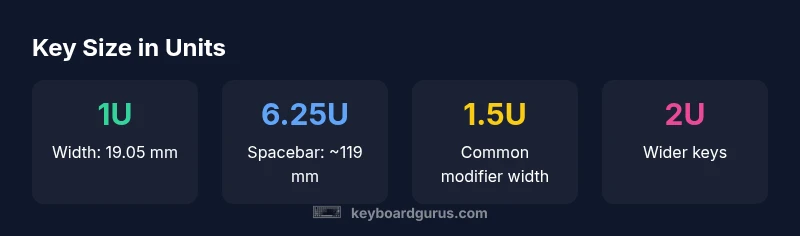
How big is a keyboard key? In keyboard design, most standard keys are 1 unit wide, known as 1U, which equals 19.05 millimeters. The spacebar is typically wider, commonly 6.25U (about 119 mm). Other common sizes include 1.25U, 1.5U, and 2U for modifiers; overall key sizes vary by layout. This article explains how key sizes are measured and how to choose compatible sets.
What does '1U' mean?
To answer the question of how big is a keyboard key, you first need to understand the unit system used in keyboards. Each keycap width is measured in units, with 1U being the baseline. A single unit, 1U, corresponds to 19.05 millimeters. This standard is rooted in early PC keyboard design and remains the de facto sizing reference for most mechanical keyboards today. In practice, the majority of alphanumeric keys on a standard 104-key ANSI layout occupy exactly 1U of width. The unit approach simplifies cross-brand compatibility, so a 1U keycap from one vendor generally fits across many boards that share the same grid. Keyboard Gurus analysis notes that this consistency is the bedrock of reliable interchangeability across layouts and keycap sets.
Standard key sizes and what they look like
Key sizes come in several common widths, all measured in units. Here are the most frequently seen:
- 1U — the baseline unit, about 19.05 mm wide, used by most letter keys.
- 1.25U — roughly 23.81 mm; found on some Backspace keys and narrow modifier keys.
- 1.5U — about 28.58 mm; used for certain tabs or decorative keys on some layouts.
- 2U — about 38.10 mm; common for wider modifiers on many boards.
- 6.25U — about 119.06 mm; the standard spacebar on most ANSI layouts.
- 2.75U, 2.25U, and other mid-sized options — used on less common layouts or special keys.
- 7U — around 133.35 mm; seen on some split spacebars or specialty builds.
Understanding these widths helps you plan compatible keycap sets and avoid misfits when building or modding a keyboard. It also makes it easier to read product charts and compare sets without guessing about unit size. For beginners, remember: most letters are 1U; the spacebar is the largest standard single-piece key in a traditional layout; and modifiers vary with layout and design choices.
Measuring a keycap: a practical at-home method
If you want to verify a keycap size yourself, you can measure at home with a ruler or calipers. Remove the keycap you want to measure, then measure the width across the top from edge to edge. Convert that measurement to units by dividing by 19.05 mm. This simple method confirms whether a keycap is 1U, 1.25U, or another size. For typical keyboards, you’ll want to measure a few different keys to confirm consistency across the row. Be mindful that some keycaps are molded for specific profiles; while width might align to a unit, the stem fit must also be compatible with your switch housing to avoid wobble or improper seating. Keyboard Gurus notes that practical checks like this save time when shopping for aftermarket sets.
Layouts and their impact on key sizing: ANSI vs ISO and beyond
Layout standards influence which keys exist and how wide they are. ANSI layouts (common in the U.S.) usually feature a 2U Enter and 1U Backspace, with a 6.25U spacebar. ISO layouts (common in Europe) often feature a wider Enter (2U or 2.25U) and a differently shaped Backslash key, which changes the unit map for the top row and right-hand cluster. These differences affect compatibility with keycap sets. When shopping, check the layout your keyboard uses and confirm the keycap set’s unit map matches. Keyboard Gurus analysis emphasizes that compatibility hinges on agreeing on the unit grid and the row-specific key counts between keyboard and keycap set.
Special-case keys and their widths: spacebar, Enter, Shift
Some keys break the monotony of 1U width; the spacebar typically spans 6.25U. Enter keys are commonly 2U on ANSI boards but can be 2.25U or larger on ISO layouts. Shifts vary widely: the left Shift is often 2.25U or 2.75U, while the right Shift can be 2.0U to 2.75U depending on the board. Tab keys frequently sit at 1.5U, Caps Lock around 1.75U, and Backspace at 1.75U–2U, depending on the design. These variations influence which keycap sets will fit without interference and which profiles feel natural when typing.
How size affects feel, acoustics, and typing comfort
Key width interacts with typing feel and acoustics. Wider keys generally offer more surface area for fingertip contact and can affect keystroke sound and travel perception. The profile (shape and height) of the keycap also influences feel; for instance, taller profiles can subtly change rebound and typing sound. For users building a custom board, consider both width (units) and profile to optimize ergonomics and acoustics. A mismatched profile can cause misalignment with neighboring keys, creating accidental presses or uncomfortable travel. Keyboard Gurus emphasizes that consistent sizing across keycaps, aligned with your keyboard’s grid, improves accuracy and satisfaction.
Replacing keycaps and compatibility tips
When replacing keycaps, always verify two primary factors: width (units) and stem compatibility. The stem stem type (for example, Cherry MX-compatible) must fit your switches; width must align to the key’s unit. If you’re mixing sets across different layouts (e.g., 60%, TKL, or full-size), ensure the non-1U keys share unit widths that correspond to your keyboard’s grid. If in doubt, check product specs for the exact unit map and any exceptions (like 2.25U Enter or 1.5U Tab). A practical approach is to measure several keys on your board and compare with the keycap set’s width map before purchasing. Keyboard Gurus suggests compiling a quick compatibility checklist to avoid sizing surprises.
Quick reference size table and common examples
This section provides a quick guide to sizes you’ll encounter most often, in a compact, easy-to-scan format. Use it as a reference when planning a build or shopping for a replacement set. The table below is followed by a more detailed data table later in this article to help you compare in mm and units at a glance.
Practical tips for modding and customizing
- Start with a plan: list your keyboard layout, then map each key to its unit width. - Use a consistent profile across the board for a cohesive typing feel. - Double-check stem compatibility when mixing brands. - When in doubt, compare the unit map of your board to the keycap set’s map. - If you have a spacebar of unusual width, ensure the stabilizers match your stabilizer type, or you may experience wobble or rattle.
Common key sizes and their dimensions
| Key Size | Width (U) | Width (mm) | Notes |
|---|---|---|---|
| 1U | 1 | 19.05 mm | Standard alphanumeric keys |
| 1.25U | 1.25 | 23.81 mm | Less common, used on some quirk keys |
| 1.5U | 1.5 | 28.58 mm | Tab, small modifiers on some layouts |
| 2U | 2 | 38.10 mm | Wider modifiers on many boards |
| 6.25U | 6.25 | 119.06 mm | Standard spacebar |
| 2.75U | 2.75 | 52.49 mm | Less common modifier key (some boards) |
| 7U | 7 | 133.35 mm | Extended spacebar on special layouts |
Got Questions?
What does 1U mean in keyboard terminology?
1U refers to one unit of width in a standard keycap grid, measuring 19.05 mm. It’s the baseline width for most alphanumeric keys and a key metric for compatibility across layouts.
1U is the standard width unit—19.05 mm—used on most ordinary keys.
Why is the spacebar wider than other keys?
The spacebar spans multiple keys and acts as a central typing anchor, so it is typically wider. The standard spacebar on most ANSI keyboards is 6.25U, about 119 mm.
Spacebars are wider because they cover more horizontal space for comfort and reach.
Are ISO and ANSI layouts different in key sizes?
Yes. ISO layouts often introduce a wider Enter and alternate key positions, which changes the unit map. ANSI boards typically use 2U Enter and 6.25U spacebar. Always match the layout’s unit map when buying keycaps.
ISO and ANSI differ in key sizes, especially Enter and some spacer keys; always verify the layout.
Can I replace a keycap with a different size?
Only if the new keycap shares the same unit width and profile, and if the stem type matches your switches. Mismatched width or stem can cause fit issues or wobble.
Only use keycaps that share the same width in units and stem type.
What is a keycap profile and why does it matter for sizing?
A keycap profile describes the shape and height; sizing care focuses on width (units) and stem compatibility. A mismatched profile can affect alignment and comfort.
Profile affects feel and alignment; pick a profile that fits your keyboard and feels comfortable.
“Key size in units is the quiet backbone of keyboard customization; understanding 1U basics unlocks reliable compatibility across layouts.”
What to Remember
- Know your unit: most keys are 1U wide (19.05 mm).
- Spacebars are typically 6.25U (about 119 mm).
- Modifiers vary by layout; check the unit map before buying.
- Measure and verify stem compatibility when replacing keycaps.