How Long Is a Keyboard? A Practical Size Guide for Every Setup
Explore standard keyboard lengths, how to measure yours, and how length affects desk space, ergonomics, and gaming. A detailed guide from Keyboard Gurus to help you pick the right size for your workflow and setup.


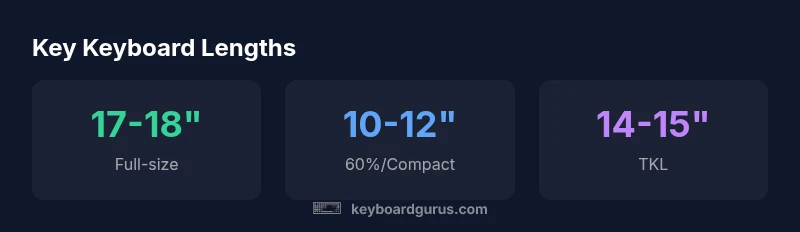
How long is a keyboard? In general, keyboards come in several standard lengths to fit different desks and uses. A typical full-size keyboard runs about 17 to 18 inches (43 to 46 cm) from edge to edge, while most 60% layouts measure around 10 to 12 inches (25 to 30 cm). Tenkeyless keyboards sit in the 14 to 15 inch range (36 to 38 cm).
Understanding Keyboard Length: Why size matters
Keyboard length isn’t just a matter of aesthetics. The length of a keyboard impacts how you sit, how your wrists rest, and how far your mouse travels on your desk. A longer keyboard can shift your monitor, chair, and mouse position, affecting posture and comfort over long sessions. Conversely, a shorter keyboard frees desk space but may require adaptation for certain shortcuts or navigation. According to Keyboard Gurus, the length class you pick should align with your desk footprint, your typical tasks, and your preferred typing posture. If you’re setting up a workstation for long coding sessions or gaming marathons, the length you choose can influence brace depth and wrist comfort. The goal is to minimize reach while maximizing control. When you start with the right length, you will notice fewer awkward twists and smoother cursor movement across tasks.
Practical takeaway: identify your primary use case—coding, writing, gaming—and then pick a length category that preserves comfortable hand alignment and an optimal chair height.
Common Keyboard Sizes Explained
Keyboard layouts come in several recognizable lengths, each with pros and cons for different tasks. A full-size keyboard, typically 17–18 inches long (43–46 cm), includes number keys and a dedicated navigation cluster. A 60% layout (around 10–12 inches, 25–30 cm) sacrifices the number row and some function keys, trading off compactness for portability and a cleaner desk footprint. Tenkeyless (TKL) models omit the numeric keypad, landing in the 14–15 inch range (36–38 cm) and offering a middle ground between functionality and space. There are also 75% and 80% variants that pack more keys than a 60% while staying relatively compact. It’s important to note that these are approximate ranges and can vary by manufacturer and design choices. Keyboard Gurus data shows these length bands cover the vast majority of consumer keyboards, though enthusiasts may encounter irregular shapes or custom cases. When selecting, think about key groups you rely on (navigation, function keys) and how much desk depth you have for the keyboard plus a wrist rest and mouse.
How to Measure a Keyboard Correctly
Measuring a keyboard isn’t guesswork. Start with the outermost edges for a true length, then measure the body width to understand bezel sizes and keycap slants. Use a tape measure or a ruler and record the longest straight line from one edge to the opposite edge. For a more practical assessment, measure how much desk depth your keyboard will require when you’re seated at your typical posture. Consider the space needed for a once-placed wrist rest and for comfortable mouse travel. If you use a curved or split ergonomic layout, measure from the alphanumeric region to the far edge of the case to understand real-world length. Finally, verify if your chosen keyboard will fit under your desk shelf or monitor stand without obstruction. These measurements help ensure you don’t buy a keyboard that looks good but feels cramped.
Practical Implications for Desk Setup
Desk space allocation is the hinge that connects length to daily comfort. A standard desk depth of 28–30 inches (71–76 cm) can comfortably accommodate full-size keyboards with wrist rests, leaving room for a mouse and monitor stand. If your desk is tighter, a 60% or 75% layout often fits with better monitor alignment and cable routing options. A longer keyboard may require you to shift your chair forward or reposition your monitor to maintain a neutral eye line. Cable management becomes more important as length increases, since longer keyboards can add more cables or raise the footprint of the overall setup. Evaluate how the keyboard length interacts with your chair height, monitor height, and preferred typing angle. A well-chosen length can reduce neck strain and improve reach efficiency during long sessions.
Impact on Typing Ergonomics and Comfort
Typing comfort isn’t just about the key switches or key travel; it also hinges on the keyboard’s reach relative to your body. A keyboard that’s too long can force you to stretch, especially if your chair and desk aren’t perfectly aligned. Conversely, a keyboard that’s too short can push your hands inward, causing awkward finger angles. The ideal length allows your forearms to rest comfortably, with wrists slightly elevated and a straight line from elbow to fingertip. For many users, a slight negative tilt (sloped keyboard) or a small tilt foot improves alignment and reduces wrist extension. Ergonomic accessories like a wrist rest or a monitor arm that positions screens at eye level can complement length choices and further reduce strain during extended typing sessions.
Use Cases: Gaming, Typing, Portability
Gaming setups often prioritize longer keyboards with extra macro keys and a comfortable grip distance for rapid keystrokes. Casual typing benefits from a balanced length that won’t interfere with arm movement. Portability is a different concern: smaller layouts weigh less and pack into bags more easily, but you may have to sacrifice dedicated keys and certain modifiers. For professionals who travel frequently, a 60% or 65% keyboard can offer significant weight and space savings without compromising core typing ability. Your decision should consider how often you carry your keyboard, how much desk depth you have at work or school, and whether you rely on a numeric keypad for data entry.
Keycap and Case Factors that Affect Perceived Length
The perceived length of a keyboard isn’t just the physical size; it’s also influenced by the case design and keycap profile. A highly contoured case with a wide bezel can make the keyboard appear longer than it actually is, while a slim, snug case can look more compact. Keycap profiles also play a role: sculpted or SA-profile keys can visually extend the keyboard, and larger legends or extra spacing around key clusters can affect perception. Additionally, backlighting, RGB strips, or a tray underneath the keyboard can alter how the length is perceived in a given lighting setup. If you care about aesthetics as well as function, test both the physical distance and the look in your actual workspace before committing.
Buying Guide: Matching Length to Your Needs
To choose the right length, start by mapping out your daily tasks. If you frequently use the numpad for data entry, a full-size keyboard may be more efficient. If you prefer a compact desk and travel often, a 60% or 65% layout could be ideal. For general productivity and coding, a TKL layout strikes a balance between functionality and space. If you’re unsure, try to borrow or test a few layouts in a local store or showroom. Pay attention to how your wrists feel after 15–20 minutes of typing, and simulate common tasks like coding, spreadsheet work, or gaming to gauge whether a layout suits your muscle memory and finger reach. Lastly, consider your desk depth and chair height in the decision workflow; a length that fits your physical space leads to long-term comfort.
Common Pitfalls and Myths about Keyboard Length
There’s a temptation to equate longer keyboards with better ergonomics or more productivity keys. In reality, the most effective length depends on your posture, desk space, and keyboard tray configuration. Another myth is that shorter keyboards are inherently inferior for gaming; many gamers prioritize layout familiarity and key travel over size. Finally, don’t assume that a larger layout provides a better typing experience for everyone—some users prefer tight spacing and quick reach to essential functions. The right length is the one that keeps your wrists aligned and your arms comfortable during long sessions, not the one that looks most impressive in photos.
Size guide by keyboard layout
| Keyboard Size | Typical Length (inches) | Typical Length (cm) |
|---|---|---|
| Full-size | 17-18 | 43-46 |
| Tenkeyless (TKL) | 14-15 | 36-38 |
| 60% (compact) | 10-12 | 25-30 |
Got Questions?
What is the most common keyboard length?
The most common lengths are full-size and TK/L layouts, chosen based on desk space and needed functions. Full-size offers the numeric keypad, while TK/L provides more compactness for portability and tighter workspaces. Real-world preferences vary by user and task.
Most people pick full-size or TK/L depending on desk space and whether they need a numeric keypad.
Do smaller keyboards affect typing speed?
Not inherently. Speed depends more on familiarity with the layout, key travel, and your typing technique. It may take time to adjust to losing the numeric keypad or function row, but speed can rebound as muscle memory develops.
Speed depends on your familiarity with the layout; you’ll adjust with practice.
Are 60% keyboards good for gaming?
60% keyboards are popular for portability and clean setups. Some gamers adapt with programmable layers or external macro pads. You’ll lose dedicated function keys and a separate navigation cluster, which can affect certain game or scripting methods.
They’re great for portability, but you might miss some function keys in games.
What should I measure on my desk?
Measure desk depth, chair height, monitor stand clearance, and the space behind the keyboard for wrist rest. Also check cable routing channels and the room for mouse movement. Accurate measurements help prevent cramped or awkward setups.
Measure desk depth, chair height, and monitor clearance to fit the keyboard well.
How do I know if a keyboard fits ergonomically?
Look for a keyboard with comfortable reach to keys, a neutral wrist position, and a slight negative tilt if you prefer it. A wrist rest can improve alignment. If you type for hours daily, consider an adjustable angle stand or a split layout to reduce strain.
Check wrist posture and comfort; use a wrist rest if needed.
Are 80% keyboards a thing?
Yes. 80% keyboards sit between TKL and 60%, offering a compact footprint with more keys than a 60% but without a full keypad. They’re popular for keyboards with compact macros and improved portability.
Yes—80% is a compact middle ground with more keys than 60%.
“The most important factor is how well the keyboard fits your desk and posture, not the sheer number of keys. Length should support natural reach and comfortable typing.”
What to Remember
- Measure desk depth before choosing length.
- Match length to your primary tasks and layout needs.
- 60% and TKL layouts save space but change navigation.
- Consider ergonomics: wrist posture and monitor alignment.
- Test different lengths to find what feels natural.