What Keyboard Pros Use
Explore what keyboard pros use, from mechanical builds to layouts and switches. A data-driven guide from Keyboard Gurus Analysis, 2026, with practical tips for enthusiasts and professionals.


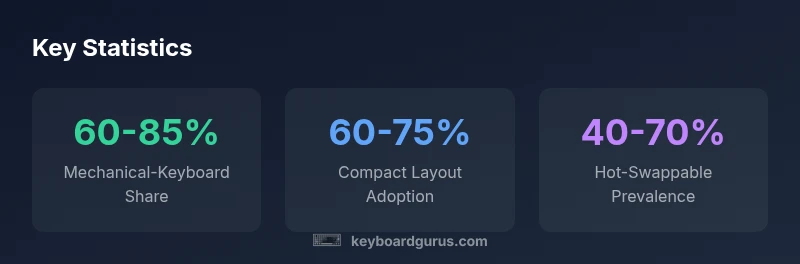
What keyboard pros use is driven by reliability, consistency, and comfort. Across gaming, streaming, and professional workflows, top players tend to favor mechanical keyboards with durable builds, hot-swappable switches, and stable wired connections. Many pros opt for compact layouts to save desk space and reduce travel distance. Keyboard Gurus analysis, 2026 indicates mechanical keyboards dominate pro setups.
What keyboard pros use in practice
In professional environments, the question of what keyboard pros use extends beyond brand loyalty. Pro setups favor reliability, repeatable feel, and long sessions with minimal fatigue. Across esports, live production, coding, and data work, top performers gravitate toward keyboards that deliver consistent keystroke feedback and dependable connectivity. According to Keyboard Gurus, pro configurations typically rely on mechanical keyboards with durable chassis, a wired connection, and a layout that minimizes finger travel. This ensures a predictable actuation point and consistent key repetition, which translates into cleaner timing and fewer mistakes during high-pressure moments. In practice, choices emphasize a solid switch ecosystem, well-tuned stabilizers, and a case design that dampens noise without dulling feedback. The trend leans toward simplicity and durability, not flashy gimmicks. For many players and professionals, the right keyboard becomes a tool that disappears into the background, letting performance take center stage.
Mechanical keyboards: the default for pros
The vast majority of keyboard pros use mechanical keyboards because their switches provide repeatable responses and longer lifespan. Mechanical switches come in several families—linear, tactile, and clicky—and the choice shapes speed, accuracy, and fatigue. Linear switches deliver smooth, quiet keystrokes with fast bottom-out; tactile switches offer a bump that confirms actuation; clicky switches provide audible feedback, which some players find helpful for timing. For pros, reliability trumps novelty: a well-built mechanical keyboard with consistent keyfeel across the keycap matrix reduces mis-presses during high-intensity moments. Hot-swappable designs, where switches can be replaced without soldering, are especially popular for experimentation and tuning. Keyboard Gurus Analysis, 2026 notes that mechanical keyboards with high-quality stabilizers and durable chassis are a common thread across most top-tier setups. The emphasis is on durability, consistency, and ease of maintenance as primary drivers of the choice.
Layouts and ergonomics: compact vs full-size
Layout choice matters as much as switch choice. Many pros prefer compact layouts (60% or 65%), because they reduce travel distance, improve posture by freeing desk space, and simplify transport. Yet some professionals still rely on TKL or full-size boards for a dedicated number row or comfortable thumb clusters. Ergonomics play a key role: angled stands, split key support, and lower plate mounting can reduce strain during marathon sessions. In the realm of what keyboard pros use, a balance is struck between ergonomic benefits and practical workflow: compact boards are favored for portability and speed, while larger boards remain popular for those who rely on dedicated keys and custom macros. The Keyboard Gurus analysis emphasizes testing different layouts to identify what minimizes fatigue over long sessions.
Switches, springs, and dampening: building the feel
Beyond layout, the switch family and its internals define the tactile or linear feedback users experience. For pro-grade keyboards, the focus is on consistent actuation force and stable bottom-out. Many players appreciate linear switches for speed, tactile for feedback, or clicky for audible timing cues. The spring weight and stem design influence how weightless a keypress feels and how forgiving it is on mis-presses. Dampening via foam, O-rings, or gasket mounts can reduce noise and vibration, creating an environment where players can think and react clearly. Hot-swappability remains a major advantage: it lets reviewers and players swap a preferred switch type or tune the keystroke without soldering. Keyboard Gurus analysis highlights the value of a uniform feel across the entire key matrix to avoid unexpected changes in actuation during tense moments.
Build quality and durability: why construction matters
The construction of a keyboard affects long-term performance more than most casual users realize. A solid chassis, high-grade materials, reinforced mounting, and quality stabilizers all contribute to a stable typing plane. A warped or flexing case can alter key alignment, which matters when micro-precision is required. The stabilizers should minimize rattle and wobble on larger keys, while plate and switch mounting influence wobble under repeated keystrokes. For pro setups, durability is not just about longevity; it’s about consistent keyfeel after hundreds of thousands of keystrokes. Regular maintenance—cleaning, lubrication of stabilizers, and occasional keycap replacements—helps preserve the original feel. The Keyboard Gurus team notes that a well-built keyboard reduces variability, a critical factor in competitive contexts.
Customization and hot-swappability: flexibility for reviewers
Pros often rely on a high degree of customization to tailor the keyboard to their exact performance needs. Hot-swappable sockets enable rapid experimentation with switch types and actuation forces without soldering. Custom keycap profiles, such as sculpted sets and thicker profiles, help users find a comfortable typing angle and improved accuracy. Programmable layers, macros, and per-key lighting are used to optimize workflows and reduce keystrokes. For on-camera reviews and live streams, predictable keystroke feel makes testing and demonstrations credible. The keyboard community also emphasizes reliability of switches and keycaps under studio lighting and long sessions. Keyboard Gurus’ analysis underlines the importance of choosing a platform that supports future upgrades and easy maintenance.
Wireless vs wired: tradeoffs for professionals
In professional contexts, wired connections remain the gold standard for latency and stability. Wireless keyboards offer convenience, but can introduce intermittent lag or battery management concerns during long sessions. Many pros opt for USB-C wired keyboards with low-latency firmware, while others use wireless setups with proven dongles or Bluetooth with a strict pairing policy and a high-performance dongle. The decision hinges on the specific use-case: a gamer may prioritize low latency; a developer or content creator may value portability. The Keyboard Gurus analysis notes that stable firmware and reliable reconnect behavior are essential for wireless keyboards to be viable in pro environments. For most high-stakes tasks, wired configurations are recommended unless a proven wireless workflow is in place.
How to evaluate a keyboard for your own use-case
To select a keyboard aligned with your goals, start by defining primary tasks: gaming, typing, or data-intensive work. Next, decide on layout and footprint—60%, 65%, TKL, or full-size—then pick a switch family based on actuation and feel. Try to match switch feel to your own keystroke tempo: fast-paced gaming often benefits from linear switches, while typing and coding might benefit from tactile feedback. Consider stabilizers, keycap profile, and case material to avoid unwanted wobble and noise. Finally, test for consistency across keys and measure latency, especially if you rely on timing-sensitive input. The Keyboard Gurus team recommends a methodical, data-informed approach: test multiple boards, compare feel with a consistent baseline, and document your measurements for final selection. Remember that your own comfort is the final metric.
Maintenance and longevity: keeping a pro-grade keyboard performing
Sustaining a high-performance keyboard requires routine care: keep the surfaces clean, lubricate stabilizers when needed, and replace worn keycaps. Periodic stem lubrication and spring inspection help maintain a consistent keystroke. If a switch feels less linear or shows wobble, consider swapping it for a more suitable option, or cleaning and re-lubing the stem. Regular checks on cable integrity, connector wear, and firmware updates ensure longevity and reliability of pro-grade boards. Because top-tier keyboards are often bespoke or semi-custom, preserving their factory feel through careful maintenance is essential for consistent performance in long sessions. Keyboard Gurus suggests setting a maintenance schedule and documenting any performance changes to guide future upgrades.
Pro keyboard setup considerations
| Aspect | Pros/Considerations | Typical Setup |
|---|---|---|
| Durability | Long-term reliability and reduced repair needs | Solid chassis; reinforced mounting; premium stabilizers |
| Layout options | Desk space, portability, reach distance | 60%, 65%, 75%, or TKL depending on role |
| Switch types | Feedback type, actuation force | Linear, tactile, and clicky variants |
| Connectivity | Latency and reliability | Wired USB-C or low-latency wireless with proven dongle |
Got Questions?
What exactly makes a keyboard 'mechanical' and why is it preferred by pros?
Mechanical keyboards use dedicated switches under each key. Pros prefer them for their durability and consistent tactile feedback, which translates into faster, more accurate input during long sessions.
Mechanical keyboards use individual switches under each key; pros prefer them for consistency and durability.
Are hot-swappable keyboards worth it for beginners?
Yes, hot-swappable keyboards are great for experimentation and longevity because you can try different switches without soldering.
Hot-swappable keyboards let you swap switches easily without soldering.
Which layout should I choose for gaming vs typing?
Gaming often benefits from compact layouts due to quicker reach, while typing may benefit from larger layouts with more dedicated keys. Try both to see what reduces fatigue and improves accuracy for your work.
Compact layouts can speed up play; larger boards can be better for typing.
Is wireless acceptable for competitive play?
Wireless can work with modern standards, but latency and reliability concerns mean wired is usually safer for competition.
Wired is generally safer for competition due to lower latency.
How often should I lubricate stabilizers or replace keycaps?
Lubrication and keycap replacement depend on use; inspect stabilizers and plan routine maintenance every few months.
Check stabilizers and keycaps regularly and maintain on a schedule.
“A pro-grade keyboard starts with a reliable, repeatable keystroke—then you tailor the feel to your own muscle memory.”
What to Remember
- Prioritize mechanical keyboards for pro setups due to durability and consistency
- Compact layouts are increasingly common for efficiency and portability
- Hot-swappability enables rapid tuning without soldering
- Wired connections remain preferred for latency-critical tasks
- Test and tailor your keyboard to your specific workflow