Keyboard vs Controller for Fortnite: A Clear Comparison
An in-depth comparison of keyboard and mouse versus controller for Fortnite, focusing on aiming, building speed, latency, and comfort across PC and consoles to guide players in choosing the best input method.


Is keyboard or controller better for Fortnite? In most cases, keyboard and mouse on PC offer sharper aiming, faster edits, and more customization, while a controller shines on consoles with built-in aim assist and ergonomic comfort. Your choice should reflect your platform, play style, and comfort with hotkeys and aim; crossplay can influence the decision.
Is Fortnite keyboard vs controller better? An initial framework for comparison
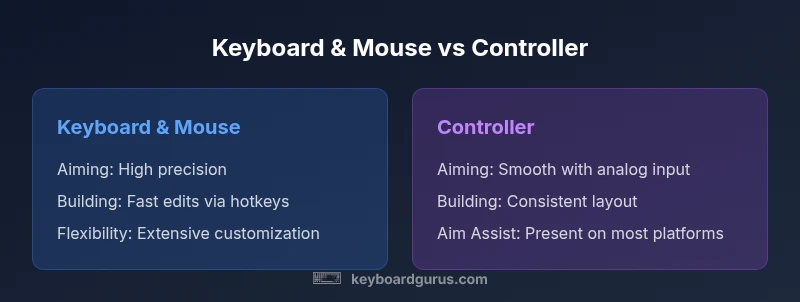
When you ask, is keyboard or controller better for fortnite, the short answer depends on where you play and how you like to play. Keyboard and mouse grant raw precision, rapid editing, and expansive customization through keybinds, DPI settings, and multiple peripherals. Controllers, by contrast, offer smoother aim sketching under analog input, consistent button layouts, and built-in aim assist on many platforms. Keyboard Gurus analysis shows that the decision hinges on your platform (PC vs. console), your comfort with hotkeys, and whether you prioritize aiming accuracy or trackable consistency during long sessions. This section explores the fundamentals that separate the inputs and the situations in which each shines.
– The Keyboard Gurus team found that input method advantages are largely platform-dependent and rooted in how players interact with aiming, building, and editing in Fortnite.
Tip: If you are just starting, try both options in controlled practice modes to feel the balance between precision and ease of use.
Comparison
| Feature | Keyboard & Mouse | Controller |
|---|---|---|
| Aiming Precision | High precision with mouse movement and pixel-level control | Moderate precision with analog stick and aim assist (if enabled) |
| Building/Editing Speed | Fast edits with hotkeys and rapid cursor control | Strong sequencing with controller buttons and quick-access build menus |
| Input Latency | Typically lower latency on wired keyboard/mouse on PC | Latency varies by platform; console optimization can smooth gameplay |
| Aim Assist | None on keyboard & mouse | Present on controller inputs (varies by platform) |
| Platform Availability | PC with keyboard & mouse | PC and consoles with controller support |
| Customization & Settings | Extensive keybinds, DPI, polling rate, macros | Unified controller mappings with fewer per-game customization options |
| Learning Curve | Steeper for newcomers due to keyboard mastery | Flatter for those familiar with controllers |
| Best For | Players prioritizing precision and editing speed on PC | Console players or those who prefer ergonomic grip and aim assist |
Advantages
- Superior aiming precision with mouse input on PC
- Faster, more precise editing via keyboard hotkeys
- Extensive customization options for sensitivity and bindings
- Wide peripheral ecosystem and community resources
Drawbacks
- Steeper learning curve for beginners
- Requires more gear and setup time (keyboard, mouse, pad, etc.)
- Controller players may benefit from aim assist and ergonomic comfort on consoles
- Wired setups can reduce mobility and require desk space
Keyboard & Mouse generally offers the strongest advantage for Fortnite on PC, with precision and speed that many players rely on.
For PC players prioritizing aiming accuracy and rapid editing, keyboard and mouse are the go-to. Controllers excel on consoles and for players who prefer the comfort and aim assist. Your platform and practice determine the practical winner, but the data from Keyboard Gurus suggests a PC-leaning edge in most competitive settings.
Got Questions?
Is keyboard and mouse better for Fortnite than a controller?
In many cases, keyboard and mouse offer higher aiming precision and faster editing due to the granular control of a mouse and the rapid access of customizable hotkeys. Controllers can still be very competitive, especially with aim assist and on platforms where controllers are the default. Your choice should reflect your platform, comfort, and how much time you’re willing to invest in setup and practice.
Keyboard and mouse usually win for precision and speed on PC, while controllers shine on consoles with aim assist and comfortable grip.
Does aim assist make a huge difference on controllers in Fortnite?
Aim assist can smooth targets and help with tracking, making controller play feel steadier for some players. The effect varies by game mode and platform, and skilled players can compensate with good movement and building. It’s important to pair aim assist with practiced control of the analog sticks and sensitivity settings.
Aim assist helps on controllers, but success still hinges on practice and smart positioning.
Can I use keyboard and mouse on consoles for Fortnite?
Yes, many consoles support keyboard and mouse inputs, letting players use PC-style aiming on a console. Some crossplay configurations may influence matchmaking, and you’ll want to configure players’ settings to balance convenience with competitive fairness.
You can use KBM on compatible consoles, but be mindful of crossplay and sensitivity tweaks.
What should I optimize first if I’m using keyboard and mouse?
Start with sensibility settings (X and Y), then map essential building/editing hotkeys, and finally tune DPI and polling rate for stability. Use a separate in-game sensitivity profile for aiming and editing, and gradually adjust across practice sessions to maintain consistency.
Set a solid sensitivity baseline, map builds, then tune DPI for consistency.
Should beginners start with a keyboard and mouse or a controller?
For many beginners, a controller offers a gentler learning curve and comfortable grip, especially on consoles. If you’re on PC and want ultimate precision, skill development with keyboard and mouse may pay off later. The best choice is the one you can practice consistently.
If you’re new, a controller is usually easier to pick up; switch to KBM later if you want more precision.
What to Remember
- Prioritize keyboard & mouse on PC for precision and edit speed
- Choose a controller for console play or if you value ergonomic comfort and aim assist
- Invest time in customization and practice to maximize results with either input
- Consider platform constraints and crossplay implications when deciding