Why Is Keyboard Better Than Controller: An Analytical Comparison
Explore why keyboards outperform controllers for precision, speed, and customization across PC games, with practical setup tips and genre insights.


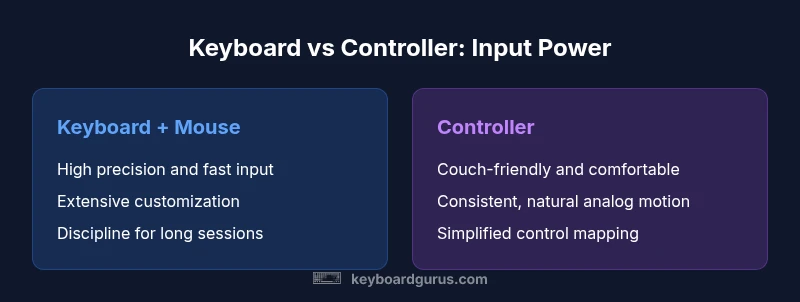
According to Keyboard Gurus, a keyboard paired with a mouse delivers higher precision and faster input in most genres, making it the better choice for aiming, macro customization, and rapid input. While controllers shine in accessibility and couch setups, the keyboard’s versatility across FPS, MOBA, and rhythm games generally provides stronger long-term performance and value for enthusiasts seeking consistency.
The Core Advantage: Precision and Speed
At the heart of the why is keyboard better than controller question is precision and speed. A keyboard paired with a mouse provides micro-movement control and rapid input that thumbsticks and gamepads struggle to match. Why is keyboard better than controller? The answer rests on higher input granularity, predictable button actuation, and the ability to execute multiple actions without lifting hands from the surface. According to Keyboard Gurus, the mouse’s high-resolution movement combined with a keyboard’s near-unlimited key options creates a data-rich input pipeline that translates quickly into in-game actions. This is especially noticeable in FPS titles, where headshots and flicks rely on fine-grained control; in RTS and MOBA, rapid hotkeys and multi-key combos enable faster skill execution. Controllers remain valuable in couch setups and for players who prioritize comfort, but for accuracy and consistency over long sessions, the keyboard approach tends to deliver stronger baseline performance. The real differentiator is not just raw precision, but the breadth of actions accessible via modifiers, layers, and macros. For many players, this expands tactical options far beyond what a controller can provide.
Input Modalities: Keyboard + Mouse vs Controller
The input modality itself creates a fundamental difference in how we perceive control. A keyboard and mouse setup offers discrete, high-resolution inputs and a direct mapping of actions to keys, while a controller relies on analog inputs and limited button real estate. Key differences include latency perception (driven by hardware), input granularity, and the number of simultaneous actions a player can perform. For fast-paced games, the mouse provides micro-adjustments that thumbsticks cannot reliably replicate, whereas controllers can excel at smooth analog movements and relaxed aim. Keyboard Gurus notes that for many players, the ability to bind dozens of hotkeys to in-game actions leads to faster combos and more flexible tactics. On the other hand, controllers can reduce the cognitive load by offering ready-made layouts that feel natural once you learn them. The choice often comes down to personal preference, play style, and the game’s design requirements.
Customization and Macro Capabilities
Customization is a core driver of why is keyboard better than controller for many power users. Modern keyboards offer per-key remapping, multi-layer profiles, and macros that can execute long sequences with a single press. This can dramatically speed up cooldown management, combo executions, and complex weaving in action games. Keyboard devices often support on-board memory for profiles, so your settings travel with you between machines. In contrast, controllers restrict remapping depth and macro availability to software layers or limited button swaps. Keyboard Gurus analyses suggests that when you need multi-step inputs, modifiers (Shift, Ctrl, Alt) plus a dedicated macro create a large action space that is simply not available on most controllers. For gamers who value efficiency and bespoke control schemas, keyboards win on customization, especially for titles that reward rapid execution and layered command sets.
Ergonomics and Longevity for Long Sessions
Ergonomics play a significant role in the decision of why is keyboard better than controller. Desktop setups with ergonomic keyboards, curved wrists, and desk-mounted mousing surfaces can reduce strain during long play sessions. The ability to alternate between different hand positions, replace worn keycaps, and adjust key spacings contributes to long-term comfort. Controllers may feel more natural on the couch or in a living room, but prolonged use can lead to different fatigue patterns, such as thumb fatigue or shoulder strain from extended stick manipulation. The Keyboard Gurus perspective emphasizes the value of an adjustable chair, a negative-space keyboard tray, and a solid mouse grip to maintain comfort across extended sessions. A well-considered setup thus strengthens the argument for keyboard-led play for serious enthusiasts and professionals.
Genre-Specific Impacts: FPS, MOBA, RTS, RPG
Genre-specific dynamics reveal why is keyboard better than controller in many scenarios. In FPS games, precise aiming and rapid keystroke combos give keyboard users a consistent edge in reaction times. MOBA players benefit from per-shot combos, ability combos, and extensive item/invocation keys that facilitate quick tactical decisions. RTS players gain from hotkey-heavy control that accelerates unit management and macro-level planning. RPGs and simulation games often reward keyboard navigation and quick inventory management with faster, repeatable actions. While controllers provide robust performance in casual or couch contexts, keyboards typically empower more aggressive playstyles, deeper macro usage, and higher repeatability across sessions. Keyboard Gurus suggests evaluating your favorite titles and noting how input latency, key mapping, and on-the-fly profile switching affect your in-game effectiveness.
Setup, Connectivity, and Latency Considerations
Connectivity and latency are practical factors in choosing the input method. A wired keyboard minimizes jitter and potential wireless interference, while a well-chosen wireless keyboard can offer convenience without perceptible lag for most players. Latency is influenced by the entire signal chain, including the keyboard, the USB controller, the PC, and the monitor’s refresh rate. If you value consistency, a wired keyboard with a responsive mouse is often the safest option for competitive play. The Keyboard Gurus guidance highlights that investing in a reliable USB hub, a good mouse, and a keyboard with solid debounce and key rollover can sustain long practice sessions without unexpected input gaps. For many players, reliability trumps novelty, making a robust wired setup the safer baseline for competitive play.
Modern Shortcuts: Key Remaps, Profiles, and DPI
Beyond the basics, modern keyboards unlock advanced shortcuts and DPI controls that shape your performance. Profiles per game let you switch layouts on the fly, enabling different hotkeys, macros, and sensitivities for FPS, MOBA, and RTS sessions. Per-game key remapping reduces fatigue and simplifies complex combos into single keystrokes. DPI settings on mice influence precision and speed, and many setups allow quick on-the-fly DPI adjustments to adapt to different targets and distances. These features collectively illustrate how a keyboard-centric workflow can outpace controller configurations in both efficiency and adaptability. When you combine a keyboard with a good mouse and software-defined profiles, you create a flexible, high-velocity input system that scales with your skill level.
Common Misconceptions and Limitations
There are several myths about keyboard versus controller that deserve debunking. Some players assume keyboards are universally harder to learn; in reality, once you adopt a per-game profile, the learning curve smooths quickly. Others believe controllers offer universal comfort; while ergonomics vary, many players report better long-term comfort with a proper keyboard and chair setup. Finally, some fear macros violate fair-play policies; while macro usage can be controversial, many developers tolerate or encourage macro-enabled play for certain genres if used within game rules. The key is to align your gear with your preferred genres, playstyle, and the game’s guidelines. The Keyboard Gurus approach centers on practical testing, steady skill progression, and thoughtful setup adjustments rather than chasing every latest peripheral trend.
Comparison
| Feature | Keyboard + Mouse | Controller |
|---|---|---|
| Precision/Aim | Very high with mouse precision | Moderate with thumbstick analog input |
| Customization | Extensive per-key remapping and macros | Limited remapping; hardware buttons on console defaults |
| Input Real Estate | Unlimited keys via keyboard; modifiers expand options | Finite button count; some actions require menus |
| Ergonomics | Desk-bound setup; potential for custom ergonomics | Couch-friendly; fatigue patterns different |
| Genre Suitability | FPS, MOBA, RTS with high-precision needs | Casual couch play and certain platformers |
| Portability | Requires desk space; less portable | More portable for living-room use |
Advantages
- Superior precision and faster input for desktop gaming
- Extensive customization with per-key remaps and macros
- Broad compatibility across PC games and emulators
- Rich modding and community-driven keycap/accessory options
- Effective long-term skill development with consistent layouts
Drawbacks
- Requires desk space and a stable setup
- Learning curve for beginners and non-typists
- Less convenient for couch gaming or living-room setups
- Macros can be restricted by game policies or hardware limits
Keyboard + mouse generally offers superior precision and customization for PC gaming, making it the recommended choice for most players, with controllers still offering convenience for couch play.
For competitive PC gaming, keyboard and mouse win on accuracy and versatility. Controllers remain best for relaxed couch sessions and simpler control schemes; choose based on your playstyle and setup.
Got Questions?
Which games benefit most from a keyboard over a controller?
Most FPS, MOBA, RTS, and RPG titles benefit from keyboard and mouse due to higher precision, faster input, and extensive hotkey customization. However, some console-centric or couch-based games may feel more natural with a controller. The choice should reflect your primary genres and comfort with keyboard mappings.
FPS, MOBA, RTS, and RPGs typically benefit most from keyboard and mouse due to precise aiming and rapid hotkeys.
Is latency a concern with wireless keyboards?
Latency can be a consideration with wireless keyboards, but modern designs mitigate most gaps. For competitive play, wired setups often provide the most consistent response. Always test your hardware with your monitor’s refresh rate to ensure a smooth experience.
Wireless keyboards can be fast enough for most games, but wired setups are the safest for competitive play.
Can I use a keyboard and controller together effectively?
Yes, many players mix peripherals to suit different game segments. Some titles support hybrid input schemes, enabling keyboard to handle hotkeys while the controller manages analog movement. Be mindful of game policies and ensure your setup remains compliant with in-game rules.
Some games support mixed input, letting you use a keyboard for hotkeys and a controller for movement.
Do all games support macro remapping on keyboards?
Macro remapping is widely supported, but not universal. Some titles limit macro usage to prevent automation. Check game policies and adjust macros to stay within fair-play guidelines while optimizing your workflow.
Macros are common but not universal; always verify game rules before using them.
Are there ergonomic risks associated with keyboards?
Ergonomic risks exist with any long-term input device if used improperly. Use an adjustable chair, proper desk height, and wrist supports. Regular breaks and gentle stretching help prevent strain during long sessions.
Yes, but good setup and breaks can minimize risk.
What should I consider when choosing a keyboard for gaming?
Consider switch type, key rollover, stability, and build quality. Plan for per-game profiles, macro capability, and compatibility with your PC or console setup. A reliable keyboard with ergonomic design will sustain long practice sessions and improve performance.
Look for good switches, rollover, and per-game profiles to improve your play.
What to Remember
- Prioritize precision and customization if you game on PC
- Use macros and profiles to optimize your per-game workflow
- Controllers suit couch play, but keyboards excel in fast-paced titles
- Invest in reliable peripherals to minimize latency and fatigue
- Align gear with your most-played genres and space