Keyboard vs Controller Fortnite: A Thorough Comparison
In-depth, analytical comparison of keyboard vs controller Fortnite choices. Learn how input methods affect build speed, aim, platform differences, and practical guidance to choose the best path for your playstyle.


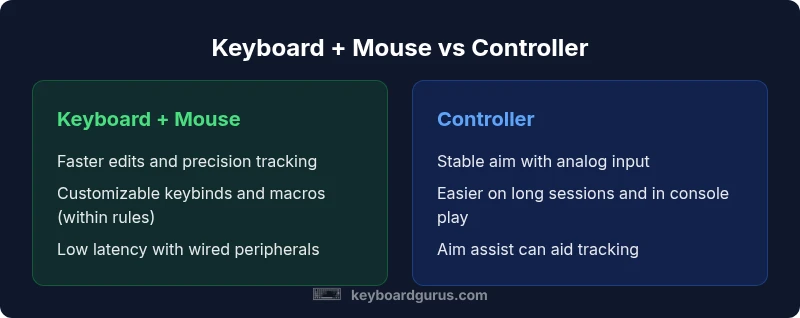
Keyboard + mouse generally offers faster edits and greater precision in Fortnite, while a controller provides steadier aim and easier access to movement on consoles. The best choice depends on your platform, playstyle, and willingness to practice. Keyboard Gurus recommends testing both inputs on your main platform to build solid muscle memory and then committing to a single setup for consistency.
Fortnite input methods and the core trade-offs
According to Keyboard Gurus, the decision between keyboard vs controller fortnite hinges on how you value speed versus accuracy, responsiveness versus consistency, and your platform ecosystem. In this analysis we examine how each input method shapes your build speed, aim control, and decision making under pressure. The goal is not to declare a universal winner but to map real world implications, what you gain on PC with a keyboard and mouse, what you gain on consoles with a controller, and how to translate that into better performance. We discuss short term comfort, long term skill ceiling, and the adjustments you may need to make as patches shift the meta. The keyboard vs controller fortnite debate mirrors broader questions about gaming input: is raw speed more valuable than stability? By the end you should have a clear framework for testing and choosing the path that aligns with your goals, whether you play solo, duo, or competitive modes.
Precision, speed, and build/edit dynamics
In fortnite the speed at which you place builds, edit walls, and rotate structures matters as much as raw aim. The keyboard and mouse combo generally gives higher raw speed for edits thanks to keyboard hotkeys and a precise mouse sensor. Controllers rely on a compact set of face buttons and shoulder inputs that reduce hand travel but can bottleneck quick edits when you lack muscle memory. The key takeaway for keyboard vs controller fortnite is to quantify your own performance in practice sessions: measure edit time, wall placement cadence, and reaction to high pressure moments. Over time, players who invest in keyboard setups often push their build sequences into multi step combos with fewer seconds per action, while controller players tend to optimize tracking and movement with ease, leveraging aim assist and analog input.
Aim dynamics and control fidelity across inputs
Aim dynamics differ sharply between input methods. Keyboard players tend to use precise cursor control to snap to crucial pixels, while controller players rely on aim assist and joystick stability to keep shots on target. In fortnite these differences influence how you approach engagement ranges and peak builds mid fight. For keyboard users, calibrating sensitivity and DPI is crucial to ensure smooth tracking and rapid editting. Controller users benefit from tuning dead zones and aim assist settings to ensure consistent cross hair placement. The result is a balance: keyboard can exceed in micro precision while controller provides reliable, fluid tracking, especially in mid range duels.
Setup considerations: hardware, sensitivity, and comfort
Your choice of keyboard type, mouse profile, and controller configuration directly impacts your fortnite performance. For keyboard vs controller fortnite, a wired keyboard and mouse with adjustable DPI enables low latency and repeatable tracking, assuming a robust PC setup. Controllers require comfortable grips and reliable joysticks plus proper dead zones to avoid over or under shooting. Sensitivity tuning is essential for both paths: lower DPI with larger hand movements can improve stability on controllers, while higher DPI and finer in game sensitivity can sharpen keyboard based play. Ergonomics also matter for long sessions, so invest in a comfortable chair, wrist support, and proper desk height to reduce fatigue during intense matches.
Meta shifts and patch impact on input effectiveness
Epic Games patch notes frequently tweak input handling, aim mechanics, and building behavior. The keyboard vs controller fortnite debate shifts when new weapons, editing mechanics, or controller aim improvements arrive. A change to aim assist strength or a new building piece can tilt the balance toward one input method for a season or two. Staying adaptable means readying your room for updates and adjusting your sensitivity curves or keybinds to preserve or enhance performance. Keyboard Gurus emphasizes following official patch notes and experimenting in creative modes before deploying changes in ranked playlists.
Platform specific nuances: PC versus consoles
Platform differences shape the real world outcomes of keyboard vs controller fortnite. On PC, keyboard and mouse dominate for building speed and precision, while aim tracking on PC with a controller is less common unless playing with console style aim assist. Consoles offer stable performance and often rely on a controller with aim assist that can help new players. Cross play options can complicate head to head competition, so understanding platform rules and mappings is crucial. If you primarily play on console, controller input remains a practical default; if you game on PC, keyboard and mouse can give you a speed and precision edge, provided you invest time in training.
Myths versus reality: common misconceptions debunked
A frequent myth is that keyboard ultimately guarantees victory regardless of practice. The truth is that improvement comes from deliberate practice, not just hardware. Another misconception is that aim assist on controllers makes up for poor tracking; in practice aim assist helps centering but does not replace accurate aiming on fast moving targets. Some players believe macros or rapid fire give an unfair advantage; in fortnite these practices are restricted or discouraged, and relying on raw mechanics with your chosen input yields steadier, longer term gains. The reality is that both inputs can be excellent in capable hands, with the better choice determined by your platform, environment, and practice discipline.
Practical testing plan: trying both inputs in fortnite
A practical approach to keyboard vs controller fortnite is to run a structured testing plan over a two week period. Start with a controlled practice routine that alternates days between each input, using the same sensitivity and target drills. Track metrics like edit speed, building accuracy, reaction time, and win rate in controlled playlists. After a week compare your progress, focusing on the most critical tasks for your style such as high ground retakes or fast edits. Use a log to note fatigue or comfort issues and decide once you have a consistent data picture whether to commit to a single input.
Personalization and ergonomics: keybinds and layouts
Custom keybinds and ergonomic layouts significantly affect fortnite performance. On a keyboard, map critical actions to easy reach keys and consider spacing to avoid mis presses during intense moments. For controllers, fine tuning button mappings and reach can improve engagement consistency. Regardless of input, consider hotkey grouping, color coding, and practice routines to reinforce muscle memory. Ergonomics should guide your setup because comfortable play translates into longer sessions and better focus during late game scenarios.
Keyboard Gurus recommendations and road map
Keyboard Gurus recommends a deliberate path rather than chasing the best hardware. Start with a reliable keyboard mouse pair or a well balanced controller configuration, then commit to a consistent input method. Build a practice plan focusing on editing speed, aim consistency, and decision making under pressure. As you become more proficient, you can fine tune sensitivity curves, keybinds, and assist options to match your play style. The end goal is clarity of purpose: a single input method paired with steady practice that maximizes your fortnite outcomes.
Comparison
| Feature | Keyboard + Mouse | Controller |
|---|---|---|
| Aim precision | Higher precision with a good mouse sensor | Steadier aim aided by analog stick and aim assist |
| Edit/build speed | Faster edits via keyboard hotkeys and quick access to walls/ ramps | Slower raw edits but steady transitions using buttons |
| Input latency | Low latency with wired peripherals and optimized drivers | Comparable latency; may vary with console settings |
| Learning curve | Steeper due to multiple keys and sensitivity tuning | Easier for beginners due to fewer inputs to memorize |
| Platform pairing | PC friendly; highly flexible with configurations | Common on consoles; supports cross play with PC via Epic accounts |
| Cost and value | Variable; depends on keyboard, mouse, and monitor | Often cheaper upfront; controller cost plus a simple setup |
Advantages
- Higher skill ceiling with keyboard for advanced builds
- Extensive customization of keybinds and macros (within game rules)
- Potentially faster reaction times with a precise mouse
- Greater room for peripheral upgrades and DPI tuning
Drawbacks
- Steeper learning curve for beginners
- Requires desk space, cable management, and setup time
- Longer adaptation period to master muscle memory
- Controller players may rely on aim assist in some settings
Keyboard + Mouse edges ahead for build speed and precision; controller remains best for accessibility and aim assist on consoles
Choose keyboard if you want faster edits and higher precision. Choose controller if you prioritize consistency, aim assist, and comfort for long sessions. The right choice depends on your platform and personal preference.
Got Questions?
Is keyboard better for Fortnite than a controller?
In Fortnite the keyboard plus mouse often provides faster edits and finer control, but controllers offer reliable aim with aim assist on many platforms. The best choice depends on your platform, practice time, and comfort level. Both inputs can be competitive in the right hands.
Keyboard plus mouse usually gives faster edits, while a controller offers steady aiming and is easier to pick up on consoles.
Do aim assist advantages on controllers make them competitive?
Aim assist does help controllers remain competitive by stabilizing shots, but top players still rely on practiced aiming and movement. It reduces some tracking difficulty but does not replace precision and speed built with keyboard and mouse.
Aim assist helps with aiming on controllers, but skill and practice still matter a lot.
Should a new player start with keyboard or controller on PC?
For PC beginners, starting with keyboard and mouse is common, as it builds classic mechanics early. If you feel overwhelmed, try a controller in a limited mode to learn movement and timing, then progressively switch as you gain confidence.
Start with keyboard and mouse on PC if you want to stick to the standard build and edit workflow.
Can you switch inputs mid season without loss of performance?
You can switch inputs at any time, but you should expect a learning curve. Give yourself a few practice sessions to rebuild muscle memory and adjust sensitivity settings before competing seriously.
You can switch inputs anytime, just give yourself practice time to adjust.
Are macros or rapid fire allowed in Fortnite?
Fortnite policies discourage or ban macros that automate actions. Rely on skill and intentional inputs to stay compliant and maintain fair play.
Macros are not allowed, so practice your real input speed instead.
What gear yields the best performance for either input?
A responsive keyboard and a high quality mouse or an ergonomic controller with reliable joysticks is ideal. Focus on a comfortable setup, a medium to low latency screen, and a stable desk environment to reduce fatigue over long sessions.
Choose a comfortable, low latency keyboard or controller setup and a good monitor for smooth gameplay.
What to Remember
- Test both inputs on your main platform before deciding
- Keyboard excels in building and micro edits; controller shines in tracking
- Tune sensitivity and ergonomics to maximize comfort
- Platform and patch changes can shift the balance; stay adaptable