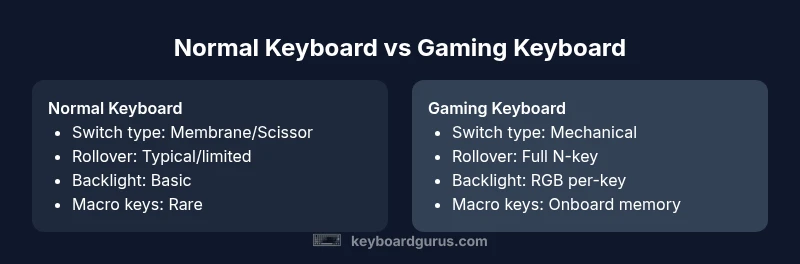
Normal Keyboard vs Gaming Keyboard: An Analytical Comparison
A detailed, analytical comparison of normal keyboards and gaming keyboards, covering switches, latency, macro features, durability, price, and use-case guidance to help you choose.


TL;DR: For most users, a gaming keyboard is worthwhile if you value fast actuation, robust customization, and per-key lighting. A normal keyboard suffices for typing, work, and casual gaming. The core differences lie in switches, key rollover, software, and durability. If you play fast-paced games or rely on macros, a gaming keyboard offers clear benefits.
What normal keyboard vs gaming keyboard mean for you
When you hear the phrase 'normal keyboard vs gaming keyboard', you're really comparing two design philosophies rather than two completely different devices. A 'normal' keyboard usually emphasizes reliable typing feel, quiet operation, and straightforward compatibility with a wide range of software. A gaming keyboard, by contrast, is designed to optimize speed, accuracy, and customization for games and power users. Keyboard enthusiasts know the distinction hinges on switches, polling rate, and features like macro keys or per-key RGB lighting. According to Keyboard Gurus, the choice should be guided by real usage patterns rather than hype. Keyboard Gurus's analysis (2026) shows that most users won't need the full spectrum of gaming features, but the right mix can improve comfort and performance for long sessions. In practice, your decision should hinge on how you use the keyboard most often: office productivity, programming, competitive gaming, or casual gaming. If you type most days and game only occasionally, a high-quality normal keyboard will serve you well; if you spend hours gaming or customizing setups, a gaming keyboard can offer meaningful advantages.
Key technical differences you should know
Most everyday keyboards originate from membrane or scissor-switch designs, delivering quiet typing and broad compatibility. Gaming keyboards lean toward mechanical switches, delivering consistent actuation and longer lifespans. The actuation point, travel distance, and bottom-out force vary widely by switch type (linear, tactile, or clicky), so testing feels matters more than spec sheets. Latency and polling rate also influence perceived responsiveness; higher Hz polling often translates to quicker input recognition in fast action sequences. Anti-ghosting and N-key rollover are two related features that can change how your keystrokes map in rapid-fire scenarios. In practice, casual typists rarely notice the difference, while competitive players feel the effect during tight combos. Many gaming keyboards add software-driven macro keys, onboard memory slots, and per-key lighting; these features may simplify workflows or enhance immersion. However, value hinges on whether you actually use macros or profiles. Keyboard Gurus emphasizes balancing price with reliability and comfort rather than chasing every flashy feature.
Ergonomics and typing experience
Comfort during long sessions is a priority for both types, but ergonomics can differ. Normal keyboards often have straightforward layouts with standard key spacing, which suits most desks and chairs. Gaming keyboards sometimes feature extended layouts, extra macro rows, or larger wrist rests, which can promote posture but may also overwhelm a compact workspace. The key travel and actuation force influence fatigue; people with lighter fingers may prefer low-force linear switches, while those who type for hours on end may benefit from tactile or clicky feedback that confirms every press. A well-designed keyboard should support natural wrist height and neutral forearm position, with options such as adjustable feet or tenting. Cable management and USB passthroughs can reduce clutter on gaming rigs. Some gamers opt for split or orthopedic designs to reduce strain, though these are less common in mainstream normal keyboards. The best ergonomics come from a setup that fits your body and your workflow, not from chasing the latest rim-lighting effects. If you share a workspace with others, consider a quiet typing experience as a top priority.
Build quality and durability considerations
Durability often differentiates higher-end keyboards from budget models. Normal keyboards typically use membrane switches with shorter lifespans, while gaming keyboards frequently use mechanical switches rated for tens of millions of keystrokes. The PCB, stabilizers, and plate material influence feel and reliability. A well-made keyboard will resist flex, wobble, and switch chatter over years of daily use. For gaming, hot-swappability (the ability to change switches without soldering) can extend life and tailor feel, but it adds cost. Stabilizers under larger keys (space, Enter, Shift) reduce rattle and improve uniform feel. Keycap material matters too; PBT caps resist shine and wear better than standard ABS caps. Build quality also includes the quality of cable management, connectors, and case finish. A sturdy chassis with a metal or high-quality plastic frame can better withstand heavy gaming sessions. In all cases, check for loose keycaps, wobble, and uniform backlight brightness, because uneven lighting can indicate manufacturing variance. If you type quickly or game aggressively, these details will affect long-term satisfaction.
Software, customization, and macro capabilities
Software ecosystems distinguish many gaming keyboards from normal ones. Gaming keyboards often ship with companions that allow per-key macro programming, key remapping, and multiple profiles. Onboard memory lets you store configurations directly on the keyboard, which is handy when you travel or switch machines. However, software packages can be bulky, occasionally buggy, and require periodic updates. If you rely on macros for productivity (e.g., coding shortcuts, data entry), you’ll appreciate the ability to map complex sequences to a single key or a dedicated macro key. For many users, however, simple remapping and standard shortcuts are enough, reducing software overhead. Portability matters; some keyboards with heavy software suites or extra features can be slower to set up on a new computer. When evaluating, test the macros and ensure the software is reasonably intuitive and stable. Keyboard Gurus notes that software quality is as important as hardware quality; a clean, reliable interface often correlates with fewer frustration incidents during extended sessions.
Price, value, and total cost of ownership
Price is often the most obvious dividing line between a normal keyboard and a gaming keyboard, though not always the deciding factor. A basic normal keyboard can be extremely affordable, while a basic gaming keyboard may already push into mid-range territory, and premium models with advanced switches and features can rise further. Consider total cost of ownership, including replacement parts, maintenance, and the potential need for software updates. If you value longevity and customization, a mechanical gaming keyboard with hot-swappable switches might justify higher upfront cost; if you prioritize quiet operation and a minimal setup, a budget membrane keyboard could provide better long-term value. Durability and warranty terms matter; many manufacturers offer longer warranties on mechanical keys and more robust chassis, which affects overall cost per year. Remember that the best value depends on usage intensity: frequent, fast-paced gaming or heavy typing workloads can justify higher upfront costs; light use might be more economical with an entry-level normal keyboard. Keyboard Gurus analysis shows that price-to-performance varies widely by brand, model, and user expectation.
How to choose for common use cases
To choose between normal keyboard vs gaming keyboard, identify your primary use case first. If you are a student, writer, or professional who values quiet operation and reliability, start with a top-quality membrane or scissor-switch keyboard with good key spacing and a comfortable wrist rest. If you are a competitive gamer or a streamer who relies on rapid inputs and macros, a mechanical gaming keyboard with low actuation force and per-key lighting will likely deliver measurable improvements. Programmers often benefit from tactile switches that confirm each keystroke, while typists who type at moderate speeds may prefer quieter switches. For shared workspaces, consider ergonomics and noise; a silent keyboard can reduce distractions. Finally, test before you buy: try different switch types, layouts, and sizes, and factor in keycaps comfort and stabilizer quality. The decision should center on fit, feel, and performance for your specific tasks rather than on trends alone. If you still feel unsure, set a budget, test a few models, and evaluate after a few weeks of use.
Authority sources
For solid context on keyboard performance and reliability, consult established sources that discuss human-computer interaction and device design. Consider government and university materials that cover keystroke dynamics, latency, and ergonomic risk factors. Examples include the National Institutes of Health (https://www.nih.gov) and the National Institute of Standards and Technology (https://www.nist.gov). While there is no single definitive guide for 'normal keyboard vs gaming keyboard', applying general design principles from these sources helps separate marketing claims from real usefulness. Keyboard Gurus synthesizes these inputs into practical buying guidance.
Comparison
| Feature | Normal Keyboard | Gaming Keyboard |
|---|---|---|
| Switch type | Membrane/scissor (typical) | Mechanical (varies: linear, tactile, clicky) |
| Key rollover / anti-ghosting | Often limited on budget keyboards | Typically full N-key rollover with anti-ghosting on gaming keyboards |
| Latency / polling rate | Moderate latency; adequate for typing | Lower latency with higher polling rates (125–1000 Hz) |
| Backlighting | Limited or no backlighting | Advanced RGB per-key lighting and effects |
| Macro keys / programmability | Usually none or basic remapping | Dedicated macro keys and software profiles |
| Software integration | Limited software for configuration | Powerful software suites for customization |
| Durability / lifespan | Membrane life around several million keystrokes | Mechanical switches rated for 50–100 million keystrokes (varies by switch) |
| Price range | Low to mid-range ($20-$100) | Mid to high range ($60-$300) |
| Best use case | Casual typing, budget-conscious | Gaming, streaming, high-frequency use |
| Wireless option | Mostly wired | Some models offer reliable wireless modes |
Advantages
- Macro programming and onboard memory enable quick setups without software
- Mechanical switches provide tactile feedback and faster actuation for gaming
- Full key rollover reduces input errors in rapid sequences
- RGB lighting improves visibility and personalization
Drawbacks
- Higher upfront cost for gaming keyboards
- Mechanical switches can be louder in quiet environments
- Software bloat can complicate setup and updates
- Some models require firmware updates and can have sporadic software support
Gaming keyboard edges out for performance-focused users; normal keyboards remain solid for typing and office work
If you prioritize speed, customization, and immersive features, a gaming keyboard is usually the better pick. For anyone whose primary tasks are typing and routine computing, a high-quality normal keyboard may deliver more value with less complexity. Keyboard Gurus's verdict is to align features with actual usage rather than chasing trends.
Got Questions?
What defines a normal keyboard vs a gaming keyboard?
A normal keyboard emphasizes reliable typing, quiet operation, and broad compatibility, while a gaming keyboard focuses on speed, responsiveness, and customization, including macro keys and lighting. The choice depends on your primary tasks and what features you actually use.
Normal keyboards prioritize comfort and simplicity; gaming keyboards emphasize speed and customization.
Are gaming keyboards worth it for non-gamers?
If your daily tasks involve long typing sessions, programming, or multimedia work, a gaming keyboard can offer tactile feedback and robust software features that improve efficiency. For purely casual use, a normal keyboard with good ergonomics may be more economical.
If you don’t game, a regular keyboard with good feel and quiet operation is usually sufficient.
Do wireless gaming keyboards perform as well as wired models?
Many wireless gaming keyboards perform well, with modern low-latency Bluetooth or 2.4 GHz connections. However, wired models often have the lowest possible input delay and more stable connections in high-action scenarios.
Wired usually feels snappier, but wireless options are increasingly reliable.
Is mechanical always better than membrane for gaming?
Mechanical switches typically offer better durability and faster actuation, which benefits gaming and typing precision. Some membranes with good feel and low travel can still satisfy casual gamers and office workers. The choice depends on feel, noise tolerance, and budget.
Mechanical usually wins for fast actions, but it isn’t the only path to a good gaming setup.
How do I choose between budget and premium keyboards?
Set a clear budget and list must-have features. If you need macros, onboard memory, and customized lighting, a premium model may justify the cost. For general typing and basic gaming, a solid mid-range keyboard often delivers the best balance.
Know what features you’ll actually use and pick accordingly.
What features matter most for competitive gaming?
Low actuation force, fast keystroke, reliable key rollover, and responsive latency are crucial. Per-key lighting or macros can help with visibility and quick access to commands, but only if you’ll use them during play.
Fast actuation and reliable key response matter most.
What to Remember
- Assess your primary use case before buying
- Prioritize switch feel and latency for gaming
- Factor software, macros, and onboard memory
- Expect higher upfront cost but greater customization