Difference Between Keyboard and Gaming Keyboard: An Objective Comparison
Explore the difference between keyboard and gaming keyboard with an objective, data-driven comparison covering switches, latency, macros, lighting, software, and price ranges. Learn which type suits your workflow and playstyle.


According to Keyboard Gurus, the difference between keyboard and gaming keyboard centers on switches, latency, and customization. Gaming keyboards emphasize rapid actuation, anti-ghosting, and macro programming, while standard keyboards prioritize typing comfort, durability, and dependable key feel. For most users, the choice depends on whether you need speed and macros for games or consistent, quiet typing for work and study.
Defining the Core Terms
A keyboard is any input device that translates key presses into signals the computer recognizes. A gaming keyboard is a specialized subset designed to optimize speed, accuracy, and customization for competitive play or power-user tasks. The difference between keyboard and gaming keyboard is not a strict dichotomy; rather, it reflects a continuum driven by switches, actuation, and the availability of programmable profiles. As noted by Keyboard Gurus in their analysis, the central distinction lies in how the actuation feedback, latency, and feature set align with higher-intensity input scenarios versus everyday typing.
Core Differences in Design Philosophy
Traditional keyboards prioritize reliability, comfortable typing feel, and broad compatibility. Gaming keyboards aim to maximize speed, consistency under rapid key presses, and user-control over macros and profiles. The difference between keyboard and gaming keyboard is most evident in the intended use: work-focused accuracy and endurance vs. high-speed input and customization. Keyboard Gurus emphasizes that the philosophy behind each category shapes hardware choices, software ecosystems, and long-term ownership costs. This mindset influences keycap shape, switch type, and chassis rigidity, all of which contribute to the perceived feel and responsiveness during extended sessions.
Key Features That Distinguish The Two
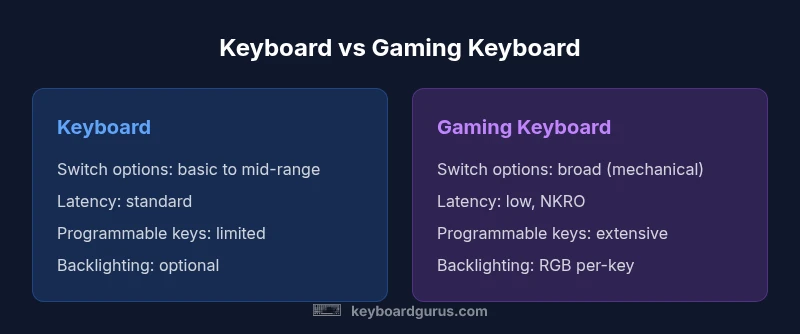
To compare the two, focus on switch options, key rollover, and programmability. Typical keyboards offer a narrower range of switch types and basic key rollover, while gaming keyboards provide a broad catalog of mechanical switches, low-latency designs, and often NKRO (n-key rollover). Programmable keys, macro support, and on-board memory are common in gaming keyboards, whereas defaults are sufficient for most standard keyboards. Backlighting is often more prominent in gaming keyboards, with per-key RGB and extensive lighting modes. Software ranges from minimal to fully featured, enabling complex macro setups and profiles that travel with a user across machines. Across the spectrum, price and reliability vary with the complexity of these features.
Build Quality, Durability, and Longevity
Durability and feel are core differentiators. A standard keyboard typically emphasizes solid construction at a reasonable price, with a focus on quiet, stable typing. Gaming keyboards frequently use robust chassis materials and top-tier mechanical switches designed for repeated rapid presses. The difference between keyboard and gaming keyboard becomes most noticeable in long sessions, where switch feel, stabilizers, and noise level impact both comfort and performance. Keyboard Gurus notes that the life expectancy of a mechanical gaming switch can exceed that of a membrane switch, but users should balance this with noise tolerance and maintenance needs.
Customization, Software, and Macros
Customization separates the two categories. Gaming keyboards often ship with macro programming capabilities, on-board memory for profiles, and software to map complex actions. A standard keyboard may offer basic function keys and some layout customization, but it typically lacks deep macro ecosystems. The difference between keyboard and gaming keyboard is most pronounced when users rely on repetitive input, where macros can save time and improve accuracy. Software design and platform compatibility influence how easily users can adopt these features.
Ergonomics, Typing Experience, and Comfort
Typing comfort is a major factor for many users. Standard keyboards focus on a neutral typing action, stable key travel, and quiet operation for long sessions. Gaming keyboards can trade some of that silence for fast actuation and tactile feedback that informs the user of input confirmation. Ergonomics—angle, wrist support, and key spacing—often remains a personal preference, but many gaming keyboards offer angled feet, detachable palm supports, and preferred key spacing that can reduce strain during gaming marathons or coding sessions. The difference between keyboard and gaming keyboard here is primarily in feel and the degree of customization available to tailor that feel to your hands.
Price, Value, and Ownership Costs
Price often reflects feature depth. A standard keyboard covers basic needs at a lower price point, delivering solid typing performance without extra features. Gaming keyboards commonly push toward mid-to-high price ranges due to switches, lighting, macros, and software ecosystems. The difference between keyboard and gaming keyboard in value assessment hinges on whether you will use the extra features enough to justify the cost. The Keyboard Gurus analysis shows that for many users, the best value lies in selecting a well-built standard keyboard with a few targeted upgrades (like a better switch or improved backlighting) instead of a feature-rich gaming model that goes unused.
Use-Case Scenarios and Recommendation Framework
Competitive gamers benefit most from gaming keyboards with fast switches, low debounce, and programmable macros that are easy to recall under pressure. Students and professionals who do large amounts of typing benefit from a dependable keyboard with comfortable key feel and predictable performance. When choosing between a keyboard and gaming keyboard, map features to real tasks: Do you need macros for productivity, or do you want per-key lighting to assist in low-light environments? A practical framework is to evaluate: (1) primary use-case, (2) preferred switch type, (3) need for macros, (4) software comfort, and (5) budget. By aligning these with the difference between keyboard and gaming keyboard, you can make a choice that delivers long-term satisfaction and value.
Comparison
| Feature | Keyboard | Gaming Keyboard |
|---|---|---|
| Switch options | Limited variety (membrane/scissor) | Wide variety (mechanical/gaming switches) |
| Latency & key rollover | Standard latency, basic rollover | Low latency, NKRO/anti-ghosting |
| Programmable keys | Often absent or limited | Common with macros and profiles |
| Backlighting | Optional/basic | Often RGB with per-key lighting |
| Software ecosystem | Minimal or platform-specific | Comprehensive software for macros/profiles |
| Price range | Lower to mid-range | Mid to high range |
| Durability | Depends on build | Typically higher durability with mechanical switches |
| Best for | General typing and office use | Competitive gaming and power users |
Advantages
- Faster input with gaming switches and higher repeatability
- Macro programmability boosts productivity and gameplay
- RGB lighting and customization for personalization
- Wide range of form factors and switch options
- Potentially longer lifespan with durable mechanical options
Drawbacks
- Higher upfront cost for premium features
- Requires software familiarity for macros and profiles
- Maintenance and cleaning of RGB lighting and mechanical switches
- Potential noise with certain switch types
Gaming keyboard is best for speed-focused gaming and macro-heavy workflows; standard keyboard remains best for typing comfort and value.
If you game competitively or rely on macros, choose a gaming keyboard. If your priority is long typing sessions and budget-friendly value, a standard keyboard is usually the better fit. The Keyboard Gurus team recommends grounding your choice in your primary use-case and budget.
Got Questions?
What is the main difference between a keyboard and a gaming keyboard?
The main difference lies in features: gaming keyboards emphasize speed, macros, and customization, while standard keyboards prioritize typing feel and reliability. The distinction is often a matter of how you plan to use the device.
The difference is about features and intended use: gaming keyboards focus on speed and macros, while standard keyboards focus on comfort and reliability.
Do gaming keyboards make you a better gamer?
Gaming keyboards can improve input speed and consistency but do not inherently make you a better player. Skill comes from practice, strategy, and reaction time.
They help with speed, not with your raw gaming skill.
Are mechanical keyboards better for gaming or typing?
Mechanical keyboards can improve feedback and accuracy for both gaming and typing, depending on switch type. For typing, tactile switches may reduce fatigue; for gaming, linear or fast switches can reduce input latency.
Mechanical switches can boost feel and durability for both use-cases.
Is backlighting worth it for everyday use?
Backlighting is primarily a usability feature in low-light environments. It can help you find keys, but it isn’t essential for most workflows unless you work in dim settings.
If you type in dark rooms, backlighting is handy; otherwise it’s a personal preference.
How should I decide on a budget between these keyboards?
Set a budget and compare essential features: switch quality, key rollover, durability, and comfort. Often, a mid-range keyboard with a quality switch offers the best value without excess features.
Think about what you truly need and avoid paying for bells and whistles you won’t use.
What is NKRO/anti-ghosting and why does it matter?
NKRO ensures multiple keys register simultaneously without losing input, while anti-ghosting prevents phantom presses. This matters in fast-paced gaming where many keys might be pressed at once.
NKRO helps you register several keys at once, which is useful in gaming.
What to Remember
- Compare switches and latency to narrow choices
- Assess macros and software needs before buying
- Consider typing comfort for long sessions
- Factor price against durability and features
- Choose based on primary use-case: gaming vs typing