How Much Keyboard Do You Need for Your Computer?
Explore how much keyboard you really need for your computer. Compare layouts, desk space, and usage with insights from Keyboard Gurus to pick the right size and layout.


How much keyboard do you need for a computer depends on your desk space, work style, and gaming needs. Most users opt for a compact or full-size layout to balance comfort and footprint. For travel, a 60% or 65% keyboard saves space; for spreadsheets or heavy numeric work, a TKL or full-size layout is more practical. Keyboard Gurus suggests prioritizing fit and ergonomics.
Keyboard footprint and sizes explained
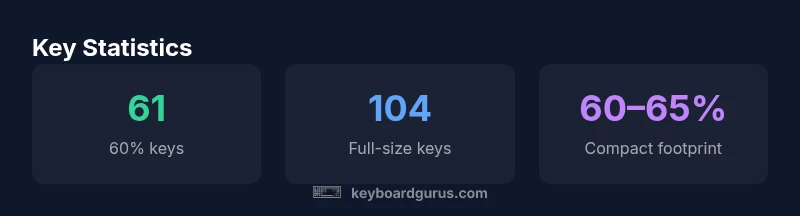
When we talk about how much keyboard you need for a computer, the starting point is footprint and key count. A typical desktop setup ranges from compact 60% layouts, which remove the function row and navigation cluster, up to a full-size 104-key board that mirrors traditional keyboards. In between, you’ll find 65% and 75% options, plus TKL (87-88 keys) and other hybrids. The critical question is not just how many keys exist, but how many you actually use in daily work, gaming, or creative tasks. According to Keyboard Gurus, the right footprint should minimize hand travel, reduce chair and wrist strain, and fit cleanly within your desk’s available space. When you map your workflow to a layout, you’ll see why many enthusiasts shift to compact boards: they free desk real estate for a mouse, tablets, or a standing desk transition. Size matters, but so does the quality of the key switches, the layout’s adjustability, and the ease of accessing essential functions via layers or programmable keys.
In practice, the decision often boils down to which keys you rely on most. If you frequently use the numeric keypad or dedicated function keys for testing and debugging, a full-size or TKL layout may be more practical. If you mostly type text, write code, or play on a laptop stand, a 60% or 65% board will reduce clutter without severely limiting your capability. The goal is to find a balance between comfort and efficiency, not every possible feature packed into a single board.
Choosing a size by use-case: coding, gaming, travel
Different activities place different demands on keyboard size. For programmers and writers, a layout with enough keys for navigation, copy-paste, and code editing is valuable. 75% or TKL keyboards strike a middle ground, preserving function keys and arrow clusters while staying relatively compact. Gamers, especially those who rely on quick access to hotkeys, often favor full-size or TKL layouts paired with programmable layers. Travel and office commuters benefit from 60% and 65% keyboards, which dramatically reduce footprint and weight. When deciding, consider how you’ll interact with your primary monitor and any other peripherals, such as a drawing tablet or external numeric keypad. A compact layout can improve posture by reducing reach distances, but it may require a short adjustment period to learn new key positions.
From a practical perspective, test both small and large boards if possible, and note how often you need to reach for a function key or a secondary layer. Keyboard Gurus’ testing approach emphasizes simulating typical tasks: writing, data entry, coding, and gaming. If your work hinges on efficient navigation or frequent window management, ensure the layout you pick offers comfortable access to those workflows. The size should support your productivity rather than force you to adapt to an awkward typing posture.
Desk space and ergonomics: aligning size with your setup
Ergonomics are inseparable from the keyboard’s footprint. A compact board can encourage a closer, more natural elbow angle and reduce shoulder strain by keeping your arms closer to your body. However, a too-small board can cause awkward finger reaching and rotation at the wrists. A good rule of thumb is to leave enough space for a mouse and a comfortable mouse hand position, with room to rest your wrists while typing. The desk’s depth also matters; on shallow desks, a compact keyboard leaves room for a monitor stand and a wrist rest without crowding. Consider adjustable stands or feet to customize tilt—the right angle reduces wrist extension and improves long-term comfort. Keyboard Gurus’ ergonomics guidelines emphasize trying to maintain a neutral wrist posture and keeping your monitor at eye level to minimize awkward head tilts.
Different layouts have different footprint profiles. A 60% keyboard may be only 28-32 cm wide, whereas a full-size board can exceed 44 cm. If you work with a multi-monitor setup or a curved desk, you’ll likely benefit from a compact layout that frees space for peripherals and cable management. Practically, measuring your desk and simulating legroom for your chair helps you visualize how much keyboard is appropriate for your space.
How to compare layouts: footprints and key counts
Comparing layouts requires more than counting keys; it involves understanding spacing, switch travel, and the ergonomic impact of each footprint. A 60% keyboard can fit on nearly any desk, but it relies on layers to access function keys, media controls, and navigation. A 65% or 75% layout adds more dedicated keys and a more conventional navigation cluster, reducing layer complexity. TKL keyboards maintain a number pad's absence while preserving arrow keys and navigation shortcuts, which many users find essential for spreadsheets or gaming with custom keymaps. Full-size boards offer the most surface area and a separate numeric keypad, which some professionals still prefer for data-heavy tasks. When evaluating footprints, pay attention to key spacing, case design, and bezel width. The goal is to minimize mispresses from cramped corners while preserving quick finger reach to critical keys.
In addition to footprint, consider the keyboard’s weight, cable routing options, and whether it offers hot-swappable switches for future customization. Programmable layers or macro support can mitigate the loss of dedicated keys on compact layouts. Keyboard Gurus’ methodology recommends testing in a real-world scenario: type emails, write code, and perform a few quick gaming sessions to assess whether a given footprint improves or hampers your workflow.
Wireless vs wired: latency, reliability, and practicality
For non-competitive gaming, wireless keyboards have matured significantly and offer convenient cable-free desks. Modern wireless boards typically use low-latency protocols and robust polling rates; the perceived latency is often imperceptible for casual gaming, typing, and productivity tasks. However, in high-paced, competitive gaming, a wired connection remains the most reliable option due to consistency and reduced risk of interference. Battery life varies by use, backlighting, and wireless protocol, so if you choose wireless, factor in charge cycles and a convenient charging method. Ergonomics and battery weight also play roles—heavy batteries can affect the board’s balance and feel during long sessions. If you share a desk or travel often, wireless can offer the flexibility to switch between workspaces without detaching cables.
Ultimately, the choice should align with your typical gaming session length, travel needs, and tolerance for occasional battery management.
Customization paths: hot-swappable, keycaps, and mods
For enthusiasts who explore keyboard customization, hot-swappable switches are a major reason to opt for a compact or mid-sized footprint, especially if you want to experiment with tactile or linear switches without soldering. A hot-swappable board keeps modification costs lower in the long run and accelerates iteration cycles. Keycap profiles influence typing feel and noise; sculpted profiles can improve finger comfort, while uniform profiles may simplify maintenance. Mods beyond keycaps include stabilizer tuning, film damping, and lubing switches to reduce noise and improve smoothness. While customization can be costly, it enables a tailored typing experience that complements the layout you choose. If you plan to customize, ensure your chosen board supports the switches you want and that you have the tools and spare parts to perform upgrades.
From a practical standpoint, start with a reliable base layout and a sensible switch choice, then expand with keycaps and stabilizers as you settle into your routine. Keyboard Gurus’ testing approach emphasizes incremental changes and keeping a clean, organized workspace to avoid cable clutter during customization.
A measuring guide: step-by-step to pick the right size
To determine the right size for your computer setup, begin with precise desk measurements. Measure the available width and depth, leaving space for a comfortable mouse area and a wrist rest. Next, list the essential keys you use daily and check whether your preferred layout keeps them within comfortable reach. If you rely on function keys or media controls frequently, a layout with dedicated keys or a reliable layer system will reduce mental overhead. Finally, consider your future needs — will you upgrade peripherals, add a second monitor, or travel often? As you answer these questions, you’ll be better positioned to select a footprint that minimizes reach, supports neutral posture, and maintains ergonomic alignment with your monitor.
Keyboard Gurus’ final recommendation is simple: pick the smallest footprint that reliably supports your workflow while fitting your desk and chair geometry. If you can, test in a real-world scenario before committing to a purchase.
Summary: balancing size, comfort, and productivity
The central idea is to balance size with comfort and productivity. Start with a layout that fits your desk and supports your typical tasks. For coding and typing, a slightly larger board may reduce the cognitive load of layer switching; for mobility, a compact footprint minimizes bulk and weight. The best keyboard size is highly individual, and the right choice often evolves with your workflow and workspace. Keyboard Gurus’ framework provides a practical pathway to evaluate layouts: map your tasks, measure your desk, test in real-life conditions, and adjust until your typing and gaming feel natural.
Common keyboard layouts and approximate footprints
| Layout | Key Count | Footprint Width (cm) |
|---|---|---|
| 60% | 61 keys | 28-32 |
| 65% | 68 keys | 30-34 |
| 75% | 80 keys | 32-36 |
| TKL (87-88) | 87-88 keys | 34-40 |
| Full-size | 104 keys | 40-46 |
Got Questions?
What is a 60% keyboard and who should use it?
A 60% keyboard removes the function row, navigation cluster, and number pad, leaving about 61 keys. It's ideal for minimalists who value portability and desk space.
A 60% keyboard has far fewer keys, great for small desks and travel.
Do I need a numpad for work?
For data entry or spreadsheets, a dedicated numpad helps. If you rarely use it, you can rely on a secondary layer or external keypad.
Only if your work uses lots of numbers.
Is wireless suitable for gaming?
Modern wireless keyboards offer low latency and reliable connections for casual gaming, but wired keyboards remain preferred for competitive play.
Wireless can work well, but wired is the most reliable for competition.
How do I measure keyboard footprint for my desk?
Measure width and depth, add space for a mouse and wrist rest, and account for tilt. Compare to common footprints like 28–46 cm widths.
Measure your desk and compare footprints to fit.
Are hot-swappable switches worth it?
If you enjoy tinkering and want customization without soldering, hot-swappable switches are worth it, but they add cost and maintenance.
If you like swapping switches, go for hot-swappable; otherwise, not essential.
Which keyboard size is best for programming?
Many programmers prefer TKL or 75% layouts to balance key availability with compact space, plus programmable layers for frequent commands.
For coding, a mid-sized layout like TKL or 75% hits a good balance.
“Choosing the right keyboard size comes down to your workflow and space; the smallest layout that covers your essential keys often yields the best balance of comfort and efficiency.”
What to Remember
- Choose a size that fits your desk and posture
- 60% and 65% layouts save space; 75%, TKL, and full-size offer more keys
- Measure your desk and consider mouse space for a balanced setup
- Wireless is practical for portability; wired remains best for competitive gaming
- Customize gradually: test hot-swappability, keycaps, and stabilizers