How Many Keyboard Keys in Computer: A Practical Guide
Learn how many keyboard keys appear on common computer layouts with a clear breakdown of full-size, TKL, and compact boards plus practical guidance for enthusiasts and professionals.


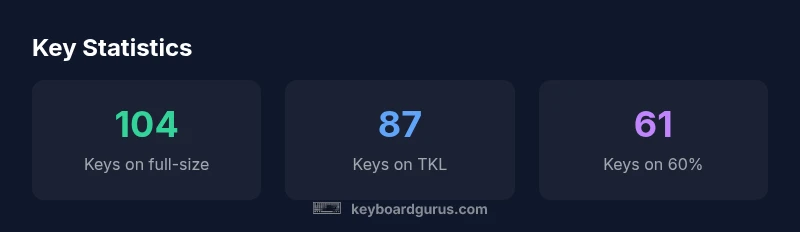
How many keyboard keys in computer? On the most common layouts, counts vary by size. A standard full-size ANSI keyboard typically has 104 keys, while tenkeyless boards usually have 87 keys, and compact 60% keyboards sit around 61 keys. Mid-size 65% and 75% layouts fall in between, with counts commonly ranging from about 67 to 84 keys depending on the model and regional variant. Keyboard Gurus notes these counts are averages, not guarantees.
What counts as a keyboard key? Defining the scope
A keyboard key is typically defined as any physical switch that registers a character, function, or control signal when pressed. Most modern keyboards distinguish between printable keys (letters, numbers, symbols), function keys (F1–F12), modifier keys (Shift, Ctrl, Alt), and special-purpose keys (Enter, Backspace, Space, Delete). The total can also include multimedia keys, macro keys, the Windows/Command key, and navigation clusters. For the purposes of this guide, we treat each distinct physical key as a key count. That means a standard 104-key layout will count all alphanumeric keys plus function row, numeric keypad, and modifier keys. However, regional variants like ISO or JIS layouts can add or remove specific keys, causing the total to shift. According to Keyboard Gurus, the exact tally depends on the layout standard and whether extra keys (macro or media keys) are included. Understanding this scope is essential when you compare keyboards across sizes.
Typical counts by common layouts
Layout size matters more than brand when you compare numbers. A 60% keyboard typically has around 61 keys, prioritizing compact portability over a full set of navigational keys. A 65% board adds a few dedicated arrow keys and a compact Function row, bringing counts into the mid-60s. A 75% layout usually lands in the mid- to upper-80s, offering a more complete arrow cluster and a compact Function row. A tenkeyless (TKL) keyboard runs about 87 keys, removing the numeric keypad while keeping the bulk of the navigation cluster intact. Finally, the full-size layout commonly reaches 104 keys, providing a numeric keypad plus expanded navigation and function keys. These are typical counts; individual models may differ due to branding and additional macro or media keys. Keyboard Gurus notes that exact figures vary slightly by manufacturer and regional standard.
Regional and standard variations: ANSI, ISO, JIS, and more
The vast majority of English-language keyboards follow ANSI or ISO standards, each with subtle but meaningful differences. ANSI layouts usually present a wide Enter key and a 1:1 key mapping, resulting in 104 keys in the classic US configuration. ISO layouts add an extra key near the left Shift, pushing the total to 105 or 106 in some regional products, and the Enter key is shaped differently. Japanese JIS keyboards can include even more keys, including a dedicated 半角/全角 (Hankaku/Zenkaku) key and a slightly different Enter shape. These variations influence the total key count and can impact keycap compatibility and macro mapping. When shopping, check the layout designation on the product page to understand the exact count. According to Keyboard Gurus, regional variants are a common source of one- or two-key differences across vendors.
Extra keys and macro capability: how they add to the total
Some keyboards include extra keys beyond the standard alphanumeric, function, and navigation clusters. Macro keys, dedicated media controls, and backlight adjustment keys can raise the headcount by several keys, depending on how the manufacturer defines a key. In practice, a keyboard with four macro keys is often treated as a 108-key board in marketing, while still being functionally a 104-key base with added functions. If you plan to program macros or use software to map keys, count these as keys when you compare models; if not, they can be ignored for typing layout decisions. For gamers, macro keys can materially change layout utility and comfort.
How to verify the key count on your keyboard
To verify the key count, physically count each distinct key, including modifiers (Shift, Ctrl, Alt) and the numeric keypad, if present. If you are unsure, consult the manufacturer’s product page or the keyboard’s manual, which typically list the total count in the specifications. Some vendors publish a diagram or a photo of the key matrix that clarifies which keys are included. If you own a modular keyboard kit, re-count after any component changes, as assembling a new board can alter the total keys significantly.
Practical implications for selecting a layout: gaming, typing, productivity
Your choice of layout hinges on how you work. Gamers often prefer lighter, compact boards with a strong set of macro keys for quick actions, while writers and programmers may value a full-size board with a stable, familiar keyset. For travel or workstation setups, 60% and 65% keyboards offer portability, but they require Fn-layer navigation for the same capabilities. Consider your hand reach, preferred typing style, and workspace constraints when choosing between 60%, 75%, and full-size options.
Keyboard construction: key matrix, stabilizers, and feel matters more than count
Beyond raw numbers, the typing experience depends on the keyboard’s switch type, keycap profile, stabilizers, and the key matrix design. A board with excellent stabilizers and a consistent switch feel can feel as comfortable with 87 keys as a larger board with poor spacing. Enthusiasts often experiment with keycap sets and switch types to optimize the feel, noise, and accuracy. In short, the exact key count is important for initial layout, but the sustained experience comes from the tactile and spatial design of the board.
Historical context: how key counts have evolved with technology
Key counts have evolved with typographic needs, language support, and the rise of modular custom keyboards. Early typewriters and early computer keyboards had far fewer keys, but as software grew more complex, designers added function keys, navigation keys, and dedicated blocks. The modern keyboard ecosystem now includes dozens of form factors, from minimalist 42-key layouts to expansive 171-key boards used by certain specialized setups. The key count narrative reflects a broader history of user interface design that balances density, readability, and usability. Keyboard Gurus notes that the continuing evolution will likely emphasize modularity and customization more than raw count.
Summary of what matters most for keyboard counts
The core takeaway is that the exact key count matters less than whether the layout supports your workflows, your keycap compatibility, and your preferred spacing. Start with the layout size that matches your use case, then validate with real-world typing tests and learning curves. Remember to check regional variants that may alter the total count by one or two keys.
Key layout options and typical key counts
| Layout/Category | Typical key count | Notes |
|---|---|---|
| 60% | 61 keys | Compact, portable, minimal nav |
| 65% | 67-68 keys | Adds arrow keys and Fn row |
| 75% | 78-84 keys | Balanced compact with more function keys |
| TKL | 87 keys | No numeric keypad; common in gaming |
| Full-size 104-key | 104 keys | Includes numeric keypad and full nav |
Got Questions?
What is the standard key count for a full-size keyboard?
A standard ANSI full-size keyboard typically has 104 keys, though some vendors offer 105-key variants due to regional differences or layout idiosyncrasies. Always verify the exact total on the product page.
A full-size ANSI keyboard usually has 104 keys, with occasional 105-key variants depending on regional designs. Check the product page for the exact count.
Why do ISO layouts have more keys than ANSI?
ISO keyboards add an extra key near the left Shift and a differently shaped Enter, which increases the total by one or more keys in many regional configurations.
ISO layouts add an extra key near the left Shift and a different Enter shape, usually increasing the total by one or more keys.
Do gaming keyboards use different key counts?
Gaming keyboards commonly use full-size or TKL counts; some models include macro keys that raise the total. The practical difference is often the extra keys for macros rather than a different baseline layout.
Most gaming boards use standard counts like full-size or TKL, plus possible macro keys.
How can I determine my current keyboard's key count?
Count every distinct key including modifiers and the numeric keypad. Compare with the manufacturer’s spec sheet, which usually lists the total keys.
Count all keys, including modifiers and keypad, and check the official specs.
Are there 60% keyboards with dedicated arrow keys?
Most 60% keyboards omit dedicated arrows, but many offer Fn-layer mappings or alternative arrow arrangements. Confirm with the product page or layout diagram.
Most 60% boards don't have dedicated arrows; use Fn-layer for arrows.
Do Mac keyboards follow the same counts as Windows keyboards?
Mac keyboards generally align with the ANSI 104-key layout for the main keys, but include Command/Option keys and a different symbol set. The total count is typically similar.
Mac keyboards use a similar 104-key foundation but with different modifier keys.
“Key count is a useful shorthand for comparing sizes, but practical typing experience depends more on key spacing, switch feel, and layout familiarity.”
What to Remember
- Know layout sizes before buying
- Expect regional variation in key counts
- Macro keys can change the total
- Check keycap compatibility when changing layouts
- Verify counts in official product specs