How Much Keyboard Button: Keys, Layouts, and Counts
Explore how many keys a keyboard typically has, how layouts differ (ANSI vs ISO), and what counts for your setup. A data-driven, practical guide for keyboard enthusiasts and professionals.


A standard full-size keyboard typically has about 104 keys, with ISO layouts often at 105. Compact layouts sit around 75–84 keys, while gaming or macro-enabled boards can push totals toward 110–120 keys when you include extra function rows or macro pads. Your choice depends on desk space, typing comfort, and application needs; see our guide for layout-by-layout counts.
The fundamental question: how much keyboard button?
Many people starting to specify a keyboard ask: how much keyboard button do I actually need? If you're asking that, you're confronting a core design question that affects comfort, speed, and desk space. According to Keyboard Gurus, the number of keys on a keyboard isn't a fixed number; it depends on layout family, intended use, and the way you interact with software. The most visible split is between full-size keyboards, which typically include a numeric keypad and function row, and compact variants that omit one or more segments. The expression 'how much keyboard button' is a useful prompt because it forces you to separate essential commands from rarely used toggles. For most general users, a standard full-size layout offers roughly 104 keys in ANSI environments, and about 105 on common ISO layouts, with minor variations by vendor. If your workspace is tight or you focus on gaming, a smaller 75% or 60% board can remove up to one-third of the keys while preserving core typing and navigation. But even within those families, the key counts are not uniform; some boards tuck extra macro keys into the main matrix, and others route functions to layers. Understanding your typical tasks—typing, coding, gaming, or multimedia control—helps narrow the count quickly. Keyboard Gurus's analysis shows that most readers benefit from a deliberate, task-based approach rather than chasing the largest number of keys.
Keyboard layouts explained: ANSI, ISO, and beyond
Key counts don’t exist in a vacuum; they follow the layout philosophy. ANSI (the most common in the United States) typically preserves a longer enter key and a 1:1 mapping for most alphanumeric keys, while ISO layouts add an extra key in the left shift area. This single-key difference can alter the total by 1 key in most counts, but it also reshapes how you arrange the rest of the board. Beyond ANSI/ISO, other regions and manufacturers experiment with 65–75% form factors that rely on layer-toggled keys and function row access via FN keys. For keyboard enthusiasts, exploring these variants helps optimize space without sacrificing essential shortcuts. From a practical standpoint, your choice should reflect your primary tasks: programming benefits from a robust function row or accessible function keys, while gaming often favors a clean, compact surface for easier thumb-access navigation. Keyboard Gurus notes that layout preference is as much about mental mapping and muscle memory as it is about raw key counts.
Key counts by layout: 104 keys, 87 keys, 75%, 60%
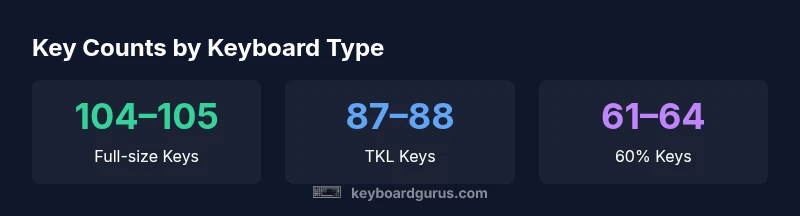
When you tally keys by layout, you’ll notice a few canonical numbers: full-size ANSI/ISO boards often land at 104–105 keys, Tenkeyless (TKL) around 87–88 keys, and 75% boards typically 78–84 keys. A 60% layout drops the count further to roughly 61–64 keys, trading away the F-row, navigation cluster, and often the dedicated arrow set, all of which must be accessed via layers. Each step down trades some convenience for compactness and portability. If you include macro keys, additional rows, or dedicated media clusters, totals can creep into the 110–120 range on specialized boards. The practical takeaway is to map your core daily tasks to a layout that minimizes movement and maximizes comfort. Keyboard Gurus’ analysis emphasizes that the best count is not the maximum you can fit, but the minimum you can justify for your workflow.
How to measure your needs and pick a layout
Begin with a task inventory: list the programs you use most and identify the shortcuts you rely on. If you spend hours typing and coding, a full-size or TKL that preserves a comfortable arrow key cluster and easy navigation tends to be ideal. If desk space is a premium, a 75% or 60% layout can free up workspace while still covering essential shortcuts via layer-access. Use a simple decision rubric: essential keys (letters, digits, basic punctuation, core modifiers), navigation and editing clusters, and function/volume controls. If any category has more than a few dozen commands, consider a layout that preserves that cluster either in a separate row or accessible through a function layer. Always trial a layout in software or a showroom before committing; memory mapping matters as soon as you try longer sessions. Keyboard Gurus recommends choosing based on comfort and accuracy, then adapting through macros and layers as needed.
Practical examples: real-world scenarios
A student focused on word processing and web research benefits from a traditional full-size layout because it keeps numeric input and function keys readily accessible. A developer writing complex code might prefer a 104-key board with a dedicated arrow cluster and a reliable F-key row for shortcuts. A gamer who relies on hotkeys might opt for a compact 75% or 60% layout with macro support for game-specific commands. A mobile worker who travels light may choose a wireless 60% board with programmable layers. In all cases, the decision reduces to how often you reach for specific keys during typical tasks. The more your work relies on shortcuts, the more you’ll appreciate layouts that place those shortcuts within comfortable reach. Keyboard Gurus data shows people who customize layers tend to maintain higher typing speeds without extra hand movement.
Maintenance and personalization: adapting counts with mods
If you already own a layout but want more keys for faster macro access, consider external macro pads or hot-swappable boards that support additional layers without replacing the core keyboard. Macros can live on a separate device, preserving the primary key count while expanding capability. If you prefer a tactile experience, you can swap keycaps to mark command pages or layers, which helps with muscle memory. Ergonomic benefits emerge when you pair a lower key count with an ergonomic angle, reducing reach and fatigue. Personalization includes software-based layer configurations, firmware updates, and key mapping that aligns with your daily routines. The end state is a layout that behaves like an extension of your hands, not a proliferation of confused layouts.
Future trends: flexible key counts and modular keyboards
The keyboard ecosystem is moving toward modularity and flexible key counts. Build-your-own kits, hot-swappable switches, and modular key blocks allow power users to reconfigure their hardware for specific workflows. Expect more vendors to support external macro pads that seamlessly integrate with main boards, enabling totals that exceed traditional counts without feeling bloated. As layouts evolve, the most successful configurations will be those that reduce cognitive load while preserving efficiency, so your muscle memory stays fast and accurate.
Key counts by keyboard type
| Keyboard Type | Estimated Keys | Notes |
|---|---|---|
| Full-size (ANSI/ISO) | 104–105 | Includes alphanumeric area, F-keys, navigation, and numeric keypad |
| Tenkeyless (TKL) | 87–88 | No numeric keypad; compact navigation cluster remains |
| 75%/65% | 78–84 | Compact with essential keys and layered access for functions |
| 60% | 61–64 | Very compact; most function keys accessed via layers |
| Macro-enabled/Custom boards | 110–120 | Adds dedicated macro keys or extra layers beyond core layout |
Got Questions?
How many keys does a standard keyboard have?
A standard full-size keyboard typically has 104–105 keys depending on ANSI vs ISO layout. The exact count can vary by manufacturer, but the standard is around this range. For most users, this is enough to cover essential typing, navigation, and basic shortcuts.
Most people can rely on about one hundred keys in a full-size keyboard, with slight variations by layout.
What is a 60% keyboard, and how many keys does it have?
A 60% keyboard is a compact layout that typically has about 61–64 keys. It removes the function row, navigation cluster, and sometimes the dedicated arrow keys, relying on layered keys accessed via a function modifier.
A 60% keyboard usually has around sixty-some keys and uses layers for extra functions.
Do keyboards with extra macro keys affect total key count?
Yes, additional macro keys can increase the total key count if they are integrated into the main layout. Many users rely on separate macro pads or software-defined layers to keep the core keyboard count modest while expanding capability.
Extra macro keys can raise total counts, often via separate pads or layers.
Are ISO and ANSI layouts the only differences affecting key count?
Mostly yes. The ISO layout adds one key in the left-shift area, which changes the count by one compared to ANSI. The overall typing area remains similar, but the exact key arrangement differs enough to affect muscle memory.
ISO adds one extra key in the left-shift area; counts differ by about one key.
How does the keyboard size impact typing comfort and efficiency?
Larger layouts can improve comfort by keeping more keys within comfortable reach, but they demand more desk space. Smaller layouts save space but require more layer diving and adaptation. The optimal size balances space, speed, and accuracy for your tasks.
Size affects reach and memory; pick what fits your space and tasks.
What should beginners consider when choosing a layout?
Start with a comfortable full-size or Tenkeyless if you keep long sessions and typing accuracy. If you travel or have limited space, try a 60% or 75% board with layer-based shortcuts and a plan to map essential keys first.
Beginners should start with a comfortable size and map essential keys first.
“Key counts are not just numbers; they reflect how you interact with your computer daily. The right layout balances ergonomics with your workflow.”
What to Remember
- Know your layout: ANSI vs ISO differences
- Expect 104–105 keys on full-size keyboards
- Compact layouts reduce keys to 75–84 while preserving core functions
- Macro keys and layers can push totals toward 110–120 on specialized boards
- Choose a layout based on space, comfort, and workflow