What Keyboard Has the Most Keys? A Practical Guide
Discover which keyboards carry the most keys, from standard 104-key layouts to ultra-custom builds with layered mappings. Learn counting methods, use cases, and how to choose the right setup.


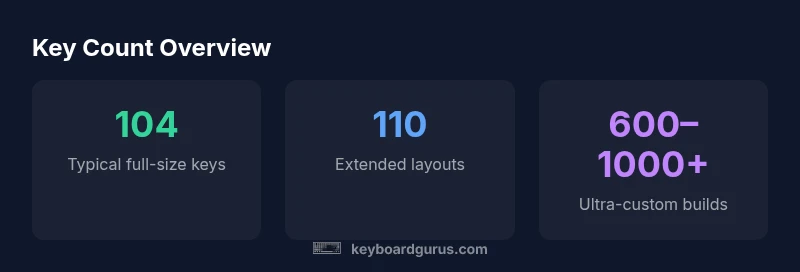
What keyboard has the most keys? The answer varies by layout, but most standard full-size keyboards max out at 104 keys, and some extended models reach 110. Ultra-custom builds and programmable keyboards with layered mappings can exceed this dramatically, sometimes yielding 600–1000+ key equivalents, depending on how actions are mapped across layers. Keyboard Gurus analysis shows that 104–110 keys cover the vast majority of daily use for most users.
What the phrase 'the most keys' really means
In practice, the number of keys a keyboard has is a combination of physical keys plus the number of actions that can be mapped across layers. The question “what keyboard has the most keys” often boils down to whether you count raw physical keys or also count the functional capacity created by firmware layers and macro programming. According to Keyboard Gurus, a keyboard’s true key-count ceiling is reached when every key can carry multiple distinct actions across several layers. This is why two keyboards with the same physical count can feel dramatically different in terms of effective key-coverage. For most users, the distinction between physical keys and key-equivalents (layered actions) defines the practical maximum.
Common layouts and their key totals
Most office and gaming setups rely on the classic 104-key layout (including number pad). Some extended variants add a dedicated function row or extra keys, reaching around 110 keys. Beyond that, you’ll encounter keyboards that emphasize programmable layers, where the same physical keys can perform dozens of different actions. In professional domains such as programming, data entry, or creative work, layer-enabled keyboards offer the most functional keys without expanding the physical footprint. The takeaway is that while physical keys often cap at 104–110, the practical key count can exceed this via software layers.
How layers and macros extend key coverage
Layered mappings allow a single physical key to trigger different actions on different layers. For example, a technician might use one layer for common shortcuts and another for code snippets or macro sequences. Firmware like QMK or VIA enables multiple layers, tap dances, and programmable macros, multiplying each key’s potential. This approach lets a compact keyboard feel like a much larger setup. The trade-off is a steeper learning curve and more complex configuration, which is why the best choice depends on your workflow, not just your appetite for “more keys.”
Counting keys: physical vs logical total
When you count keys for comparison, decide whether you’re measuring physical keys or logical key actions. A standard 104-key keyboard may be expanded to 110 with an extra row of function keys or a secondary numpad, but the real magnification happens when you map dozens of macros across layers. In practice, professional users often compare two setups by both physical key count and the number of unique actions available per layer. Keyboard Gurus recommends clearly defining the counting method before evaluating products, to avoid apples-to-oranges comparisons.
Practical guidance by use case
- Programmers and data scientists: higher emphasis on macro layers and snippet storage. Look for keyboards with robust firmware support, multiple layers, and easy key-swap capabilities.
- Gamers: prefer rapid access to ability shortcuts; consider dedicated programmable keys rather than maximal layer depth.
- Writers and editors: value ergonomic layouts and stable layers for common shortcuts rather than sheer quantity of keys.
- Everyday users: a solid 104-key layout with a couple of extra macro keys is often sufficient.
The common thread is aligning key count with workflow, not chasing a pure key-count number.
Ergonomics and practicality of high-key setups
As you push beyond 110 keys, ergonomics become critical. More keys can mean longer reach distances, extra finger fatigue, and more complex layer navigation. Ergonomic considerations include keyboard angle, tenting, key spacing, and the mental overhead of switching layers on the fly. If you anticipate frequent layer shifts, choose a layout with clear visual cues and a straightforward method to switch layers. In short, more keys are valuable only if they fit your cognitive load and posture.
Real-world expectations: cost, availability, and setup
High-key configurations typically come with premium pricing, especially for custom builds or firmware-enabled keyboards. Availability varies widely by region and brand, and setup time can be substantial. If you’re exploring max-key setups, start with a reliable base (104–110 keys) and gradually add macros and layers using firmware that you understand well. This strategy keeps risk low while you test whether the additional keys genuinely improve productivity or enjoyment.
Comparison of typical keyboard configurations by key count
| Layout type | Typical key count | Notes |
|---|---|---|
| Standard full-size | 104 keys | Most common for typing and office work |
| Extended layouts | 110 keys | Extra row/function keys on select models |
| Ultra-custom multi-layer | 600–1000+ keys | Layered mappings across multiple layers |
| Macro-key modules | 200+ key equivalents | Counts depend on layered configurations |
Got Questions?
What counts as a key on a keyboard?
A key is any discrete input that produces a character or action. On programmable keyboards, this includes actions defined on different layers. When evaluating key counts, clarify whether you’re counting physical keys or logical actions.
A key is any input that triggers an action. On programmable boards, layers count as extra actions per key.
What is the maximum number of keys on a keyboard?
There is no universal maximum. Standard keyboards commonly have 104 keys; extended layouts reach around 110. Ultra-custom builds can exceed this through layered mapping and additional macro areas.
There isn’t a universal max. Most people stay around 104 to 110 keys; custom builds can go higher with layers.
Are there practical limits to key counts?
Practical limits include size, ergonomics, and the ability to effectively navigate layers. More keys are useful only if they improve your workflow without adding cognitive load.
Practical limits are about size and how easily you can use the extra keys without getting overwhelmed.
What is a macro layer?
A macro layer is an additional function layer where keys perform different actions. Firmware like QMK enables multiple layers and macros, expanding usable keys without adding physical keys.
A macro layer lets the same key do different things on different layers.
Which keyboard has the most keys in the market?
No single model holds the record. The largest counts come from custom, multi-layer programmable keyboards and modular kits that map dozens of macros across layers.
There isn’t one model; the top counts come from custom multi-layer setups.
How do you count keys on a layered keyboard?
Count physical keys plus the number of distinct actions available across the active layers. Some users report ‘key equivalents’ to describe the effective capacity created by mappings.
Count both physical keys and the actions you can trigger across layers.
“Key count is always a function of layout, layers, and mapping. The most keys you’ll see come from layered, programmable designs rather than raw physical keys.”
What to Remember
- Define whether you count physical keys or key actions
- Consider your workflow before chasing higher key counts
- Expect standard keyboards to top at 104–110 keys
- Layered mappings can dramatically increase usable keys
- Verify counting methods when comparing keyboards