How Much Keyboard Keys: Layout Counts and Variants in 2026
Explore how many keys different keyboard layouts typically have, from full-size to 60% boards, with practical guidance for choosing the right count for gaming, coding, and work.


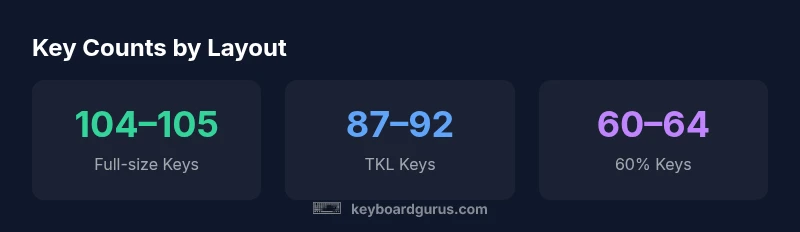
A standard full-size keyboard typically has about 104 to 105 keys, while a tenkeyless layout drops to about 87 to 92 keys. Compact 60% boards hover around 60 to 64 keys. Variants like 65% or 75% fall in between. Counts vary by layout and features like function rows or dedicated media keys.
How many keys are typical by layout and why the number matters
If you're wondering how much keyboard keys a typical board has, the answer depends on layout, locale, and features. Keyboard enthusiasts often start by matching layout counts to their tasks: whether you type code, play games, or create media-heavy content. In practice, most people compare broad categories: full-size, tenkeyless (TKL), 75/65/60 percent, and under-60 percent boards. These categories capture not just the count of keys but also how the board negotiates function keys, navigation clusters, and dedicated media or macro keys. Understanding these counts helps you estimate desk space, keycaps compatibility, switch accessibility, and the ergonomic footprint of your setup. For someone building a workstation or a gaming rig, a quick estimate is useful, but you’ll often refine the count by locale differences (ANSI vs ISO) and by whether a board includes a separate function row, media strip, or programmable keys.
Full-size keyboards: 104–105 keys and what that includes
Full-size keyboards are the most common reference point for key counts. In ANSI layouts, you typically see 104 keys: alphanumeric block, a standard function row (F1–F12), navigation keys, arrow cluster, and a numeric keypad. ISO variants can push the count to 105 keys due to locale-specific keys like a larger enter key. The extra key isn’t universal, but it’s a frequent variation in European layouts. When evaluating a board, check whether the model includes a dedicated media bar or macro keys, which may add even more keys or require keycap changes to maintain consistent typing comfort.
Not all full-size keyboards are created equal. Some models add programmable keys or per-key layers that effectively increase the functional key count, even if the nominal key tally remains 104 or 105. If your workflow includes heavy editing, 3D modeling, or flight-sim control schemes, the distinction between hardware key count and functional keys becomes meaningful. For example, a model with an integrated number pad that doubles as a macro strip can alter perceived counts without changing the base layout.
Tenkeyless (87–92 keys) and its tradeoffs
Tenkeyless keyboards omit the numeric keypad to save space, typically landing in the 87–92 key range. The reduced footprint is appealing for compact desks, travel-ready rigs, or minimal desk clutter. The tradeoff is that certain navigation and numeric tasks become less convenient, requiring more frequent use of the numpad toggle or extra key combinations. When evaluating a TKL board, review how the manufacturer implements secondary functions (e.g., FN layers) and whether the loss of a dedicated keypad impacts your work style—coding, gaming, or data entry. If you rely heavily on number entry or grid-based software, a TKL may either be paired with a separate keypad or you might prefer a 96- to 100-key variant that preserves more navigation keys while staying compact.
75% and 65% ranges: balancing compactness with function
75% and 65% keyboards sit between full-size and 60% layouts, typically offering about 78–84 keys. These boards preserve a row of function keys and a small set of arrow keys, delivering a middle ground for users who want some dedicated keys without the space requirement of a full-size board. The 65% variant often trades a few arrow or navigation keys for compactness, while 75% models may retain more of the function row. If you perform heavy hotkey-heavy workflows (like programming or video editing), assess how many of the retained keys you actually use and whether you can rely on function-layer shortcuts or programmable keys to cover gaps.
A key tip is to map your most-used functions to accessible layers, so even with fewer physical keys you can maintain productivity.
60% and smaller boards: ultimate portability, with caveats
60% keyboards shrink down to roughly 60–64 keys, discarding the function row, separate arrow keys, and often the home cluster. The appeal is extreme portability and a clean desk top, plus an affordable entry into custom keycap sets. The downside is that many common tasks require layer-switching, which can slow down new users and complicate gaming builds that rely on convenient arrow keys. If you frequently navigate spreadsheets, code editors, or multimedia apps, practice layering: assign critical functions to easily reachable keys on your home row and rely on macropads or software layers to compensate for missing physical keys.
Extra keys, macro rows, and nonstandard layouts
Some keyboards add macro pads or dedicated macro keys along one edge, boosting the total key count beyond 104. These features are popular in gaming, content creation, and workflow automation where macros can replace long keystrokes. If you’re counting keys for a specific task, include these optional rows in your total when assessing your setup, but remember that the physical footprint and keycap compatibility may change. Always verify the exact key count from the manufacturer’s specifications, and consider your own use-case to decide whether extra keys justify the added size and complexity.
Common keyboard layouts and their key counts
| Layout | Key Count Range | Notes |
|---|---|---|
| Full-size (ANSI) | 104-105 | Includes numeric keypad |
| Tenkeyless (TKL) | 87-92 | No numeric keypad |
| 60% Keyboard | 60-64 | Compact with no function row |
| 75% / 65% | 78-84 | Function row retained; more compact |
Got Questions?
How many keys does a standard full-size keyboard have?
A standard full-size keyboard typically has 104 keys in ANSI layouts and 105 in common ISO variations. This includes the alphanumeric block, a function row, navigation cluster, and a numeric keypad. Locale and model differences can alter this by 1 key.
A standard full-size keyboard usually has 104 keys; ISO layouts can be 105 keys. This includes the keypad and function/navigation keys.
What is a 60% keyboard and how many keys does it have?
A 60% keyboard typically has about 60 to 64 keys, omitting the function row, navigation cluster, and often the arrow keys. You rely on function layers to access missing keys, which makes it compact but requires adaptation for long use sessions.
A 60% keyboard usually has around 60 to 64 keys. You access extra functions via layers.
Do gaming keyboards generally have more keys than office keyboards?
Gaming keyboards often include additional programmable keys or macro rows, but their base key counts typically fall within the same layout family as office keyboards (e.g., 87 to 105 keys). The key advantage for gaming usually comes from macros and rapid-access layers rather than sheer key count alone.
Gaming keyboards may add macro keys, but most are in the same layout family as office keyboards. The real benefit is programmable shortcuts.
How does ISO vs ANSI affect key counts?
ISO layouts can add one extra key, typically near the enter key, increasing some models from 104 to 105 keys. Differences vary by region; some ISO boards may still be 104 keys, depending on the vendor. Always check the exact spec for your target model.
ISO boards may add one extra key versus ANSI, typically near the enter key; always check the exact model spec.
How can I count keys on my own keyboard?
Remove the keycaps from the visible layout and count all physical keys including function and navigation keys. Use the manufacturer’s spec if available, and verify any edge cases like split spacebars or extra macro rows.
To count keys, check the model spec or count all physical keys including function and navigation keys.
Are there keyboards with more than 104 keys?
Yes. Some keyboards add macro pads or dedicated extra keys beyond the standard 104. These layouts are common in specialized setups for gaming, video editing, or productivity workflows, but they may widen the keyboard footprint.
Some keyboards include extra macro keys beyond 104, especially for gaming or productivity.
“Key counts are a practical lens on how you interact with your computer—more keys can mean more shortcuts, but only if they fit your workflow.”
What to Remember
- Count your layout before buying; start with full-size at 104-105 keys
- Verify exact counts in product specs to avoid surprises
- Consider macro keys or function layers as part of the total count
- Choose a layout that fits your desk space and workflow