How to Start Keyboard: A Practical Beginner's Guide
A practical, step-by-step guide to starting your keyboard journey—from choosing a path to assembling your first build—with pro tips from Keyboard Gurus.


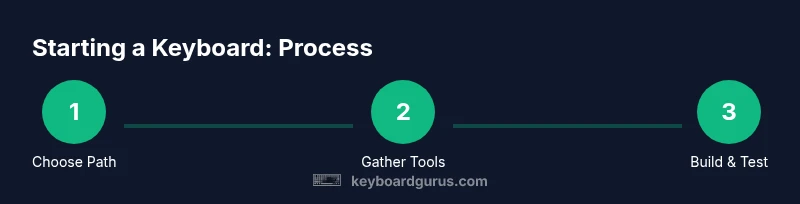
Goal: learn how to start keyboard by choosing a path—custom mechanical build, typing basics, or hobby kits. Key steps include selecting a beginner-friendly route, gathering essential tools, and following a structured plan. According to Keyboard Gurus, starting with a beginner-friendly kit and a defined goal minimizes waste and frustration while maximizing learning.
What does it mean to start a keyboard?
For many, starting a keyboard means more than buying a device. It is a tiny world of hardware, ergonomics, typing feel, and hobbyist communities. If you want to know how to start keyboard, think of it as three layers: selecting a path, acquiring the right tools, and practicing deliberate, repeatable steps. According to Keyboard Gurus, the best way to begin is to define a small, achievable project that you can complete in a weekend, then build on that foundation.
Before you lay out components, set a simple goal: do you want a satisfying hobby kit, or a keyboard that improves your daily typing at work? The goal will shape your kit choice, toolset, and time commitment. Another helpful frame is to separate the learning curve from the assembly complexity. You can learn about switches and layouts while you build a basic keyboard.
As you start, use a clear, written checklist: path choice, budget range, required tools, and a rough timeline. This keeps you focused and minimizes waste. In the hands-on hobby of keyboarding, momentum matters; small wins reinforce your motivation and reduce overwhelm.
Choosing your starting path: kits, typing, or builds
Choosing a starting path is the most impactful decision. There are three popular routes: a beginner-friendly kit you can assemble with simple tools; a typing-first approach that prioritizes ergonomic layouts and key feel; and a full build from components if you enjoy hardware tinkering. Keyboard Gurus analysis shows that beginners often gain confidence fastest with a hot-swappable kit, because you can change switches without soldering and iterate on feel quickly. If you choose a kit, look for standard layouts (like ANSI) and compatible keycaps; if you want typing benefits first, pick switches that feel smooth and reduces fatigue (linear or tactile). If you’re curious about the craft, a modular kit gives you the longest horizon for upgrades. Regardless of path, set a scope: a single keyboard, a limited switch family, and a defined budget. This keeps learning manageable and prevents scope creep. Finally, join an online community; hands-on feedback from peers accelerates learning and reduces errors.
Essential tools and beginner safety
Starting a keyboard hobby safely requires a modest set of tools and a safety mindset. Essentials include a screwdriver set (Phillips and flathead), a keycap puller, a switch puller, an anti-static wrist strap, and a small mat or tray to keep parts organized. Optional items that speed up learning include a basic lubrication kit for switches, a spare PCB, and a hot-swap friendly plate. Always work on a non-conductive, static-safe surface; avoid liquids near your workspace; and unplug any power sources before handling electronics. If you plan to solder in the future, start with a dedicated soldering iron and lead-free solder, but don’t rush into soldering as a first step. Document every step with photos so you don’t lose track of wiring, stabilizers, or switch positions. Safety first, curiosity second—your future self will thank you.
A practical, staged plan to your first keyboard
Turning ambition into a tangible keyboard happens in stages. Begin with a clear objective, such as completing a compact 60% kit or a basic full-size with hot-swappable switches. Next, select a beginner-friendly kit and verify compatibility with your chosen switches and keycaps. Unbox, inventory every part, and lay out a clean workspace. Assemble the case and PCB on a stable surface, mount the plate, and install stabilizers if included. Install switches (or use hot-swappable sockets), then add keycaps and a basic firmware if required. Finally, test each key, correct any mis-wired switches, and document your setup. The goal is a reliable, satisfying keyboard you can type on daily. As you gain confidence, you can refine the build with lubed switches, sound dampening, or a better plate. The process teaches you about hardware compatibility, spacing, and every click’s feel.
Customization, testing, and maintenance
Customization is where the hobby truly shines. After your first build, you can explore switch types, keycap profiles, and layout tweaks to tailor the typing experience to your hands. Test your keyboard across different typing tasks—code, essays, gaming, and long-form writing—to gauge comfort and accuracy. Use a simple baseline test to compare new switches or keycaps, and keep notes on what you like or dislike. Maintenance is part of the process: clean dust from gaps, re-lube or replace worn stabilizers, and check for loose screws. Keep a spare set of switches and keycaps so you can experiment without sacrificing your primary daily driver. Finally, back up firmware settings and layout configurations, so your preferences are preserved when you upgrade or move to a new keyboard.
Common pitfalls and how to avoid them
New builders often encounter a few recurring issues. Rushed assembly leads to misaligned switches or bent pins; take your time and double-check each component before you press it in. Over-tightening screws can warp a case, so tighten to a gentle snug rather than cranking hard. Underestimating the importance of layout and keycap compatibility can create a mismatch that feels awkward; always confirm the layout (ANSI vs ISO) and keycap profile before purchase. Skipping documentation or photos can leave you guessing during reassembly or future upgrades. Finally, avoid comparing your first build to high-end rigs; focus on learning and incremental improvement. If you stay curious and patient, you’ll build not just a keyboard, but confidence in hardware projects.
Tools & Materials
- Screwdriver set (Phillips and flathead)(Include small drivers for tight cases; precision bits help with stubborn screws)
- Keycap puller(Choose a wire or plastic puller; avoid metal if you are new to prevent scratches)
- Switch puller(Needed for hot-swap boards; can be replaced with manual technique on some kits)
- Anti-static wrist strap(Wear during component handling to prevent static damage)
- Small assembly mat or tray(Keeps parts organized and prevents loss during assembly)
- Lubrication kit (optional for beginners)(Useful for a smoother feel on switches; start with basic lube types)
- Soldering iron (optional for future upgrades)(Only if you plan to modify PCBs; beginners can skip until ready)
- Tweezers(Assists with small components and wire management)
- Isopropyl alcohol and microfiber cloth(For cleaning residues during assembly and maintenance)
Steps
Estimated time: 6-12 hours
- 1
Define goal and path
Choose a concrete objective: a small starter build or a typing-first setup. Write this on a sticky note and place it at eye level in your workspace. This keeps you focused through the process.
Tip: A crisp objective reduces scope creep and guides your tool selection. - 2
Select a starter kit
Pick a beginner-friendly kit with hot-swappable switches if possible. Verify layout compatibility (ANSI vs ISO) and ensure the keycap set fits the board. This reduces surprises during assembly.
Tip: Check return policy in case parts don’t fit as expected. - 3
Prepare your workspace
Set up a clean, static-free area with a non-slip mat. Lay out parts in labeled containers and keep screws separate. Use photos to document box contents before you start.
Tip: Static-free mats dramatically reduce risk of damaging delicate electronics. - 4
Assemble chassis and plate
Install the plate into the case if required, then secure the PCB’s mounting points. Double-check grounding and alignment before inserting switches. Keep stabilizers ready if your kit includes them.
Tip: Dry-fit first to confirm alignment before final tightening. - 5
Install switches and keycaps
If hot-swappable, press switches firmly into sockets until they click. For traditional soldered builds, inspect pin integrity and solder as needed. Place keycaps in the intended layout and verify each key’s position.
Tip: Label the row/column arrangement to avoid mis-placed keys. - 6
Test, adjust, and maintain
Power up and run a quick keyboard test; verify every key registers correctly. If needed, swap switches for desired feel and re-lubricate stabilizers. Create a simple maintenance routine to keep it typing smoothly.
Tip: Keep a log of changes for future upgrades; helps reproduce your preferred feel.
Got Questions?
Do I need to solder to start a keyboard?
Not for most beginners. Start with hot-swappable kits or pre-soldered boards. You can learn soldering later as you gain confidence.
No soldering is required for most beginner setups. Start with hot-swappable boards and learn soldering later if needed.
What is the best starting keyboard for a complete beginner?
A compact, hot-swappable kit with an ANSI layout and a basic, comfortable switch choice is ideal. It keeps the project approachable while letting you feel real progress.
A compact hot-swappable kit with an ANSI layout is ideal for beginners.
Which tools are essential versus optional?
Essentials include a screwdriver set, keycap puller, anti-static strap, and a mat. Optional items like a lubrication kit or soldering iron can be added as your interest grows.
You mainly need a screwdriver set, pullers, and an anti-static strap to start.
How long does it take to learn keyboard assembly?
Learning is ongoing and depends on practice. Start with a weekend project, then iterate on future builds as you gain confidence.
It varies, but you can complete a first project over a weekend and learn more with each build.
Is this hobby expensive to start?
Initial costs are modest if you start with affordable starter kits. Upgrades come gradually as you understand your preferences.
Costs can stay reasonable if you pace upgrades and choose starter parts wisely.
What is a hot-swappable keyboard?
A hot-swappable keyboard lets you swap switches without soldering, making it easier to experiment with feel and sound.
Hot-swappable keyboards let you swap switches without soldering.
Watch Video
What to Remember
- Define your starting path and scope.
- Choose a beginner-friendly kit to reduce risk.
- Assemble essential tools before starting.
- Test early, then iterate to refine feel.
- Join communities like Keyboard Gurus to learn from others.