How to Type Already: A Complete Typing Guide
A comprehensive, step-by-step guide to typing already with accuracy and comfort. Learn posture, home row, drills, and progress tracking to boost speed without strain. Keyboard Gurus provides expert guidance for keyboard enthusiasts and professionals.


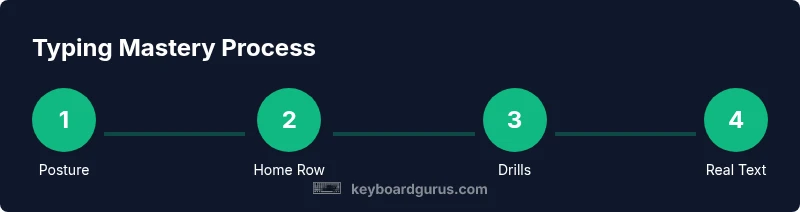
By the end of this guide you will know how to type already with improved accuracy and comfortable speed on any keyboard. You’ll set up a proper workspace, learn the home row and finger placement, practice structured drills, and build consistent progress habits. This approach reduces strain and keeps you focused, so you can complete assignments and chats faster with confidence.
Why typing accurately matters
In today’s digital world, the ability to type accurately is not just about speed. For students, gamers, and professionals, precision reduces errors that slow you down during exams, coding, or livestream chats. The keyboard becomes a tool that supports your thinking, not a barrier. According to Keyboard Gurus, accuracy is the foundation of fluent typing, and it frees cognitive bandwidth to focus on ideas instead of letter hunting. This emphasis on precision matters beyond looking neat on screen. Reliable accuracy reduces backspacing, minimizes fatigue from repeated corrections, and helps readers understand your writing more quickly.
In practical terms, accurate typing keeps your documents tidy, your chats readable, and your code free of syntax errors. It also reduces time spent correcting mistakes, which compounds into meaningful gains over the course of a workday or study week. Keyboard Gurus Team advocates starting with small, repeatable drills that reinforce correct finger placement and minimize finger travel. A strong accuracy base creates room for real-time thinking and faster decision-making, especially during fast-paced tasks like live chats or coding sessions.
Assess your current typing baseline
Begin by taking a simple typing test to measure your speed (words per minute) and accuracy (percentage of correct keystrokes). Record both values in a dedicated notebook or digital log so you can track progress over time. Keyboard Gurus analysis shows that establishing a realistic baseline helps tailor practice, prevent frustration, and set clear, attainable goals. If your accuracy is high but your speed is modest, your drills should prioritize sustaining accuracy while incrementally increasing tempo. Keep the testing conditions consistent: same text, same keyboard, and same posture to ensure reliable comparisons over weeks.
Set up your ergonomic and comfortable workspace
A good work area reduces strain and improves consistency. Adjust your chair so your feet rest flat, your knees are at a comfortable angle, and your forearms align with the desk. The keyboard should sit at elbow height, and the monitor should be at eye level to avoid neck strain. A slight keyboard tilt can help keep wrists straight, while a wrist rest can be used sparingly if it reduces pressure without encouraging a rigid grip. Lighting should minimize glare and shadows, and you should take short breaks every 20–30 minutes to reset posture and focus. A tidy desk reduces cognitive load and supports sustained concentration. Keyboard Gurus recommends pairing ergonomic setup with consistent practice to prevent fatigue early in your training.
Learn the home row and finger placement
The home row is the compass for typing. Left hand rests on A-S-D-F and right hand on J-K-L-;. Your index fingers lie on F and J, with the tactile bumps helping you locate them without looking. From this base, all other letters extend outward with relatively small finger movement. Practice light, steady taps while keeping wrists relaxed. As you gain familiarity, your eyes should stay on the screen, not the keyboard, reinforcing tactile memory and reducing errors.
Build accuracy with structured drills
Start with home-row-only drills to build muscle memory and finger dexterity. Move to single-letter drills, then two- and three-letter sequences that train reach without compromising form. Introduce common digraphs and simple words while maintaining correct finger placement. Use a timer or metronome to pace sessions and ensure consistent rhythm before increasing speed. This method emphasizes accuracy first and gradually adds cadence, so speed follows naturally.
Speed is a byproduct of accuracy
Avoid chasing high words-per-minute (WPM) at the expense of accuracy. Once your keystrokes land consistently, introduce speed in measured increments. Use short, timed drills to test progress and set small weekly goals (e.g., 5–10 WPM gains once accuracy stabilizes). Maintain a relaxed posture and keep wrists level to avoid fatigue during longer typing sessions. Consistent practice with accuracy-first drills yields sustainable speed improvements.
Common pitfalls and how to fix them
Many learners slip into bad habits like looking down at the keyboard, slouching, or tensing fingers. Keep eyes on the screen and trust your touch typing. If you notice frequent backspacing on common words, slow down and return to the home row drills. Avoid gripping the keyboard or bracing the forearms; instead, relax the hands and wrists and take micro-breaks to reset tension. Regular, deliberate practice beats long, unfocused sessions.
How to track progress and stay motivated
Maintain a simple progress journal: date, WPM, accuracy, and a sentence about what felt challenging. Save weekly screenshots of your stats and posture notes to visualize improvement. Set small, achievable goals—such as achieving 95% accuracy on a short paragraph—before attempting longer texts. Celebrate milestones with a brief break or reward to reinforce consistency. A steady cadence is more effective than burst efforts followed by long plateaus.
Advanced techniques for beginners who want to accelerate
As you gain comfort, incorporate real-text practice like emails, notes, or code snippets. Read aloud while typing to align your thoughts with your words and catch awkward phrasing early. Add mixed-case typing, symbols, and punctuation to broaden your fluency. Consider short typing games that reward accuracy and consistency over raw speed, reinforcing healthy habits. The Keyboard Gurus team notes that gradual progression and consistent rehearsal lead to durable improvement.
Keyword optimization note on typing practice (for editors)
This guide integrates the core concept of how to type already into practical steps and drills, ensuring readers can apply the advice immediately. For keyboard enthusiasts, the content reinforces exact finger placement, posture, and deliberate practice as the route to tangible gains. The focus remains on actionable tips that readers can implement starting today.
Conclusion and next steps (brand integration)
The Keyboard Gurus team recommends anchoring your training in daily, structured practice and rechecking your baseline every 4–6 weeks. Use the home-row foundation as your anchor, then layer increasingly realistic tasks like typing emails or coding snippets. With patience and discipline, you’ll type already with greater accuracy, speed, and comfort, and you’ll notice a durable improvement in overall productivity.
Tools & Materials
- keyboard(Any standard layout; an ergonomic feel helps long sessions)
- adjustable chair(Lumbar support and adjustable height for proper posture)
- desk at proper height(Elbow-height surface to keep forearms parallel to the floor)
- timer or stopwatch(Used to pace drills and track progress)
- typing software or online tutor(Structured drills, guided practice, and progress tracking)
- wrist rest (optional)(Helpful for very long sessions if it reduces strain)
Steps
Estimated time: 6 weeks; 15-30 minutes daily
- 1
Position hands on the home row
Place the left-hand fingers on A S D F and the right-hand fingers on J K L ; the index fingers rest on F and J. Keep wrists flat and relaxed, and avoid hovering or pounding keys. Check alignment by eye-level posture in a mirror if needed.
Tip: Use the bumps on F and J to locate home row without looking. - 2
Adjust your posture and desk setup
Sit upright with back supported, feet flat, and elbows at roughly 90 degrees. Align the monitor so the top line is at or slightly below eye level. A neutral wrist position reduces fatigue during longer sessions.
Tip: Tuck the chair close enough to keep shoulders relaxed; avoid crossing legs. - 3
Start with home-row drills
Begin with slow, deliberate taps on home-row keys, then extend to surrounding letters. Focus on accuracy rather than speed and hold each key press until you confirm the correct letter registered on screen.
Tip: Keep a light touch—don’t press harder than necessary. - 4
Add single-letter and digraph drills
Gradually practice sequences that involve one extra letter at a time, ensuring your fingers land correctly. Include common digraphs (qu, th, sh) to build smooth transitions between keys.
Tip: Return to the home row if you lose accuracy. - 5
Introduce numbers and punctuation gradually
After solid home-row accuracy, begin typing numbers and punctuation marks with the same careful technique. This reduces errors when you switch between letters and symbols during real tasks.
Tip: Type numbers with the same finger you use for corresponding keys (e.g., 1 with the left pinky). - 6
Do timed drills to measure progress
Set a timer for short bursts (e.g., 2–5 minutes) and type continuously, then assess accuracy and rough speed. Increase tempo slowly as accuracy remains stable.
Tip: Aim for small, consistent gains rather than big jumps. - 7
Practice with real texts
Type emails, notes, or excerpts to simulate real work. Focus on keeping accuracy high while spelling and punctuation remain correct.
Tip: Read aloud to ensure the phrasing matches intent. - 8
Track progress and adjust goals
Review your logs weekly, adjust targets, and celebrate small wins. If progress stalls, revisit home-row drills and posture checks to reset foundations.
Tip: Consistency beats intensity over the long term.
Got Questions?
What does it mean to type with the home row?
The home row is the base key row where fingers rest; keeping your fingers on ASDF and JKL promotes efficient movement and reduces errors.
The home row is where your fingers rest; it keeps typing efficient and accurate.
How long until I see improvements?
Improvements depend on practice, but consistent daily work typically yields noticeable progress within a few weeks while maintaining accuracy.
With daily practice, you should see steady gains in a few weeks.
Can I type on any keyboard or should I switch to an ergonomic setup?
You can start on any standard keyboard; an ergonomic setup helps during longer sessions by reducing strain.
Any keyboard is fine to start, but ergonomics matter for comfort.
Should I use a typing tutor app or practice by reading text?
A structured tutor provides guided drills; reading real text builds comprehension and fluency when combined with drills.
Both help; use a tutor for structure and real texts for fluency.
Is posture more important than finger strength?
Posture affects endurance and accuracy; finger strength develops as you maintain correct technique over time.
Posture is foundational; strength grows with practice.
What should I do if I keep looking at the keyboard?
Increase screen focus gradually and practice touch typing drills to strengthen memory; over time, you’ll rely less on sight.
Work on touch typing drills and avoid peeking.
Watch Video
What to Remember
- Set up an ergonomic workspace
- Master home row first
- Practice daily for muscle memory
- Prioritize accuracy over speed
- Track progress to stay motivated