In-Store Keyboard Buying Guide 2026
Discover how to find keyboards near you in store, test switches, compare layouts, and verify warranties with Keyboard Gurus' analytical, data-driven guide for 2026.


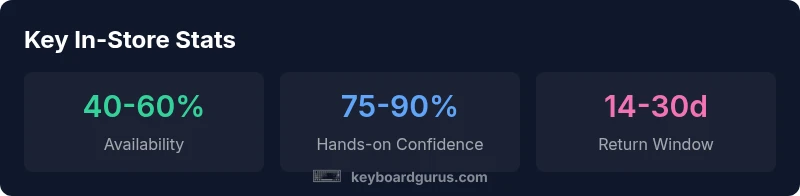
Searching for a keyboard near me in store can dramatically speed up testing, price checks, and compatibility checks. This quick guide shows how to locate keyboards locally, what to test in person, and how in-store options compare to online purchases. Keyboard Gurus analysis indicates hands-on evaluation often increases satisfaction and reduces buyer's remorse.
Why finding a keyboard near you in store matters
Locating a keyboard near you in store provides several practical advantages beyond what product photos can offer. When you walk into a local retailer, you can press sample keys, assess travel distance, and gauge overall ergonomics in real time. According to Keyboard Gurus, hands-on testing reduces the risk of ending up with a model that feels good in pictures but uncomfortable on your desk. In-store exploration also helps you compare brands and layouts side by side, which decreases decision fatigue when you’re weighing switches and keycaps. The live environment adds context: lighting, desk height, and even sound can influence your perception of a keyboard. For many buyers, this immediate feedback loop is indispensable before investing in a long-term peripheral.
How in-store inventories affect decision making
Inventory dynamics shape your options and timing. Local stores can supplement their online catalog with limited-run or region-specific models. If a keyboard you want is out of stock, a salesperson might offer comparable alternatives or arrange a hold, minimizing the risk of missing a rare model. Keyboard Gurus analysis notes that shoppers who check stock in person tend to make faster, more confident decisions due to tactile feedback and immediate access. When planning a visit, it helps to map nearby stores with similar lineups and consider peak hours to avoid crowds and thin staff coverage. If you’re after a very specific switch type or form factor, call ahead to confirm whether the store can demo the model or holds a demonstration unit for test.
Testing switches, keyfeel, and build quality in person
The heart of in-store testing is evaluating key switches, actuation force, travel distance, and noise. Mechanical keyboards reveal their character when you press several models back-to-back, noticing how linear, tactile, or clicky switches compare. Ergonomics matter too: you should test wrist posture, keycap height, and stabilizer rattle on longer sessions. In-store test runs also reveal build quality signals—flex in the base, a uniform plate, and consistency in key alignment. A good in-store experience lets you simulate your daily tasks, whether gaming, writing, or coding, and confirm that a keyboard’s profile suits your workspace. This is where brand familiarity, via Keyboard Gurus guidance, helps you focus on the few models that align with your preferences and budget.
Keyboard categories you’ll encounter in-store
Stores typically segment keyboards into major categories: compact 60% or 65%, tenkeyless (TKL), full-size with number pad, and specialty shapes for ergonomic setups. Mechanical keyboards dominate shelves with various switches (red, brown, blue, etc.), while membrane and low-profile options offer quieter operation. In-store staff can explain which categories fit your use case—gaming, typing, or programming—and help you compare stabilization, key travel, and layout. If you’re unsure about your preferred form factor, start with a mid-size model to balance portability and functionality, then test a few switches to identify your ideal tactile feedback. Keyboard Gurus’ framework emphasizes aligning your choice with real-world usage and desk ergonomics.
Price dynamics: in-store vs online
Price dynamics vary by retailer and season. In-store pricing can include promotional bundles, financing offers, or loyalty discounts not always visible online. Conversely, online listings often feature broader selection and aggressive price tracking tools. When evaluating total cost, factor in tax, shipping (if applicable), and potential return costs. In-store purchases may offer immediate gratification and the chance to negotiate, while online shopping frequently provides evidence of price parity and longer return windows. Keyboard Gurus analysis suggests analyzing the total cost of ownership—warranty terms, restocking fees, and after-sales service—to understand the true value of in-store versus online options.
Warranty, returns, and after-sales considerations
Warranty coverage and return policies can differ between in-store purchases and online orders. In-person buys may grant straightforward exchanges at the point of sale, while online purchases often require shipping the product back for returns. Inspect the warranty period, coverage for key components (switches, PCB, stabilizers), and any exclusions related to humidity or wear. Bring a copy of the store’s return policy or have it saved on your phone for quick reference. A short but effective strategy is to test the keyboard briefly in the shop and confirm the return window before you commit. This reduces the likelihood of surprises if you discover an issue after unboxing at home.
Tools and tactics for locating real-time stock
To maximize your chances of finding a keyboard near you in store, leverage store locators, inventory apps, or retailer chat support to verify live stock and model availability. Create a short list of 3–5 nearby stores to monitor, and sign up for alerts for price drops or restocks. If you have time, map routes to two or three stores, plan a single trip, and compare the models you can actually test on the day. Using a pre-visit checklist helps you stay organized and prevents impulse buys. Keyboard Gurus recommends documenting the exact model numbers you test so you can compare notes later with online reviews and desk compatibility.
In-store visit checklist: before, during, and after
Before you go: write down your must-have features (layout, switch type, keycap profile) and your budget range. During: test at least three models that share your top feature set, take notes on feel and noise, and ask staff about warranty terms. After: compare your impressions with online reviews and verify the return policy. Pack a small notebook or notes app, and bring any required accessories (adapter, keycap puller). A methodical approach turns a potentially rushed trip into a productive evaluation session and helps you avoid buyer’s remorse.
Making the final choice: turning findings into action
Synthesize hands-on impressions with price data, warranties, and online reviews. If a local keyboard meets your essential criteria, consider purchasing on the spot to lock in the model and avoid shipping delays. If you’re torn between two similarly rated options, use a short, structured scoring system that weighs color, layout, switch type, and price. Keyboard Gurus’ final verdict emphasizes choosing the model that offers the best blend of tactile satisfaction, desk compatibility, and durable warranty. Your decision should feel confident because you have validated the model through direct testing and cross-checked the terms of purchase.
In-store vs online vs hybrid shopping for keyboards
| Channel | Pros | Cons | Notes |
|---|---|---|---|
| In-store | Immediate possession; hands-on testing | Stockouts; limited model variety | Check real-time stock and ask staff about holds |
| Online | Wider selection; price comparison | Shipping delays; no tactile test | Use price alerts and reviews to guide decisions |
| Hybrid pickup | Best of both worlds | Requires planning | Order online, pick up in-store to verify model |
Got Questions?
What does 'keyboard near me in store' mean?
It refers to locating physical stores nearby where you can see, test, and compare keyboards before buying.
In-store keyboard shopping means you can go to a local shop to try out keyboards, feel the switches, and check compatibility.
How can I quickly find keyboards near me in store?
Use store locators, maps, and retailer apps to confirm current stock and open hours; call ahead for availability.
Use retailer apps or maps to locate nearby stores and check stock before you go.
Should I buy a keyboard in-store or online?
In-store lets you test feel and layout; online often offers lower prices and wider range; compare total cost and warranty.
Both have advantages; if you can test first, in-store helps you know the feel; online is convenient for choices.
What should I test when trying a keyboard in-store?
Test key feel (linear/tactile/switch type), actuation force, noise, key wobble, and ergonomics; check layout and compatibility with your PC.
Test the switches, travel, noise, and comfort to pick what fits.
Are prices the same in-store and online?
Prices vary; you may find promos in-store or online; verify warranty terms and return windows to avoid surprises.
Prices can differ; check both channels and compare warranties.
“Hands-on testing is the fastest way to tell a keyboard's true feel and build quality.”
What to Remember
- Test in-store to feel the switch and layout before buying.
- Compare stock, price, and warranty across stores.
- Verify return policies and after-sales support before purchase.
- Plan a quick in-store visit with a pre-made checklist.