Online Virtual Keyboard vs On-Screen Keyboard: A Comprehensive Comparison
A thorough comparison of online virtual keyboards vs on-screen keyboards, covering accessibility, latency, privacy, and use cases for students, gamers, and professionals.


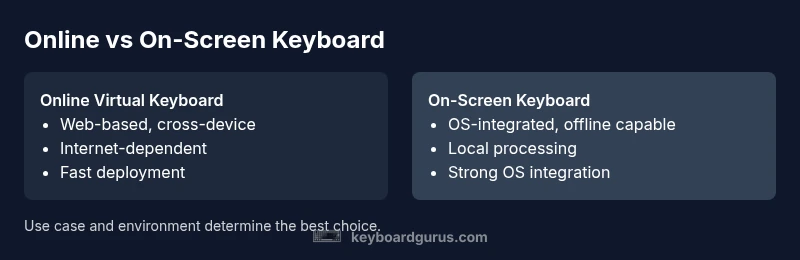
Online virtual keyboards and on-screen keyboards serve similar purposes but fit different workflows. An online virtual keyboard runs in a web browser and shines for cross-device, cross-platform use, especially on mobile and shared devices. An on-screen keyboard is typically built into the OS or app and excels in privacy, offline reliability, and latency-sensitive tasks. Overall, choose based on need for access vs. control.
What is an Online Virtual Keyboard?\n\nThe debate between online virtual keyboard vs on screen keyboard hinges on where the keyboard code runs and how data travels. An online virtual keyboard is a software keyboard that renders within a web page or web app, usually implemented with HTML, CSS, and JavaScript and served from a remote server. Users interact with it via touch or pointer input, and layouts can be customized per application. According to Keyboard Gurus, these keyboards are especially valuable when you need broad cross-device reach, uniform layouts across platforms, and quick deployment without installing client software. Yet they depend on network connectivity and can raise privacy questions because keystrokes may traverse servers or be logged by a third party. In practice, many teams mitigate this by integrating offline caches, local hints, and encrypted channels. The bottom line: online virtual keyboards offer reach and ease of distribution, but they trade some control for flexibility.
In context we will explore the other side next to reveal the nuances of on-screen options.
Comparison
| Feature | Online virtual keyboard | On-screen keyboard |
|---|---|---|
| Accessibility and reach | Web-based, device-agnostic access across browsers | OS-integrated or app-specific, device-bound but highly responsive |
| Latency and typing experience | Subject to network latency and server processing | Typically lower latency with direct, local input |
| Privacy and data handling | Keystrokes may be transmitted to servers or be logged by the service | Keystrokes processed locally, reducing data exposure |
| Offline availability | Requires internet for core operation; offline modes vary by implementation | Operates offline once downloaded or built into OS |
| Customization and language support | Elastic customization per app; broad language packs via web services | Deep OS-level language support, built-in accessibility features |
| Cross-platform consistency | Can unify layouts across devices and ecosystems | Consistency depends on OS and app support |
| Cost and maintenance | Typically subscription or usage-based, continuous updates from server | One-time or bundled with the device; updates depend on OS/vendor |
| Security considerations | Data in transit may be a risk if not encrypted | Local processing minimizes transit risk but may expose local app vulnerabilities |
| Best for | Projects needing rapid deployment, multi-device access, or web-based apps | Offline work, privacy-sensitive tasks, and high-speed input |
| Bottom line | Great for reach and quick setup, with privacy caveats | Excellent for performance and control, with offline reliability |
Advantages
- Broad cross-device reach and easy deployment
- No local installation required for immediate use
- Easy to update centrally and push improvements
- Flexible language and layout customization across apps
- Strong for web-based workflows and collaborative tools
Drawbacks
- Dependent on network quality and connectivity
- Potential privacy and data-ownership concerns with server processing
- Variable performance across devices with different network conditions
- Limited offline capabilities compared to native keyboards
- Per-app or per-site customization can fragment user experience
Online virtual keyboard wins for cross-device access and rapid deployment; on-screen keyboards excel in privacy, speed, and offline reliability.
Choose online virtual keyboard when you need uniform layouts across devices and fast rollouts. Opt for on-screen keyboard when offline work, privacy, and low latency are paramount; the Keyboard Gurus team emphasizes aligning the choice with your environment and data sensitivity.
Got Questions?
What defines an online virtual keyboard and how does it differ from an on-screen keyboard?
An online virtual keyboard runs inside a web app or browser, often hosted remotely and updated centrally. An on-screen keyboard is integrated into the operating system or a dedicated app and runs locally. The main differences are how data is processed, connectivity requirements, and how updates are rolled out. The choice depends on your need for cross-device consistency versus offline privacy and responsiveness.
Online keyboards live in the browser and update from a server, while on-screen keyboards live on your device and respond immediately.
Which option is better for privacy?
On-screen keyboards generally offer better privacy because keystrokes are processed locally. Online keyboards can introduce privacy concerns if input is transmitted to a remote service. However, many providers encrypt data and offer privacy controls. Your use case and tolerance for data transit should guide the choice.
If privacy is your top concern, lean toward on-screen keyboards.
Are there performance differences between the two?
Yes. On-screen keyboards typically have lower latency because input is processed locally, yielding a snappier feel. Online keyboards may suffer from network latency and server response times, which can affect typing speed and accuracy in busy apps.
Local processing usually feels faster than web-based input.
Can I use online virtual keyboards offline?
Some online keyboards offer offline modes or cached assets, but reliable offline use is often limited compared to native on-screen keyboards. If you work in environments with spotty connectivity, plan for offline options or fallback hardware.
Offline use is more reliable with native on-screen keyboards.
What about customization and language support?
Online keyboards can offer broad, per-app customization and rapid language updates, whereas on-screen keyboards depend on OS-level support and may have more limited per-application tailoring. Check your required languages and layouts when deciding.
Web-based keyboards can be customized per app, but OS keyboards excel in built-in language support.
Which is better for developers and product teams?
Developers may prefer online keyboards for consistency across platforms and faster deployments. However, this shift can introduce privacy and performance considerations that teams must manage, including data handling, latency, and offline support. Balance flexibility with security needs.
If you need cross-platform consistency, online keyboards are attractive, but guard privacy.
What to Remember
- Prioritize cross-device reach when choosing an online virtual keyboard
- Value offline reliability and privacy with on-screen keyboards
- Expect potential latency trade-offs with web-based solutions
- Consider privacy implications of data in transit for web keyboards
- Test both options in real-world workflows to find the best fit