What Keyboard to Use: A Practical Guide
Keyboard Gurus guides you to choose what keyboard to use, covering mechanics, form factors, switches, ergonomics, and budget for work, gaming, and study.


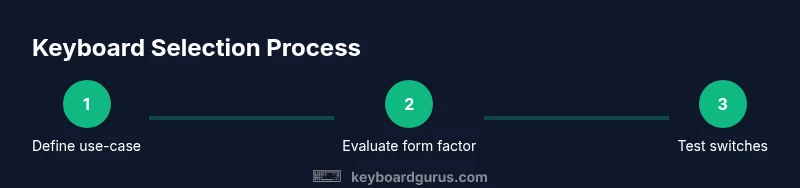
To decide what keyboard to use, map your needs to three choices: mechanical vs membrane, and form factor that fits your desk, and switch feel that matches your typing style. Then compare build quality, ergonomics, and price to find a comfortable, reliable setup. Consider whether you need extra macro keys, backlighting, or hot-swappable switches for future testing.
What keyboard to use: A practical starting point
According to Keyboard Gurus, the first step in answering what keyboard to use is to map your real needs to three core criteria: purpose, form factor, and budget. If you type a lot, code, or write, you may value tactile feedback and durability; gamers might prioritize low latency and macro capabilities; casual users may prefer quiet keyboards. Mechanical vs membrane is the largest fork, with mechanical offering longer lifespans and a wide range of feels, while membrane keyboards tend to be softer and quieter. Beyond that, decide on a form factor that fits your desk and posture: a full-size keeps the number pad, a tenkeyless saves space, and compact 60% boards minimize clutter but reduce a few function keys. In practice, you’ll narrow down to 2–3 options that satisfy both your preferred feel and your budget. Importantly, aim for consistency—switches that feel similar across devices reduce the cognitive load of typing. The Keyboard Gurus team suggests creating a simple wish-list: must-have features, nice-to-have extras, and a realistic price ceiling. This approach keeps you from chasing trends and helps you compare apples to apples. You’ll end up with a setup that fits your workflow, not a marketing pitch.
Keyboard categories explained
Choosing the right keyboard starts with understanding the major categories and how they impact feel, noise, and maintenance. Mechanical keyboards use individual switches under each key, offering durable longevity and a wide range of tactile experiences. Membrane keyboards rely on a rubber dome under a flat layer, generally delivering softer keystrokes and quieter operation. Scissor-switch keyboards, common on laptops, strike a middle ground with a short key travel and a stable feel. Some enthusiasts explore more specialized formats like hot-swappable boards (where switches can be swapped without soldering) and ortholinear or split designs for ergonomics. When you ask what keyboard to use, consider not just the switch type but also the assembly quality, keycap material, and the availability of customization options. For most buyers, a mid-range mechanical with a swappable option offers both immediate satisfaction and flexibility for future upgrades. If you value silence or are in a shared space, membrane or scissor layouts can still deliver excellent productivity with a lighter touch. The key is to align category choices with how you actually type and what your environment permits.
Form factors and layouts that fit your setup
Form factor is the most visible decision when answering what keyboard to use. Full-size keyboards include the number pad and offer complete key sets, which helps in data entry but takes more desk space. Tenkeyless (TKL) omits the number pad, freeing wrist room and reducing reach to the mouse—great for smaller desks or tighter setups. Compact 60% boards strip the layout to essential keys, delivering portability and desk clarity at the cost of fewer dedicated function keys. Some users prefer 75% or 65% layouts, which strike a balance between full-size flexibility and compactness. When evaluating layout, consider whether you frequently use the numeric row, whether you rely on media controls, and how often you switch between different software with the same key combos. For programmers and heavy typists, TKL or 75% often hits the right balance; for travel or space-constrained environments, 60% might be optimal. Ergonomics also matter—shorter keyboards can encourage a more natural arm angle, but you may need a different mouse position or a tented stance to maintain posture. Test your reach and hand comfort in a live setup to avoid postural strain over time. Remember, a form factor that feels right at first will sustain long-term usability.
Switch types and the typing feel you prefer
Switch choice is central to the feel and sound of a keyboard, and it’s a common source of decision fatigue. Linear switches glide smoothly with little resistance and minimal tactile feedback, which many typists appreciate for speed. Tactile switches give a noticeable bump mid-travel, signaling actuation without bottoming out entirely; they’re popular for touch typists who want feedback without loud clicks. Clicky switches provide audible feedback with a tactile bump and a distinct click, favored by some gamers and typists who enjoy explicit confirmation with each keypress. Beyond the basic categories, you’ll encounter variants designed to reduce wobble, dampen sound, or adjust travel distance. If you can, feel several switch types side-by-side. Keyboard Gurus recommends starting with two contrasting options (one linear and one tactile) to establish your baseline preference. For games that reward rapid micro-actions, a linear switch might feel most responsive, while long writing sessions may benefit from the clarity of a tactile switch. If you’re unsure, look for hot-swappable boards that let you try multiple switches without soldering. The key is to trust your own typing experience rather than marketing buzzwords.
Ergonomics, build quality, and durability
Ergonomics are an often-underestimated factor in choosing what keyboard to use. A keyboard that promotes a neutral wrist angle, comfortable key height, and a stable base reduces fatigue during long sessions. Look for a solid case, gasket or foam dampening, and consistent keycap profiles that minimize finger fatigue. Build quality matters for durability: metal or high-grade plastic bodies, reliable stabilizers, and high-quality keycaps resist wear and degrade less over time. If you work in front of a screen for hours, consider a keyboard with adjustable feet, a tenting option, or a split design to maintain a comfortable stance. Materials like PBT keycaps resist shine and wear better than standard ABS, and hot-swappable switches enable upgrades without replacing the entire board. While ergonomics aren’t a single-number fix, combining a comfortable form factor with a responsive switch and durable construction dramatically reduces distraction and discomfort. Keyboard Gurus emphasizes trying a few setups with proper posture before finalizing a purchase to ensure lasting comfort.
Budgeting for your keyboard: value vs features
Budgeting isn’t about choosing the cheapest option; it’s about maximizing long-term value. A mid-range mechanical keyboard with reputable switches, solid stabilizers, and a durable case often delivers the best balance of feel and reliability. If your priorities lean toward customization—like unique keycaps, lighting, or extra macro keys—you might allocate more budget to accessories and modules rather than chasing the latest model. Consider the total cost of ownership, including switches, keycaps, cleaning tools, and potential warranty coverage. Return policies and merchant reliability matter, especially when shopping online. Keyboard Gurus recommends a thoughtful price ceiling and a plan for future upgrades; a little up-front spend on a quality base can avoid frequent replacements and dissatisfaction. If you’re uncertain, target a price window that allows you to test at least two configurations within your home or office and still has a reasonable return option.
How to test keyboards and compare options
Testing keyboards in-person is the most reliable way to answer what keyboard to use. Try typing at your normal pace on each candidate, paying attention to key feel, noise, and dead zones where keys feel mushy or inconsistent. Bring a few sample sentences or code blocks to test how long you can type before fatigue sets in, and note any wrist or shoulder strain. If you can’t go to a store, simulate testing by reading reviews that include real-world typing impressions and by using demo keyboards in reputable outlets. Document your impressions in a simple comparison sheet: form factor, switch type, keycap quality, build, and price. Prioritize your must-haves and nice-to-haves, then eliminate options that fail in the essential areas. Finally, verify vendor policies on returns and exchanges so you can adjust if the keyboard doesn’t meet expectations after a few days of use.
A step-by-step decision framework for choosing
- Define use-case and budget. 2) Shortlist 2–4 form factors that fit your desk and posture. 3) Select 2 switch types to compare. 4) Evaluate build quality and keycap materials. 5) Consider ergonomics and any required accessories. 6) Test or simulate testing, and compare total cost of ownership. 7) Make a choice based on comfort, reliability, and return options. 8) Plan for optional upgrades (keycaps, dampening, or switch changes) over time. This framework helps you move from vague curiosity to a concrete decision you won’t regret. Keyboard Gurus endorses adopting a structured approach to prevent impulse buys and ensure the keyboard supports your workflow.
Common mistakes to avoid when buying a keyboard
Avoid assuming that the most expensive model is the best fit for you. High price often reflects aesthetics or brand hype rather than typing comfort. Don’t ignore ergonomics—standing desk users and long sessions reward a setup that supports neutral wrists and comfortable finger reach. Be cautious about “one-size-fits-all” marketing claims; your keyboard should align with your actual tasks, not just your favorite influencer. Finally, skip buy-and-try cycles without a solid return policy; you’ll want to evaluate feel in your real environment for several days. By avoiding these pitfalls and using a methodical testing approach, you’ll increase the likelihood of finding a keyboard that truly matches your needs.
Tools & Materials
- Notes or digital comparison checklist(Record use-case, must-have features, and budget)
- Access to keyboards to test (optional)(If possible, test at a local store or with friends)
- Basic measurement tools (ruler) for spacing (optional)(Useful for custom layouts or desk planning)
Steps
Estimated time: 60-90 minutes
- 1
Define use-case and budget
Identify your primary tasks (coding, gaming, writing) and set a realistic price ceiling. This anchors all later decisions and prevents feature creep.
Tip: Write down your top 3 must-haves and bottom 2 nice-to-haves before you start browsing. - 2
Choose a candidate form factor
Decide between full-size, TKL, 75%, 65%, or 60% based on desk space and workflow needs. Consider how often you use the keypad or function keys in everyday tasks.
Tip: If you frequently use numeric data, keep a full-size or add a separate numeric keypad. - 3
Select switch types to compare
Pick two contrasting switches (e.g., a linear and a tactile) to feel the difference and determine which aligns with your typing speed and sound tolerance.
Tip: Avoid buying just one switch type; your preference may surprise you after a week of typing. - 4
Assess ergonomics and build
Check for a stable base, comfortable key height, and optional features like adjustable feet or tenting. Ensure keycaps are robust and comfortable.
Tip: Prioritize a design that maintains a neutral wrist posture to reduce strain. - 5
Test in real-world conditions
If possible, test keyboards with your typical tasks for several days or use reputable review data when testing isn't feasible. Note fatigue and comfort.
Tip: Keep a simple log of perceived comfort after 15, 30, and 60 minutes of use. - 6
Evaluate total cost of ownership
Consider not only price but future upgrades, keycaps, dampening, maintenance, and return policies.
Tip: Prefer sellers with transparent return windows and robust warranties. - 7
Make a decision and plan next steps
Choose the keyboard that best meets your criteria and outline a short plan for any future upgrades or accessories.
Tip: Keep the receipt and track the keyboard’s performance over the first 2–4 weeks.
Got Questions?
What is the best keyboard for coding?
There isn’t a single best keyboard for coding; many coders prefer mechanical boards with tactile or linear switches in a compact layout to reduce reach. Look for a reliable build, good keycap quality, and easy key combination access. Personal comfort and a familiar typing feel are more important than brand hype.
There isn’t one perfect keyboard for coding; focus on comfort, build quality, and a feel you enjoy.
Should I choose a mechanical keyboard or a membrane keyboard?
Mechanical keyboards offer durability and a wide range of feels, while membrane keyboards are quieter and often cheaper. If you type a lot or want tactile feedback, mechanical is usually worth the premium. If silence and simplicity are paramount, a quality membrane can still serve well.
For heavy typing or gaming, mechanical keyboards are often worth it; membranes are good for quiet, budget-friendly use.
Does switch type affect typing speed?
Switch type can influence speed through feedback and travel distance, but speed ultimately comes from practice. Linear switches may feel faster for rapid tapping, while tactile switches help with accuracy by providing a touch cue. Experiment with both to see which aligns with your rhythm.
Yes, switch feel can influence speed, but practice matters most.
Are low-profile keyboards good for gaming?
Low-profile keyboards can be competitive for gaming due to shorter travel and faster actuation, but they may lack the durability and variety of switches found in full-size mechanical boards. It comes down to personal preference and whether you value portability over customization.
They can be fast, but durability and switch variety matter more than form factor alone.
How important is ergonomics in keyboard choice?
Ergonomics are very important for long sessions. Look for features like adjustable tilt, split designs, and wrist support to reduce strain. Even small improvements to posture can translate to fewer discomfort issues over weeks or months.
Very important for comfort over long use; choose features that support neutral posture.
Watch Video
What to Remember
- Define your use-case before shopping
- Match form factor to desk space and workflow
- Test switches to discover your preferred feel
- Prioritize ergonomics and build quality
- Budget with an upgrade plan and return options