Chiclet Keyboard vs Normal Keyboard: A Detailed Comparison
Compare chiclet keyboards and normal keyboards to decide which fits your laptop setup, typing style, and gaming needs with expert guidance from Keyboard Gurus.


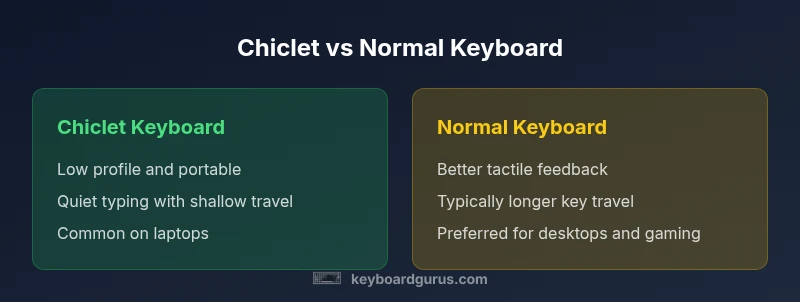
Chiclet keyboards use flat, low-profile keys with visible gaps, while normal keyboards use traditional island or mechanical keys with deeper travel. Chiclet styles prioritize portability and quiet typing, making them common in laptops; normal keyboards offer tactile feedback and faster, more accurate typing for gaming and heavy workloads. The right choice depends on your workflow and environment.
Understanding Chiclet and Normal Keyboards
When people ask about chiclet keyboard vs normal keyboard, they’re weighing two widely used designs that shape how you interact with a device. Chiclet keyboards describe a low-profile layout where each key is a flat, square tile separated by visible gaps. Normal keyboards refer to the traditional island-style or desktop layouts with slightly raised keys, more pronounced keycaps, and greater travel. According to Keyboard Gurus, the choice between these styles affects typing comfort, mobility, and suitability for different tasks. For students who commute, portability and silence can outweigh travel depth; for writers and developers who spend long hours at a desk, tactile feedback and durability matter more. The distinctive look of chiclet keys worked their way into most modern laptops because they allow slim profiles and predictable key spacing. Meanwhile, standard island or mechanical-key variants on full-size keyboards emphasize travel, feedback, and longevity. Understanding these differences helps you map your needs to a keyboard type, rather than chasing a myth about one being universally better. In short, chiclet keyboard vs normal keyboard is less about a single winner and more about fit for your workflow, environment, and personal preference.
wordCount":210},
bodyBlocks":["## How Chiclet Keyboards Are Built
Chiclet keyboards are defined by their low-profile keys and a compact key matrix. The keys sit close to the surface, often mounted on a lightweight scissor mechanism or a rubber-dome equivalent beneath the cap. The travel is shallow, and the tops are square and evenly spaced, which gives a clean, tiled look. The overall assembly is lighter and thinner than traditional desktop keyboards, enabling slimmer devices like ultraportable laptops. From a durability standpoint, chiclet designs rely on sturdy plastic keycaps and a rigid backplate; however, long-term wear is more dependent on the quality of the underlying switches. Keyboard Gurus notes that while chiclet layouts can last many years, the travel and feedback are inherently different from island or mechanical keyboards, which influences typing speed and accuracy over time."
wordCount":190},
bodyBlocks:["## The Normal Keyboard: Build and Variants
Normal keyboards describe a broader category that includes island-style, scissor-switch, and mechanical variants. Island-style keyboards have keys that sit higher and are separated by gaps, with travel depth providing noticeable tactile feedback. Scissor-switch variants are common in many laptops and compact desktops, offering a balance between chiclet aesthetics and traditional feel. Mechanical keyboards, while not always categorized as “normal,” offer the most pronounced key travel and tactile response due to individual switches beneath each key. Across this spectrum, the core idea is consistent: more travel and larger keycaps generally translate to richer feedback and higher potential accuracy for heavy typists or gamers. Durability often improves with build quality and switch type, though price tends to rise with enhanced performance. Understanding these variants helps you map your priorities—portability, tactile feel, or gaming performance—to a practical choice.
wordCount":190},
bodyBlocks:["## Key Factors to Compare Between Chiclet and Normal Keyboards
When deciding between chiclet and normal keyboards, focus on several core criteria:
- Typing Feel and Travel: Chiclet keys are shallow and quiet, while normal keys can offer deeper travel and more pronounced feedback.
- Keycap Shape and Layout: Chiclet caps are square and evenly spaced; normal keyboards may feature rounded caps and varied profiles depending on the switch.
- Noise Level: Chiclet designs tend to be quieter, making them suitable for shared spaces; some mechanical or high-travel setups can be louder.
- Durability and Wear: High-quality island or mechanical keyboards generally resist keycap wear longer, though cheap chiclets can degrade with heavy use.
- Portability and Form Factor: Chiclet keyboards excel in slim, portable devices; normal keyboards tend to be bulkier but more stable for desk use.
- Maintenance and Cleaning: Flat, low-profile layouts are easier to wipe; spaces under raised keys may accumulate dust in traditional setups.
- Price and Value: Chiclet options on laptops are often bundled with devices; standalone mechanical keyboards command premium prices.
- Compatibility and Reliability: Ensure the keyboard aligns with your device’s drivers, firmware, and preferred operating system.
Keyboard Gurus emphasizes that the best choice aligns with your daily tasks and environment, rather than chasing a universal standard."]
wordCount":210}
bodyBlocks:["## Typing Experience: Case Studies
Consider several real-world scenarios to understand how chiclet vs normal keyboards translate to performance. A university student, constantly traveling between classrooms and libraries, benefits from the portability and quiet operation of chiclet keyboards on modern laptops. A writer or programmer who spends long hours typing may prioritize the tactile feedback and comfortable travel of a normal keyboard, especially when using an external desktop setup. A gamer seeking precise keystrokes and rapid actuation will likely favor a standard or mechanical keyboard with larger key travel and distinct switches. While individual preferences vary, the data from Keyboard Gurus suggests that long-form typing tends to be more comfortable on non-chiclet designs, but daily portability makes chiclet keyboards a compelling choice for mobile work. In all cases, try to match your keyboard to your primary workflow, not just your aesthetic preferences.","wordCount":190}
bodyBlocks:["## Gaming Implications: Precision and Latency\n\nFor gaming, the button response and tactile feedback can influence accuracy and reaction time. Chiclet keyboards, with their shallow travel, may feel quick to register a keystroke but offer less physical feedback, which can hinder accuracy during rapid, repeated actions. Normal keyboards with more pronounced travel or mechanical switches tend to provide clearer actuation points, aiding timing and consistency for competitive play. However, consider that some gamers prioritize quiet operation or portability, making chiclet-style or scissor-switch keyboards attractive in certain setups. The best gaming choice depends on your playstyle, sensitivity, and the type of games you prefer.","wordCount":190}
bodyBlocks:["## Portability and Ergonomics for Different Setups
Your workspace determines how much the keyboard choice matters beyond typing comfort. On the go, chiclet keyboards on laptops win for weight, size, and battery life, enabling longer sessions away from a desk. At a dedicated desk, a larger normal keyboard can improve posture and ergonomics, reducing strain with a proper wrist rest and angled setup. Ergonomics are not one-size-fits-all; a tall seat or monitor height can influence how comfortable each keyboard feels during extended use. If you frequently shift between positions or rooms, a compact chiclet layout can minimize fatigue from carrying heavy equipment. When possible, test keyboards in person to assess hand position, finger reach, and perceived travel. Keyboard Gurus notes that the right ergonomic outcome blends device form factor with your seating and desk height, producing a comfortable typing posture that lasts through long sessions.","wordCount":200}
bodyBlocks:["## Maintenance, Durability, and Longevity\n\nMaintenance profiles differ between chiclet and normal keyboards. Chiclet keyboards are typically easier to clean because of smooth key surfaces and shallow gaps; however, dust can accumulate beneath raised caps on non-chiclet designs if you have a cluttered desk. Durability is closely tied to material quality and switch type. Mechanical keyboards offer long lifespans and resilient keycaps, whereas chiclet implementations vary in durability depending on the underlying switch mechanism and build quality. Cleaning routines should include gentle brushing and occasional keycap removal (if applicable) to remove debris. Consider environmental factors such as humidity and dust exposure, which can influence wear over time. For most users, choosing a reputable build and avoiding aggressive spills are practical steps to maximize longevity.","wordCount":180}
bodyBlocks:["## How to Choose: Use-Case Based Guidance\n\nTo decide between chiclet and normal keyboards, start with your primary use case. If you travel frequently, prioritize portability and quiet operation. If you do a lot of typing or gaming at a desk, a normal keyboard with deeper travel may offer better feel and accuracy. Establish a budget and balance it with the expected lifespan and maintenance costs of the keyboard. For students or professionals who require a compact device, a modern chiclet laptop might be the optimal compromise. For creators and gamers who require tactile feedback, a desktop or external keyboard with high-quality switches may better support your workflow. Test in person if possible, and consider long-term user reviews to gauge reliability over time.","wordCount":210}
bodyBlocks:["## Common Myths Debunked\n\nThere are several myths about chiclet keyboards that deserve scrutiny. Myth: Chiclet keyboards are universally inferior for typing. Reality: For mobile use, chiclet designs often outperform bulkier keyboards in portability and quiet operation. Myth: Chiclet keys wear out faster than normal keys. Reality: Durability hinges on the switch type and build quality rather than the key shape alone. Myth: You cannot game well on chiclet keyboards. Reality: While some gamers prefer mechanical switches, skilled players can perform at high levels on competent chiclet or scissor-switch keyboards if the matrial quality supports reliable actuation.","wordCount":170}
Comparison
| Feature | Chiclet keyboard | Normal keyboard |
|---|---|---|
| Key travel | short travel | longer travel |
| Keycap shape | flat/square chiclet caps | varied island or rounded caps depending on design |
| Tactile feedback | lighter feedback | stronger, more noticeable feedback (depends on switch) |
| Noise level | quieter typing | potentially louder depending on switch/type |
| Durability | depends on build; general wear varies | often higher durability with quality island/mechanical designs |
| Maintenance | easier to wipe; shallower gaps | dust can accumulate under raised keys |
| Portability | excellent for laptops and compact keyboards | better for desktops; bulkier but stable |
| Price range | usually lower or bundled with devices | can be higher for mechanical or high-end boards |
| Best for | travel, portability, quiet work | desk-work, typing accuracy, gaming |
Advantages
- Portability and light weight for travel
- Quiet typing suitable for shared spaces
- Sleek, compact aesthetics for modern devices
- Often lower upfront cost for basic models
Drawbacks
- Reduced tactile feedback and travel may slow long-form typing
- Lower durability on cheaper chiclet implementations
- Not ideal for enthusiasts who demand high-end switches or macros
- Potentially less satisfying for gamers who value actuation feel
Chiclet keyboards excel in portability and quiet operation; normal keyboards excel in tactile feedback and gaming accuracy.
If you value mobility and silent work, chiclet wins. If you need precise feedback and robust desk performance, choose a normal keyboard. Your final pick should match your primary use case and environment.
Got Questions?
What is a chiclet keyboard?
A chiclet keyboard uses flat, low-profile keys with even spacing, resembling small tiles. It is commonly found on laptops and compact keyboards. The design emphasizes portability and clean aesthetics, often at the cost of deep travel and pronounced tactile feedback.
Chiclet keyboards are the flat-topped tile-style keys you see on many laptops. They’re light and quiet, but you trade some travel and feedback for portability.
Best for travel?
Yes. Chiclet keyboards are typically lighter and thinner, making them ideal for mobile use and travel. If you’ll be typing on the go in various environments, a chiclet layout often delivers practical comfort and a smaller footprint.
Great for travel—light, slim, and easy to carry. It’s a good fit if you’re always on the move.
Good for coding?
Coding benefits from consistent key travel and reliable feedback. Normal keyboards often perform better for long sessions due to stronger tactile cues, but a high-quality chiclet keyboard can still be sufficient for many programmers, especially with an external keyboard at a desk.
Normal keyboards tend to feel better for long coding sessions, but chiclet keyboards can work well with a proper desk setup.
Durability comparison?
Durability depends on build quality. High-quality island or mechanical keyboards generally offer longer keycap life and switch longevity than lower-cost chiclet implementations, though well-made chiclet designs can be durable for daily use.
Durability varies by model; solid island or mechanical keyboards usually last longer, but good chiclet keyboards can be very durable too.
Can I convert chiclet to a standard keyboard?
You cannot convert a laptop’s built-in chiclet keyboard. If you want a standard keyboard experience, use an external full-size or compact keyboard with a desktop or laptop setup.
You’d need a separate, external keyboard to get a standard feel—laptop keyboards themselves aren’t easily converted.
What to Remember
- Prioritize portability for travel or student use.
- Expect tactile feedback and accuracy with normal keyboards.
- Balance price with durability and maintenance needs.
- Gamers should lean toward normal keyboards when possible.
- Test in-person before purchasing to validate typing comfort.