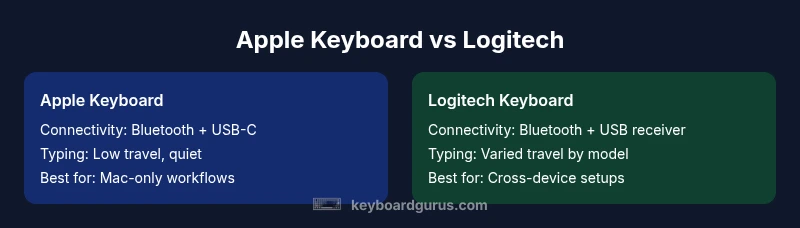
Apple Keyboard vs Logitech: An Objective Comparison
A rigorous, impartial comparison of Apple keyboards and Logitech options, covering design, typing feel, connectivity, software, price, and best-use scenarios for Mac users, Windows users, gamers, and professionals.


For Mac-first workflows, Apple keyboards offer native macOS integration with minimal setup and familiar layout. Logitech keyboards excel in cross-device versatility, customization, and robust software support. The best choice depends on your primary ecosystem, how much you value software control, and whether you switch between devices.
Why the Apple ecosystem shapes keyboard choice
According to Keyboard Gurus, the decision between an Apple keyboard and a Logitech model extends beyond keyfeel. It hinges on how deeply you’re embedded in macOS, iPadOS, and the broader Apple ecosystem. For many students, creators, and professionals who rely on Apple software like Final Cut Pro, Pages, and other native apps, a Mac-centric keyboard minimizes friction, preserves familiar shortcuts, and streamlines workflows. The Keyboard Gurus team found that when your daily tasks are woven into Apple's ecosystem, the native keyboard often feels like an extension of the computer itself. However, those who juggle multiple devices or crave deeper customization may benefit from Logitech’s ecosystem-aware options. The overarching aim is to reduce friction between intent and action, starting with a keyboard that respects your platform preferences and work habits.
Keyboard geometry and typing feel: Apple keyboards
Apple’s Magic Keyboard and its peers emphasize a slim, laptop-like profile, precise scissor-switch action, and compact layouts. The key travel is modest, which most long-form typists report as efficient for focused writing and coding on macOS. The aluminum chassis common to many Apple keyboards feels premium and pairs well with Apple desktops and laptops. The layout is distinctly Mac-friendly: the Command and Option keys mirror macOS conventions, and the function row tends to align with macOS shortcuts. For users who value a clean, minimal desk and a consistent, predictable typing experience on macOS, Apple keyboards are naturally satisfying. However, the trade-off is less room for aggressive key travel or highly tactile feedback that some Windows-centric models offer.
Keyboard geometry and typing feel: Logitech keyboards
Logitech offers a broader spectrum of typing experiences, from low-travel laptop-like keys to more pronounced travel on models designed for typing-heavy work. MX Keys, for example, aims for a balanced feel with comfortable travel, solid tactile feedback, and backlighting that adapts to ambient light. G-series keyboards cater to gamers with sometimes higher travel and programmable macro keys. This variety means you can pick a Logitech model that emphasizes typing comfort, chilling-fast responsiveness for gaming, or customization for creator workflows. In practice, this means Logitech keyboards can adapt to multi-device setups and varied use cases, which is a major draw for people who value flexibility over a single-brand Mac-native experience.
Build quality and materials
Apple keyboards typically feature a sleek aluminum chassis that exudes premium aesthetics and rigidity. The overall build communicates durability consistent with Apple’s hardware design language. Logitech keyboards span a wider material range, from premium metal-bodied options to higher-quality plastics with reinforced frames. In practice, Logitech’s hardware often emphasizes longevity for daily multi-device use, with some models designed to endure heavy typing or gaming sessions. If you want a keyboard that can withstand long hours of use across different environments, Logitech presents a broader portfolio with varied durability profiles. Keyboard Gurus notes that material choices can subtly influence typing feel and acoustics, which matters for quiet workspaces or shared setups.
Connectivity options: Bluetooth, USB-C, and dongles
Apple keyboards generally support Bluetooth and USB-C connections, with robust pairing within the Apple ecosystem. The setup tends to be straightforward on macOS and iPadOS, with seamless switching between Apple devices in many scenarios. Logitech keyboards typically add more flexible connectivity, including Bluetooth, USB-C, and dedicated USB receiver options for cross-device workflows. This multiprong approach is attractive for users who toggle between Windows, macOS, and even Linux, or who want a dedicated dongle for a stable, low-latency connection during gaming sessions. The tradeoff is slightly more complex pairing configurations on some models. Keyboard Gurus’ experience suggests this is a meaningful consideration for multi-device households.
Bluetooth latency and reliability in practice
In real-world use, both brands deliver reliable wireless performance, but the reliability often depends on the specific model and environment. Apple keyboards tend to deliver consistent latency within the Apple ecosystem, with minimal interruptions when used with a Mac or iPad. Logitech models, especially those with a dedicated receiver, can exhibit ultra-low latency in competitive gaming or fast-paced tasks when paired with the appropriate USB dongle. The practical takeaway is to choose based on your primary usage: single-ecosystem quiet work tends to favor Apple, while cross-device speed and stability benefit from Logitech receiver setups. Keyboard Gurus’ testing suggests prioritizing devices and environments that match your daily rhythm for the best experience.
Key layouts and compatibility across platforms
Mac users often prefer the Apple layout with the Command key mapped for common shortcuts. Windows users will discover that Logitech keyboards offer a more flexible layout with Windows-style keys and easy remapping for cross-platform workflows. For users who work on both Mac and Windows, Logitech’s cross-platform keyboards tend to minimize friction by providing consistent hardware controls and software configurations that translate well across OS boundaries. The result is a smoother transition across devices, with fewer mental mapping gymnastics during the workday.
Software customization and firmware updates
Apple keyboards rely mostly on macOS-level settings and do not require heavy software for routine use. Logitech keyboards shine in this area with companion software that enables key remapping, macro programming, and per-profile customization across devices. Firmware updates from Logitech can bring feature enhancements and stability improvements, which can be meaningful for power users. The flip side is occasionally more software complexity. Keyboard Gurus notes that if you value deep customization and per-device profiles, Logitech’s ecosystem offers more knobs to turn, whereas Apple keeps things simple and predictable.
Key durability and keycap considerations
Key durability varies by model and switch type. Apple keyboards typically emphasize quiet, firm key switches with stable keycaps that resist wear over many months of typing. Logitech models may use a mix of materials depending on the model tier, with higher-end keyboards offering more robust keycaps and reinforced stabilizers. If you type heavily or spill concerns arise, choosing a model with easily replaceable keycaps or a more durable cap hard-ware can improve long-term usability. Keyboard Gurus suggests considering spill resistance and cap material in the long run for heavy usage environments.
Portability and battery life
A core advantage of Apple keyboards is a slim, lightweight profile that travels well with MacBooks and iPads. Logitech keyboards also emphasize portability across some models, while others prioritize a more substantial build for durability and better key travel. Battery life varies by model, with energy-efficient backlighting and auto-sleep features extending usage between charges. For frequent travelers or students carrying devices to classes, choosing a model with reliable battery life and a compact form factor becomes a practical priority.
Price, value, and warranty considerations
Apple keyboards sit in the mid-to-upper price tier relative to many office-friendly keyboards, reflecting the premium materials and brand ecosystem. Logitech offers a broader price spectrum, including cost-effective options and premium models with advanced features. Warranty terms generally align with the manufacturer’s standard period, with longer warranties sometimes available for select models. The decision should weigh not just sticker price but long-term value, feature set, and software support across devices. Keyboard Gurus emphasizes evaluating total cost of ownership, including potential replacement cycles and software updates, to determine which option delivers better long-term value.
Buyer personas: who should choose which brand
If you are a purist Mac user who values a seamless, distraction-free typing experience and minimal setup, Apple keyboards provide a natural fit. If you work across devices, require heavy customization, or want a keyboard tailored to gaming or creator workflows, Logitech offers the most practical flexibility. Gamers, students, and professionals often find Logitech models with cross-platform capabilities and macro support more suited to their day-to-day demands, while coders and writers who live inside macOS may prefer Apple’s streamlined approach. The right choice aligns with your daily tasks, device ecosystem, and preferred workflow.
Comparison
| Feature | apple keyboard | logitech keyboard |
|---|---|---|
| Connectivity options | Bluetooth, USB-C; Apple ecosystem pairing | Bluetooth, USB-C, USB receiver options for cross-device setup |
| Typing experience | Low-travel, quiet, Mac-like feel | Balanced to deeper travel depending on model; some tactile options |
| Layout and compatibility | Mac-centric layout; Command/Option keys on macOS | Cross-platform layout; Windows/macOS key remapping supported |
| Software and firmware | Minimal software; macOS-driven settings | Robust software (Options/SetPoint) and frequent firmware updates |
| Price range (relative) | Mid-to-high price; premium materials | Mid-range to premium, varied by model and features |
| Warranty and support | Standard warranty with Apple-grade support | Standard to extended warranties across models |
| Best for | Mac users seeking a native, distraction-free experience | Multi-device users needing customization and cross-platform compatibility |
Advantages
- Strong ecosystem integration for macOS and iPadOS
- Broad model variety from Logitech for different use cases
- Reliable wireless connections and long battery life
- Cross-platform compatibility and robust software options
Drawbacks
- Apple keyboards often carry a higher upfront price
- Logitech software can be heavy and occasionally buggy
- Some Apple keyboards lack advanced customization options
- Key layouts can differ between Mac and Windows, causing friction
Logitech keyboards win on versatility and customization; Apple keyboards win on seamless Mac integration and simplicity.
If you work mainly in macOS, Apple’s keyboard offers a frictionless experience. If you switch between devices or need fine-grained control, Logitech provides a stronger toolkit. Keyboard Gurus endorses choosing based on your primary ecosystem and how much you value software customization.
Got Questions?
Which keyboard is better for Mac users, Apple or Logitech?
For pure Mac users, the Apple keyboard minimizes setup and preserves familiar shortcuts, creating a seamless Mac experience. Logitech offers cross-platform options that can still feel very Mac-friendly with proper configuration.
For Mac users, Apple keyboards typically provide a smoother, more native feel. If you need cross-platform compatibility, Logitech also works well with macOS.
Do Logitech keyboards work well with macOS?
Yes, Logitech keyboards work well with macOS, especially models designed for cross-platform use. You can map keys and customize shortcuts using Logitech Options to suit macOS workflows.
Yes, Logitech keyboards are generally very macOS-friendly with good software support.
Are there latency differences between Bluetooth and USB receivers?
Latency varies by model and environment. USB receivers often provide lower latency in gaming or fast typing scenarios, while Bluetooth is convenient for everyday tasks but can show occasional interference.
Latency depends on model and setup; USB receivers are typically faster, Bluetooth is convenient but can lag in busy environments.
Which is more customizable: Apple Keyboard vs Logitech MX Keys?
Logitech MX Keys and related models offer extensive customization through Logitech software, including macros and per-device profiles. Apple keyboards emphasize a simpler, consistent macOS shortcut experience with minimal tweaks.
Logitech is more customizable; Apple sticks to macOS defaults but stays very reliable.
Do Apple keyboards support Windows keys or function keys?
Apple keyboards map the keys to macOS shortcuts, with Windows keys not always present. You can use modifier remapping, but some Windows-specific shortcuts may need workarounds.
Not out of the box; you may remap keys for Windows workflows if needed.
Which is better for gaming: Apple or Logitech?
For gaming, Logitech offers models with faster key travel, programmable macros, and a dedicated hardware ecosystem. Apple keyboards are generally not designed with gaming in mind, focusing more on typing and productivity.
If you game seriously, Logitech is typically the better choice due to features and customization.
What to Remember
- Choose Apple keyboard for Mac-centric workflows
- Choose Logitech for cross-device setup and customization
- Evaluate price relative to features and ecosystem
- Prefer a model with comfortable key travel and reliable wireless
- Test multi-device pairing if you switch between devices