Apple Magic Keyboard vs Logitech MX Keys: An In-Depth Comparison
Explore the Apple Magic Keyboard vs Logitech MX Keys: design, typing feel, connectivity, backlighting, and value to help you decide which keyboard fits macOS, Windows, or mixed setups.


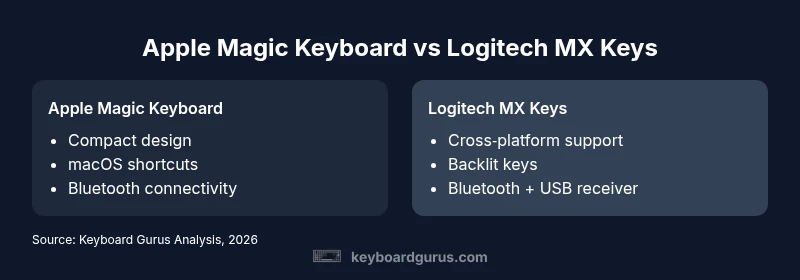
For most users, the Logitech MX Keys offers more versatility due to multi-device pairing and backlighting, while the Apple Magic Keyboard excels in macOS integration and compact design. According to Keyboard Gurus, the right pick depends on your ecosystem and priorities: mac users who value seamless macOS shortcuts and a slim profile may prefer the Magic Keyboard, whereas mixed-device workflows benefit from MX Keys.
Overview: apple magic keyboard vs logitech mx keys
According to Keyboard Gurus, the two keyboards anchor a shared goal: deliver a clean, comfortable typing experience with minimal desk clutter. Yet they cater to different audiences. The Apple Magic Keyboard is a natural choice for macOS purists who want seamless integration with Apple shortcuts, trackpad behavior, and a visually cohesive Mac desk. The Logitech MX Keys, by contrast, aims at multi-device households, freelancers, and students who juggle Windows, macOS, and even iPadOS. This overview frames the comparison around ecosystem alignment, software support, and daily use cases, setting the stage for a deeper dive into design, typing feel, and connectivity.
Design and Build Quality
Both keyboards embrace a low-profile aesthetic and premium materials, but their construction and weight reflect different priorities. The Apple Magic Keyboard emphasizes minimalism: a lightweight, slim aluminum chassis with a compact footprint that fits neatly into a Mac desk setup. The MX Keys leans toward ergonomic versatility, offering a slightly taller key height and a broader profile to accommodate more tactile feedback and easier reach for a wider range of hand sizes. In practice, the Magic Keyboard feels airy and unobtrusive, while MX Keys conveys a reassuring, sturdy presence on a busy desk.
Typing Experience and Key Feel
Typing is highly subjective, and the apples-to-oranges comparison hinges on key travel, actuation force, and feedback. The Magic Keyboard uses a traditional scissor switch with very short travel, delivering quiet keystrokes that many users associate with Apple devices. MX Keys uses a chiclet-style key layout with a modest amount of travel and tactile feedback that can feel more immediate for long sessions or intense typing bursts. Keyboard Gurus notes that the MX Keys’ slightly firmer bottom-out and the Magic Keyboard’s lighter touch influence fatigue and speed differently, depending on your baseline typing rhythm.
Connectivity and Cross-Platform Use
Connectivity is where MX Keys shines for multi-device users. MX Keys supports Bluetooth on multiple devices and, in some variants, a dedicated USB receiver, enabling quick switchover via the Easy-Switch keys. Apple’s keyboard relies on Bluetooth and is optimized for macOS, with automatic engagement of macOS function keys and system shortcuts. If you frequently work across Windows, macOS, and iPadOS, MX Keys offers a more flexible cross-platform experience, while the Magic Keyboard delivers a native macOS feel with minimal setup.
Backlighting, Shortcuts, and Customization
Backlighting is an important comfort feature, particularly in dim workspaces. The MX Keys provides adjustable backlighting that responds to ambient light and user preference, plus programmable keys and Easy-Switch functionality. The Apple Magic Keyboard has a simpler approach, with backlit keys that dim or brighten in response to environmental lighting and do not offer extensive macro capabilities. In terms of customization, MX Keys lets you tailor shortcuts and function-key behavior via Logitech software, whereas the Magic Keyboard emphasizes macOS-native shortcuts and system controls.
Price, Value, and Longevity
Pricing guidance for these two keyboards falls into a similar mid-range band, but the value calculus depends on ecosystem commitment and features you actually use. Apple’s Magic Keyboard is often popular with pure Mac ecosystems due to its clean aesthetic and seamless pairing, whereas MX Keys appeals to users who want cross‑platform flexibility, multi-device switching, and backlit keys. Longevity considerations include key feel consistency, build quality, and the availability of driver software that keeps features up to date across platforms.
Use-Case Scenarios: When to Choose Which
If your primary workflow lives inside the Apple ecosystem and you value a spare, minimalist setup, the Magic Keyboard is likely the better fit. For students, freelancers, or anyone who routinely moves between macOS, Windows, and tablets, MX Keys offers the practical advantages of cross‑platform compatibility, better backlighting, and easier multi-device management. The decision should hinge on how you work, not just how the keyboard looks.
Comparison
| Feature | Apple Magic Keyboard | Logitech MX Keys |
|---|---|---|
| Design and form factor | Slim, compact aluminum body | Slightly taller, broader profile |
| Typing feel | Light, quiet scissor switches | Moderate travel with tactile feedback |
| Connectivity | Bluetooth only (charging via USB-C) | Bluetooth + optional USB receiver; USB-C charging |
| Multi-device support | Limited to one device under macOS setup | Supports multiple devices with Easy-Switch |
| Backlighting | Backlit keys (ambient-light aware) | Backlit with adjustable brightness |
| Customization | Limited customization, optimized for macOS | Software-enabled customization for shortcuts |
| Best for | Apple-centric workflows | Cross-platform productivity |
Advantages
- Compact and elegant for Mac desks
- Excellent macOS integration and shortcuts
- MX Keys offers cross‑platform versatility and backlighting
- Strong build quality across both options
- Easy wireless setup and pairing
Drawbacks
- Magic Keyboard has limited Windows customization
- MX Keys can be larger and heavier
- Feature-rich software can complicate setup for casual users
MX Keys is the more versatile choice for mixed ecosystems; Magic Keyboard excels in a pure Apple workflows
Choose MX Keys if you work across devices and platforms; pick Magic Keyboard for a clean, Apple‑centric desk with native macOS feel.
Got Questions?
Which keyboard is better for macOS users?
If your workflow is centered on Apple devices, the Magic Keyboard provides smoother macOS integration, with native shortcuts and a cohesive look. If you need cross‑platform support, MX Keys remains a stronger option.
For Mac users, the Magic Keyboard offers the most seamless macOS experience; for multi‑device setups, MX Keys is a better fit.
Can the MX Keys connect to an iPad?
Yes, the MX Keys supports Bluetooth pairing with iPadOS, making it convenient for tablet-driven work sessions. You may need to reconfigure function keys for iPad shortcuts.
Yes, you can pair it to an iPad via Bluetooth.
Is backlighting available on the Apple Magic Keyboard?
The Apple Magic Keyboard includes backlit keys that adjust with lighting conditions, but it does not offer advanced brightness controls via software.
Yes, Magic Keyboard has backlit keys, with automatic brightness.
Which keyboard is better for gaming?
Neither is a gaming keyboard by design. For casual gaming, MX Keys may offer better cross‑platform compatibility, but neither matches performance-oriented gaming keyboards.
Neither is built for gaming, but MX Keys is versatile if you game across devices.
What should I consider for long typing sessions?
Key travel and feedback influence fatigue. The MX Keys’ tactile feedback can feel more comfortable across long sessions, while the Apple Keyboard’s light feel is gentle on the fingers for quick typing.
MX Keys may feel better for long typing, depending on your rhythm.
How should I budget for these keyboards?
Expect mid-range pricing for both, with MX Keys often offering more features for the price. Consider your device ecosystem and software needs to determine value.
Both are mid-range; MX Keys offers more cross-platform value.
What to Remember
- Define your ecosystem first: mac-only vs cross-platform.
- MX Keys wins for multi-device workflows and backlighting.
- Magic Keyboard offers seamless macOS shortcuts and a minimalist form.