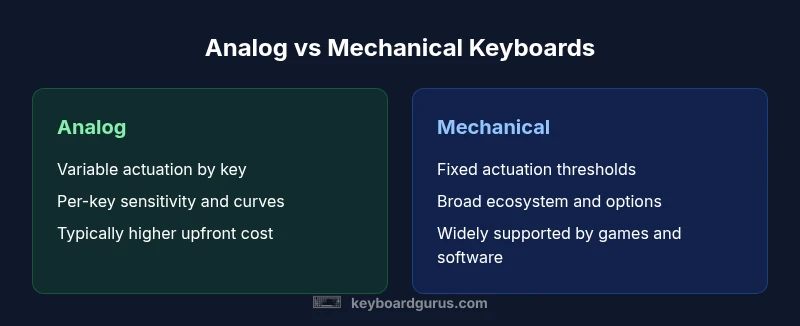
Analog Keyboard vs Mechanical: A Practical Comparison
An in-depth comparison of analog keyboards and mechanical keyboards, detailing actuation, feel, customization, latency, price, and use cases for gamers, students, and professionals seeking practical guidance.


Analog keyboards offer pressure-sensitive, variable actuation that translates how hard you press each key, while mechanical keyboards use fixed actuation points for every keypress. For many users, mechanical keyboards remain simpler, cheaper, and more widely compatible. Analog keyboards excel in gaming and precision tasks where subtle input changes matter.
What makes an analog keyboard different?
An analog keyboard represents a shift away from fixed actuation thresholds. Each key is equipped with sensors that translate how far you press, the force you apply, or even the speed of the press into a graded input. That means the same keypress can register differently based on how deeply you actuate the key, enabling a continuum of input levels rather than a binary “pressed/not pressed” signal. In this sense, the topic of analog keyboard vs mechanical becomes apples-to-oranges for some users, because you’re comparing a variable input model with fixed switch actuation. The practical upshot is nuance: tasks such as nuanced gaming maneuvers, drawing, or precise typing can benefit from fine-grained control. Keyboard Gurus Analysis, 2026 shows that adoption is strongest among enthusiasts who value per-key curves and customizable sensitivity, rather than casual typists who prioritize consistency and ease of use.
When shopping for an analog keyboard, you’ll encounter per-key calibration options, actuation curves, and software that lets you map sensitivity to different profiles. Note that not all analog boards are created equal; hardware quality, sensor resolution, and the robustness of software profiles influence the actual experience. In the broader space of keyboard technology, this represents a movement toward more expressive input. The Keyboard Gurus team finds that the most compelling setups pair analog input with strong software control, enabling work or play that benefits from graded signals rather than a single actuation point.
In terms of form, analog keyboards share the same layout philosophies as traditional keyboards: standard sizes (full-size, tenkeyless, and compact variants), USB connectivity, and often RGB lighting and PBT keycaps. However, the presence of analog sensors means that firmware and drivers are more central to the user experience. If you’re evaluating the topic of analog keyboard vs mechanical, you’ll want to weigh the emphasis on per-key curves and calibration against the broad ecosystem that mechanical keyboards offer today.
SEO note: The phrase analog keyboard vs mechanical appears here and throughout to reinforce the comparison and help readers discover practical guidance on this topic.
AspectsCoveredInDepthUsedInThisBlockForSeoDensityAndRelevanceColumnsAndKeywordsUsedInParagraphsAndHeadings
Comparison
| Feature | Analog keyboard | Mechanical keyboard |
|---|---|---|
| Actuation model | Analog input with variable actuation thresholds per key | Fixed actuation points per key (typical 1-2 ms pre-travel, fixed threshold) |
| Input feel | Graded response; pressure curves per key | Consistent, defined feel by switch type (linear/tactile/click) |
| Customization | Calibration curves, per-key sensitivity, profiles | Remappable keys, switch options, pre-set layouts |
| Latency | Low latency with software calibration (depends on implementation) | Very low fixed latency typical of mechanical switches |
| Durability | Comparable to mechanical in build quality, varies by hardware | High durability with rated lifespans by switch type |
| Price range | Typically higher upfront due to sensor tech ($120-200) | Broad range depending on switch brand and features ($40-180) |
| Software dependence | Software-driven profiles; ongoing updates common | Software-free or lighter software ecosystems exist on many models |
| Best for | Precision gaming, creative tasks requiring graded input | Typing, programming, and general use with broad compatibility |
Advantages
- Potential for per-key sensitivity and nuanced input in gaming and design tasks
- Extensive customization through actuation curves and profiles
- Expressive feel that can differentiate high-end setups
- Keeps evolving with firmware and software improvements
Drawbacks
- Higher upfront cost and limited entry-level options
- Software and driver requirements can complicate setup
- Inconsistent availability across brands; learning curve for calibration
- Traditionally smaller ecosystem compared to mechanical keyboards
Analog keyboards offer compelling precision and customization for specialized tasks; mechanical keyboards remain the practical default for most users.
If you prioritize per-key sensitivity and flexible input curves, analog keyboards are worth the investment. If you want broad compatibility, predictable typing feel, and easier maintenance, stick with mechanical keyboards. The Keyboard Gurus team recommends evaluating your primary tasks and budget before choosing between analog keyboard vs mechanical.
Got Questions?
What is an analog keyboard?
An analog keyboard uses sensors to measure how far you press a key and how hard you press it. This creates a graded input, unlike traditional keyboards that register a single actuation when a threshold is reached. It’s especially useful for nuanced gaming and creative tasks.
An analog keyboard reads how hard you press each key, giving you more control over inputs. It’s great for precise games and special tasks.
Do analog keyboards require special software?
Most analog keyboards rely on companion software to adjust actuation curves, per-key sensitivity, and profiles. The software lets you tailor the experience but may add setup complexity and occasional updates.
Yes, many analog keyboards use software to fine-tune sensitivity and curves.
Are analog keyboards more expensive than mechanical keyboards?
Generally, analog keyboards sit in a higher price bracket due to sensing hardware and calibration features. However, the price gap varies by brand and model, so it’s best to compare specific options.
They’re usually pricier, but it depends on the model you choose.
Are analog keys more durable than mechanical keys?
Durability depends on build quality, not solely on the analog tech. Mechanical keyboards have a long-standing reputation for durability due to proven switch lifespans, while analog keyboards’ longevity varies by sensor quality and construction.
Durability depends on the build quality; both can last a long time if well made.
Which is better for gaming: analog or mechanical?
For gaming, analog keyboards can offer nuanced control in certain genres, such as simulators or MOBA games where precise input matters. Mechanical keyboards are often preferred for fast, reliable actions and broader compatibility across titles.
If you need precise control, analog helps; for broad gaming use, mechanical is often the safe bet.
What to Remember
- Test actuation curves before purchase to gauge value
- Expect higher upfront costs with analog keyboards
- Mechanical keyboards offer broad compatibility and established ecosystems
- Choose analog for precision gamers and designers
- Balance software needs against maintenance when selecting a keyboard