Regular Keyboard vs Mechanical: A Detailed Comparison
An in-depth, data-driven comparison of regular (membrane) keyboards vs mechanical keyboards, covering feel, durability, gaming, price, and upkeep to help you choose.


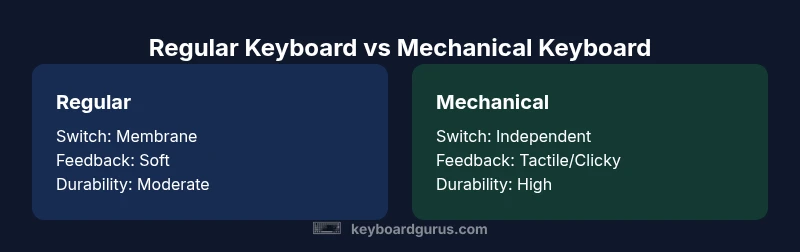
Regular keyboards (membrane) are cheaper and quieter but wear out faster; mechanical keyboards use independent switches for each key, offering better feel, durability, and customization—but at a higher price. For most users, mechanical keyboards provide long-term value, while regular keyboards remain attractive for budget-conscious or casual use.
What the terms mean in the debate between regular keyboard vs mechanical
When people talk about a regular keyboard, they usually mean a membrane or rubber-dome layout. Each keypress completes a circuit through a flexible membrane, giving a soft, mushy feel and typically quiet operation. These keyboards dominate budget and entry-level markets due to low manufacturing costs, simple assembly, and broad compatibility. They’re common in schools, campuses, and offices where cost efficiency and quiet environments matter. According to Keyboard Gurus, the practical takeaway for most beginners is that regular keyboards deliver reliable everyday typing with predictable results, but you may run into a shorter lifespan and more surface wear over time.
In contrast, mechanical keyboards rely on individual switches for every key. Each switch contains a stem, housing, and spring, producing distinct tactile or audible feedback depending on the switch type. They’re favored by gamers and typists who value precision, durability, and customization options. The Keyboard Gurus team notes that mechanical boards typically offer a wider range of feel profiles, from linear to tactile to clicky, enabling users to tailor actuation force and travel to their preference. This upfront diversity often translates to higher upfront costs but longer useful life and easier maintenance for hobbyists.
Core differences in mechanism, feel, and long-term implications
The most obvious distinction between a regular keyboard vs mechanical is the underlying switch technology. Membrane keyboards press down on a flexible layer that closes a circuit, which can result in a “bottoming out” sensation if the key hits the base. Mechanical keyboards separate each key with a dedicated switch that provides varying actuation force, travel distance, and feedback. This mechanical separation helps isolate each keypress, reducing bottoming-out fatigue for some typists and delivering more reliable input during fast gaming bursts.
Durability is another major variance. Regular keyboards tend to wear down as the membrane degrades, leading to inconsistent keystrokes and eventual failure in high-use scenarios. Mechanical keyboards, by contrast, benefit from switch-level replaceability and a design that tolerates repeated actuation without significant loss of tactile feel. The Keyboard Gurus analysis shows that enthusiasts often replace or mod switches rather than entire boards, extending the life of a mechanical setup well beyond a typical membrane keyboard.
Maintenance needs diverge as well. Regular keyboards usually require routine cleaning and occasional keycap replacement, but hinge and switch components aren’t designed for easy access. Mechanical keyboards invite customization—new switches, keycaps, and even hot-swappable designs—though this comes with added maintenance to keep lubrication, dust-free switches, and stable key alignment. Both types benefit from periodic cleaning and mindful cable management, but the long-term upkeep profile shifts with your choice of technology.
Typing experience and ergonomic considerations in the regular vs mechanical debate
Typing comfort is highly subjective but consistently influenced by key travel, actuation force, and feedback. Regular keyboards typically offer shallower travel and a softer feel, which some users appreciate for long writing sessions. However, the softer feedback can blur keystroke registration at higher speeds, particularly for touch typists who rely on precise feedback cues. Mechanical keyboards, by contrast, provide distinct feedback that can improve typing accuracy for many people. The tactile bump in a switch can help you register keystrokes with less effort, reducing fatigue over time if your typing pattern benefits from clear tactile cues. Yet, for some users, the louder click or louder tactile mechanism can create strain in shared spaces.
Ergonomically, keyboards with split designs, tenting, and adjustable feet are common in both categories. The decision often hinges on whether you prioritize minimal keystroke effort and audible confirmation (mechanical) or compact, affordable form factors (regular). Keyboard Gurus emphasizes trying a few switch styles or models before deciding, since comfort is deeply personal and there’s no universal best choice across all users.
Gaming performance and the pragmatic factors that matter
For competitive gaming, the regular keyboard vs mechanical debate typically tilts toward mechanical keyboards. The ability to customize switches, reduce input latency through consistent actuation, and achieve reliable key rollover can translate to more precise control, especially during rapid-fire or complex macro sequences. Mechanical boards often support anti-ghosting, NKRO, and programmable keys, enabling players to map commands without input clashes. That said, not all mechanical keyboards offer meaningful improvements for every game or player; a well-made membrane keyboard with solid key switches can still deliver excellent results for many titles. The key decision factor is how much you value feedback and customization versus cost and silence.
Keyboard Gurus notes that the best gaming setup doesn’t necessarily require top-tier hardware. If you’re gaming casually or you play infrequently, a well-chosen regular keyboard could be perfectly adequate. For power users who want consistent keystrokes, minimal fatigue during long sessions, and the ability to tailor a setup to a specific game or genre, a mechanical keyboard provides clear advantages.
Durability and total cost of ownership over time
Durability is a central pillar in the regular keyboard vs mechanical comparison. Membrane keyboards are generally less robust under heavy use and can begin to feel mushy as the rubber layer degrades. That degradation, along with keycap wear and potential moisture exposure, often leads to shorter lifespans under demanding daily workloads. Mechanical keyboards, while more expensive upfront, are designed for longevity. Switch housings and stems are built to endure tens of millions of actuations, and enthusiasts frequently upgrade only the switches or keycaps rather than retiring the entire unit. Over the lifespan of a keyboard, mechanicals frequently deliver lower relative replacement costs if you factor in upgradeability and modularity.
Noise, desk footprint, and the ambient impact of each type
Noise levels are a practical consideration when choosing between a regular keyboard vs mechanical. Membrane keyboards tend to be quiet, with soft bottom-outs that are unobtrusive in shared spaces. Mechanical switches vary widely: linear switches whisper more than tactile or clicky types, while clicky variants can be markedly loud. Space and layout also matter; compact layouts reduce footprint, but some mechanical keyboards offer full-size form factors with detachable cables, which can affect desk organization and portability. If quiet operation is essential in a dorm, library, or open-plan office, a membrane keyboard or a silent mechanical switch can be the decisive factor in favor of the regular option—or a quieter mechanical model.
Customization, upgrades, and the ecosystem you’re buying into
A major strength of mechanical keyboards is the ecosystem. You can swap switches, swap keycaps, adjust stabilizers, and even opt for hot-swappable boards that let you change switches without soldering. This level of customization appeals to enthusiasts who enjoy experimenting with different feels and aesthetics. By contrast, regular keyboards offer fewer knobs to tweak; you’re generally limited to layout options and occasional replacement of worn keycaps. If you’re curious about personalization and plan to tinker with your setup over years, mechanical keyboards unlock a broader horizon of possibilities. Keyboard Gurus highlights that experimentation and refinement are common paths for enthusiasts to optimize typing comfort and gaming performance.
Price, value, and deciding what fits your budget
Cost naturally informs the regular keyboard vs mechanical decision. Regular keyboards tend to start at lower prices, making them attractive for students or anyone prioritizing basic functionality. The range often extends into mid-tier prices for feature-rich membrane models. Mechanical keyboards typically begin higher, driven by switch quality, build materials, and customization features. The value proposition hinges on how much you value the tangible benefits of switches, tactile feedback, and upgradeability. Budget-conscious buyers can still find solid mechanical options, but the cost-vs-benefit equation shifts toward mechanicals when you anticipate long-term use and frequent typing or gaming sessions. Keyboard Gurus’s guidance is to map your usage patterns and tolerance for upfront cost against expected longevity.
Practical scenarios: who should pick which type in everyday life
If you’re a student with a tight budget and a need for quiet operation in shared spaces, a good regular keyboard is typically the most sensible choice. For a professional who spends long hours typing and values a comfortable, customizable feel, a mechanical keyboard can reduce fatigue and increase accuracy. Gamers who want rapid input, macro capability, and persistent feel across sessions will often lean toward mechanical designs, while casual gamers may achieve satisfactory results with a cost-effective membrane option. In a mixed household or office, the decision may come down to noise tolerance and desk space. By aligning your priorities with the practical strengths of each category, you can reduce the chance of buyer’s remorse after a few weeks of use.
Care, cleaning, and longevity tips for both types
Maintenance for a regular keyboard is straightforward: keep it free of dust, wipe the surface regularly, and replace worn keycaps when needed. For mechanical keyboards, regular cleaning of the keycaps and switches—especially if you swap switches or lenses—helps maintain feel and aesthetics. Avoid liquids near the keyboard and consider a brush or compressed air for dust removal. If you’re into customization, plan for periodic lubrication of stabilizers or switches (if you install them) and keep spare switches and keycaps on hand. Proper care can significantly extend both your regular and mechanical keyboards’ usable life, though the mechanical boards’ upgradeability often adds to their long-term appeal.
A practical, step-by-step decision guide to pick your keyboard type
- List your top priorities: budget, noise, customization, durability, and gaming needs. 2) Try two or more options in person if possible, focusing on actuation feel and travel. 3) Consider future plans for upgrades or changes in layout. 4) Check compatibility with your computer, desk space, and cable management. 5) Decide based on the combination that best aligns with your daily tasks and room constraints. 6) Reassess after a few weeks of ownership to confirm the choice was the right fit for your workflow.
Comparison
| Feature | Regular keyboard (membrane) | Mechanical keyboard |
|---|---|---|
| Switch mechanism | Membrane dome under keycaps | Independent mechanical switch per key |
| Feel and travel | Soft, sometimes mushy feedback | Tactile or linear travel with distinct actuation feel |
| Durability | Moderate lifespan under heavy daily use | Typically longer lifespan with replaceable switches |
| Key rollover/ghosting | Basic to moderate ghosting in older models | Often full rollover or high anti-ghosting reliability |
| Noise level | Quiet, unobtrusive in shared spaces | Noisier options, depending on switch type |
| Maintenance | Minimal upkeep, simpler repair | More maintenance but easier customization |
| Price range | Low to mid-range (budget-friendly) | Mid to high range (premium options) |
| Best for | Budget typing, basic use | Gaming, typing enthusiasts, customization |
Advantages
- Lower upfront cost and broad compatibility
- Quiet operation suitable for shared spaces
- Easier to replace or upgrade as a simple unit
- Good enough for casual typing and basic gaming
- Wide availability and variety across brands and models
Drawbacks
- Faster wear of membrane layers leading to degraded feel over time
- Less tactile feedback and less consistent actuation
- Limited customization compared to mechanical keyboards
Mechanical keyboards generally offer better long-term value for enthusiasts and heavy typists; regular keyboards remain viable for budget-conscious users.
If you typify long sessions or crave customization, mechanics win on feel and durability. If you need a low-cost, quiet setup with minimal upkeep, regular keyboards are a sensible choice. The best pick hinges on your priorities and space.
Got Questions?
What is a regular keyboard in this comparison?
A regular keyboard here refers to membrane or rubber-dome keyboards where a single membrane conducts the signal for multiple keys. They’re typically cheaper and quieter but may wear out sooner and offer less tactile feedback. This type is common in budget setups and common office environments.
A regular keyboard uses a single membrane under many keys. It’s quiet and affordable, but might wear out faster and feel less responsive over time.
What defines a mechanical keyboard?
A mechanical keyboard uses independent physical switches for each key, delivering distinct feedback and durability. Switch options vary by feel, actuation force, and sound, and many boards support swapping switches or keycaps to customize the experience.
Mechanical keyboards use per-key switches, offering different feels and longer life, with lots of customization options.
Are regular keyboards better for gaming?
For casual gaming, a regular keyboard may be adequate and affordable. Mechanical keyboards often offer advantages for competitive gaming due to precise actuation and potential for customization, though results depend on the game and the user’s preference.
Casual gamers can be fine with regular keyboards, but many gamers prefer mechanicals for feel and precision.
Can you customize a mechanical keyboard easily?
Yes, many mechanical keyboards support hot-swappable switches and replaceable keycaps, allowing you to tailor the feel and aesthetics without soldering. This level of customization is a key draw for enthusiasts.
You can swap switches and keycaps on many mechanical keyboards for a personalized feel.
Do mechanical keyboards last longer?
Mechanical switches are designed for many more actuations than membranes, and they’re replaceable on many models. In practice, this often means longer usable life for mechanical keyboards, especially under heavy typing or gaming use.
Yes, they’re typically more durable and easier to repair or upgrade.
What should a student consider when choosing?
Students should balance cost, desk space, and noise. A compact regular keyboard is often best for small study areas and quiet environments, while a fundamental mechanical option can be a good long-term investment if typing is frequent.
Students should weigh budget, space, and quietness; a compact regular keyboard is usually good, but a mechanical one can pay off with long-term use.
What to Remember
- Assess your budget vs. long-term value.
- Choose mechanical for durability and customization.
- Select regular for quiet, cost-effective typing.
- Consider gaming needs and noise tolerance.
- Try before you buy when possible.