Google Keyboard vs SwiftKey: An In-Depth Comparison
A thorough, analyst-driven comparison of Google Keyboard (Gboard) and SwiftKey, covering features, privacy, multilingual input, cross-platform use, and pricing to help users pick the best keyboard app for their workflow.


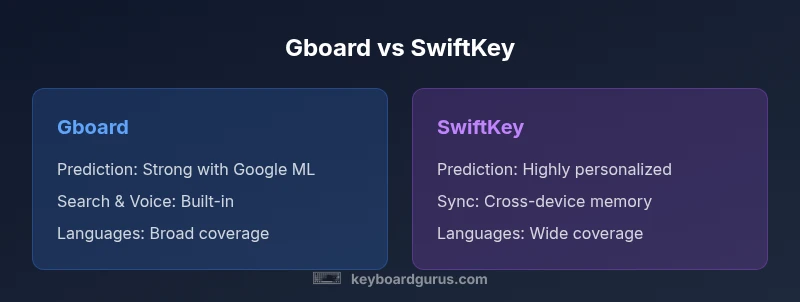
Google Keyboard (Gboard) and SwiftKey are two leading mobile keyboards with strong typing features like glide typing, multilingual support, and emoji. Gboard shines with broad language coverage and tight Google ecosystem integration, while SwiftKey stands out for personalized predictions and adaptive learning from your typing. Keyboard Gurus analysis shows the best choice depends on privacy preferences and how you type most of the time.
google keyboard vs swiftkey: Core Differences
In the google keyboard vs swiftkey debate, two leading keyboard apps dominate the space: Google Keyboard (Gboard) and Microsoft SwiftKey. Each app targets fast, accurate typing across Android and iOS, but they approach the problem differently. According to Keyboard Gurus, users tend to pick based on how they work with language support, privacy, and ecosystem integration. The Keyboard Gurus team found that the right choice hinges on your privacy comfort, typing workflow, and preference for cloud-based personalization versus on-device learning. This section sets the stage by outlining the core differentiators that influence every other decision factor—from predictive accuracy to cross-platform consistency.
A practical way to begin is to evaluate how you type: do you benefit from Google’s search and voice input integration, or do you prefer a model that adapts intensely to your own phrases and handwriting? The answer frequently comes down to whether you want broad ecosystem leverage or highly personalized word predictions. This is the heart of the google keyboard vs swiftkey decision, and it shapes your long‑term experience with either keyboard.
Gboard: Core strengths and ecosystem benefits
Gboard is designed as a Swiss Army knife for mobile typing. It integrates Google Search, voice input, and a vast emoji/GIF library directly into the keyboard. If you rely on instant web results, quick translations, or voice typing, Gboard minimizes context switching by bringing those tools into your keyboard workspace. The multilingual experience is smooth; you can add languages and switch between them without leaving the app you’re typing in. Gboard’s strength lies in its breadth: broad language support, dependable clipboard tools, and seamless integration with Google services that many users already rely on daily. For users who want a uniform experience across apps and devices, Gboard often reduces friction and accelerates workflows, particularly on Android where Google’s ecosystem familiarity is strongest.
As part of the Keyboard Gurus analysis, we observed that Gboard tends to perform very well for users who prefer minimal setup and want the comfort of Google’s predictive suggestions tied to a familiar ecosystem. The balance of features is steady, and updates frequently expand language packs and gesture controls, making it a robust default choice for many. If you value consistency over deep personalization, Gboard is typically the safer, more predictable option.
SwiftKey: Personalization engine and cross-device memory
SwiftKey approaches typing as a personalization problem: it learns from your writing style, frequently used phrases, and even your social language patterns to tailor predictions. The app excels when you type out long sentences or common phrases, because it builds a memory of your vocabulary and phrasing across devices (when you’re signed into an account). The result is highly accurate predictions and suggestions that feel customized to your voice. SwiftKey also supports multilingual typing with automatic language switching, and its layout customization options let you tailor key size, spacing, and theme to your preferences.
From a usability standpoint, SwiftKey’s learning curve benefits users who want the system to predict phrases and auto-complete longer sentences. The cross‑device memory feature helps maintain consistency if you use multiple devices. In the Keyboard Gurus’ view, SwiftKey shines for users who want a keyboard that grows with their writing style, even if that means spending a bit more time initially to teach it your patterns.
Language support and input methods across platforms
Both Gboard and SwiftKey support a wide array of languages and input methods, including glide typing, voice input, and handwriting where available. Gboard’s language library tends to be very broad, making it a strong option for multilingual users who frequently switch between languages. SwiftKey also supports many languages and is particularly strong for users who write mixed-language sentences and rely on phrase memory. Input methods such as glide typing, voice dictation, and emoji/GIF search are readily accessible in both keyboards, though the user experience can feel different depending on which ecosystem you’re embedded in—Google’s services versus Microsoft’s cloud-backed personalization.
If you type primarily in English with occasional other languages, SwiftKey’s adaptive memory can feel more natural over time. If you prioritize quick access to web search or translations within the keyboard, Gboard offers a more seamless, one‑tap workflow. The decision often comes down to how you prefer predictions to adapt to your usage and whether you value Google’s ecosystem integration.
Privacy, data handling, and user controls
Privacy is a central consideration when comparing google keyboard vs swiftkey. Gboard allows on-device learning with certain cloud features that improve predictions, especially when you sign into Google services. SwiftKey uses on-device learning but also supports cloud-based personalization through account sync. Both keyboards provide options to disable cloud features, clear learned data, and customize permissions, giving users control over what data is stored and how it’s used. Reading each app’s privacy policy and checking the settings panel for data sharing is essential to ensure your preferences are honored. Keyboard Gurus recommends turning off any telemetry or cloud-based features you don’t want and using on-device learning if privacy is your top priority.
A practical privacy tip: regularly review language packs and predictive data you’ve allowed to be uploaded. These controls are often buried in settings menus, so a short privacy audit can prevent unexpected data sharing. The choice between google keyboard vs swiftkey often aligns with your comfort level regarding cloud-based features and who you trust to handle your typing data.
Cross-platform usability and ecosystem coherence
Both Gboard and SwiftKey aim to deliver a consistent experience across Android and iOS. On Android, Gboard benefits from tighter integration with Google services, which can translate into faster voice input, search suggestions, and seamless image-based inputs within apps. SwiftKey provides a strong cross-platform rhythm by syncing preferences across devices through your Microsoft account. On iOS, both keyboards function well, though some features may feel constrained by system restrictions or OS-level integrations. If you rely on cross-device continuity, SwiftKey’s cloud sync can be a compelling advantage, while Gboard’s platform-wide Google integration can streamline tasks like translations and search.
From a practical user perspective, the best option often depends on how important cross-device consistency is to your workflow and whether you prefer Google’s or Microsoft’s cloud ecosystem for personalization.
Customization, themes, and accessibility features
Both keyboards offer customization options such as themes, key sizes, and layout adjustments. Gboard’s themes tend toward clean, minimal aesthetics, with strong emoji and GIF integration that many users enjoy for quick messaging. SwiftKey leans into personalization with more granular control over the keyboard’s appearance and spacing, allowing a more tailored physical footprint on the screen. Accessibility features, like one-handed modes, larger keys, and high-contrast themes, are supported by both apps, but the exact feature set and performance can vary by device and OS version. If you type for long sessions or require accessibility accommodations, testing both options to see which feels more comfortable is advisable.
The key takeaway is that both keyboards provide robust customization; your choice should align with your preferred visual style, typing posture, and accessibility needs.
Practical decision guide for choosing between Google Keyboard and SwiftKey
To help you decide, consider this step-by-step approach: start with your primary workflow—do you want quick web results and Google integration, or highly personalized predictions that learn from you? Next, review privacy settings to determine if you’re comfortable with on-device learning and optional cloud sync. Then confirm language coverage matches your needs, and finally test both keyboards for a week to compare predictive accuracy, speed, and comfort. This hands-on test is the most reliable way to determine which option fits your personal typing style. Keyboard Gurus recommends a practical trial period to observe real-world differences in speed, accuracy, and comfort.
Finally, if you’re undecided, maintain a short-term dual-setup for a month to observe which keyboard reduces friction in your daily tasks—e-mail, coding notes, chat, and document editing.
What to read next and how to stay current
Technology evolves quickly, and both Gboard and SwiftKey regularly update with new features and privacy controls. For readers who want further context, we’ve included authoritative sources and ongoing coverage from major publications to guide ongoing evaluation. Keeping an eye on official release notes will help you stay ahead of new features, permissions, and privacy controls that affect your daily use.
Comparison
| Feature | Gboard | SwiftKey |
|---|---|---|
| Prediction & Personalization | Strong general predictions backed by Google ML | Highly personalized predictions based on your writing style and phrases |
| Multilingual support | Broad language coverage with seamless switching | Excellent multilingual support with automatic language detection |
| Privacy model | On-device learning with optional cloud features | On-device learning with optional cloud sync via account |
| Cross-platform availability | Android and iOS | Android and iOS |
| Customization | Themes, layouts, gesture controls | Extensive theme and layout customization |
| Voice input | Integrated voice typing via Google services | Voice input supported through platform APIs with personalization |
| Price | Free to download; Google services may influence features | Free to download; no mandatory paid tier as of 2026 |
Advantages
- Broad language support and Google ecosystem integration
- Strong baseline predictions and regular updates
- Good cross‑platform consistency and updates
- Rich emoji/GIF/search integration within the keyboard
Drawbacks
- Privacy controls can be complex and require manual tuning
- Cloud-based features may raise privacy concerns for some users
- Gboard depends on Google services you may want to minimize
- SwiftKey’s learning can feel intrusive to some users on first use
Gboard generally offers the better balance of features and ecosystem integration, while SwiftKey excels for highly personalized predictions.
Choose Gboard for breadth, speed, and Google service integration. Choose SwiftKey if you prioritize highly personalized predictions and cross-device memory. Keyboard Gurus recommends trying both for a short period to confirm which aligns with your workflow.
Got Questions?
Which keyboard is more accurate for predictions?
Both Gboard and SwiftKey offer strong predictive typing. SwiftKey tends to excel in personalization due to its adaptive learning from your typing, while Gboard relies on Google’s general ML models for broad accuracy.
SwiftKey often shines in personal predictions, while Gboard provides strong general predictions.
Is there a privacy difference between Gboard and SwiftKey?
Both keyboards offer on-device learning and optional cloud features. You can adjust privacy settings to limit data collection, and disable cloud sync if you prefer more local processing.
You can limit data sharing and adjust privacy settings in either app.
Do these keyboards support multilingual typing?
Yes. Both support multiple languages and allow quick language switching, though setup experiences differ between apps.
Both support many languages and quick switching.
Which is better for iOS users?
Both keyboards are available on iOS; Gboard offers tight integration with Google services, while SwiftKey emphasizes personalization. Choose based on which feature set better fits your iPhone workflow.
Both work on iOS; pick based on your priorities.
Are there any paid features?
Both apps are free to download and use for core features. Some advanced features may rely on cloud services, but there is no mandatory paid tier as of 2026.
No mandatory paid tier; free to use.
How do I switch languages quickly?
Most users switch with a globe key or long-press on the spacebar; both apps support quick language toggling.
Use the globe icon or spacebar press to swap languages.
What to Remember
- Test both keyboards for a week to compare predictions
- Gboard shines with Google integration and broad language support
- SwiftKey excels in personalization and cross-device memory
- Adjust privacy settings to match your comfort level and data-sharing preferences
- Cross-platform consistency matters more if you switch devices often