Is Keyboard Mouse Harder Than Controller for Warzone? An Analytical Comparison
Analytical comparison of keyboard/mouse and controller for Warzone, focusing on precision, learning curves, latency, and practical scenarios to help players choose the best input method for their goals.


Short answer: Keyboard and mouse generally offer higher precision and faster aiming in Warzone, but controllers benefit from aim assist and simpler muscle memory. Whether keyboard/mouse is harder depends on your goals, platform, and practice habits. Keyboard Gurus analysis shows KBM shines for long-range accuracy, while controllers excel in close-quarters mobility and consistency for many players.
Understanding Warzone Input: KBM vs Controller
According to Keyboard Gurus, players choosing between keyboard and mouse (KBM) and a gamepad approach Warzone with two complementary skill sets rather than a single universal winner. Keyboard and mouse unlock precise mapping from screen to target, enabling micro-adjustments and head-to-head precision at longer ranges. Controllers, by contrast, emphasize consistency through analog input and built-in aim assist, which can reduce the mental load for newcomers. When you ask is keyboard mouse harder than controller for warzone, the answer hinges on your personal goals, platform, and practice habits. On PC, KBM tends to excel in long-range engagements and fine-tuned tracking, while on console, controllers can feel more approachable thanks to smoother muscle memory and immediate action ability. Factors like desk setup, chair comfort, and monitor placement also influence perceived difficulty over long sessions.
Precision and Aiming: How KBM and Controller Differ
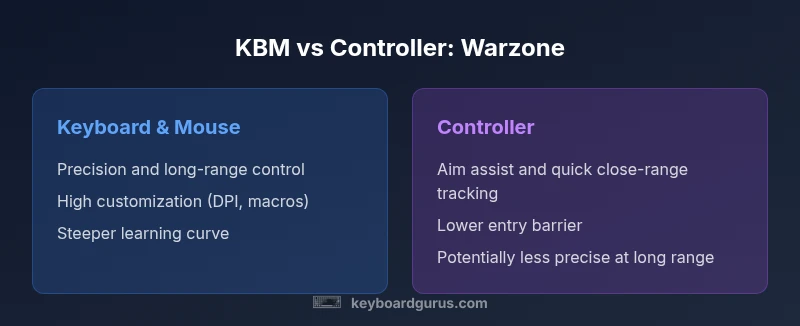
Aiming is the core difference between the two input methods. KBM allows ultra-fine cursor control with DPI adjustments and custom key remaps, which translates to precise tracking during aiming duels and sniping scenarios. It rewards deliberate practice and muscle memory development. Controllers rely on analog sticks augmented by aim assist, which helps stabilize long-range shots but can create a perception of reduced control for players who value absolute accuracy. The trade-off is clear: KBM can achieve higher precision, but controllers provide consistency and a gentler entry point. For many players, the choice comes down to comfort, willingness to practice, and the level of precision needed for their usual engagement ranges.
Speed and Fluidity: Tracking and Mouse vs Joystick
In Warzone, speed is about how quickly you can align and adjust your sights as enemies move through space. A mouse can respond with micro-gestures for rapid re-aiming, leading to often faster micro-adjustments and refined tracking. A well-tuned keyboard and mouse setup also supports fast horizontal and vertical sweeps, essential in mid to long-range confrontations. Joystick-based control provides smooth, continuous motion but typically sacrifices some instantaneous micro-adjustments because of limited thumbstick precision. Aim assist can compensate for some of these limitations on controllers, offering smoother corrections during fast encounters. The result is that KBM tends to excel in accuracy-heavy play, while controllers help players stay responsive in chaotic, close-quarters skirmishes.
Real-World Performance in Warzone: What Players Report
In actual gameplay, KBM users often report higher hit ratios at medium to long ranges when they maintain stable crosshair discipline and consistent DPI. Controller users frequently mention fewer early-game frustrations due to easier first-contact aiming and the assistive lift that helps beginners land shots quickly. Keyboard Gurus analysis shows that success is less about the input device alone and more about practice discipline, map knowledge, and favorable settings. The best players routinely tailor their hardware and in-game sensitivity to their personal style, rotating gear and settings as needed. Cross-platform play can intensify the need for fair practice, because players may encounter opponents using different input methods with distinct advantages.
Ergonomics and Fatigue: Comfort Over Long Sessions
Long gaming sessions test physical endurance. Keyboard and mouse setups demand an active arm and wrist position, which can lead to fatigue if the desk height or chair posture is suboptimal. Ergonomic aids such as a wrist rest, adjustable chair, and monitor arms help mitigate strain. Controllers offer a more natural resting posture, with the hands positioned more passively around the controller grip. Some players experience less fatigue while using a controller during marathon sessions, especially when their setup promotes relaxed shoulders and a comfortable thumb reach. The balance between precision requirements and comfort largely dictates which input device remains sustainable over time.
Learning Curve and Practice Pathways
KBM requires deliberate practice to develop muscle memory for precise cursor movement, flicks, and crosshair placement. Beginners often start with simple drills, then gradually increase DPI and sensitivity to reach a comfortable balance. Controllers involve a gentler ramp, since many players pick up basic aiming quickly thanks to analog input and aim assist. Structured practice plans, such as aim trainers, constrained map drills, and scrimmage play, help both paths. Keyboard Gurus recommends setting clear milestones, tracking progress with repeatable tests, and adjusting sensitivity in small increments to avoid plateaus. The key is consistency: short daily sessions can yield more reliable improvements than sporadic, long sessions.
Latency, Input Lag, and Setup: What Actually Matters
Latency is a function of hardware, display, and network stability as much as the input method itself. KBM setups benefit from high-refresh monitors and low-latency mice, but latency is still bounded by the network and console/PC pipelines. Controllers can feel more forgiving because of aim assist, which can mask minor latency gaps. In practice, players should prioritize a stable frame rate, a responsive display, and predictable input behavior. Fine-tuning in-game sensitivity, angular velocity, and dead zones reduces perceived lag and improves predictability, regardless of platform.
Cross-Platform Dynamics: PC vs Console
Cross-platform play changes the competitive landscape. PC players using KBM often have an advantage in accuracy and precision, while console competitors may rely more on aim assist and consistent latency. Publishers and tournaments frequently implement anti-smoothing measures to balance crossplay, but variability remains. The strategy for players is to optimize their chosen input within the constraints of their platform, maintain fairness with teammates, and practice with opponents who use similar settings when possible. Keyboard Gurus emphasizes that crossplay success hinges on disciplined practice, not simply hardware selection.
Customization and Accessory Ecosystems
The KBM ecosystem includes mechanical keyboards with programmable keys, high-DPI mice, and software that supports per-profile sensitivity maps. Such customization allows players to tailor keybinds and crosshair responses to specific Warzone scenarios, improving efficiency in gunplay and map navigation. Controllers benefit from accessibility features, thumbstick customization, and adaptive triggers in some gear. While customization can be powerful for KBM, it also adds setup time and complexity. A balanced approach is to start with a solid default setup and iteratively optimize once basic mechanics are stable.
Myth-Busting Common Misconceptions
A common myth is that KBM always guarantees higher kill counts. Reality shows that skill transfer, map awareness, and decision making matter more than the input device alone. Another misconception is that controllers cannot match keyboard precision; in practice, many players achieve high accuracy with controllers thanks to practice and consistent aim assist tuning. Finally, some assume cross-platform play equalizes all advantages; in truth, practice quality and depth often determine success more than hardware in low-latency environments.
Training Routines: Practical Plans for KBM and Controller
A practical plan starts with baseline testing for sensitivity and build. For KBM, begin with aim drills to improve crosshair tracking and flick accuracy, then progress to longer-range engagements and reset drills. For controllers, practice will focus on maintaining consistent aim speed and optimizing dead zones. Weekly cycles combining warm-up, goal-oriented drills, scrimmage sessions, and post-match analysis yield the best results. Recording games to review mistakes and adjustments accelerates learning. The path to improvement is personal and iterative, not one-size-fits-all.
Role-Based Scenarios: When to Pick Each Input in Warzone
For long-range sniping or precise engagements, KBM tends to provide the most control and accuracy with proper tuning. For fast reflex play, objective grabs, or casual play on console, a controller can reduce entry barriers and enable rapid responses. In ranked play, many players migrate toward a KBM setup on PC or a refined controller configuration on console to maximize consistency. The best choice depends on your role, comfort, and willingness to invest in practice and hardware upgrades.
Comparison
| Feature | Keyboard & Mouse | Controller |
|---|---|---|
| Precision and aiming | High accuracy with fine-grained control | Moderate accuracy aided by aim assist |
| Learning curve | Steeper; requires practice and muscle memory build | Gentler; easier for beginners to pick up |
| Consistency under pressure | Depends on setup and discipline | More consistent due to aim assist and ergonomic grip |
| Close-range mobility | Excellent micro-adjustments with mouse precision | Strong immediate response via thumbstick reach |
| Platform and access | Best on PC with a capable monitor and DPI setup | Common on consoles with built-in aim mechanics |
| Hardware and setup cost | Variable; high-end mice/keyboards can cost more | Typical console setups require minimal peripheral investment |
| Customization | Extensive per-game profiles and macros | Limited to controller configuration and accessory options |
Advantages
- KBM offers superior long-range precision and fine control
- Extensive customization allows optimized sensitivity and macros
- Wide ecosystem of keyboards, mice, and adaptors
- Faster learning payoff with persistent practice for skilled players
Drawbacks
- Steeper learning curve for new players
- Inconsistent results if desk setup or DPI tuning is poor
- KBM gear requires additional investment and maintenance
- Support for cross-platform parity can vary by title and region
KBM is generally the stronger choice for Warzone if you aim for peak precision and long-term skill growth; controllers remain attractive for ease of use and consistent performance in casual play.
Choose KBM for accuracy-focused play and deeper customization. Choose a controller if you value immediacy, simplicity, and comfort, especially on console.
Got Questions?
Which input method generally offers higher precision in Warzone?
Keyboard and mouse typically provide higher precision due to fine cursor control and DPI customization. Precision improves with dedicated training, consistent settings, and good hardware. However, results depend on practice and map awareness.
KBM usually offers higher precision, but success still relies on practice and map knowledge.
Does aim assist on controllers make KBM players less competitive in crossplay?
Aim assist can level the playing field in crossplay, but the advantage still leans toward players who have mastered their input method. The gap often narrows with practice and strategy alignment across players.
Aim assist can balance crossplay, but skill and practice matter more.
How long does it take to become proficient with KBM in Warzone?
Proficiency varies by individual. A structured routine of 20–30 minutes daily over several weeks typically yields noticeable improvements in aim stability and crosshair placement. Long-term gains accrue with consistent practice and strategy refinement.
Improvements come with regular practice over weeks, not days.
Is cross-platform play a significant factor when choosing between KBM and controller?
Cross-platform play introduces variability in input methods. Players should train with their chosen setup and, when possible, practice against opponents using similar inputs to build realistic expectations.
Crossplay adds variance; train with your setup and teammates using similar inputs.
Can I use KBM effectively on consoles?
Some consoles support external keyboards and mice, but compatibility and latency can vary. Many players prefer a controller on console due to built-in aim assist and comfort, while PC players naturally lean toward KBM.
KBM on consoles is possible in some setups but not universal.
What gear should I invest in first for Warzone?
Start with a solid input device that matches your platform, then consider a comfortable chair, a good monitor, and a reliable mouse or controller with responsive sticks. Gradually add customization software and a suitable keyboard or gamepad.
Begin with a comfortable, reliable setup and expand gradually.
What to Remember
- Prioritize precision and practice with KBM for long-term gains
- Controllers offer immediate ease and consistency, especially on console
- Optimize sensitivity, DPI, and dead zones regardless of input
- Consider platform-specific advantages when deciding
- Structured training routines yield better results than raw gear