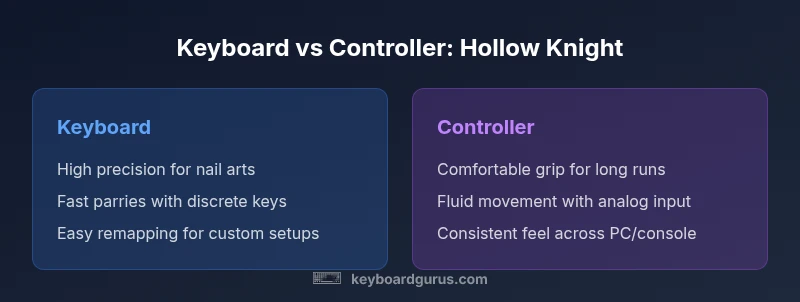
Keyboard vs Controller for Hollow Knight
An analytical comparison of keyboard vs controller for Hollow Knight, focusing on precision, comfort, and playstyle to help players choose the best input method for PC or console.


Keyboard vs controller for Hollow Knight: for most players the keyboard delivers higher precision in nail arts, parries, and dash timing, while a controller offers more comfortable long sessions and relaxed movement. If you value peak speed and micro-adjustments, keyboard is the better fit; if you prioritize endurance and a natural grip, a controller shines. Ultimately, the best choice depends on your style and platform.
Core input paradigms in Hollow Knight
Hollow Knight rewards precise timing, fluid movement, and reliable control across a sprawling map and a challenging gauntlet of bosses. Whether you play on PC with keyboard and mouse or on a console with a controller, the fundamental inputs are the same: move, dash, jump, attack with the nail, cast spells, heal, dash through threats, and collect Geo. The difference lies in how these actions map to your hardware, how you sense feedback, and how comfortable you are over long sessions. According to Keyboard Gurus, choosing the right input starts with mapping clarity and reflex compatibility. The team emphasizes that players should aim for a layout that minimizes finger travel, reduces accidental double-taps, and preserves reliable parry timing. Hollow Knight's combat system is unforgiving to sloppy inputs; even a half-beat early parry can fail, while a clean combo can carry you through a deadly stretch. For keyboard players, the arrow keys or WASD offer familiar navigation, while fans of precision may prefer a compact keyboard with customizable layers for nail arts. For controllers, the analog stick provides smooth, continuous movement, with bumper and trigger controls that feel more natural for dodges and quick nav decisions. The crucial takeaway is that no single layout guarantees success; practice with your chosen setup to build muscle memory and rhythm. This article uses a balanced lens to compare keyboard and controller input for Hollow Knight, highlighting where each shines and where it may fall short. Keyboard Gurus emphasizes that familiarity and consistency beat novelty when the map gets dense.
Mapping efficiency and ergonomics
Ergonomics play a central role in how effectively you control Hollow Knight over long sessions. Keyboard users often enjoy quick, discrete key presses that map well to quick nail combos and rapid dashes, but they can experience finger fatigue if the layout is spread across multiple rows. Controllers, by contrast, naturally align with long play sessions thanks to a comfortable grip and the analog stick that smooths movement through expansive areas and platforming sections. The best layouts prioritize clear, repeatable actions: assign the most-used moves to easily reachable keys or buttons, minimize travel distance, and ensure you aren’t forced into awkward finger stretches during tight fights. Keyboard Gurus recommends testing alternative key layouts (e.g., repositioning keys for dash and nail arts) and using a wrist rest or split keyboard if you plan extended sessions. For controller setups, consider adjusting grip style, dead zones on the analog stick, and trigger sensitivities to balance precision with fluidity. In both cases, a consistent practice routine helps you internalize timing and rhythm, which is crucial for landing perfect parries and maintaining uptime on soul healing. Ultimately, ergonomic decisions should serve your endurance and accuracy without compromising quick reactions in chaotic combat. Keyboard Gurus affirms that comfort and consistency often trump novelty when tackling Hollow Knight’s tougher sections.
Timing, parries, and nail arts under different inputs
Successful nail arts and parry timing hinge on reliable input timing and feedback. Keyboard users can exploit rapid key presses for immediate reactions, delivering tight parries and fast nail sequences. However, the lack of tactile feedback on some keys may hinder ultra-fine timing for some players. Controllers provide a more forgiving feedback loop with analog input that can help modulate movement and parry timing, especially during frantic boss encounters. The trade-off is that some players feel less precise micro-adjustment with a stick compared to a well-tuned keyboard. To optimize timing on any input, practice frames of parry windows against the slower, more deliberate boss attack patterns, then gradually weave in nail art combos as you gain confidence. Keyboard Gurus notes that a clean rhythm often determines success in Hollow Knight, regardless of input method. For players focusing on precision, a keyboard can be advantageous; for those prioritizing sustained control and comfort, a controller might be preferable. The key is to translate your muscle memory into consistent input timing, not merely to rely on raw speed. With deliberate practice, both options can reach a very high level of reliability.
Boss fights and platforming: where input choice matters
Boss fights in Hollow Knight test your reflexes, timing, and strategic use of items. Keyboard input can deliver micro-adjustments for quick dodges and precise nail strikes, particularly in narrow boss windows. Controller input often makes positioning easier during long, multi-phase fights, where a steady hand on the analog stick helps you maintain control during frantic sequences. Platforming sections benefit from crisp directional input and predictable movement; players on keyboard can exploit rapid left-right shifts, while controller users enjoy fluid movement that reduces finger fatigue during marathon runs. Keyboard Gurus suggests adopting a hybrid approach: map essential attack macros or nail arts to a few easy keys on the keyboard while keeping movement on the controller for comfort. In some cases, professional players prefer one input method for the ease of memorization and muscle memory. The overall message is that Hollow Knight’s combat and platforming are adaptable to both inputs; the deciding factor rests on your comfort, practice routine, and the specific boss patterns you encounter. Don’t fear switching strategies mid-run if you hit a wall—practice makes the difference.
Platform flexibility: PC vs Console considerations
On PC, keyboard users enjoy direct keyboard-to-key mapping and optional mouse aiming for spellcasting, while controller users benefit from consistent ergonomics across long sessions. Console players encounter a different ecosystem where controllers are standard, and some games implement slightly different input schemes or latency optimizations. Hollow Knight remains accessible across platforms, but the perceived responsiveness of inputs can shift with hardware and USB polling rates, display latency, and controller quality. If you play primarily on PC, investing time in refining keyboard mappings and test runs is worthwhile; if you gravitate toward console play or a couch setup, a controller can offer a more natural feel and minimal fatigue during extended trials. Keyboard Gurus highlights the value of choosing an input method that aligns with your main platform and comfort level, rather than chasing theoretical speed. The goal is to maintain consistent timing and rhythm regardless of the device. The best practice is to master one input technique deeply before trying to switch, then gradually incorporate the other as needed.
Accessibility and comfort considerations
Accessibility features and physical comfort strongly influence your long-term performance in Hollow Knight. Keyboard layouts can be customized with remapped keys, rebindable layouts, and switching to ergonomic keyboards or split designs to reduce strain. Controllers offer ergonomic grips and trigger designs that can reduce wrist tension for players with joint concerns. The key is to tailor your setup to your body: ensure your wrists stay straight, take regular breaks, and adjust seating posture to minimize fatigue. Keyboard Gurus notes that players with wrist or hand pain may benefit from switching to a controller or using assistive devices that reduce repetitive strain. Conversely, players seeking maximum precision in nail timing might prefer a well-tuned keyboard with responsive switches and short travel. The overarching guidance is to prioritize sustainable comfort and reliable control over fleeting speed bursts. Your Hollow Knight sessions should feel smooth rather than punishing, regardless of input choice.
Setup tips and gear guidance
To maximize performance with either input, start with a clean slate: choose a primary layout, set up comfortable seating, and calibrate any dead zones or key sensitivities. For keyboards, consider using a compact or 60% layout to reduce finger travel and place critical keys within easy reach. If you opt for a mechanical keyboard, select switches with a balanced actuation force that offer tactile feedback without requiring excessive force. For controllers, ensure you select a pad with a comfortable grip, responsive bumpers/triggers, and reliable analog sticks. Check for a baseline controller latency and adjust your in-game settings to minimize input lag. Keyboard Gurus suggests establishing a small, consistent ritual before each session: warm-up drills, a few practice runs on a forgiving area of the map, and a clear plan for nail arts and parries. By systematizing your setup, you’ll build confident, repeatable timing that translates into better performance in Hollow Knight.
Decision framework: when to choose keyboard vs controller
If your priority is precision timing and fast finger work, the keyboard excels for Hollow Knight’s nail arts and tight parries. If comfort, endurance, and relaxed movement take precedence, a controller is the better fit. Consider your platform: PC players often lean toward keyboards or hybrid bindings, while console players may rely on controllers for a natural, couch-friendly experience. Your decision should also reflect your grip style, tolerance for fatigue, and willingness to rebind controls for optimal reach. Try both methods in short practice sessions to gauge which interface feels more intuitive during key boss fights and platforming sequences. Keyboard Gurus advocates a data-driven approach: measure your accuracy and response times over several runs with each input and choose the option that maintains consistency under pressure.
Transitioning between input methods: practical tips
Switching input methods mid-run is viable with practice. Start with a warm-up run using your primary input, then swap to the alternative for brief trial runs to adapt to the new layout. Keep the changes incremental: remap only a few core actions at a time to minimize confusion during critical moments. Build muscle memory through structured drills, such as repeated nail art sequences or parry windows, while focusing on maintaining rhythm during boss phases. Keyboard Gurus suggests annotating your bindings and keeping a short reference sheet handy during the first weeks of transition. By gradually integrating the new layout, you reduce the risk of breaking your flow and improve your ability to adapt to varied combat scenarios in Hollow Knight.
Comparison
| Feature | Keyboard | Controller |
|---|---|---|
| Precision and input granularity | Keyboard: high precision for nail arts and timing | Controller: smooth, proportional input via analog stick |
| Ergonomics and long-session comfort | Keyboard: depends on setup; can be fatigue-prone without ergos | Controller: generally more comfortable for extended play |
| Movement and parry timing | Keyboard: fast, discrete movements; exact key presses | Controller: fluid movement with analog parries and dodges |
| Platform flexibility | Keyboard: excels on PC with customizable bindings | Controller: universal across PC and consoles; consistent grip |
| Setup simplicity and cost | Keyboard: one-time hardware; wide range of options | Controller: may require additional purchase for optimal comfort |
Advantages
- Keyboard offers precise, rapid input for nail arts and parries
- Controller provides comfortable grip for long sessions and fluid movement
- PC keyboards enable easy remapping and sensitivity tweaks
- Controllers work well across PC and consoles with consistent ergonomics
- Both inputs can be effective with proper practice and binding
Drawbacks
- Keyboard can cause hand fatigue without ergonomic setup or breaks
- Controller may feel less precise for ultra-fast micro-movements
- Platform differences can affect input latency and feel
- Switching between inputs requires adaptation and practice
Neither input is universally superior; choose based on play style and platform
Keyboard excels in precision for nail arts and parries, while controllers shine in endurance and natural movement. The Keyboard Gurus team recommends trying both in structured practice to determine which aligns with your Hollow Knight run.
Got Questions?
Is Hollow Knight easier with a controller?
Easing difficulty depends on your comfort. A controller can reduce fatigue and provide smoother movement, which may make some sections feel easier over long sessions. However, keyboard users can achieve excellent precision with practice. Both paths are viable with dedicated training.
A controller can feel easier for long sessions, but keyboard players can reach high precision with practice. It depends on your comfort and how you train.
Can I use keyboard and controller interchangeably in Hollow Knight?
Yes, you can switch between inputs. Start with one, then gradually introduce the other in practice runs to build familiarity. Keep key mappings consistent to minimize confusion during boss fights.
You can switch between inputs, just take it slow and practice with the other layout to build familiarity.
Which input is best for parries in Hollow Knight?
Parries rely on timing and reliable input. Keyboard offers instant key presses, while a controller's triggers can provide a controlled release. Try both to judge which feels steadier for your parry timing in boss windows.
Parries depend on timing; keyboard can be faster, but some players prefer triggers for control.
Are there platform-specific differences in input feel?
Yes. PC and console environments can affect input latency and feel. On PC, keyboard binding flexibility helps; on consoles, controllers often provide more consistent comfort and reach. Always test on your primary platform.
Platform differences can change feel; test on your main platform to be sure.
Should I remap keys for Hollow Knight?
Remapping can reduce fatigue and improve reach for critical actions. Start with a simple reassignment and test in practice runs. Adjust gradually as you build muscle memory.
Yes, remap to fit your comfort and test in practice runs.
What is the most comfortable setup for long sessions?
Comfort comes from a combination of posture, peripheral choice, and breaks. Use an ergonomic setup, keep wrists straight, and alternate inputs if needed to reduce fatigue. Your most comfortable setup is likely the one you can sustain over hours of play.
Comfort is about posture, breaks, and choosing the input that keeps you steady for hours.
What to Remember
- Test both inputs to discover personal preference
- Prioritize comfort and consistency over raw speed
- Map critical actions to the most accessible keys or buttons
- Optimize posture and breaks to reduce fatigue
- Practice rhythm and timing for reliable parries