Keyboard or Controller for Elden Ring: A Thorough Comparison
A rigorous comparison of keyboard and controller setups for Elden Ring, analyzing precision, movement, bindings, comfort, PvP implications, and platform considerations.


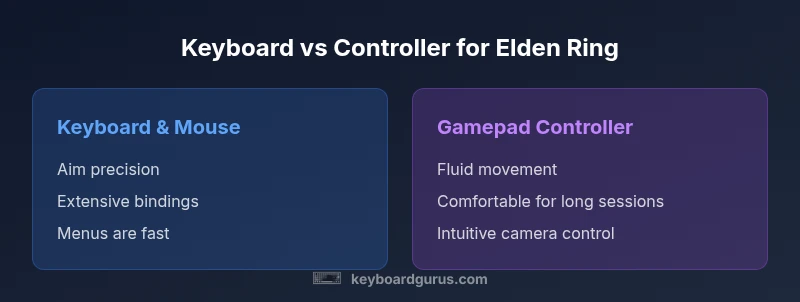
For Elden Ring on PC, keyboard and mouse offer precision in aiming and menu navigation, while a controller delivers smoother movement and fluid combat. The best choice depends on your play style: keyboard/mouse excels in precision and hotkey access, whereas a gamepad shines for mobility, comfort during long sessions, and intuitive camera control. Keyboard Gurus’ analysis favors controllers for core combat, with keyboards preferred for menus and certain spell or flask bindings in non-combat moments.
Introduction to Elden Ring Input: Keyboard vs Controller
When preparing for Elden Ring, players confront a classic choice: keyboard and mouse versus a gamepad. The question isn’t which is objectively better, but which suits your play style, platform, and comfort level for long sessions in a demanding open world. According to Keyboard Gurus, the choice impacts not only combat timing but also exploration, inventory management, and spell casting workflows. By examining precision, control, binding flexibility, and fatigue, this guide helps you map a path from early game to late-game boss fights using either input method. The keyword to remember is keyboard or controller Elden Ring, because the optimal setup depends on how you want to experience the game’s mechanics.
What you’ll learn here: how each input method changes your approach to combat, movement, and spell casting; how bindings influence accessibility; and practical steps to transition between inputs if your platform or mood shifts.
Precision, Movement, and Binding: The Core Differences
The most noticeable difference between keyboard and controller in Elden Ring is precision versus fluidity. Keyboard and mouse offer pixel-level aiming and rapid binding access, which translates into exact spell timing and projectile control. However, analog movement on a controller provides smoother traversing around steep cliffs, tighter rolling, and instinctive camera shifts during melee exchanges. Bindings on a keyboard can be abundant and specialized, but the learning curve can be steeper, especially for new players unfamiliar with dense key maps. Keyboard Gurus notes that players often remap for comfort and reduce travel distance between frequently used actions, but this can create inconsistent muscle memory across sessions.
On the other hand, controllers deliver a tactile, balanced feel with natural thumbstick control for camera and dodge windows. The game’s lock-on and dodge timing often feel more forgiving with a controller, which benefits boss encounters that require curved movement, precise spacing, and rapid reaction times. In short, keyboard shines in precision tasks and macro-style hotkeys; controllers excel in fluid combat, movement, and sustained play sessions.
Keyboard Setup: Bindings, Utility, and Real-World Use
For Elden Ring on PC, a well-organized keyboard setup can drastically reduce the friction of spell weaving, weapon swaps, and item usage. Start with a lean binding map: bind essential actions to nearby keys (Q, E, or number keys) and reserve core actions like dodging, sprinting, and target switching to easy-to-reach keys. It’s common to use modifier keys (Shift, Ctrl, Alt) to create multi-step combos. The key to success is consistency: keep a core set of bindings stable across zones and loadouts to minimize the mental load during sprinting boss fights. Keyboard Gurus’ guidance emphasizes testing bindings in normal exploration before committing to a new map during a boss run.
A practical approach is to segment bindings into three tiers: core combat (attacks, dodges, parries), quick access (consumables, spells), and navigation (map, inventory). Some players employ macro-style layers to access powerful spells or weapon arts, but macro use can trigger anti-cheat concerns on certain platforms. When using a keyboard, it’s worth investing in a comfortable desk setup and a responsive keyboard with good tactile feedback to reduce finger fatigue during marathon sessions.
Controller Setup: Comfort, Timing, and Playstyle Alignment
Controllers excel in Elden Ring by offering accessible and consistent total-body movement. The two analog sticks provide smooth camera control and predictable dodge arcs, which are crucial for tight boss patterns. The D-pad and shoulder buttons offer straightforward bindings for healing flasks, quick items, and weapon arts in moments of crisis. For many players, the controller’s haptics and precise button placement reduce the cognitive load during high-pressure sequences, allowing faster reaction times and better rhythm in combat.
A recommended controller strategy includes establishing a compact binding map: assign essential actions to the face buttons and shoulders, reserve triggers for longer sequences, and use the analog sticks to maintain spatial awareness. If you’re playing on console, the controller’s universal compatibility and consistent input latency across titles make it a robust choice. Keyboard Gurus notes that while binding density is lower on a controller, it compensates with comfortable, long-session ergonomics and minimal finger strain.
PvE Combat: Timing, Spacing, and Resource Management
PvE encounters in Elden Ring demand a blend of timing, spacing, and resource management. Keyboard players often rely on rapid key access to cast spells, quick items, and weapon arts during controlled fights. The speed of input can influence how quickly you can weave between a heavy attack window and defensive dodge. Controllers, by contrast, tend to enable smoother dodges and camera control, allowing you to maintain positions around bosses with less mental juggling. In practice, many players adopt a hybrid approach: they use the keyboard for menus and hotkeys, but switch to a controller for active combat segments where fluidity matters more than sheer key count.
The decision also depends on your class and build. Melee builds with tight windows benefit from precise timing that keyboards can provide, while magic builds with frequent quick-cast sequences may find controllers more intuitive for keeping a steady rhythm. Keyboard Gurus highlights that experimentation with both inputs during early-game exploration can reveal your natural preference without sacrificing progression.
PvP Considerations: Reflexes, Adaptation, and Fair Play
PvP in Elden Ring introduces a new set of constraints. Keyboard players often enjoy expansive key maps that enable rapid item usage and spell casting but risk slower reaction times if bindings are densely packed. Controllers can offer sharply tuned reflexes and consistent input latency, especially on console, fostering more predictable duels. The real factor is muscle memory and adaptation: players who practice with one input method for a sustained period tend to outperform those who constantly swap.
If you plan to PvP heavily, consider a hybrid approach: keep a practical keyboard layout for menus and powerful utility spells, and transition to a controller for arena skirmishes where mobility and timing dominate. Keyboard Gurus’ analysis suggests focusing on reaction drills, dodge windows, and stable camera control regardless of input type to improve ladder performance and win rates.
Platform-Specific Considerations: PC vs Console Experience
PC players often enjoy full keyboard and mouse freedom, including dynamic DPI tweaks, macro capabilities, and a large number of bindings. This flexibility can translate into fast menu navigation and rapid spell cycling, but it demands a higher learning curve and a stable desk setup. Console players rely on controllers for their ergonomics and consistent input latency, which reduces fatigue during long play sessions and aligns well with Elden Ring’s melee and dodging rhythm. Bitrate, display settings, and control schemes may influence your experience across platforms. Keyboard Gurus notes that cross-platform players should start with the platform’s default input behavior and adjust gradually to avoid destabilizing muscle memory.
In short, PC gamers benefit from customization and precision, while console players gain simplicity and comfort. If you own both platforms, you may want to reserve keyboard use for exploration and menus and switch to a controller during bosses and combat.
Bindings, Macros, and Button Economy: Efficient Setup for Longevity
A practical binding strategy centers on reducing button churn during combat. Keyboard users can map hotkeys for quick items, staff or catalyst spells, and weapon swaps in an organized grid. Macros can offer rapid access to longer sequences, but they must be used with caution to avoid input misreads or unintended activations. Controllers, while providing fewer keys, excel in consistency; using short sequences and well-placed mappings keeps your hands in their comfortable zones. A balanced approach is to practice with a minimal viable binding set and expand only after confirming stability in repeated encounters. Keyboard Gurus encourages incremental binding experiments to prevent cognitive overload and enhance long-term retention of mappings.
Ergonomics and Session Longevity: Protecting Your Health
Prolonged Elden Ring sessions can strain wrists, shoulders, and eyes. Keyboard setups may cause fatigue if the hand remains at a static position for long durations, especially with cramped layouts. Controllers generally offer a more natural posture, reducing wrist extension and keeping the wrists in a neutral alignment. Ergonomic considerations include chair height, desk depth, monitor distance, and break cadence. Keyboard Gurus recommends micro-breaks every 60-90 minutes, stretch routines, and rotating input methods if fatigue accumulates. If you’re someone who plays for hours on end, a controller may reduce the risk of repetitive strain injuries while still delivering satisfying combat timing.
Fallback tip: combine a comfortable chair, good desk height, and a wrist rest to maintain a healthy posture while playing Elden Ring on either input method.
Practice Plans: Building Skill with Either Input Method
A structured practice plan accelerates proficiency with Elden Ring’s input systems. For keyboard users, start with guardrails: a two-hour practice block on basic combat, then 15-minute micro-sessions to refine spell timing, followed by 30 minutes of exploration with a focus on hotkey usage. For controllers, dedicate time to camera control, dodge timing, and weapon art chaining, gradually increasing fight complexity. The key is consistency: schedule short daily sessions rather than long sporadic marathons. Keyboard Gurus suggests recording quick clips of your sessions to analyze timing and reaction windows, then adjusting bindings or controller grip accordingly. With deliberate practice and steady progress, you’ll gain confidence in both input methods.
Cost, Availability, and Practical Considerations
In the Elden Ring ecosystem, both keyboard setups and controllers come in a range of costs, from budget-friendly options to premium builds. The practical choice focuses on comfort, reliability, and platform compatibility rather than chasing the latest gadget. For keyboard users, investing in a reliable mechanical switch and a wrist-friendly keyboard can pay dividends in long fights and chatty menus. Controller considerations include build quality, comfort for extended sessions, and compatibility with console features. Keyboard Gurus emphasizes that the best setup is the one you can sustain for hundreds of hours without sacrificing accuracy or joy. Start with a familiar device, then scale up if you notice meaningful gains in your win rate and experience.
Final Guidance: Pathways for Different Player Types
For players prioritizing precision and rapid spell access in Elden Ring, keyboard and mouse deliver unmatched control and binding flexibility, especially on PC. For those who value smooth movement, endurance, and intuitive combat pacing, a controller is typically the more forgiving and ergonomic option. A practical path is to begin with your default input and gradually introduce a dedicated secondary setup for menus orBoss fights, testing each configuration in safe areas before committing to major changes in combat scenarios. The overarching message from Keyboard Gurus is to tailor your input choice to your play style and to practice consistently across sessions.
Comparison
| Feature | Keyboard & Mouse | Gamepad Controller |
|---|---|---|
| Aim precision | High accuracy with mouse (fine targeting) | Moderate precision via analog sticks |
| Movement and camera | Direct control with WASD; sharp camera jerks possible | Smooth camera with right stick; fluid movement |
| Binding flexibility | Extensive hotkeys; macro options available | Fewer keys; compact, ergonomic layout |
| Learning curve | Steeper for beginners due to dense bindings | Gentler; intuitive for most players |
| Platform compatibility | Best on PC; some console workarounds | Excellent on consoles; consistent latency |
| Long session comfort | Potential fatigue with extended sessions | Typically more comfortable for hours |
| PvP suitability | Great for macro access and control in menus | Solid for rapid reactions and camera control |
| Cost/value | Varies with keyboard quality; good value with choices | Budget-friendly controllers available; reliability varies |
Advantages
- Greater aiming precision with a mouse
- Expanded keybinds for quick actions
- Excellent control for menus and spell casting
- Potential for macros and hotkeys on keyboards
- Alternative comfort: ergonomic keyboards reduce fatigue
Drawbacks
- Steeper learning curve for keyboard bindings
- Higher cognitive load from many bindings
- Potential fatigue from dense keymaps during long sessions
- Controller offers more consistent comfort and timing for many players
Controllers generally offer the best balance for Elden Ring; keyboards excel for precision and menu efficiency
Choose a controller for fluid combat and long sessions. Use a keyboard when you need precise aiming and expansive keybinds for spells and items.
Got Questions?
Is keyboard better than controller for Elden Ring overall?
There is no one-size-fits-all answer. For precision and menu access, keyboard/mouse shines, especially on PC; for mobility and comfort during long sessions, a controller tends to perform better. Your build, platform, and play style drive the choice.
Keyboard is best for precision and menus, while a controller is best for comfort and fluid combat.
Can you use mouse and keyboard on console for Elden Ring?
Some consoles support keyboard and mouse input, but feature parity can vary. If supported, you’ll need compatible peripherals and may experience different latency than a controller. Check your console’s official guidance before investing.
Yes, but check your console’s compatibility and latency expectations.
Which is better for PvP in Elden Ring?
PvP viability depends on practice and build. Controllers often offer consistent timing for reaction-based play, while keyboards allow rapid binding access for potions and spells. Practicing with your chosen input method is key.
It depends on your rhythm—practice with your setup to win more duels.
Any binding tips for beginners?
Start with a lean map: attack, dodge, spell, item, and swap bound to nearby keys. Keep a core set stable for 20-30 hours of play, then expand gradually as you gain confidence.
Keep bindings simple at first, then expand as you get comfortable.
How can I switch input methods mid-game without losing progress?
Save a baseline loadout before switching. Use your preferred method for combat, and a secondary setup for menus if supported by your platform. Rebind only one category at a time to preserve muscle memory.
Switching is easier if you plan ahead and reset bindings gradually.
What’s a good starter setup for beginners?
Beginners should pick one input and stick with it for the first 20-30 hours, focusing on core combat and essential spell casts. After building confidence, experiment with a secondary input for menus and quick access.
Start simple and build up bindings as you gain comfort.
What to Remember
- Choose controller for comfort and smooth combat
- Use keyboard for precise aiming and menu efficiency
- Practice binding strategies to reduce cognitive load
- Consider hybrid setups for menus and combat
- Prioritize ergonomics to sustain long play sessions