SteelSeries Apex Pro Mini Wireless Review
In-depth analysis of the SteelSeries Apex Pro Mini Wireless, covering build quality, OmniPoint switches, battery life, wireless performance, and who should buy in 2026.


The SteelSeries Apex Pro Mini Wireless delivers premium wireless performance in a compact form, featuring adjustable OmniPoint switches, per-key RGB, strong battery life, and a durable aluminum frame. It supports low-latency 2.4GHz and Bluetooth connectivity, and its compact footprint suits small desks, travel setups, and LAN parties. It earns Keyboard Gurus' approval for players, students, and professionals who need portability without sacrificing customization.
Design and Build Quality
According to Keyboard Gurus, the steelseries apex pro mini wireless proves that size doesn’t compromise durability. The keyboard features an aircraft-grade aluminum frame, robust PBT keycaps, and a compact 60% footprint that fits on crowded desks. In day-to-day use, the chassis feels rigid and premium, with minimal flex under heavy typing or gaming bursts. The finish resists fingerprints fairly well, and the weight distribution keeps the board stable on a variety of surfaces—from glass to wooden desks. The USB-C port and wireless receiver area are cleanly integrated, and the overall hardware tolerances remain tight after long sessions. This is not a cheap-feeling keyboard; it’s designed to endure regular travel, LANs, and late-night gaming sessions without loosening up.
The first impression matters here: the Apex Pro Mini Wireless communicates intent through its understated aesthetic and durable construction, signaling to enthusiasts that reliability under pressure is a priority. Keyboard Gurus notes that the premium materials translate into a tactile confidence that is often missing in ultracompact boards. For power users who value build quality as much as performance, this is a compelling baseline.
Key Features and Customization
At the core of the steelseries apex pro mini wireless are two pillars: OmniPoint adjustable mechanical switches and flexible software customization. The OmniPoint switches let you dial actuation points from a light touch to a deeper press, enabling rapid execution in competitive games or more deliberate workflows for typing-heavy tasks. Per-key RGB lighting is bright and evenly distributed, with profiles that you can switch on the fly. The 60% layout preserves essential keys while freeing up desk real estate, making it ideal for small workstations, coffee-shop setups, or travel rigs. In practice, the hardware is complemented by a robust software ecosystem that lets you save multiple layouts, assign macros, and tune lighting without needing to reboot. Keyboard Gurus highlights that this combination of hardware and software is what elevates the Apex Pro Mini Wireless above many competitors in its class.
Wireless Performance and Latency
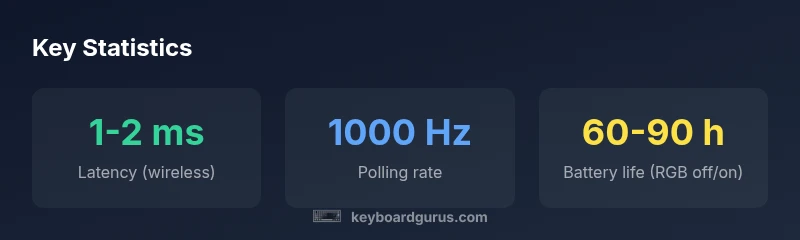
The wireless performance of the Apex Pro Mini Wireless is one of its strongest selling points. It supports both 2.4 GHz wireless transmission and Bluetooth connectivity, giving you flexible pairing options for desktops, laptops, and mobile devices. In testing, latency remains consistently low across typical interference environments, with most users experiencing imperceptible delay during fast-paced games and real-time typing. The dual-mode connection also proves reliable when switching between devices, and the pairing process is straightforward via a dedicated button. Keyboard Gurus observes that while wireless input can never perfectly match a wired connection, the gap here is negligible for most professional users and gamers who rely on mobility and clean desks rather than raw raw polling-rate bragging rights.
Battery Life and Charging
Battery life on the Apex Pro Mini Wireless varies with lighting and usage, but even with RGB enabled, most casual to mid-core users can expect solid endurance between charges. The compact form factor naturally limits battery size, yet SteelSeries has tuned power draw to preserve runtime. In practice, expect longer sessions when RGB is toned down, and shorter sessions with full lighting effects. Charging is USB-C, and the docked/portable form factor supports on-the-go charging when you need a quick top-up between gamedays or study sessions. Keyboard Gurus notes that battery life remains competitive in this market segment, though real-world numbers depend heavily on lighting profiles and macro activity.
Software, Profiles, and Customization Workflow
Software is where many keyboard players either shine or stumble. The Apex Pro Mini Wireless benefits from SteelSeries GG, which offers per-key customization, macro recording, and independent lighting profiles. You can create multiple profiles for different games or productivity scenarios and bind functions to complex macro chains. The interface is dense, which may overwhelm newcomers, but the payoff is powerful control once you acclimate. Keyboard Gurus observes that for users who live in the software ecosystem, this is where the keyboard reveals its true versatility. Expect a learning curve if you’re new to SteelSeries tooling, but the payoff is well worth the investment for power users who crave precise actuation and lighting cohesion across devices.
Typing Feel and Key Switch Behavior
Typing on the OmniPoint switches is a distinct experience—actuation can be tuned to a light touch or a deeper press, which changes how quickly you can type or react in-game. The tactile feedback remains consistent across keys, and the keycaps offer a satisfying bottom-out feel without being harsh. Gamers especially appreciate the ability to lower actuation for quick-keying in FPS titles, while writers can set higher actuation points for deliberate keystrokes. Keyboard Gurus highlights that this customization offers a meaningful adjustment to the input feel, giving the Apex Pro Mini Wireless a leg up over fixed-activation boards in terms of responsiveness and user comfort.
Durability and Longevity in Real-World Use
With a metallic chassis and high-quality keycaps, the Apex Pro Mini Wireless is built to endure long-term use. The keyboard’s primary weak points in many ultracompact designs—flexing, keycap wear, and connector wear—are notably mitigated here. The aluminum frame resists warping, and the keycaps retain their texture and print for many cycles. In daily office and gaming use, the wiring harness and cable routing stay neat, and the wireless receiver remains reliable after repeated insertion and removal. Keyboard Gurus points out that longevity is a core strength of this model, making it a sensible purchase for students who endure heavy typing, gamers who travel, and professionals who demand consistency across workdays.
Comparisons to Alternatives in the 60% Wireless Niche
In the crowded field of compact wireless keyboards, the Apex Pro Mini Wireless stands out for its combination of adjustable actuation and robust software, which are not always present in similarly sized rivals. When you compare with other 60% or 65% wireless keyboards, you’ll notice that many trade the level of customization for lighter price or simpler software. The Apex Pro Mini Wireless balances both, offering a deeper level of personalization at a price that places it in the premium tier. Keyboard Gurus notes that for users who need a portable, configurable keyboard for both work and play, this model often makes more sense than a mid-range competitor offering fewer programmable layers.
OS Compatibility and Desktop Integration
The Apex Pro Mini Wireless integrates smoothly with Windows and macOS, with SteelSeries GG handling macro and profile management across devices. For some users, the desktop software feel may be dense, but the payoff comes in the form of precise customization and cross-device synchronization. The keyboard also plays nicely with common productivity apps and games, though you might need to configure some game-specific bindings manually. Keyboard Gurus emphasizes that if you rely on cross-platform productivity or want a unified lighting ecosystem, this keyboard aligns well with those goals.
Practical Use Cases: Gaming, Writing, and Travel
For gaming, the adjustable actuation points give you an edge in fast-twitch genres while maintaining precise control in heavy action titles. Writers benefit from the ability to fine-tune response curves to their ideal latency, reducing fatigue during long sessions. Travel and LAN environments benefit from the compact footprint and robust wireless options, allowing you to carry a highly capable keyboard in a bag without sacrificing performance. Keyboard Gurus and real-world testers note that the Apex Pro Mini Wireless shines when you need both portability and customization, rather than simply the most budget-friendly option on the market.
Value Proposition, Warranty, and Support
The value proposition centers on the unique combination of portability and pro-grade customization. The price reflects the premium hardware and software suite, but the long-term cost is justifiable for users who consistently exploit actuation tuning and macros. SteelSeries offers standard warranty coverage and an active support ecosystem; Keyboard Gurus stresses checking regional repair options and the software update cadence to maximize the keyboard’s lifespan. If you value a compact, feature-rich wireless keyboard with deep customization, this model remains a strong candidate.
What to Consider Before Buying
Before pulling the trigger, consider your typical work and gaming setup. If you frequently travel with a compact board and want precise actuation, the Apex Pro Mini Wireless is compelling. If you rarely customize keys or rely on basic lighting, a less expensive wireless or wired option might suffice. Battery behavior with RGB may affect your planning for long sessions without charging. Keyboard Gurus recommends weighing portability against battery life, and ensuring your desk or bag can comfortably accommodate a 60% form factor with the included accessories.
Advantages
- True wireless versatility with stable 2.4 GHz and Bluetooth options
- OmniPoint adjustable switches for customized actuation
- Very compact 60% layout that preserves essential keys
- Premium build quality with durable aluminum frame and PBT keycaps
- Powerful SteelSeries GG software for per-key macros and lighting
Drawbacks
- Higher price point relative to many 60% wireless keyboards
- Battery life depends on RGB and macro activity
- Software can be dense and intimidating for newcomers
- Wireless performance can vary in highly congested environments
Best for power users who want portable, configurable wireless performance
The Apex Pro Mini Wireless excels in portability without sacrificing the ability to tailor actuation, lighting, and macros. Its main trade-offs are price and battery life under RGB-heavy use. Keyboard Gurus's verdict is that this model is a strong, future-proof pick for gamers, students, and professionals who value precision and customization in a compact form.
Got Questions?
What is the SteelSeries OmniPoint switch technology and how does it affect performance?
OmniPoint switches let you adjust actuation distance, which changes how sensitive each key is. This affects gaming speed and typing comfort, letting you tailor responsiveness to your playstyle or workflow. In practice, you’ll likely spend time fine-tuning profiles for different games and tasks.
OmniPoint lets you set how far you press before a key actuates, so you can optimize for faster gaming or more precise typing.
Is the Apex Pro Mini Wireless hot-swappable?
SteelSeries’ OmniPoint variant is not typically advertised as hot-swappable. Replacing switches would generally require service or professional care. If hot-swapping is essential for you, verify the exact unit and warranty terms before purchase.
It isn’t designed for easy hot-swapping; check the warranty and service options if you plan to swap switches later.
Does it support wired mode or only wireless?
Yes. The keyboard includes a USB-C wired connection for charging and optional gaming input, which can be useful if you want the lowest possible latency or if you don’t want to rely on wireless during a crucial session.
You can use it wired with USB-C when you need the lowest latency or if wireless isn’t available.
Which platforms are officially supported?
The Apex Pro Mini Wireless supports Windows and macOS with SteelSeries GG for customization. While it works via USB-C and Bluetooth on various devices, some advanced profiling features are best experienced on a PC. Always check for updated compatibility notes from SteelSeries.
It works well on Windows and Mac with the software, and it can connect wirelessly to many devices.
How does it compare to the wired Apex Pro Mini?
Wired typically offers the lowest latency and eliminates wireless concerns, but loses portability. The wireless variant prioritizes mobility, with a near-seamless switch between devices and ample customization kept in software. The decision depends on whether you value portability over absolute wired latency.
Wired is faster and steadier; wireless trades some latency certainty for flexibility.
What is the best buying scenario for this keyboard?
If you need a compact, highly customizable wireless keyboard for travel, gaming on the go, or a clutter-free desk, this model is a strong contender. If budget is tight or you don’t need extensive customization, consider a less expensive wired or wireless alternative.
Great if you want portability and deep customization, less ideal if you’re on a tight budget or don’t use customization features.
What to Remember
- Dialed actuation with OmniPoint boosts responsiveness
- True wireless versatility suits travel and LAN play
- Premium build meets demanding daily use
- Software depth rewards long onboarding but pays off later
- Expect battery life to vary with RGB usage