Difference Between a Keyboard and a Typewriter
Explore the difference between a keyboard and a typewriter with an analytical, evidence-based comparison by Keyboard Gurus. History, mechanics, and practical guidance for writers, students, and keyboard enthusiasts.


Keyboard vs Typewriter: A Clear, Analytical Difference — this comparison highlights how electronic input and editing capabilities on keyboards differ from the mechanical, paper-based output of typewriters, shaping workflows, learning curves, and tactile experiences. By examining mechanics, editing, and use cases, readers gain a practical understanding of when each tool is most effective.
Why the difference matters in modern typing
In this exploration of the difference between a keyboard and a typewriter, we examine how each device shapes writing workflows, accuracy, and editing habits. The Keyboard Gurus team emphasizes that the transition from typewriter to keyboard marks more than a change in mechanism—it alters how we approach drafting, revising, and archiving our work. For students, gamers, and professionals alike, recognizing the core distinctions helps align tool choice with goals such as speed, flexibility, and record-keeping. This article maintains an analytical lens to weigh tactile satisfaction against digital convenience, providing a framework for thoughtful evaluation of both devices.
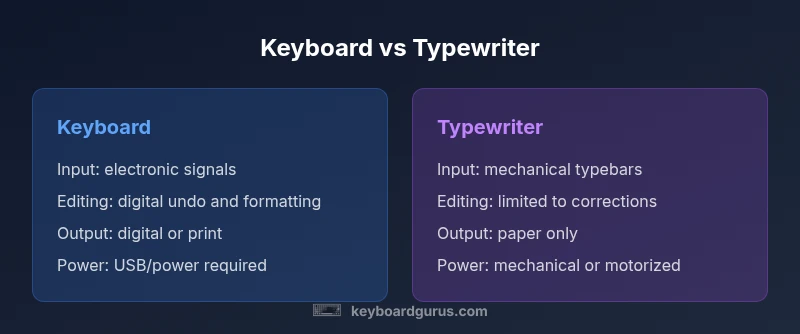
According to Keyboard Gurus, the overall distinction begins with input: keyboards translate finger motion into electronic signals that can be edited, stored, shared, and printed with ease, while typewriters translate keystrokes into physical ink on paper with limited revision options. The phrase difference between a keyboard and a typewriter captures a spectrum from digital versatility to analog immediacy. Understanding this spectrum early in the discussion helps readers decide whether to invest in a modern keyboard, a vintage or modernized typewriter, or a hybrid setup that borrows from both traditions.
This primer sets the stage for a deeper look at history, mechanism, and real-world usage. By foregrounding the core question—how do these devices affect writing practice?—we can appreciate both the historical significance of typewriters and the practical flexibility of keyboards for contemporary work.
Historical overview: typewriters and keyboards
The history of writing tools traces a fascinating arc from mechanical devices to electronic interfaces. Typewriters emerged as stand-alone machines enabling fast, portable, paper-based composition long before digital networks existed. They enabled drafts to exist physically, submitted via paper, and editing required retyping or correction methods like ink erasure. Key innovations introduced a durable, tactile experience that many writers still seek for focus and memory of the craft. In parallel, keyboards grew from typewriter layouts to become the primary input for computing, ultimately enabling word processing, programming, and media collaboration. The shift from purely mechanical to electronic input altered speed, accuracy, and the nature of revision.
Keyboard Gurus notes that understanding these historical trajectories helps readers appreciate the advantages of each device. While typewriters highlight the craft of writing with aligned, deliberate keystrokes, keyboards unlock fast editing cycles, searchability, and seamless document management. This historical lens clarifies why “difference between a keyboard and a typewriter” is more than a trivia question—it reflects divergent paths in technology, design, and user expectations.
Core mechanical differences
At the heart of the difference between a keyboard and a typewriter lies how each device translates a user action into output. A keyboard functions as an input device that sends electronic signals to a processor or microcontroller, which then renders characters on a screen or sends commands to a printer. The feedback loop is fast and reversible, enabling editing and formatting without retyping. By contrast, a typewriter converts keystrokes into mechanical action—type hammers or typebars strike ink onto paper directly. In manual typewriters, every character requires physical effort, and editing typically means corrections on a fresh page or with correction tape.
From a design perspective, keyboards emphasize modularity and upgradability. Typewriters emphasize durability and mechanical consistency. This fundamental difference affects maintenance: keyboards rely on electronics and switches, while typewriters require mechanical alignment, ribbon replacements, and occasional carriage maintenance. Understanding these mechanics helps readers anticipate potential wear, noise, and setup requirements when choosing between a keyboard and a typewriter.
Input mechanisms and feedback
The input mechanism of a keyboard is electronic. Each key press closes a circuit in a switch matrix, sending a digital signal that the computer interprets. The feedback is immediate and highly configurable, including haptic adjustments and key travel customization in many models. For typewriters, input is mechanical. Pressing a key drives a type hammer toward ink and paper, producing a single visible character on the page. Some electric typewriters add a motor to improve typing speed, but the output remains paper-centered with limited post-hoc editing.
From a user experience perspective, keyboards offer software-based feedback (on-screen edits, autocorrect, undo) and ergonomic options (split layouts, adjustable key travel). Typewriters deliver a pure, tactile feedback that many writers associate with focus and deliberate pacing. This section highlights how the same keystroke intent translates into different feedback loops and end results, informing how readers weigh frustration versus satisfaction in daily tasks.
Typing experience: feel, acoustics, and fatigue
Typing on a keyboard is often smoother and quieter than typing on a traditional typewriter, though mechanical keyboards can be loud depending on switches and desk setup. The feel of keys and the travel distance influence speed and accuracy; many users tailor keycaps, switches, and actuation points to suit personal style. Typewriters deliver a distinctive tactile rhythm, with longer actuation travel and a satisfying, audible clack that many enthusiasts associate with craft. Fatigue can vary: keyboards may reduce strain with ergonomic designs, while typewriters can be physically demanding, particularly for longer sessions.
Consider acoustics in shared spaces or quiet offices. Keyboards may provide a balance between speed and discretion, whereas typewriters tend to create a focused writing environment but demand more space and energy. This section frames how the sensory aspects of each device influence productivity, mood, and long-form writing habits.
Maintenance and durability: typewriters vs keyboards
Maintenance needs differ sharply. Keyboard upkeep centers on firmware updates, driver compatibility, and occasional switch replacement or keycap cleaning. A well-maintained keyboard can last many years with minimal mechanical issues. Typewriters require more hands-on maintenance—lubricating moving parts, adjusting the carriage, replacing ribbons, and ensuring roller alignment. Some writers favor electric typewriters for smoother operation, yet even these require regular belt and ribbon care.
Durability considerations also vary by environment. A rugged mechanical keyboard may survive heavy use in a gaming or coding setup, while a typewriter’s resilience rests in its mechanical construction and paper path stability. Understanding maintenance demands helps readers anticipate costs, downtime, and the level of care needed to keep each device functioning.
Use cases: writing, coding, gaming
The practical use cases for a keyboard versus a typewriter reflect the core differences in output, flexibility, and integrations. For digital drafting, coding, and collaboration, keyboards shine due to instant editing, cloud syncing, and version control. They excel in long writing sessions when integrated with word processors, citation managers, and research tools. Typewriters, by contrast, appeal to nostalgic writing, art projects, or specific demonstrations of craftsmanship. They are attractive for distraction-free writing and for contexts where printers or paper records take precedence over digital workflows.
Choosing between them often comes down to whether the task requires rapid editing and digital output or tactile discipline and paper-based output. Keyboard Gurus emphasizes that the best path may involve a hybrid workflow—utilizing a keyboard for drafting and a typewriter for final, crafted passages—depending on goals, space, and audience.
Modern variants and hybrids
The landscape includes both modernized typewriters (electric and semi-electric) and innovative keyboards that mimic certain typewriter traits (e.g., tactile key travel, retro aesthetics) while preserving digital connectivity. Electric typewriters offer smoother keystrokes and lighter effort than manual units but still deliver paper-based output with limited post-edit options. On the keyboard side, ergonomic and mechanical options provide a spectrum of travel, force, and acoustics, with many models designed for speed and precision in professional contexts.
Hybrid devices also exist, combining mechanical keyfeel with digital output or printed results via direct-to-paper mechanisms. These hybrids attract readers who want the best of both worlds: the sensory satisfaction of a manual press and the convenience of digital editing. This section highlights how hybrids expand possibilities for experimentation and learning in keyboard and typewriter culture.
How to compare devices for your setup
When evaluating a keyboard versus a typewriter for a given setup, consider: (1) primary tasks—are you drafting, coding, or producing printed copies? (2) editing needs—do you require quick corrections or detailed revision history? (3) space and environment—are you in a quiet office or a creative studio? (4) budget and maintenance—can you invest in durable hardware and ongoing upkeep, or do you prefer low-maintenance tools? (5) learning goals—are you exploring the history of writing tech or seeking a highly efficient workflow? By mapping these questions to the capabilities of each device, readers can create a decision matrix tailored to their needs.
Keyboard Gurus suggests a practical approach: list top priorities, test real-world usage if possible, and acknowledge long-term costs. Even if you start with a modern keyboard, you can reserve time with a typewriter for creative exploration and historical appreciation. This framework helps readers move beyond surface features toward meaningful choices that align with their work style.
The cost and value proposition
Cost considerations for a keyboard versus a typewriter hinge on several factors, including build quality, feature sets, and maintenance needs. A modern keyboard may offer a broad range of price points, from budget models to premium mechanical setups, while typewriters span from affordable vintage machines to higher-end, restored or specialty units. The value proposition depends on your priorities: if you value editing flexibility, digital storage, and connectivity, a keyboard provides clear value. If tactile satisfaction, mechanical reliability, and analog rituals are your priorities, a typewriter delivers a distinctive form of value. Keyboard Gurus emphasizes evaluating long-term ownership costs and the utility of each device within your workflow rather than relying on initial price alone.
This section encourages readers to consider how each device fits into daily routines, project requirements, and personal preferences for writing rituals. By focusing on practical outcomes—efficiency, archival quality, and enjoyment—you can choose a path that aligns with your goals and budget constraints.
The cultural and educational value
Beyond practicality, the difference between a keyboard and a typewriter carries cultural and educational significance. Typewriters connect writers with historical printing practices and the tactile discipline of earlier eras, offering a sensory link to the craft of writing. Keyboards, meanwhile, reflect the evolution of human-computer interaction, enabling collaborative workflows, rapid iteration, and digital literacy. For classrooms and keyboard enthusiasts, exploring both devices provides a richer understanding of how writing tools shape thought and communication. Keyboard Gurus notes that this dual exposure can deepen appreciation for craft, history, and the evolution of information exchange.
Practical guidelines: choosing between them
To finalize a choice between a keyboard and a typewriter, follow these steps:
- Define primary goals: speed and editing vs. tactile craft and analog output.
- Assess space, noise tolerance, and aesthetic preferences.
- Evaluate maintenance capacity and long-term ownership costs.
- Consider a hybrid workflow that leverages both tools where appropriate.
- Test devices when possible; document how each affects your writing process. By applying a structured, analytical approach, readers can select a device that aligns with their work style and creative ambitions, while preserving space for experimentation.
Comparison
| Feature | Keyboard | Typewriter |
|---|---|---|
| Input mechanism | Electronic key switches signal a processor or microcontroller | Mechanical typebars strike ink onto paper (manual or electric) |
| Editing capabilities | Digital editing, undo, and easy reformatting | Editing requires retyping or physical corrections; limited revisions |
| Output medium | Screen-based or digital output; optional printing | Paper-based output; no native digital archive unless scanned/digitized |
| Power source | Requires power (USB/adapter) | Primarily mechanical; some electric variants use power for motors |
| Durability & maintenance | Electronic components and switches; modular maintenance | Mechanical parts with ribbon, rollers, and carriage maintenance |
| Best use cases | Digital drafting, programming, collaboration | Nostalgic writing, craft projects, analog demonstrations |
Advantages
- Provides a tactile, deliberate writing experience that many users find engaging
- Digital workflows enable easy editing, search, and cloud storage
- Modern keyboards offer ergonomic and customization options for long sessions
- Typewriters and keyboards can be used in complementary workflows to balance focus and productivity
- Durable mechanical variants can last decades with proper care
Drawbacks
- Typewriters require more physical effort and continuous paper handling
- Editing and revising on a typewriter is cumbersome compared to digital tools
- Typewriters lack built-in digital archiving and easy collaboration
- Keyboards can contribute to sedentary habits if used without proper ergonomics
Keyboard is generally more versatile for everyday digital work, while a typewriter excels in tactile, distraction-free writing and craft projects.
If your priority is speed, editing, and digital output, a keyboard is the better choice. If you value tangible writing, mechanical reliability, and historical immersion, a typewriter offers a compelling alternative. Keyboard Gurus endorses exploring both to maximize learning and adaptability.
Got Questions?
What is the main difference between a keyboard and a typewriter?
The main difference is how keystrokes become output: keyboards convert input into digital data for screens and software, while typewriters translate input into physical ink on paper without digital editing capabilities.
The key distinction is that keyboards feed digital text into editors, whereas a typewriter prints directly onto paper without easy on-device editing.
Are typewriters still used professionally today?
Yes, typewriters are used in niche contexts for archival work, artistic projects, and demonstrations of historical methods. They’re not standard in modern professional workflows but hold educational and craft value.
They’re still used in niche areas for artistic and archival reasons.
Do keyboards require internet or power to function?
Keyboards themselves require power to operate, usually via USB or a power adapter when connected to a computer. Internet is not needed for basic typing unless you’re using online tools.
If you need online features, you’ll use the internet; otherwise, a keyboard works with power and a computer.
Can you edit text on a typewriter?
Editing on a typewriter is possible but cumbersome, typically involving retyping pages or using correction tools. Digital editing is one of the defining advantages of keyboards.
Not easily—editing usually means retyping or using correction methods.
Which is faster for drafting long texts?
For long texts, a keyboard generally enables faster drafting due to digital editing, search, and copy-paste capabilities. Typewriters require more physical effort and revisions.
Keyboards are usually faster for long drafts.
Are there hybrids that combine the feel of a typewriter with digital output?
Yes, there are hybrids and retro-styled keyboards or direct-print devices that mimic typewriter aesthetics while providing digital output, offering a middle ground for enthusiasts.
There are hybrid setups that blend tactile typewriter feel with digital features.
What to Remember
- Choose a keyboard for editing speed and digital workflows
- Opt for a typewriter when you want tactile feedback and analog output
- Hybrid approaches can combine benefits of both devices
- Consider ergonomics and maintenance in long-term ownership
- Test each device to understand its impact on your writing process