Difference Between Digital Keyboard and Electronic Keyboard
A practical guide to the difference between digital keyboards and electronic keyboards, covering definitions, sound generation, features, and buying tips for students, gamers, and professionals.


Digital keyboards and electronic keyboards are both electronic instruments, but they differ in sound generation, feature sets, and intended use. Digital keyboards typically offer richer voices, polyphony, and software compatibility, while electronic keyboards focus on affordability and simplicity. According to Keyboard Gurus, understanding these distinctions helps buyers align features with goals and avoid paying for features you won’t use.
Overview of Keyboard Terminology
The terms digital keyboard and electronic keyboard are often used interchangeably, but they carry nuances that matter for buyers and players. This article examines the difference between digital keyboard and electronic keyboard and what those labels typically imply in practice. According to Keyboard Gurus, the language around keyboard types can vary by region and brand, which means expectations can diverge from device capabilities. The difference between digital keyboard and electronic keyboard hinges on how sound is produced and how features are implemented, not just what the labeling says. For most readers, focusing on the instrument's sound generation, polyphony, and responsiveness will yield more useful guidance than memorizing taxonomy. In this guide we anchor definitions to typical market usage while acknowledging exceptions. The Digital keyboard is described here as a generally fully digital instrument that relies on sampled voices or digital synthesis, often with a wide voice library and robust feature sets. The electronic keyboard, in contrast, is often marketed as affordable, portable, and user-friendly, with simpler voice options and basic effects. The Keyboard Gurus team found that the practical impact of these labels is most evident when evaluating real use cases like practice, teaching, or stage work.
How Digital Keyboards Work
Digital keyboards use a digital signal processing chain to generate sound. They typically rely on sampling (playing back recordings of real instruments) or digital synthesis (creating tones algorithmically). The voice pool can be extensive, covering pianos, organs, strings, synths, and specialty sounds. A hallmark of many digital keyboards is high polyphony (the number of notes that can sound simultaneously), often 64 notes or more, along with deep menus for effects, layering, splits, and programmable performances. Connectivity tends to be generous, including USB audio/MIDI, line outputs, and sometimes Bluetooth. Software updates and library expansions are common in modern models, enabling the instrument to stay current with new voices and features over time. For players who rely on nuanced articulations, aftertouch, or expressive control, digital keyboards offer a broad canvas for performance and composition.
How Electronic Keyboards Work
Electronic keyboards are typically simpler and designed for accessibility and portability. They often rely on a smaller set of onboard voices and straightforward control layouts. Some models use basic digital engines, while others may employ less advanced synthesis methods or pre-programmed patterns. Built-in speakers are common, making these keyboards easy to pick up and play without external gear. Because of their emphasis on ease of use and affordability, electronic keyboards frequently appeal to beginners, students, or casual players who want immediate results with minimal setup. While updates exist in some models, the upgrade path is usually narrower than on higher-end digital keyboards, and the voice library may be less expansive. The practical takeaway is that electronic keyboards can be excellent starters, but they may not scale up as your musical demands grow.
Core Differences at a Glance
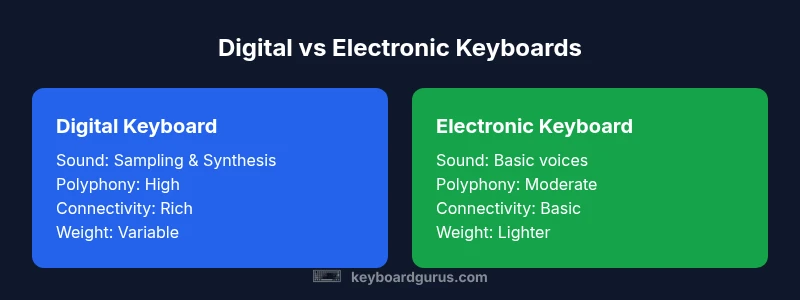
- Sound generation: Digital keyboards rely on digital sampling or synthesis with extensive voice libraries, while electronic keyboards often use simpler onboard voices.
- Polyphony: Digital models typically offer higher polyphony, enabling complex chords and layering; electronic keyboards may cap at lower counts.
- Keys and touch: Digital keyboards frequently provide a range of key actions (semi-weighted to weighted) and more expressive control; electronic keyboards often prioritize light, affordable actions.
- Connectivity: Digital keyboards commonly feature wider MIDI/USB integration and more ports; electronic keyboards may have essential outputs but fewer options.
- Portability and price: Electronic keyboards tend to be lighter and more budget-friendly, while digital keyboards may be heavier and priced higher due to features and sound libraries.
- Use cases: Digital keyboards suit performers, educators, and producers who need versatility; electronic keyboards fit beginners, hobbyists, and portable setups.
- Update cycles: Digital keyboards frequently benefit from firmware updates and library expansions; electronic keyboards may receive fewer updates.
The key takeaway is that most of the functional gap narrows at mid-to-high price points, where both types can offer similar capabilities, but the path to those features differs by design philosophy.
Sound Generation: Sampling vs Modeling
At the heart of the difference between digital keyboard and electronic keyboard lies sound generation. Digital keyboards typically use sampling (playing back recordings of real instruments) or advanced digital modeling (simulating how instruments behave). This yields a broad, authentic palette of tones and more realistic instrument emulation. On the other hand, some electronic keyboards rely on simpler synthesis methods or factory presets, which can result in a more limited sonic range but faster access to reliable sounds. The trade-off is often between realism and simplicity, with digital keyboards offering greater fidelity and creative flexibility. Keyboard Gurus notes that the quality of the onboard sounds matters more than branding alone, and the choice should hinge on how often you need convincing piano tones versus quirky, fun presets for teaching or casual play.
Keyboard Action and Feel
The physical feel of the keys plays a critical role in how comfortable an instrument is to play, especially for longer sessions or serious practice. Digital keyboards are more likely to offer a choice of key actions, including light non-weighted keys, semi-weighted keys, and sometimes fully weighted hammer-action keys favored by pianists. This variety supports better technique transfer, dynamic playing, and expressive control. Electronic keyboards, by contrast, often use lighter, plastic action to minimize cost and weight, which can be perfectly adequate for beginners or players focusing on rhythm patterns and basic melodies. When shopping, test the weight, travel, and response of the keys alongside velocity sensitivity, aftertouch, and the feel of any after-sound. The right action helps you develop accurate finger technique and reduces fatigue during longer practice sessions.
Connectivity, Power, and Portability
Digital keyboards usually come with richer connectivity: USB MIDI ports, Bluetooth audio/MIDI, line-level outputs, and multiple channels for routing audio to external gear. They may require more power and can be heavier due to larger speaker systems. Electronic keyboards often emphasize portability and battery operation; they may include simpler outputs and fewer digital features. If you plan to connect to a computer, a DAW, or a live rig, prioritize digital keyboards with robust MIDI support and stable drivers. If you need something you can grab and go for a quick jam or classroom activity, an electronic keyboard with a built-in speaker and long battery life might be more appropriate. In both cases, check compatibility with your existing gear, the availability of spare parts, and how easy it is to upgrade later.
Practical Buying Scenarios: Who Should Buy What
For students and beginners, an electronic keyboard can provide a friendly entry point with low cost and portability. It’s a solid choice for practice, basic music theory, and learning rhythm. For hobbyists and professionals, a digital keyboard delivers more voices, flexible routing, and room to grow into advanced playing styles. Stage performers and composers benefit from stronger synthesis engines, more realistic piano tones, and deeper control over effects and routing. If you need a keyboard for classroom use, consider durability and ease of maintenance as well as software compatibility. Keyboard Gurus suggests mapping your needs to a feature checklist rather than chasing every new spec, ensuring you invest in a model that supports your long-term goals.
Maintenance and Longevity
Long-term enjoyment from either type depends on care and routine maintenance. Regularly cleaning surfaces, keeping dust from vents, and using proper power management reduces wear on keyboards. Firmware updates can improve stability and add features, particularly on digital keyboards; check the manufacturer’s update policy. For portable electronic keyboards, protect against rough handling and battery drainage by keeping spare batteries or a reliable power supply on hand. A well-maintained keyboard remains enjoyable to play and holds its value better over time, especially if you opt for models with widely supported repair options and a strong spare-parts ecosystem.
Quick Decision Checklist
- Identify your primary goals: practice, performance, or production.
- Consider your budget and how far you intend to scale features.
- Assess the importance of voices, polyphony, and realistic piano tone.
- Decide on portability versus feature depth.
- Confirm compatibility with other gear (MIDI, DAW, audio interfaces).
- Evaluate build quality and key action suited to your playing style.
- Check after-sale support, updates, and community resources.
Comparison
| Feature | Digital Keyboard | Electronic Keyboard |
|---|---|---|
| Sound Generation and Voices | Digital sampling or synthesis with extensive voice libraries | Simpler onboard voices; may rely on basic digital or analog methods |
| Key Action and Feel | Often semi-weighted to weighted options; broader feel choices | Typically lighter, affordable action; basic keys |
| Polyphony | High polyphony (often 64–128 notes or more) | Lower polyphony (often 12–48 notes) |
| Connectivity | Robust MIDI/USB, audio outputs, Bluetooth/USB-C on many models | Basic outputs; limited MIDI and external connectivity on budget models |
| Built-in Speakers | Strong, high-quality speakers; some models support stage-level monitoring | Small to mid-sized speakers; designed for portability |
| Price Range | Mid-to-high depending on voice quality and features | Low-to-mid; budget-friendly options available |
| Best For | Performers, educators, studio work, and producers | Beginners, students, casual players, travel-friendly |
Advantages
- Versatility and a wider range of voices and features
- Better integration with studio setups via MIDI
- Potential for longer lifespan and higher resale value
- More opportunities for customization and effects
Drawbacks
- Higher upfront cost on average
- Can be more complex to learn and master
- Some models are heavier and less portable
- Overkill for casual, single-voice needs
Digital keyboards are typically the more capable, future-proof option; electronic keyboards excel in simplicity and affordability.
Choose digital if you need broad voice options, advanced connectivity, and room to grow. Choose electronic if budget, portability, and straightforward use are your priorities. Keyboard Gurus's verdict is that the best choice depends on your musical goals and practice needs.
Got Questions?
Are digital keyboards and electronic keyboards interchangeable terms?
In practice, digital and electronic keyboards are sometimes used interchangeably, but they can imply different capabilities. Digital keyboards often emphasize breadth of voices, polyphony, and digital sound engines, while electronic keyboards emphasize affordability and ease of use. Always check the specs rather than relying on the label alone.
They’re not always the same. Look at the features, not just the name, to know what you’re getting.
What should beginners buy between digital vs electronic keyboards?
Beginners typically benefit from electronic keyboards for low cost and portability, plus simple interfaces. If your budget allows and you plan to grow, a digital keyboard with a solid action and expandable voice library offers more long-term value.
For new players, start with portability, then consider upgrading as skills grow.
Can I use a digital keyboard for live performances?
Yes. Digital keyboards with strong polyphony, reliable MIDI, and quality onboard tones are well-suited for live performance. Ensure the model has durable construction, reliable outputs, and a good-sounding piano voice for stage use.
Yes—if you need depth of sounds and reliable outputs on stage.
Do these keyboards require separate software or DAWs?
Many digital keyboards integrate with DAWs via USB-MIDI and can run standalone, but some users pair them with computer-based studios. Electronic keyboards usually don’t require software for basic use, though some models offer basic USB or Bluetooth connectivity for updates.
Usually you can go standalone, but USB MIDI makes studio setups easy.
Is polyphony important for beginners?
Some polyphony is essential for sustained chords or complex riffs, especially in modern songs. Beginners can start with mid-range polyphony and upgrade later if their repertoire expands.
Yes, it helps with fuller sounds as you progress.
What is a good budget option for a student?
A budget-friendly electronic keyboard can be a smart starting point for students, offering essential tones and portability. If possible, choose a model with at least 24–48 notes of polyphony and basic MIDI or USB connectivity for future growth.
Start with a budget-friendly option that still leaves room to grow.
Do digital keyboards require constant internet access?
Internet access is not required for basic use. Some models offer online sound libraries or firmware updates, but you can operate the keyboard offline with onboard voices.
You can play offline; updates may add new sounds over time.
Which should I buy for school programs?
For school programs, durability, ease of use, and maintenance matter. A robust electronic keyboard can handle heavy classroom use, while digital keyboards offer more versatility for varied curricula with future-proofing options.
durability and reliability matter; both types have a place in classrooms.
What to Remember
- Define your goals before shopping.
- Expect more voices and features with digital keyboards.
- Choose an electronic keyboard for portability and budget.
- Test key action to ensure comfortable playing.
- Check connectivity if you plan to integrate with other gear.