Flat Keyboard vs Raised Keys: In-Depth Comparison
An objective, in-depth comparison of flat keyboard vs raised keys, covering ergonomics, typing feel, maintenance, and best use cases for students, gamers, and professionals.


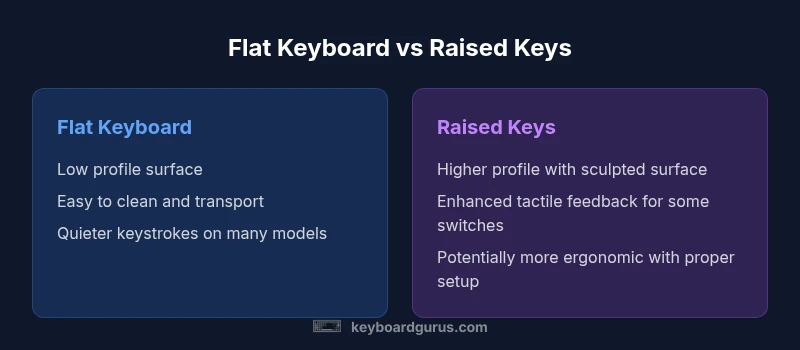
Flat keyboards sit flush with the desk, delivering a lower-profile typing surface, while raised-key designs use a higher sculpted surface for distinct key travel. For many users, raised keys offer improved tactile feedback and comfort, whereas flat boards excel in portability, easier cleaning, and space efficiency. According to Keyboard Gurus, the best choice depends on your setup, typing preferences, and whether you value ergonomics or travel-friendly form.
Core design differences between flat keyboard vs raised keys
At its most basic level, the difference between flat keyboard vs raised keys is geometry: how high each key sits above the desk and how the surrounding keyboard chassis supports travel. Flat keyboards typically feature a low-profile case with a flush surface, resulting in a compact footprint and a uniform finish across the top panel. Raised-key designs, in contrast, use a stepped contour with elevated keycaps and a taller housing. This difference affects typing posture, wrist alignment, and even dust management, especially on long workdays. Both layouts can be built around the same switch technology, but the outer geometry influences how you position your hands and how much space your desk or armrests require.
When you compare flat keyboard vs raised keys, the first consideration is profile. A flatter design minimizes overall height, which can improve clearance under a monitor stand and reduce the chance of hitting the keyboard edge with your palms. Raised-key boards, however, emphasize a sculpted top surface that can guide your finger travel and help you orient your hands without looking. Brand and model choice matters here, because the tolerances around the keys and the chassis can noticeably affect wobble, keycap alignment, and long-term feel.
Typing feel, travel, and acoustics in flat vs raised key designs
Typing feel evolves from key travel, actuation force, and the overall feedback each key provides. Flat layouts often use shorter travel distances, which can create a snappier, more precise cadence for touch typists who favor speed over tactile bump. Raised-key boards typically feature longer travel and a more pronounced tactile or mechanical feedback, which some writers and gamers find improves accuracy over time. The auditory signature can also differ: flatter designs tend to be quieter because the keys do not travel as far before actuation, while raised designs may produce a deeper clack or thud depending on switch type and keycap material.
Ergonomically, the vertical height of raised keys can alter wrist posture and forearm angle. If you already suffer from extended typing sessions, raised-key configurations with a gentle tenting or a split bezel might encourage a more natural wrist alignment. Conversely, a flat keyboard can reduce the need to tilt the wrist, potentially lowering the risk of certain repetitive strain patterns for some users. The best approach is to try both styles, then compare perceived comfort after a few hours of typing.
Durability, dust, and maintenance: how flat vs raised keys hold up
Care and maintenance influence long-term reliability. Flat keyboards, with their flush surface, are easier to wipe down and less likely to trap dust between key stems and the chassis. This makes them attractive for users who regularly eat at their desk or operate in dusty environments. Raised-key keyboards create more nooks and crannies where crumbs, hair, and dust can accumulate around sculpted keycaps and stabilizers. Cleaning becomes a two-step process: wipe the surface, then use a brush or compressed air to clean around the key bases. Over time, the stability of raised keys depends on switch quality and keycap fit; looser keycaps can wobble and degrade the typing feel faster than flatter, more uniform designs.
Both layouts can be highly durable when built with quality switches, stabilizers, and reinforcing plates. Look for solid mounting, uniform key alignment, and consistent keycap profiles when evaluating longevity. Keyboard Gurus emphasizes that long-term satisfaction often comes down to how well the board resists daily wear and how easy it is to service.
Materials, keycaps, and switch compatibility across flat vs raised keyboards
Keycap profiles, materials, and switch types shape the overall sensation of the keyboard more than height alone. Flat designs frequently favor low-profile keycaps, which can pair well with scissor switches or low-profile mechanical switches. Raised-key boards often accommodate a wider range of keycap styles, from OEM to SA or DSA profiles, and they might support higher-profile switches that deliver deeper travel. If you plan to customize, consider slotting in thicker keycaps or deeper switches, as raised layouts can offer more physical clearance for stabilizers and larger keycaps. Matching your preferred switch family—linear, tactile, or clicky—with the chosen layout can dramatically alter perceived ergonomics and typing rhythm. In short, the flat keyboard vs raised keys decision often hinges on your willingness to experiment with keycaps and switches to achieve your desired feel.
Use-case scenarios: students, gamers, and professionals
For students who carry a keyboard to libraries or campus lounges, flat keyboards are appealing because of their compact footprint and easy cleaning. They make a great companion to laptops when desk space is at a premium. Gamers who prize rapid keystrokes, crisp actuation, and a particular sound profile may lean toward raised-key boards, especially if they favor tactile switches or enjoy a more immersive key travel sensation. Professionals who type for hours on end—writers, programmers, data analysts—often seek a balance between comfort and practicality. A raised design with an ergonomically oriented setup can reduce fatigue in long sessions, while a flatter board might win back desk depth for secondary monitors or document scanners. The optimal choice depends on your daily tasks, posture, and the physical space you command at work or school.
Cleaning, maintenance, and long-term care: practical tips
Maintenance habits depend on layout and usage. Flat keyboards tend to be easier to clean: you can wipe the surface with a damp cloth and avoid dislodging loose debris beneath keycaps. Raised-key keyboards require targeted cleaning around the stems, switches, and under keycaps; you may need a soft brush, isopropyl-ethanol wipes, and sometimes a keycap puller for deeper maintenance. Dust buildup around sculpted edges can influence key stability and travel feel, so periodic checks are prudent. Cable management and desk setup also impact maintenance: a clean, dust-free workspace reduces the rate at which you must service your keyboard. Regardless of layout, a regular cleaning schedule helps maintain a consistent typing experience and extend keyboard life.
Price ranges and value: budgeting for flat vs raised keyboards
Price is a major factor when choosing between flat keyboard vs raised keys. Flat keyboards often come in at lower price points, especially for compact, non-backlit models or those with basic keycaps. Raised-key boards with premium switches, customized keycaps, and ergonomic features can command higher price brackets. The total cost of ownership includes not only the initial purchase but also potential accessories, replacement keycaps, and maintenance. For many buyers, the value of a raised design lies in comfort during long sessions and longer-term usability, while a flat board delivers value through portability and lower upkeep. Assess your budget against your anticipated usage to determine the best balance of upfront cost and long-term satisfaction.
How to test and compare before buying: a practical checklist
Before buying, try both layouts side-by-side if possible. Look for:
- Surface feel: flat surface versus sculpted top
- Key travel and actuation: shallow versus longer travel
- Wrist posture: neutral alignment during typical typing tasks
- Cleaning practicality: ease of wiping and access beneath keys
- Noise and distraction: does the sound affect your workspace environment
- Compatibility with desk setup: monitor height, chair, and armrests
Create a short hands-on test plan that lasts 15–30 minutes each, then extend to a full workday if feasible. If you cannot try in person, read user reviews focusing on comfort and maintenance, and consider a model with a return window. Keyboard Gurus suggests framing your test around your primary tasks to gauge real-world impact on productivity and comfort.
Common myths and how to debunk them
A common myth is that flat keyboards always cause less wrist strain. In reality, ergonomic factors, like keyboard tilt, seat height, and monitor position, drive comfort as much as height does. Another misconception is that raised-keyboards are inherently noisier; switch type and keycap material have a larger role in acoustic feedback than height alone. Some assume flat keyboards lack durability; many modern flat layouts use robust chassis construction and consistent stabilizers. Finally, the belief that you must sacrifice aesthetics for ergonomics is outdated: many brands offer flat and raised designs with sleek lines and premium finishes. By testing layout, you can separate fact from fiction and select a setup that aligns with your needs.
Comparison
| Feature | Flat keyboard | Raised-key keyboard |
|---|---|---|
| Profile / Key Height | Low-profile, flush surface | Higher, sculpted surface |
| Key Travel Feel | Shorter travel, snappier feel | Longer travel with pronounced feedback |
| Typing Comfort & Ergonomics | Compact wrists-friendly for small desks | Can be more ergonomic with tenting and splits |
| Dust/Debris Resistance | Fewer crevices; easier wipe-down | More gaps around sculpted keys |
| Cleaning & Maintenance | Easier surface cleaning | More thorough cleaning required under keys |
| Portability & Desk Footprint | Smaller footprint, lighter to carry | Bulkier but stable on desks |
| Durability & Longevity | Solid, uniform wear, fewer wobble points | Potential wobble around sculpted keys if poorly fitted |
| Price Range | Low to mid | Mid to high depending on features |
| Best For | Portability, simple setups, tight spaces | Ergonomics enthusiasts, long typing sessions |
Advantages
- Lower profile saves desk space and enhances portability
- Flat designs are easier to clean and maintain
- Raised-key designs provide improved tactile feedback and ergonomics
- Keycap customization options are broader on some raised-key boards
- Both layouts can be highly durable with quality components
Drawbacks
- Flat keyboards may offer less ergonomic support for long sessions
- Raised-key designs can be bulkier and harder to travel with
- Dust and debris can gather around sculpted keys on raised layouts
- Higher cost or complexity of raised-key options in some markets
Raised-key boards tend to win for long typing sessions; flat keyboards win for portability and space-saving
Choose raised-key if ergonomics and feedback matter most for extended use. Opt for flat if desk space and travel are your primary concerns.
Got Questions?
What is the main difference between flat keyboards and raised-key keyboards?
The main difference is the keyboard's profile: flat keyboards sit closer to the desk, while raised-key keyboards have a higher, sculpted surface. This affects typing feel, wrist posture, and cleaning accessibility. Both can use similar switches, but the layout changes handling and ergonomics.
The key difference is height and shape: flat keyboards sit low and flush, raised-key keyboards sit higher with sculpted tops, changing feel and wrist alignment.
Which layout is better for gaming?
Gaming preferences vary by player. Raised-key boards can offer more tactile feedback, aiding fast reactions for some games, while flat keyboards provide quick, predictable keystrokes and easier desk setup. The best choice depends on your grip, chair height, and monitor placement.
Gaming preference matters—raised keys can help some players with feedback, but flat keys give fast, uniform keystrokes. Test both to see what matches your playstyle.
Are flat keyboards more durable than raised-key designs?
Durability depends on build quality, switches, and keycap stability, not height alone. Flat keyboards can have fewer moving parts around edges, but raised keyboards with solid stabilizers can last just as long. Choose based on chassis quality and switch reliability.
Durability isn’t about height alone—it's about build quality. Both layouts can last a long time with good parts and care.
How should I choose between flat vs raised keys for work or school?
Consider your typical tasks and space. If you travel often or have a small desk, a flat layout may be preferable. If you type for long hours and value comfort, a raised design with proper ergonomics might be a better fit. Accessibility and maintenance should also factor in.
If you move around a lot or have little desk space, pick flat. For long typing sessions and better ergonomics, choose raised keys with a comfortable setup.
Do raised-key keyboards require special keycaps?
Raised-key keyboards can use a wider variety of keycap profiles, including tall sculpted options. Flat keyboards may favor shorter, low-profile caps. Check compatibility with your chosen layout and stabilizers when planning a customization path.
Raised keyboards often support more keycap varieties; just verify compatibility with your layout and stabilizers.
What to Remember
- Assess your desk space and portability needs
- Test both layouts for typing comfort
- Consider cleaning and maintenance implications
- Balance ergonomics against budget and availability
- Choose a setup that aligns with your workflow