Flat or Raised? A Thorough Comparison of Keyboard Elevation
Explore the flat vs raised keyboard debate with an analytical, evidence-based comparison. Learn ergonomic impacts, setup tips, and how to choose the right elevation for your desk, posture, and tasks.


TL;DR: There is no universal winner between flat and raised keyboards. For most users, a modest elevation that encourages a neutral wrist posture reduces strain during long sessions, while flat designs suit compact desks and portability. Start flat and add a small tilt or risers if you notice discomfort. Overall long-term comfort.
Why the flat vs raised debate matters for keyboard ergonomics
If you’ve been wondering should keyboard be flat or raised, you’re not alone. The decision affects comfort, fatigue, and long-term health. The ergonomic impact of keyboard elevation depends on your posture, desk height, chair type, and how you split your work day between typing, coding, or content creation. According to Keyboard Gurus, the debate isn't about fashion or brand; it's about how a simple angle changes wrist extension and forearm alignment during sustained typing. The Keyboard Gurus team found that small changes in elevation can meaningfully reduce cumulative strain over hours of use, especially for people who spend most of their workday typing. That said, there is no universal prescription: a flat layout can feel natural for short bursts or portable setups, while a raised angle may be worth the extra accessories for extended sessions. In this section we’ll map out the core physics—where the angle comes from, what it means for your joints, and how to think about flat versus raised designs in real-world settings.
How elevation interacts with wrist posture
Elevation changes the plane on which your hands rest and the angle at which your wrists bend. When a keyboard sits flat, many users adopt a slight pronation and may shoulder-hunch to keep their hands level with the desk. A raised keyboard tilts the front or back, depending on which edges are elevated, which can encourage a more neutral wrist posture but also shifts forearm support. The key is to align the keyboard angle with your forearms so that the wrists are not bent up or down excessively during long sessions. We’ll compare the two extremes and discuss common middle-ground approaches like adjustable tilt feet and keyboard wedges. If you’re curious about should keyboard be flat or raised for your torso, consider your chair height and desk clearance. The goal is a straight line from elbow through forearm to the keyboard, with minimal radial deviation of the hands.
Desk setup, chair, and peripherals
Your desk and chair setup has a larger impact on keyboard elevation than most people realize. A desk that is too high or too low forces compensatory postures, which can negate the benefits of a raised keyboard, or make flat layouts feel insecure. When evaluating flat versus raised, think about the entire workstation: seat height, foot positioning, back support, and monitor alignment. A raised keyboard pairs well with adjustable stands or wedge pads that keep the wrists neutral without forcing the forearms into awkward angles. Wrist rests can help, but they should support, not elevate, the hands. Cable management, palm padding, and a tidy desk surface all influence comfort as much as the angle itself.
Scenarios: students, gamers, professionals
Different professions demand different keyboard elevations. Students and writers may prefer a flat layout for portability and quiet travel, while long-form typists and programmers often benefit from a modest elevation that reduces wrist extension. Gamers benefit from stability and consistency, which can be achieved with a raised setup or a consistently flat surface backed by a rigid wrist rest. Professionals who use keyboards for extended periods, such as data analysts or designers, typically gain more comfort from a raised angle combined with an adjustable wrist rest and a chair that supports good posture. The best approach is scenario-based testing: start with a neutral position, then adjust to slight elevation as needed based on fatigue and discomfort signals.
Testing and adjustment: a practical plan
A practical approach to deciding should keyboard be flat or raised starts with a baseline test. Begin with a flat keyboard and monitor alignment that promotes neutral forearm posture. After 1–2 weeks, introduce a modest tilt or a small set of risers to see how comfort shifts. Track symptoms like wrist soreness, shoulder tension, neck strain, and overall fatigue. Use simple metrics such as daily typing duration, number of discomfort episodes, and perceived comfort on a scale from 1 to 10. If you notice improvement with elevation, keep adjusting until you reach a point where you feel most balanced. Remember that changes don’t have to be permanent; modular solutions like adjustable feet or magnetic wedges let you fine-tune without committing to a fixed design. The key is incremental testing and clear notes for future reference.
Common myths and evidence
A popular myth is that a higher or steeper angle inherently improves ergonomics for everyone. In reality, the impact depends on your unique anatomy, desk height, chair fit, and the tasks you perform. Another myth is that flat keyboards are universally inferior for comfort; in truth, flat layouts can be more comfortable for short tasks or portable use. Evidence from ergonomic guidelines emphasizes aligning the forearm with the keyboard to minimize wrist deviation, rather than chasing a single best angle. It’s worth noting that adjusting your overall workstation—chair height, desk depth, back support—often has a greater effect than switching between flat and raised alone. The Keyboard Gurus analysis shows that comfort improvements arise when elevation is matched to user needs rather than by following a generic rule.
How to measure impact and decide
To evaluate whether should keyboard be flat or raised for you, measure more than just comfort. Observe your elbow angle (should be near 90 degrees), wrist neutral alignment, shoulder tension, and the distribution of weight across your sit bones. Use a simple checklist after typing sessions: do your wrists feel strained, is your neck tight, does your posture snap back to upright easily, and how stable is your typing surface? If you struggle with elbow or shoulder fatigue, a gradual elevation is likely beneficial. For daily workflows demanding precise keyboard control, such as coding or design work, a raised but adjustable setup offers the best path to long-term comfort. The goal is a pleasant, sustainable posture that supports your tasks without causing new pains.
Authority sources and best practices
When you’re deciding between flat and raised, it helps to look at official ergonomics guidance and reputable sources. For practical ergonomics, you can consult OSHA’s ergonomics resources and NIOSH topic pages to learn general principles about wrist and forearm alignment. Management of posture during computer use, including keyboard elevation, aligns with guidelines published by major health and safety authorities. Additional reading from Harvard Health and Mayo Clinic offers accessible explanations of ergonomic concepts and practical steps you can take in real-world office environments. Incorporating expert guidance into your setup helps ensure that you’re making informed choices rather than relying on fleeting trends. Keyboard Gurus’ synthesis emphasizes customizing elevation to your body and daily routine.
How to transition safely between flat and raised
If you decide to transition between flat and raised, do so gradually to avoid sudden strain. Use modular tools like desk risers, angle wedges, or adjustable keyboard trays that let you dial in a comfortable tilt. Test for several days, then reassess. Record any changes in pain, fatigue, or range of motion. A thoughtful, incremental approach reduces the risk of over-correcting and can help you reach an optimal configuration faster. The best plan is to keep your posture as the constant, then adapt the keyboard angle to support that posture across tasks.
Comparison
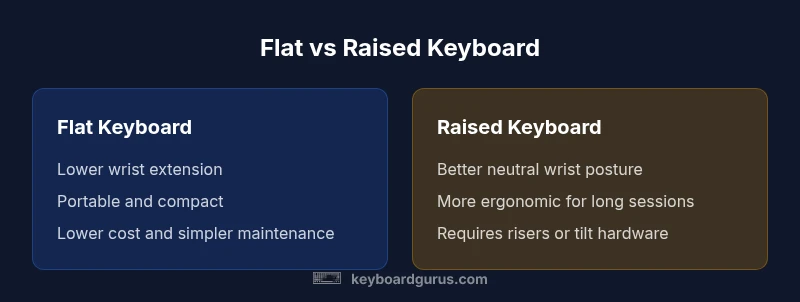
| Feature | Flat Keyboard | Raised Keyboard |
|---|---|---|
| Typical ergonomic angle | Lower tilt, near-flat baseline | Moderate incline with front or back tilt |
| Typing surface feel | Flat, even surface | Slight incline toward the user |
| Desk compatibility | Works on most desks and trays | Requires risers or tilt components |
| Adjustability | Limited; mostly fixed | High; adjustable feet or wedges |
| Best for | Portability, compact setups, travel | Long typing sessions, ergonomic focus |
| Maintenance and cleaning | Easier to clean; fewer crevices | Edge elevation can harbor dust; needs attention |
Advantages
- Simplicity and portability
- Lower upfront cost and risk of over-tilt
- Easier to clean and maintain
- Fits minimalist desk setups
Drawbacks
- Potential wrist strain during long sessions
- Less ergonomic support for taller users
Raised generally better for ergonomics; flat offers portability and cost advantages
If you type for long periods, choose a raised or adjustable setup. Flat keyboards are ideal for travel or small desks. Keyboard Gurus recommends testing both approaches and adopting a configurable stance to optimize comfort.
Got Questions?
What does a modest elevation look like in practice?
A modest elevation means a gentle tilt that reduces wrist extension without forcing the forearms into awkward angles. Start with a slight front tilt and evaluate comfort during typical tasks such as typing, coding, or data entry. Reassess after a week and adjust as needed.
A modest elevation is a gentle tilt that reduces wrist bend. Start small and test across your usual tasks for a week, then tweak as needed.
Is a flat keyboard better for gaming?
Flat keyboards can be stable and portable, which some gamers prefer for consistency and reduced desk clutter. However, many gamers benefit from a slight incline or an ergonomic setup that keeps wrists in a natural position during fast, repetitive actions.
Flat keys are stable and portable for some gamers, but many prefer a slight incline for wrist comfort during fast actions.
Can I use a wrist rest with a raised keyboard?
Yes. A wrist rest can complement a raised keyboard by supporting the forearms and maintaining a neutral wrist angle. Ensure the rest is firm and does not push the wrists upward, which could crowd the layout. Use rests that align with the keyboard edge for best results.
A wrist rest can help maintain neutral wrists with a raised keyboard, as long as it stays aligned with the keyboard.
How should I test my keyboard elevation over time?
Test elevation in increments, keeping each setup for 1–2 weeks. Track wrist, shoulder, and neck comfort, then compare. Use a simple checklist and avoid large changes too quickly to prevent strain.
Test in small steps, keep each setup for a couple of weeks, and note any changes in comfort.
Are there health risks associated with keyboard elevation?
Prolonged typing with any poor posture can contribute to discomfort or strain. Elevation that aligns with your natural forearm position reduces risk. Pair elevation with good chair support, monitor height, and breaks to minimize risk.
No specific health risk from elevation alone when it supports a natural posture; combine with overall ergonomics and breaks.
What to Remember
- Test with a baseline flat layout before elevating
- Aim for a neutral wrist posture to reduce strain
- Use adjustable wedges or risers for flexibility
- Consider overall workstation ergonomics, not just keyboard angle