Should Keyboard Be Flat or Angled? A Data-Driven Comparison
Explore whether a flat or angled keyboard is better for comfort, productivity, and long-term ergonomics. Keyboard Gurus analyzes wrist posture, desk setup, and task needs to help you decide.


Should keyboard be flat or angled? In most setups, there isn’t a one-size-fits-all answer. The Keyboard Gurus team finds that a modest tilt—roughly a few degrees—often improves wrist posture and comfort for many users, while flat layouts minimize pronation for others. The best choice hinges on your forearm alignment, chair height, and typing style. Use the detailed comparison below to decide what's right for you.
Ergonomics foundations
Understanding the basic question of should keyboard be flat or angled starts with ergonomic principles. Wrist posture, forearm alignment, and scapular support all influence comfort and endurance during long typing sessions. In practice, most people benefit from a modest tilt that reduces awkward wrist bend while keeping the forearms roughly parallel to the desk. The Keyboard Gurus team emphasizes measuring your own comfort by watching your wrists in a neutral position as you type, then gradually adjusting tilt until the forearms stay relaxed. We also discuss neutral positions and how they interact with chair height and desk depth. The goal is to achieve a rhythm where your hands move naturally with minimal tension. When you experiment, track how often you adjust your posture and whether your hands fatigue after a session. The takeaway is clear: there is no universal rule for should keyboard be flat or angled; it depends on your unique setup and habits.
Flat keyboards: advantages and trade-offs
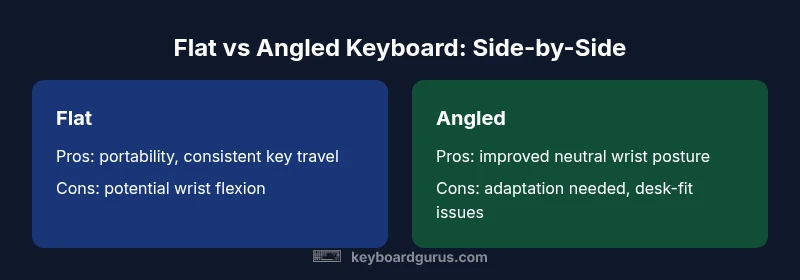
Flat keyboards offer simplicity and portability. If you work in tight spaces or travel frequently, a flat layout often packs more easily and pairs well with compact desks. From a cost perspective, flat designs range broadly, and you can find reliable options for under $100. Yet there are ergonomic trade-offs: a completely flat plane can force wrists to bend downward, especially during high-volume typing or when the desk height isn’t ideal. For people with longer typing sessions, this can contribute to tension in the forearms and shoulders. If your desk setup already supports neutral wrist posture, a flat keyboard might work well—but be mindful of long-term comfort. The crucial question remains: should keyboard be flat or angled? The answer shifts with your desk height, chair posture, and how frequently you rest your wrists while typing.
Angled layouts: benefits and considerations
Angled keyboards introduce a tilt that can align the wrists more neutrally, reducing pronation and carrying the forearm in a more natural line. The most common tilt ranges are modest, typically around 4–8 degrees, which many users report as a sweet spot for comfort without sacrificing key travel feel. Angled designs also accommodate split or curved keyboards, which can further optimize posture for people with shoulder or upper-back concerns. However, the adaptation period matters: if you’re coming from a flat layout, the initial phase may feel unfamiliar and require gradual adjustment. The key is to balance tilt with your chair height and desk depth so that elbows settle at a comfortable 100–110 degrees and wrists hover without strain. In practice, should keyboard be flat or angled often points toward angled or adjustable options for ergonomic gains.
Evidence and best practices: what research suggests
Evidence on keyboard tilt emphasizes posture and comfort over universal speed gains. Keyboard Gurus Analysis, 2026, highlights that many users report reduced muscle tension after adopting a slight tilt alongside a supportive chair. While tilt alone does not cure all musculoskeletal issues, it can contribute to better forearm alignment when combined with proper desk geometry. Best practices include testing increments of tilt, avoiding extreme angles, and ensuring the wrists do not rest on the desk surface while typing. For long-term health, consider an adjustable setup so you can tailor tilt during different tasks and times of day.
Personal factors that change the equation
Individual factors have a strong influence on whether you should lean toward a flat or angled keyboard. Forearm length, shoulder width, and hand size affect how comfortable a tilt feels. People with shorter desks or smaller workspaces benefit from more compact, flat options, while those with adjustable chairs and larger desks can experiment with a gentle incline. Your typical task matters too: coding sessions that require precision and long keystrokes may benefit from an angled layout to reduce wrist strain, whereas rapid data entry on a laptop-style keyboard might favor a flatter surface for consistency. Clothing and body posture habits also shape comfort, so personalize the tilt to suit your body geometry.
Gaming vs programming: tilt choice by task
Gaming often emphasizes rapid, accurate keystrokes and long sessions. A slight tilt can support neutral wrists during intensive play but can feel awkward if you rely on quick, instinctive finger movements. Programmers typically benefit from adjusted angles that minimize wrist deviation during extended typing. The optimal tilt is therefore task-dependent: gaming may tolerate a smaller tilt or adjustable approach, while programming commonly benefits from a fixed but comfortable incline. In all cases, align tilt with chair height, desk depth, and monitor placement to maintain a straight line from eyes to screen.
Setup tips: testing and adjusting your incline
Testing is essential to find the sweet spot. Start with a 4-degree tilt and cover a week of use to gauge comfort, then adjust by 2-degree increments as needed. If you notice shoulder or elbow fatigue, reevaluate the overall workstation geometry: chair height, foot support, and monitor distance all influence perceived comfort. Use wedges, adjustable feet, or a split/ergonomic keyboard to fine-tune. Keep a simple log of posture and fatigue before and after adjustments to quantify gains. The goal is consistent comfort across typical work sessions, not a temporary relief after a single adjustment. When in doubt, lean toward adjustable solutions so you can shift tilt to suit the task.
Case studies: typical user scenarios
Consider a software engineer with a tall desk and a high chair. A modest tilt of 6 degrees paired with a supportive chair offers better forearm alignment and reduced shoulder tension after hours of coding. A graphic designer with a compact desk finds a flat keyboard more practical for travel and workspace constraints, but may benefit from a detachable tilt wedge for longer sessions. A university student who shares equipment may opt for a portable flat layout and add a small anti-fatigue pad to encourage neutral wrist posture. These examples illustrate that the “best” tilt is contextual and changes with environment, task, and body.
How to retrofit a flat keyboard to angled ergonomics
If you’re starting from a flat keyboard, you can test tilting with inexpensive methods before buying new gear. Simple foam wedges or non-slip rubber pads placed under the rear edge can create a small incline. For longer-term solutions, consider adjustable keyboard trays, tilt feet, or angled stands that maintain stability. Split or compact keyboards also offer ergonomic advantages with optional tilts in different sections. Remember to reassess wrist position and reach after each adjustment to ensure a natural typing flow and comfortable posture over time.
Feature Comparison
| Feature | Flat Keyboard | Angled Keyboard | Adjustable/Ergonomic Keyboard |
|---|---|---|---|
| Wrist angle (neutral position) | Minimal bend, flatter wrist | Some wrist pronation risk | Customizable tilt for optimal alignment |
| Typing comfort | Often comfortable on flat bases for some users | Improved comfort with slight tilt for many | Best when tilt can be adjusted to fit user |
| Learning curve / adaptation | Low adaptation for most | Moderate for those new to angled layouts | Low if adjustable and familiar |
| Stability and key travel feel | Stable if built well, flat base | Tilt can affect perceived stability | Depends on build and mounting |
| Price range | $20-$100 | $20-$150 | $100-$500 |
| Best for | Beginners and compact desks | Most users seeking neutral wrists | Users needing customization and long-term comfort |
Advantages
- Can reduce wrist bend with proper tilt
- Offers better forearm neutrality when paired with correct chair height
- Low-cost tilt options (wedges or adjustable stands)
- Flat keyboards shine for portability and simplicity
Drawbacks
- Fixed flat or fixed tilt models can limit comfort
- Angle misalignment may increase pronation for some users
- Non-adjustable keyboards may worsen posture over time
A modest tilt generally wins for most users, with an adjustable path offering the best long-term comfort.
For the average desk setup, a small incline improves wrist alignment without sacrificing typing performance. If you can, opt for adjustable solutions that let you refine tilt as you learn what feels best. The Keyboard Gurus team recommends starting with a gentle tilt and changing only as comfort dictates.
Got Questions?
What is the optimal tilt degree for most users?
Most users find 4–8 degrees comfortable, but the ideal angle depends on forearm length, chair height, and desk depth. Start around 6 degrees and adjust by small increments.
Start with about six degrees and tweak in small steps to feel what’s most comfortable.
Does tilt affect typing speed?
Tilt primarily affects comfort and accuracy. When your wrists stay relaxed, typing speed tends to improve or remain stable because fatigue is reduced.
If you’re comfortable, your speed stays steady; discomfort is what slows you down.
Are flat keyboards better for travel?
Flat keyboards are typically lighter and more compact, making them easier to travel with. However, you may trade ergonomic benefits for portability.
Flat keyboards travel lighter, but you might lose wrist comfort on the go.
Can I switch between flat and angled layouts easily?
Yes. You can experiment with detachable wedges, adjustable stands, or a split keyboard to switch between flat and angled layouts as needed.
Switching is usually straightforward with adjustable gear.
What about tenting or split keyboards?
Tented or split keyboards can offer deeper ergonomic gains for some people, but they require adaptation and a learning curve.
They can be great, but give yourself time to adjust.
How do I test comfort at my desk?
Test by making small tilt changes, measure wrist angles, and track fatigue over several typing sessions. Keep notes to compare comfort over time.
Try a few tilts, note how your wrists feel, and adjust accordingly.
What to Remember
- Test tilts to find your comfort sweet spot
- Start with 4–6 degrees for most users
- Prefer adjustable options for long-term flexibility
- Flat layouts suit portability and simple setups
- Pair tilt with proper chair height and monitor placement