Keyboard Online Practice: Your Guide to Fast, Accurate Typing
Master typing with keyboard online practice. Learn platform selection, structured plans, progress tracking, ergonomics, and a practical starter routine to boost speed and accuracy.


This guide shows you how keyboard online practice can rapidly improve your typing speed and accuracy. You’ll learn how to choose platforms, structure daily drills, and track progress with a tailored plan that fits your schedule. Follow the steps for a steady path from beginner moves to proficient touch-typing.
What is keyboard online practice and why it matters
Keyboard online practice refers to structured, web-based exercises designed to improve typing speed, accuracy, and touch-typing technique. It leverages guided drills, real-time feedback, and adaptive difficulty to help you progress at your own pace. According to Keyboard Gurus, this approach builds durable motor memory and reduces the cognitive load of looking at the keyboard. For students, gamers, and professionals, consistent online practice lowers friction during long typing sessions and enhances overall productivity. In practice, you’ll move from basic letter drills to complex passages, all hosted by accessible platforms that track your progress over time.
The core benefit is consistency: short, focused sessions are easier to sustain than long, irregular practice binges. By practicing online, you can tailor drills to your current weaknesses—be it letter accuracy, speed, or transitioning between words—and receive instant feedback to correct mistakes. The result is a reliable improvement curve you can observe through built-in dashboards and progress charts.
How online practice scales with skill level
Online typing practice scales gracefully from beginner through advanced stages. Beginners benefit from games and guided home-row drills that establish correct finger placement and posture. Intermediate users should introduce timed drills and error-focused exercises to boost throughput without sacrificing accuracy. Advanced typists can tackle multi-task drills such as copying passages or coding snippets, which simulate real workflows. The key is to increase difficulty gradually and celebrate small wins to maintain motivation. Keyboard Gurus notes that a well-structured progression reduces plateaus and sustains momentum over weeks, not days. A balanced mix of accuracy-focused and speed-focused drills tends to yield the best long-term results.
Structured practice also supports habit formation. By scheduling regular sessions, you train your brain to recognize keyboard patterns quickly, lowering the mental effort required during real-world typing tasks. This translates into smoother writing, faster communication, and less fatigue during long typing sessions—for students, gamers, and professionals alike.
Choosing the right platform: features to look for
When selecting a platform for keyboard online practice, prioritize features that match your goals and learning style. Look for adaptive drills that adjust difficulty based on your performance, precise accuracy tracking, and clear, actionable feedback after each lesson. A good platform should offer a structured curriculum (beginners through advanced levels), a distraction-free typing environment, and cross-device syncing so you can practice on desktop, tablet, or phone. Privacy controls and data export options are also important if you want to share progress with mentors or educators. Keyboard Gurus recommends trying a few platforms with free tiers before committing to a paid plan, ensuring you get a good fit for your pace and goals.
Additionally, seek platforms with community features or coach feedback options. Social accountability—like weekly challenges or shared progress boards—can improve adherence and make practice more engaging. Finally, consider accessibility: adjustable font sizes, color schemes, and screen-reader compatibility support a broader range of users.
Structured practice plans: building consistency
A structured plan breaks learning into manageable chunks, making it easier to sustain daily practice. Start with a 2-week starter plan that alternates between accuracy drills and short speed sessions. Each session should be roughly 15-30 minutes, with a 5-minute warm-up and a 5-minute cooldown to review mistakes. As you progress, gradually increase the length of timed drills and incorporate real-world text (emails, notes, or excerpts) to simulate everyday typing tasks. Consistency beats intensity: even modest daily effort compounds over time.
To ensure progress, pair your plan with objective metrics such as accuracy rate and error count per drill. A weekly review helps you adjust the difficulty and focus areas, preventing stagnation. If you miss a day, resume with a lighter session to avoid burnout while preserving momentum. A well-structured plan reduces decision fatigue and makes practice a natural part of your routine.
Personalization and progress tracking: metrics that matter
Effective keyboard online practice relies on meaningful metrics rather than vague impressions. Track accuracy (correct keystrokes divided by total), speed (keystrokes per minute), and error patterns to identify recurring mistakes (e.g., certain letter pairs or finger combos). Most platforms offer progress dashboards with streaks, percentile comparisons, and drill-level breakdowns. Keyboard Gurus analysis shows that visibility into your daily improvements reinforces positive habits and guides targeted improvement. Use milestones (e.g., reach a sustained accuracy above a threshold for a full week) to stay motivated and map your trajectory.
Beyond speed and accuracy, monitor time-on-task, consistency (how often you practice per week), and fatigue indicators (your ability to maintain posture and focus). These qualitative signals are just as valuable as quantitative metrics when tailoring your plan to your natural learning pace.
Accessibility and safety: typing ergonomics and habits
Ergonomics matter as much as technique. Sit with feet flat, elbows relaxed at a 90-degree angle, and wrists floating above the keyboard rather than resting on the desk. The monitor should be at or slightly below eye level to reduce neck strain, and the chair should support a natural spine curve. Take short micro-breaks every 20-30 minutes to reduce stiffness and fatigue. Hydration and proper lighting also support long practice sessions. If you experience pain or numbness, pause and seek guidance from a clinician or an ergonomic specialist. Keyboard online practice is most effective when done in a sustainable, health-conscious way.
Finally, remember that accuracy beats speed initially. Build a reliable foundation before pushing for rapid finger movement, and your long-term typing performance will improve more consistently.
Getting started: a sample 14-day plan
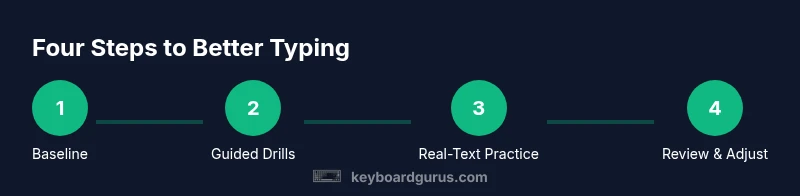
This starter plan introduces you to keyboard online practice with a balanced mix of drills and real-text typing. Day 1–2 focuses on home-row accuracy drills, Day 3–5 adds simple letter drills, Day 6–7 introduces short passages, Day 8–10 increases duration, Day 11–12 adds mixed text, and Day 13–14 completes a full practice session with goals for speed and accuracy. Throughout, log your results, adjust difficulty, and maintain a calm, focused pace. By the end of the two weeks you should notice smoother keystrokes and fewer mistakes in daily tasks, with a solid habit formed.
Getting started: quick-start checklist
- Set a fixed daily practice window (e.g., 20-25 minutes)
- Choose a platform with adaptive drills and clear feedback
- Place your keyboard and monitor at ergonomic heights
- Begin with home-row drills before moving to real text
- Review mistakes and adjust your plan weekly
Tools & Materials
- Computer with keyboard(Any modern computer with a physical keyboard.)
- Reliable internet connection(Stable bandwidth to support online drills.)
- Web browser(Chrome, Firefox, or Edge recommended.)
- Headphones or quiet space(Helps maintain focus during drills.)
- Timer or clock(To pace timed drills and cooldowns.)
- Notetaking app or paper(Capture insights, mistakes, and adjustments.)
- Optional: external keyboard (for layout trials)(Test comfort and key travel.)
Steps
Estimated time: 60-90 minutes
- 1
Set clear goals
Identify what you want to achieve with online practice (e.g., improve accuracy, boost daily minutes, or hit a target speed). Write these goals down and attach a realistic timeline. This baseline will guide your drill selection and progress reviews.
Tip: Define a single primary goal for this week to stay focused. - 2
Prepare your workspace
Position your keyboard and screen for neutral wrists and a straight posture. Clear distractions and test your mic/headphones if you plan to use coaching features or live sessions.
Tip: Raise the monitor to eye level and align your elbows at ~90 degrees. - 3
Choose a platform and set up
Pick one keyboard online practice site and create your profile. Complete any onboarding tests to seed your first set of drills and set a daily practice window.
Tip: Prefer platforms that adapt drills to your current accuracy and speed. - 4
Warm up with home-row drills
Begin with simple home-row exercises to re-establish proper finger placement. Focus on posture and steady, accurate keystrokes rather than speed.
Tip: Keep wrists floating; avoid resting them on the desk. - 5
Practice real-text passages
Move to passages that resemble your daily tasks (emails, notes, articles). Maintain accuracy first, then gradually increase speed as you build confidence.
Tip: Read ahead only slightly to reduce trial-and-error mistakes. - 6
Track progress and adjust
Review the platform metrics weekly, note common error patterns, and adjust drill difficulty. If you plateau, swap an exercise type or length.
Tip: Use a consistent metric set (accuracy, speed, duration). - 7
Establish a regular schedule
Lock in a daily practice habit, even on busy days. Short, consistent sessions outperform sporadic longer ones for long-term gains.
Tip: Set a reminder and keep sessions under 30 minutes to prevent fatigue.
Got Questions?
What is keyboard online practice and who is it for?
Keyboard online practice is a structured, web-based approach to improving typing speed, accuracy, and technique. It suits students, gamers, and professionals who want disciplined, trackable progress.
Keyboard online practice helps you type faster and more accurately using guided drills and progress tracking. It's ideal for students, gamers, and professionals seeking measurable improvement.
How long should I practice each day to see results?
Consistency matters more than duration. Start with 15-20 minutes daily, then increase as you feel comfortable. Avoid long sessions that cause fatigue or poor form.
Start with about 15 to 20 minutes each day and gradually increase. The key is regular, focused practice, not marathon sessions.
Can I improve using free resources alone?
Yes, many free platforms offer solid practice drills and tracking. For faster progress, combine free tools with a paid platform that offers structured curricula or coaching.
Free tools can help, but pairing them with a structured plan from a paid platform can speed up progress.
Do these platforms teach proper finger placement and posture?
Most platforms include finger placement cues and posture tips, plus guided exercises to reinforce correct form. Look for tutorials and feedback features to reinforce good habits.
Yes, most platforms teach proper finger placement and how to maintain good posture with guided feedback.
What should I do if I experience wrist pain?
If you experience pain, pause practice, check your workstation ergonomics, and consult a clinician if pain persists. Short, frequent sessions with proper posture are safer than long, unstructured ones.
If you feel wrist pain, stop typing and review your setup. If it continues, talk to a clinician.
Is there a certification or formal credential from typing platforms?
Some platforms offer badges or certificates based on milestones, but these are typically for motivation rather than formal credentials. Use them to validate progress and set goals.
Many sites offer badges or certificates for milestones, mainly as motivation rather than official credentials.
Watch Video
What to Remember
- Start with a clear goal and a structured plan
- Choose an adaptable platform and track progress
- Prioritize accuracy, then speed, to build durable skill
- Maintain ergonomic form to sustain practice
- Build a consistent daily routine for lasting gains