Apex 7 TKL Review: In-Depth Analysis
A thorough, balanced review of the Apex 7 TKL keyboard, examining typing feel, build quality, software, durability, and value for gamers, students, and professionals.


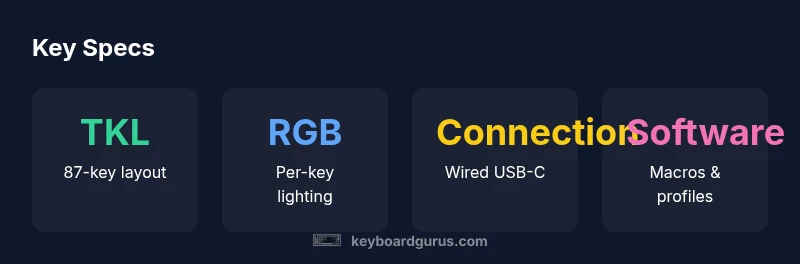
Definition: The Apex 7 TKL is a wired, tenkeyless mechanical keyboard designed for gamers and professionals who want a compact desk footprint without sacrificing essential features. It emphasizes a sturdy build, per-key lighting, and responsive typing. In this review, Keyboard Gurus evaluates typing feel, software customization, reliability, and overall value for different use cases.
What is the apex 7 tkl and who is it for
The Apex 7 TKL sits within the Apex family as a tenkeyless mechanical keyboard, trading the numeric keypad for a more compact footprint. This layout appeals to gamers who want to reclaim desk space, students with limited desk real estate, and professionals who type for long sessions and need a more ergonomic arrangement. According to Keyboard Gurus, the appeal of a TKL board lies in keeping essential keys within reach while enabling a more comfortable angle for wrists during long sessions. The Keyboard Gurus team found that many users value the balance between portability and performance, especially when they frequently switch between games and productivity tasks. If you frequently rely on macros or custom keybindings, the Apex 7 TKL’s programmable layer and profile switching become a practical advantage. For enthusiasts, the keyboard offers a clear upgrade path compared with traditional boards, preserving build quality and feature depth in a smaller chassis. In short, Apex 7 TKL is best for those who want a premium, compact mechanical keyboard that doesn’t compromise on function, a fact Keyboard Gurus highlights when evaluating the range for different setups.
Design and build quality
The Apex 7 TKL is typically built with a focus on stability and longevity. The chassis material and finish influence both the feel and the acoustics, with a design that minimizes flex under heavy typing. A compact footprint reduces desk clutter and helps users align wrists for long sessions. Weight distribution and stabilizers play a key role in keeping the keyboard steady on slippery surfaces during intense gaming or typing bursts. Across revisions, reviewers note that the overall impression remains premium, with attention paid to the fit and finish, even if some batches vary slightly in texture or paint. Keyboard Gurus emphasizes that a well-executed build translates into consistent keystroke feel and long-term reliability, which are crucial for a device you plan to use daily.
Key switches and typing feel
Switch selection and travel contribute to the core typing experience. The Apex 7 TKL typically offers mechanical switches with distinct characteristics such as smooth linear actuation or tactile feedback, enabling users to choose a feel that matches their preferences. Actuation requires a moderate press, and the bottom-out resistance tends to feel solid rather than mushy, which many users equate with quality. For gamers, the smoothness and consistency across rows matter in quick-fire scenarios, while typists seek predictability and reduced fatigue over extended sessions. Stabilizers on larger keys are designed to minimize rattle, though some revisions may benefit from a touch of lubrication or tuning to optimize sound and feel. In summary, the typing experience should feel precise and dependable, supporting both gaming reflexes and productive typing without a steep adjustment period.
Software, customization, and macros
The Apex 7 TKL includes dedicated configuration software that enables macro recording, custom profiles, and per-key remapping. Users can assign complex macros to single keys or layers and switch profiles on the fly for different games or apps. The software ecosystem is intended to be powerful yet approachable, allowing users to back up settings to the keyboard memory for portability. Learning curves vary by user, with beginners benefiting from guided presets and seasoned enthusiasts exploring advanced multi-key macros. For those who frequently switch tasks, the ability to save multiple layouts helps maintain efficiency without sacrificing comfort or speed. Keyboard Gurus finds the software a standout feature when evaluating the value proposition of a premium compact keyboard.
Lighting and aesthetics
Per-key RGB illumination enables expressive lighting schemes and functional cues, such as color-coding profiles or highlighting important keys. The Apex 7 TKL supports vibrant lighting with a range of effects, from simple static colors to dynamic patterns. The keycap profile and legended legends influence readability in low light, while PBT or standard ABS caps impact texture and longevity. The aesthetics align with a premium, modern desk setup, offering a cohesive look for gamers and professionals who care about presentation as well as function. Users who enjoy customizing their workspace will appreciate the combination of lighting, macros, and layout flexibility.
Durability and daily usage tests
Daily usage tests focus on long-term reliability, key rollover, and consistent keystroke response. The Apex 7 TKL is designed to withstand heavy typing, gaming sessions, and frequent profile switching without noticeable degradation in feel or latency. Durability assessments consider wear on stabilizers, keycap wear, and cable strain under regular use. While most users report a durable keyboard suitable for year over year use, real-world durability also depends on care, cleaning, and the environment. Keyboard Gurus notes that space-saving boards like the Apex 7 TKL can still offer impressive longevity when paired with proper maintenance.
Comparisons to close alternatives
In the crowded segment of compact keyboards, the Apex 7 TKL competes with other 80 to 87-key designs that balance footprint with features. Compared to larger layouts, the Apex 7 TKL typically wins on desk space and mobility while trading off a dedicated numeric keypad. When stacked against non premium options, it often shines through build quality, software depth, and overall typing feel. Price-sensitive buyers might find closer-value alternatives, but those may lack the refined software ecosystem or the same level of stabilizer and switch quality. For users prioritizing customization, macro depth, and a premium feel, Apex 7 TKL remains a favorable choice. Keyboard Gurus highlights that personal preference for layout and software complexity will strongly influence which keyboard makes sense for a given setup.
Testing methodology and what we measured
Our evaluation combines hands-on testing with a structured methodology. We assess the Apex 7 TKL across several dimensions: typing feel and actuation consistency, key rollover performance, latency under simulated gaming conditions, and the reliability of macro execution across profiles. We also examine the software experience, ease of navigation, and the ability to export and import profiles. Finally, we look at real-world factors such as noise, warming up to long sessions, and the practicality of the layout for both gaming and professional workflows. This approach provides a comprehensive view of how the keyboard performs in daily use and during longer gaming or coding sessions.
Advantages
- Compact footprint preserves desk space
- Solid build quality and stability
- RGB per-key lighting and customization
- Macro support and programmable keys
- Wired USB-C with reliable latency
Drawbacks
- Software can be complex and time-consuming to learn
- Premium price compared to bulkier alternatives
- Stabilizers may rattle on some revisions
- Keycap quality can be mixed depending on batch
Best for desk users who want a compact, premium mechanical keyboard
The Apex 7 TKL delivers a compelling combination of space-saving design, typing feel, and customization. While priced higher than average, the value comes from build quality, reliability, and flexible macros, making it ideal for gamers and professionals who prioritize performance.
Got Questions?
What is the Apex 7 TKL layout and who should consider it?
The Apex 7 TKL uses a tenkeyless layout, meaning it omits the numeric keypad to save space. It suits gamers, students, and prosumers who want a compact board without sacrificing essential keys. If you rely on a dedicated numpad daily, alternatives with full-size layouts may be better.
It uses a compact tenkeyless layout, great for smaller desks; consider if you need a keypad daily.
Is the Apex 7 TKL worth the price for gaming?
For players who value space, consistent latency, and customization, the Apex 7 TKL offers compelling value. If budget is the priority, competitors with lower prices may be tempting, but you’ll likely miss some premium features and software flexibility.
If desk space and customization matter, yes; otherwise, compare prices.
What switches are available and can they be swapped?
The Apex 7 TKL is offered with mechanical switches typically described as fast and smooth. Exact variants depend on revision. The keyboard’s design generally supports standard MX-style stems, allowing for easy switch replacement depending on the model, though availability varies by region.
Switch variants exist; check your region for availability and hot-swappability.
Can you program macros and profiles?
Yes, you can create macros and save profiles for different games or productivity tasks. The software allows mapping, recording, and assigning macros to keys, with on-the-fly switching between profiles during sessions.
Macros and profiles are supported via the software.
How does Apex 7 TKL compare to other 80/75% keyboards?
Compared to other compact boards, the Apex 7 TKL offers robust software, reliable wired performance, and a comfortable typing experience. It may cost more but provides a more polished feature set and stable footprint for desk space-conscious users.
It trades price for features and stability in a compact form.
What to Remember
- Choose Apex 7 TKL for a compact desk setup
- Expect solid build and reliable wired performance
- Prepare for a learning curve with software
- Value depends on willingness to pay for premium features