Keyboard Mechanical vs Membrane vs Optical: A Comprehensive Comparison
Explore the key differences between mechanical, membrane, and optical keyboard switches, including feel, durability, latency, and price, to help gamers, typists, and professionals choose the right keyboard.


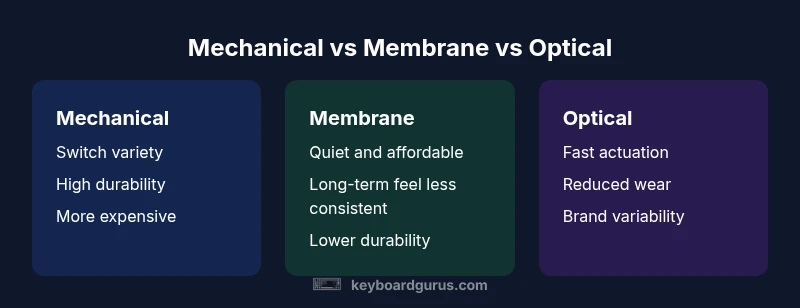
Mechanical keyboards generally offer the best balance of tactile feedback, durability, and customization, especially for gaming and heavy typing. Membrane keyboards remain quiet, budget-friendly options with softer key travel but shorter lifespans. Optical switches can provide fast actuation with less wobble in some models, though performance varies by vendor. Choose based on budget, noise tolerance, and typing style.
Understanding the landscape of keyboard mechanical vs membrane vs optical switches
When people talk about the keyboard landscape, they’re usually comparing three switch ecosystems: mechanical, membrane, and optical. This trio is often summarized as keyboard mechanical vs membrane vs optical, but the real differences lie in how each switch registers a keypress, how they feel under your fingertips, and how long they tend to last. According to Keyboard Gurus, the mechanical category dominates for users who crave tactile feedback and durability, while membranes excel on price and quiet operation. Optical switches, meanwhile, promise fast actuation and reduced wear in some designs. The exact experience, however, hinges on the specific build, the brand, and the intended use—gaming, typing, or professional work.
- Mechanical switches rely on individual springs, stems, and housings, which yields diverse feels (tactile, linear, and clicky).
- Membrane keyboards use a rubber dome under each key, producing a quieter and softer motion with a less crisp tactile cue.
- Optical switches use light as the actuation signal, often with fewer moving parts and potentially faster response times.
For most buyers, these distinctions translate into three practical questions: Do you want feel and durability or quiet affordability? Is latency a critical factor? And how much are you willing to invest in a keyboard that can be customized to your setup? The choice should align with your priorities—no one-size-fits-all answer exists.
How actuation and feedback differ across switch types
Actuation and feedback are the heart of how a keyboard feels and responds. Mechanical switches come in varieties that emphasize feel (tactile bump), travel, and noise. A tactile mechanical switch gives you a noticeable bump before the actuation point, while a linear switch offers smooth travel with little resistance and a quiet finish. Clicky mechanical switches provide audible feedback in addition to tactile cues. Membrane switches, in contrast, register a keystroke when a conductive layer beneath the rubber dome makes contact, offering a softer, quieter, and more uniform texture across keys but with less precise feedback and a shallower actuation point. Optical switches rely on light beams to detect actuation; there is no physical contact at the point of registration in the same way as metal springs, so some users report faster, more consistent response and reduced debounce delay. However, the perceived feel and noise can vary by model, brand, and keycap design. The key takeaway: the actuation mechanism fundamentally shapes the sensory experience—feel, sound, and perceived responsiveness—whether you’re gaming, coding, or typing an essay.
Durability, maintenance, and long-term costs
Durability is a common differentiator among keyboard types. Mechanical keyboards are renowned for longevity; the separate switches and springs can outlast membranes in terms of keystroke life, and many enthusiasts swap switches to customize feel over time. Membrane keyboards typically have shorter lifespans and may require more frequent key feel recalibration, especially when the rubber domes wear out. Optical switches offer potential durability advantages by reducing physical contact that can degrade switch contacts, though real-world longevity also depends on build quality and usage patterns. Maintenance considerations include keycap wear, switch replacement costs, and the need to re-lubricate switches on custom builds. Budget-conscious buyers might opt for membranes, while power users who value feel and customization may lean mechanical or optical, weighing initial cost against long-term value. Keyboard Gurus analysis suggests that durability and maintenance are often the deciding factors for long-term satisfaction, particularly for heavy typists and gamers who log many hours.
Use-case driven choices: gaming, typing, programming, and work
Your primary use case should drive the selection between mechanical, membrane, and optical. If you’re a heavy gamer who values speed, crisp actuation, and tuning options, a mechanical keyboard with a preferred switch family is a strong choice. Typists and programmers who value accuracy and consistent feedback may prefer tactile or clicky mechanical switches, especially for long writing sessions. Membrane keyboards tend to be attractive for budget-conscious students or office environments where quiet operation matters more than a distinct tactile cue. Optical switches can appeal to users who want fast, debounce-free action and a sense of modern technology; however, the feel can differ across brands, so sampling models before buying is important. In professional settings, consider how the typing experience affects productivity, comfort, and long-term fatigue. Keyboard Gurus notes that choosing the right switch type comes down to balancing personal preference with practical constraints like noise, price, and reliability.
Noise considerations and ergonomic tips
Noise level and ergonomics often tip the scales between switch types. Mechanical keyboards can be louder, especially with certain switches, but many users retrofit with dampening rings, lubing, or silent switches to mitigate sound. Membrane keyboards tend to be quiet by design, making them attractive for shared workspaces or dorm rooms. Optical keyboards’ noise levels depend on the mechanical design and housing; some models are quieter than traditional mechanicals, while others emphasize speed over acoustic comfort. Ergonomic factors—such as key wobble, actuation force, and travel distance—impact fatigue and typing accuracy. If you’re sensitive to noise or carpal-tunnel risks, test keyboards in-person when possible, and consider dampeners, desk setups, and chair ergonomics to optimize comfort during long sessions. Keyboard Gurus experiments show that small changes in switch choice, keycap height, and typing angle can significantly influence comfort over time.
How to test a switch before you buy: a practical approach
Testing switches is essential before committing to a purchase. If you can, try a friend’s keyboard or in-store demo to probe feel: press a few keys with varying actuation forces, note the tactile cues, and listen for sound. For mechanical switches, ask to try at least three styles (linear, tactile, and clicky) to understand the spectrum. For membranes, assess uniformity: are all keys behaving the same, and is the bottom-out feel comfortable? For optical keyboards, compare latency and consistency by performing quick-flick gaming scenarios or rapid typing tasks. If you have a specific model in mind, read user reviews for long-term reliability and how well the switch type performs in real-world tasks. A careful test plan helps you avoid buyer’s remorse and ensures your chosen type aligns with your daily workflow.
Common myths debunked and realistic expectations
There are several common myths about keyboard switch types. Some people assume all mechanicals are unbearably loud; in reality, you can select quieter mechanical switches or add dampening. Others think membranes are universally inferior in every regard; membranes can be perfectly adequate for casual use or shared spaces where noise reduction is prioritized. Optical switches are not magically flawless—brand differences, compatibility, and feel can still influence your experience. Realistic expectations involve acknowledging that taste, build quality, and tuning options matter as much as the switch type itself. The truth is that any of these options can excel in the right context, provided you match the switch characteristics to your goals, budget, and environment.
Feature Comparison
| Feature | Mechanical keyboards | Membrane keyboards | Optical keyboards |
|---|---|---|---|
| Switch mechanism | Independent mechanical switches with springs (tactile/linear/clicky) | Rubber dome under a membrane (conductive layer contact) | Light-based actuation with optical sensing |
| Tactile feedback | Varying tactile levels by switch family; strong options available | Usually softer or minimal tactile cue | Depends on model; some offer tactile variants |
| Durability | Often very high life expectancy with proper maintenance | Moderate durability; wear on domes and layers over time | Good durability, potential longevity benefits from reduced physical contact |
| Price range | Typically higher upfront cost with customization options | Lower upfront cost, widely available | Mid-range to higher depending on brand and features |
| Latency / speed | Varies by switch; generally fast with good debounce handling | Typically highest latency among three options | Often fast; latency depends on implementation and firmware |
| Noise level | Can be loud or moderate depending on switch; dampening helps | Quietest by design in many models | Variable; some models are quiet, others resemble mechanical feel |
| Best for | Gamers and typists who want customization and longevity | Budget-conscious users and quiet environments | Speed-focused setups and modern tech enthusiasts |
Advantages
- Clear, actionable differences help users tailor to budget and use
- Mechanical and optical switches offer customization and speed potential
- Membrane keyboards are affordable and quiet for shared spaces
- Optical switches can reduce wear and debounce issues in some designs
Drawbacks
- Mechanical keyboards can be expensive and louder
- Membrane keyboards may feel less precise and wear out sooner
- Optical switches vary by brand; feel and availability differ
Mechanical keyboards win for feel and long-term value; optical switches offer speed and modern durability, while membranes remain the budget-friendly silent option.
For most users, mechanical keyboards balance feel, customization, and durability. Optical switches suit speed-focused tasks and newer builds with potential durability benefits. If cost and quiet operation are your top priorities, membranes can be a practical choice.
Got Questions?
What is the main difference between mechanical, membrane, and optical keyboards?
Mechanical keyboards use individual switches per key, offering varied feels and durability. Membrane keyboards rely on rubber domes under the keys, delivering quiet operation but softer feedback. Optical keyboards use light-based actuation with fewer moving parts, which can improve response consistency. The choice depends on feel, durability, and budget.
Mechanical keys give you lots of tactile options. Membrane keys are quieter and cheaper. Optical switches promise fast actuation; test to see if the feel matches your typing style.
Are optical switches faster than mechanical switches?
Optical switches can offer very fast actuation with reduced debounce delay in some designs, giving a perceived speed advantage. The difference varies by model and firmware, and not all optical keyboards feel identical to traditional mechanicals.
Yes, optical switches can be faster in actuation, but it depends on the model.
Do mechanical keyboards wear out faster than membranes?
In general, mechanical switches are designed for longer lifespans and can outlast membrane domes with proper care. Membrane keyboards may wear more quickly as the rubber domes degrade with heavy use.
Mechanical switches typically last longer than membranes, though it depends on quality and usage.
Which type is best for gaming and fast response?
Optical or mechanical keyboards are common favorites for fast response, depending on switch type and build. Optical switches may offer faster actuation with less debounce, while mechanicals provide a broad range of feel options that can optimize performance.
For gaming, optical or fast mechanical switches are good bets; test your preferred models.
Which should I choose for typing and programming?
Many typists prefer tactile or clicky mechanical switches for clear feedback and reduced mistakes. If you work in a quiet office, membranes can be appealing for low noise, but many programmers also enjoy the durability and customization of mechanical keyboards.
If you type a lot, go for mechanical switches with a feel you like.
Are there compatibility issues between switch types and computers?
Switch types largely share standard USB interfaces, but software features, lighting, and key mapping can vary by brand. Optical keyboards and certain hot-swappable boards may require specific firmware. Always verify compatibility with your operating system and any required software.
Most keyboards work across platforms, but check firmware and software requirements.
Is it worth paying a premium for mechanical switches?
If you value feel, durability, and customization, a premium mechanical keyboard can offer long-term value. For casual use or strict budget constraints, membranes remain a sensible baseline option. Consider how often you use the keyboard and what you gain from additional features.
Premium switches pay off for heavy users who value feel and durability.
What to Remember
- Know your primary use: gaming, typing, or programming.
- Weigh feel vs. noise vs. price before choosing a switch type.
- Test in-person when possible to compare real-world differences.
- Consider long-term value and maintenance needs.